How to Base64url Encode Text in the Terminal

Base64url is base64 with three changes that make it safe in web addresses and file names: + becomes -, / becomes _, and the = padding at the end goes. JSON Web Tokens store every part this way. This guide encodes text as base64url with one command in bash, zsh and PowerShell.
Syntax
On macOS and Linux, in bash or zsh:
printf '%s' '<text>' | openssl base64 -A | tr '+/' '-_' | tr -d '='
| Part | What it does |
|---|---|
printf '%s' '<text>' | Prints <text> exactly as you typed it, with no line break at the end. Put your text between the single quotes. |
openssl base64 -A | Encodes what it receives as standard base64. -A keeps the result on one line. |
tr '+/' '-_' | Swaps characters: every + becomes -, and every / becomes _. |
tr -d '=' | Deletes every =, the padding that base64 adds at the end. |
The | between the parts is a pipe: it hands the output of one command to the next.
In PowerShell 7.6:
[System.Buffers.Text.Base64Url]::EncodeToString([Text.Encoding]::UTF8.GetBytes('<text>'))
| Part | What it does |
|---|---|
[Text.Encoding]::UTF8.GetBytes('<text>') | Turns <text> into bytes using UTF-8, the encoding JSON and the web use for text. |
[System.Buffers.Text.Base64Url]::EncodeToString(…) | .NET's base64url encoder. Microsoft's documentation says it "omits the optional padding characters" and uses - and _ instead of + and /. |
Without the Base64Url class, standard base64 and three string methods give the same result: [Convert]::ToBase64String(…).TrimEnd('=').Replace('+', '-').Replace('/', '_').
The Example
The text to encode is Is 2 > 1? Yes!. Its standard base64 contains all three characters that base64url changes, a +, a / and an =, so you can watch each one change.
Prerequisites
- macOS or Linux: OpenSSL. macOS includes it, and most Linux distributions do too; check with
openssl version. A minimal Linux image may not have it, so install your distribution'sopensslpackage if the command isn't found. - Windows: PowerShell 7.6, the current long-term support release. The
Base64Urlclass arrived in .NET 9, which Windows PowerShell 5.1 doesn't run on. Check your version with$PSVersionTable.PSVersion.
Step 1: Encode the Text as Base64
Start with standard base64, to see the three characters that base64url replaces.
- macOS / Linux
- Windows (PowerShell)
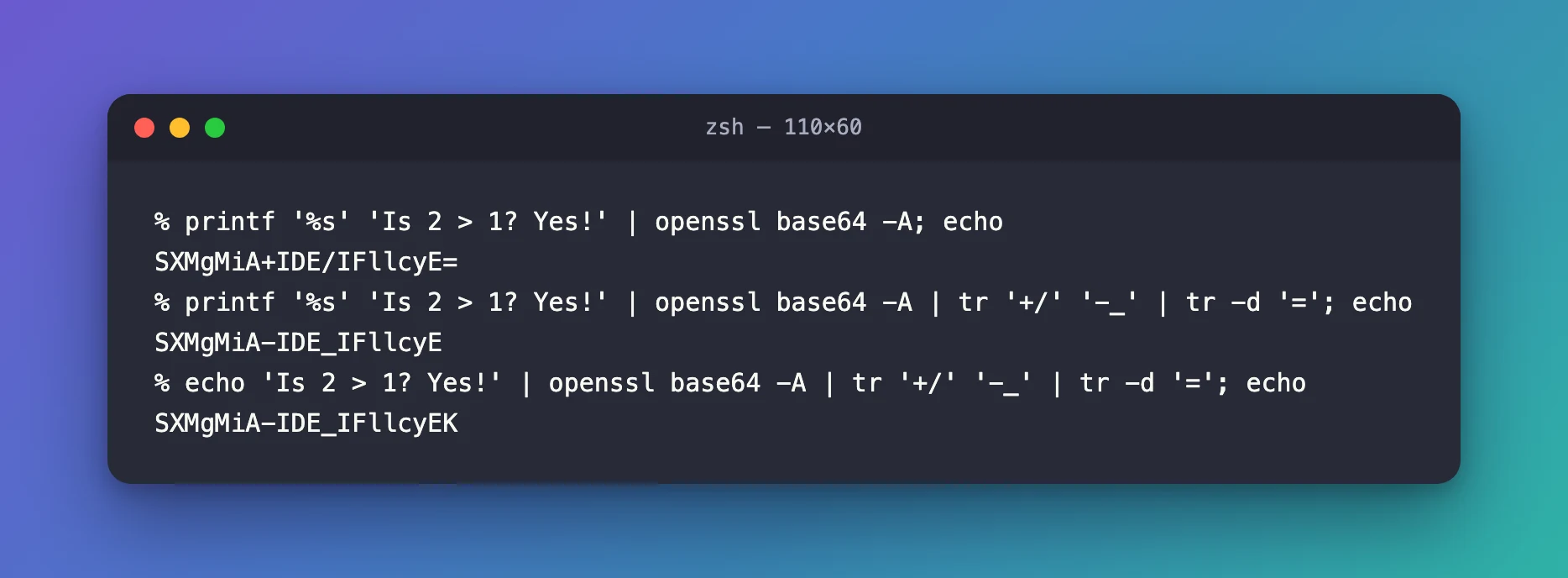
printf '%s' 'Is 2 > 1? Yes!' | openssl base64 -A; echo
SXMgMiA+IDE/IFllcyE=
-A doesn't end the output with a line break, so ; echo adds one, and your next prompt starts on its own line.
$base64 = [Convert]::ToBase64String([Text.Encoding]::UTF8.GetBytes('Is 2 > 1? Yes!'))
$base64
SXMgMiA+IDE/IFllcyE=
[Convert]::ToBase64String is .NET's standard base64 encoder. The result is kept in $base64 for the next step.
The output has a +, a / and an =. In a web address, a + can turn into a space, a / separates folders, and an = separates a name from its value, so none of them travels safely.
Step 2: Turn It into Base64url
- macOS / Linux
- Windows (PowerShell)
printf '%s' 'Is 2 > 1? Yes!' | openssl base64 -A | tr '+/' '-_' | tr -d '='; echo
SXMgMiA-IDE_IFllcyE
$base64.TrimEnd('=').Replace('+', '-').Replace('/', '_')
SXMgMiA-IDE_IFllcyE
TrimEnd('=') removes the padding, and each Replace swaps one character. .NET's own encoder gives the same text in one call:
[System.Buffers.Text.Base64Url]::EncodeToString([Text.Encoding]::UTF8.GetBytes('Is 2 > 1? Yes!'))
SXMgMiA-IDE_IFllcyE
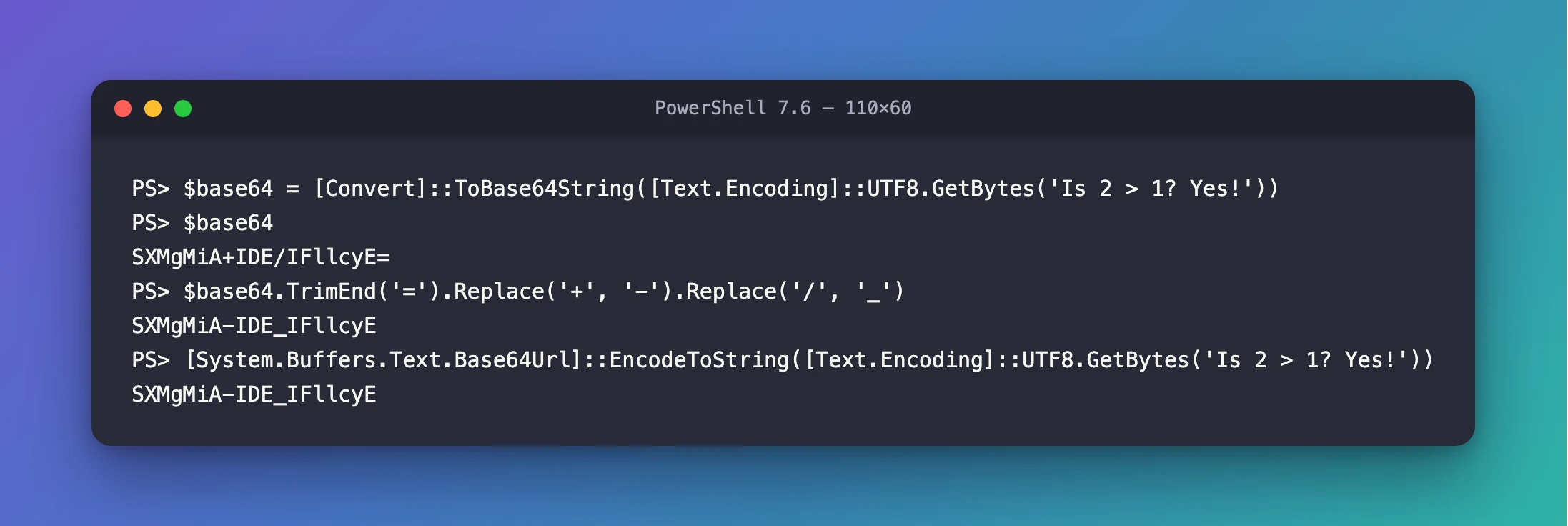
+ became -, / became _, and the = is gone. Everything else stayed the same.
Why printf and Not echo
echo ends its output with a line break, and the line break gets encoded too:
echo 'Is 2 > 1? Yes!' | openssl base64 -A | tr '+/' '-_' | tr -d '='; echo
SXMgMiA-IDE_IFllcyEK
The extra K at the end is that line break. Anything that decodes this text gets Is 2 > 1? Yes! plus an invisible new line, and a token signed over it won't match a token made from the text alone. printf '%s' prints exactly what's between the quotes, which is why every command here uses it. PowerShell strings don't carry a line break, so the PowerShell commands don't have this problem.
Common Mistakes
| Mistake | What happens | Do this instead |
|---|---|---|
Using echo instead of printf '%s' | A line break is encoded with the text | Use printf '%s' |
Leaving out -A | OpenSSL breaks the output into lines of 64 characters | Keep -A |
Keeping the = padding | The text no longer matches how JWTs encode their parts, which RFC 7515 defines without padding | End with tr -d '=' |
Using Base64Url in Windows PowerShell 5.1 | The class doesn't exist there | Use PowerShell 7.6, or the TrimEnd and Replace version |
Troubleshooting
| Symptom | Likely cause | Fix |
|---|---|---|
| The result has an extra character or two at the end | echo added a line break that got encoded | Use printf '%s' |
| The result is split over several lines | -A is missing | Add -A after openssl base64 |
command not found: openssl | OpenSSL isn't installed | Install your distribution's openssl package |
FAQ
What's the difference between base64 and base64url?
Two characters and the padding. RFC 4648, the standard for both, defines base64url as base64 with - and _ in place of + and /. JSON Web Tokens also leave out the = padding: RFC 7515 defines their base64url "with all trailing '=' characters omitted".
Why can the padding be dropped?
The length of the text already tells a decoder how many bytes the last group holds. RFC 7515's Appendix C shows how a decoder puts the = back from the length alone.
How do I turn base64url back into text?
How to Decode Base64url Text in the Terminal does the reverse, including putting the padding back.
Conclusion
To base64url-encode text in bash or zsh, pipe it from printf '%s' into openssl base64 -A, swap +/ for -_ with tr, and delete the =. In PowerShell 7.6, [System.Buffers.Text.Base64Url]::EncodeToString does all of it in one call. Use printf rather than echo, or a hidden line break becomes part of your data.
Additional Resources
- RFC 4648, Section 5: Base 64 Encoding with URL and Filename Safe Alphabet — the base64url alphabet.
- RFC 7515, Section 2: Terminology — base64url without padding, as JWTs use it.
- openssl-enc — the
-aand-Aoptions behindopenssl base64. - Base64Url Class — .NET's base64url encoder and decoder.
