How to Base64url-Encode a String in C# with Base64UrlEncoder

Base64url is base64 made safe for web addresses: - and _ instead of + and /, and no = padding. JSON Web Tokens use it for every piece. In .NET, the Base64UrlEncoder class from the Microsoft.IdentityModel.Tokens package encodes and decodes it in one call.
Syntax
using Microsoft.IdentityModel.Tokens;

string <encoded> = Base64UrlEncoder.Encode(<text>);
string <text> = Base64UrlEncoder.Decode(<encoded>);
| Part | What it does |
|---|---|
Base64UrlEncoder.Encode(<text>) | Encodes the string as UTF-8 and returns base64url without padding. |
Base64UrlEncoder.Decode(<encoded>) | Decodes base64url text back into a UTF-8 string. |
Microsoft Learn on Base64UrlEncoder.Encode(String): it "Performs base64url encoding, which differs from regular base64 encoding as follows: Padding is skipped so the pad character '=' doesn't have to be percent encoded. The 62nd and 63rd regular base64 encoding characters ('+' and '/') are replaced with ('-' and '_'). This makes the encoding alphabet URL safe."
The Example
The example encodes the text Hi?> once with plain base64, Convert.ToBase64String, and once with Base64UrlEncoder.Encode, then decodes the base64url result back into text. Those four characters were chosen because their base64 contains a / and padding.
Prerequisites
- .NET SDK. This guide uses .NET SDK 10.0.404.
Step 1: Create the Project
dotnet new console -o demo
cd demo
dotnet package add Microsoft.IdentityModel.Tokens
dotnet new console creates a console app in a new demo folder, and dotnet package add adds the Microsoft.IdentityModel.Tokens package, version 8.23.0 here, which holds Base64UrlEncoder.
Step 2: Write the Code
Replace the contents of Program.cs:
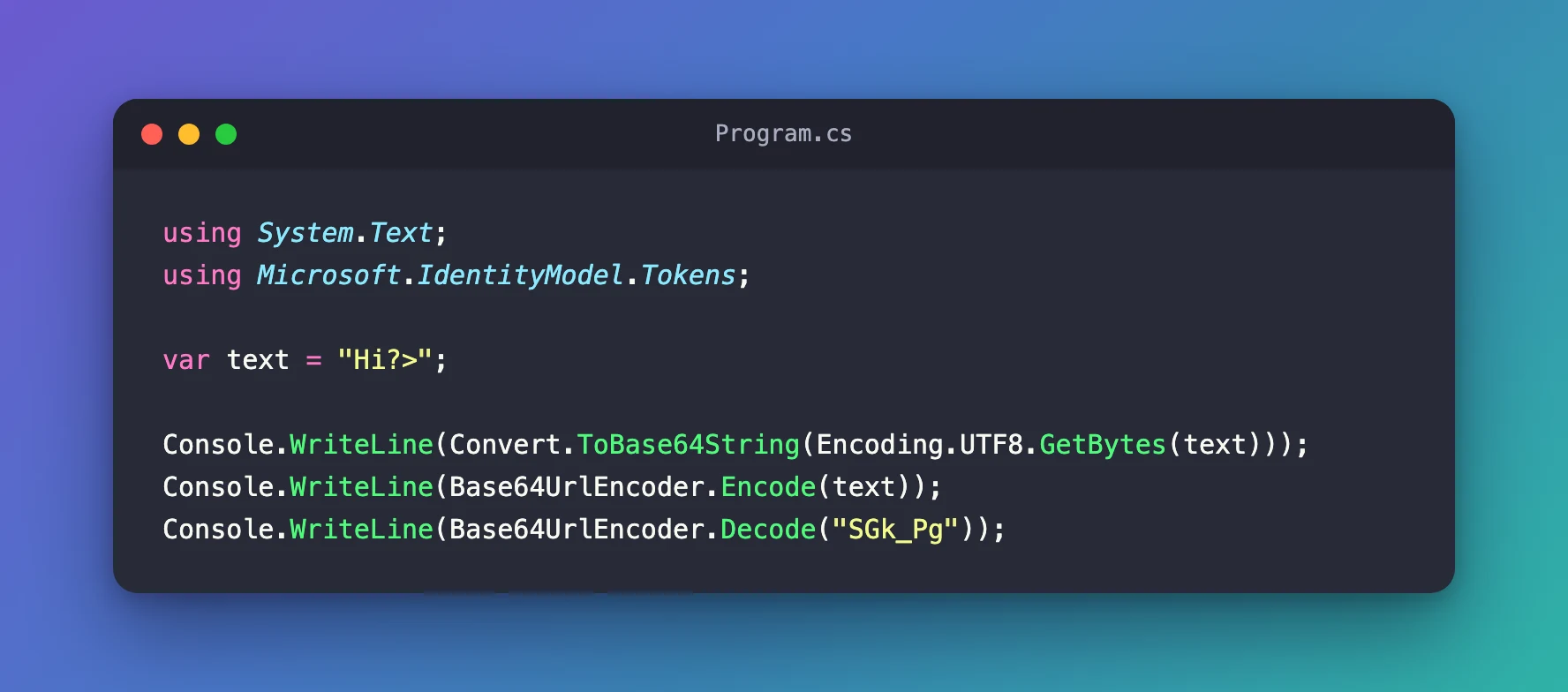
using System.Text;
using Microsoft.IdentityModel.Tokens;

var text = "Hi?>";

Console.WriteLine(Convert.ToBase64String(Encoding.UTF8.GetBytes(text)));
Console.WriteLine(Base64UrlEncoder.Encode(text));
Console.WriteLine(Base64UrlEncoder.Decode("SGk_Pg"));
Step 3: Run It
dotnet run
SGk/Pg==
SGk_Pg
Hi?>
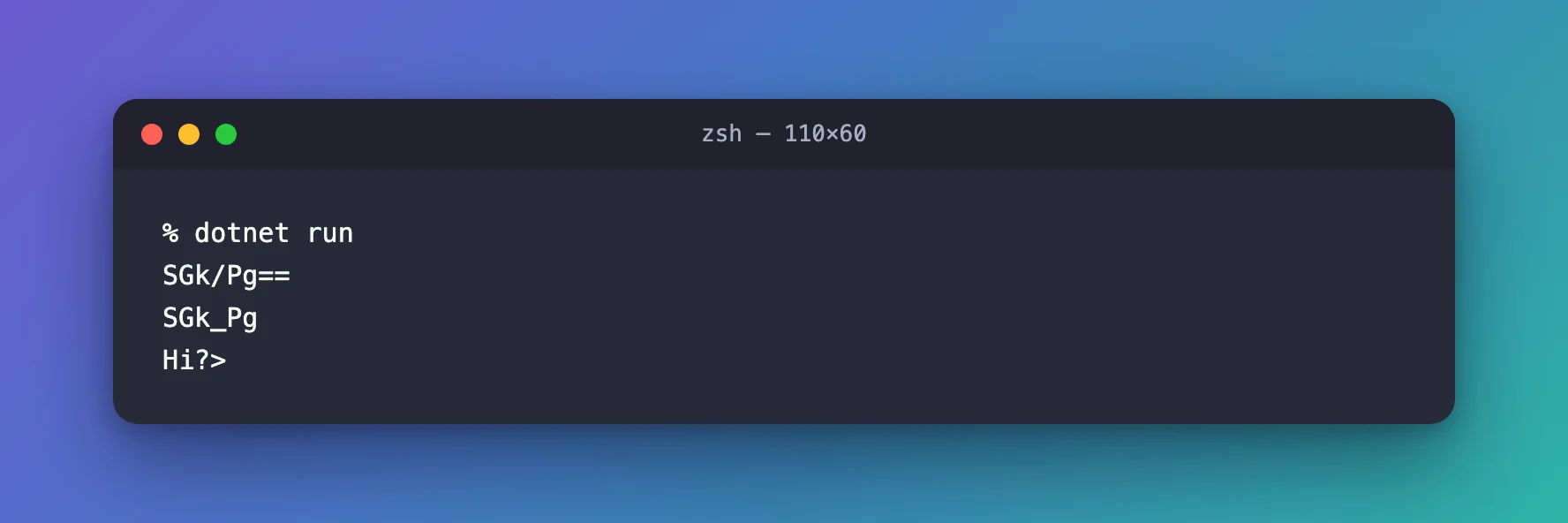
The command is the same in zsh, bash and PowerShell.
What Happened
Convert.ToBase64StringgaveSGk/Pg==: a/and two=of padding.Base64UrlEncoder.EncodegaveSGk_Pg: the/became_, and the padding is gone.Base64UrlEncoder.DecodeturnedSGk_Pgback intoHi?>.
Common Mistakes
| Mistake | What happens | Do this instead |
|---|---|---|
Using Convert.ToBase64String where base64url is required | The text can contain +, / and = | Use Base64UrlEncoder.Encode |
Decoding binary data with Decode, which returns a string | Bytes that aren't UTF-8 text come out garbled | Use Base64UrlEncoder.DecodeBytes |
| Adding the package only for this | It works, but it's an extra dependency | Without the package, .NET 10's System.Buffers.Text.Base64Url.EncodeToString(bytes) gave the same SGk_Pg |
Troubleshooting
| Symptom | Likely cause | Fix |
|---|---|---|
error CS0103: The name 'Base64UrlEncoder' does not exist in the current context | The using Microsoft.IdentityModel.Tokens; line or the package is missing | Add both |
The output ends in = | The text was encoded with Convert.ToBase64String | Use Base64UrlEncoder.Encode |
FAQ
Can Decode read plain base64?
Yes. Base64UrlEncoder.Decode("SGk/Pg==") also gave Hi?>.
Is this the same encoding a JWT uses?
Yes. JsonWebTokenHandler uses base64url for the header, the payload and the signature of every token it writes.
Conclusion
Base64UrlEncoder.Encode(text) gives the unpadded, URL-safe base64 that JWTs use, and Base64UrlEncoder.Decode(encoded) turns it back into text. Both come with the Microsoft.IdentityModel.Tokens package.
Additional Resources
- Base64UrlEncoder, on Microsoft Learn.
- RFC 4648, section 5: base64 with the URL and filename safe alphabet.
