How to Ask Follow-Up Questions About an Image with Microsoft Agent Framework in C#

To ask a Microsoft Agent Framework agent more about a picture you've already sent, run every question in the same AgentSession. The session keeps the conversation, picture included, so the model can look at it again for each follow-up. Without the session, a follow-up arrives with no picture at all, and the model may answer anyway.
A message to an agent can carry a picture as a DataContent, next to the question. People rarely stop at one question about a picture: what else does the sign say, what colour is it, what about Saturday? A session lets the next question be plain text, because the picture is already part of the conversation.
Syntax
AgentSession <session> = await <agent>.CreateSessionAsync();

ChatMessage <message> = new(ChatRole.User,
[
    new TextContent("<question>"),
    new DataContent(<bytes>, "<media type>"),
]);
await <agent>.RunAsync(<message>, <session>);

await <agent>.RunAsync("<follow-up question>", <session>);
| Part | What it is |
|---|---|
<agent> | Your AIAgent, with a model that accepts images |
CreateSessionAsync | Creates the session, one conversation. The reference: An AgentSession is always constructed by an AIAgent so that the AIAgent can attach any necessary behaviors |
<message> | The first message: the question and the picture |
<bytes> | The picture's bytes, for example from File.ReadAllBytesAsync |
<media type> | What the bytes are, such as image/png, image/jpeg or image/webp |
<follow-up question> | A later question, as plain text |
<session> | The same session, passed to every run of the conversation |
With an agent on Microsoft Foundry, the service stores the conversation and the session holds a reference to it. Each run tells Foundry which earlier response it follows, and Foundry gives the model the conversation up to there, picture included.
The Example
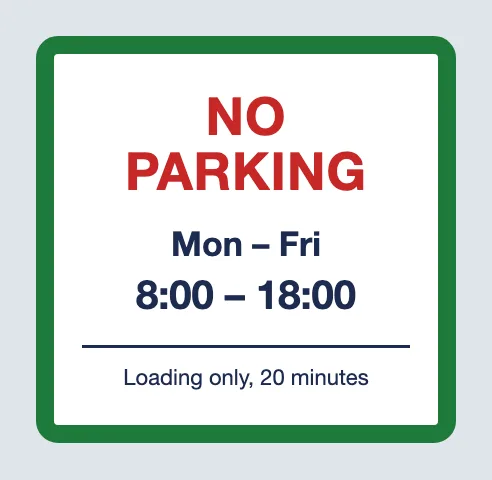
A console app called SignReader sends a picture of a parking sign with a question. Then it asks a follow-up that only the picture can answer, What colour is the border of the sign?, twice: in the same session, and without it. This is the sign:
Prerequisites
- A model deployment that accepts images, in a Microsoft Foundry project, and the Foundry User role on the Foundry resource for your account. The app calls the model as you.
- The .NET 10 SDK (
dotnet --versionprints a version that starts with10.0) and the Azure CLI, signed in withaz login.
Step 1: Create a Console App
dotnet new console -n SignReader
cd SignReader
dotnet add package Microsoft.Agents.AI.Foundry --version 1.28.0-preview.261106.1
dotnet add package Azure.Identity --version 1.21.0
Microsoft.Agents.AI.Foundry turns a model in a Foundry project into an agent and brings in Agent Framework. It's a preview package: it's the one that ships with Agent Framework 1.28, whose core is generally available. Azure.Identity signs the app in with your Azure CLI sign-in.
Save the sign above as parking-sign.webp in the SignReader folder, next to Program.cs.
Step 2: Create the Agent and a Session
Replace everything in Program.cs, starting with this:
using Azure.AI.Projects;
using Azure.Identity;
using Microsoft.Agents.AI;
using Microsoft.Extensions.AI;

AIAgent agent = new AIProjectClient(
        new Uri("https://foundry-devblogs-exp.services.ai.azure.com/api/projects/proj-devblogs-exp"),
        new AzureCliCredential())
    .AsAIAgent(
        model: "gpt-5.6-luna",
        instructions: "You answer questions about the pictures you're given. Answer in one sentence.",
        name: "SignReader");

// 1. One session for the whole conversation.
AgentSession session = await agent.CreateSessionAsync();
- The endpoint and model are this example's Foundry project and deployment. Use your own project endpoint and the name of a deployment that accepts images.
CreateSessionAsynccreates a new, empty conversation. Every run that gets this session continues it.
Step 3: Send the Picture
// 2. The first message carries the picture.
byte[] sign = await File.ReadAllBytesAsync("parking-sign.webp");
ChatMessage withPicture = new(ChatRole.User,
[
    new TextContent("Can I park here on a Wednesday at 10:00?"),
    new DataContent(sign, "image/webp"),
]);
Print("With the picture", await agent.RunAsync(withPicture, session));
DataContentholds the picture's bytes and its media type.agent.RunAsync(withPicture, session)sends the question and the picture in the session. The answer, and the picture, are now part of that conversation.
Step 4: Ask Follow-Up Questions
// 3. A follow-up in the same session: text only.
Print("Follow-up in the session", await agent.RunAsync("What colour is the border of the sign?", session));

// 4. The same follow-up without the session.
Print("Follow-up without the session", await agent.RunAsync("What colour is the border of the sign?"));

static void Print(string title, AgentResponse response)
{
    Console.WriteLine($"--- {title} ({response.Usage?.InputTokenCount} tokens in, {response.Usage?.CachedInputTokenCount ?? 0} cached) ---");
    Console.WriteLine(response.Text);
    Console.WriteLine();
}
- The follow-up is plain text, in the same
session. The picture isn't sent again. - The last run has no session. It asks the same question as a new conversation, to show what the session changes.
Printshows each answer with its input tokens and how many of them were cached.
Step 5: Run It
dotnet run
--- With the picture (326 tokens in, 0 cached) ---
No, parking is prohibited on Wednesdays from 8:00 to 18:00; only loading for up to 20 minutes is allowed.

--- Follow-up in the session (374 tokens in, 0 cached) ---
The border is green.

--- Follow-up without the session (33 tokens in, 0 cached) ---
The border of the sign is black.
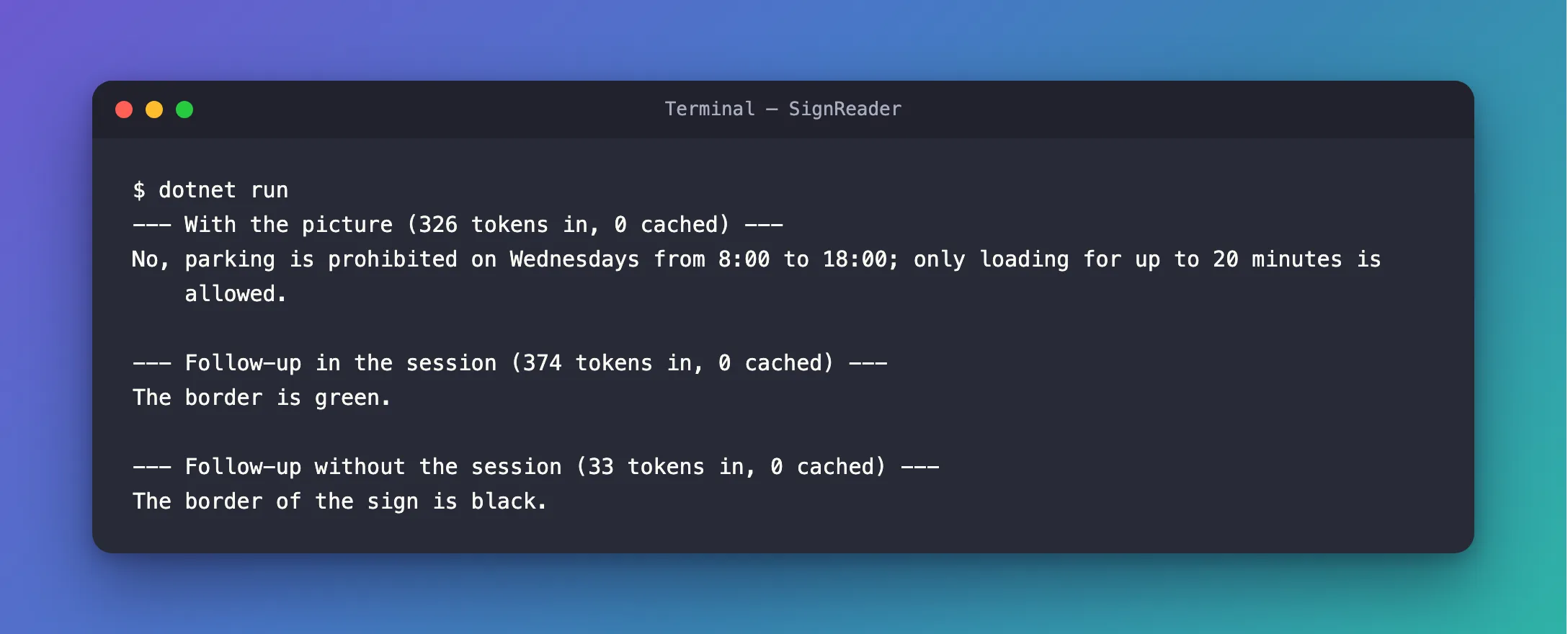
- With the picture: the model read the days, the hours and the loading exception off the sign.
- In the session: green, which is right. Nothing in the first answer mentions the border, so the model looked at the picture again. The run took 374 input tokens, more than the first one: the conversation so far, picture included, was part of the model's input again, with the new question.
- Without the session: 33 input tokens, so no picture reached the model. It answered anyway: black, stated as a fact, for a green border. A follow-up outside the session doesn't fail with an error. It gets a wrong answer.
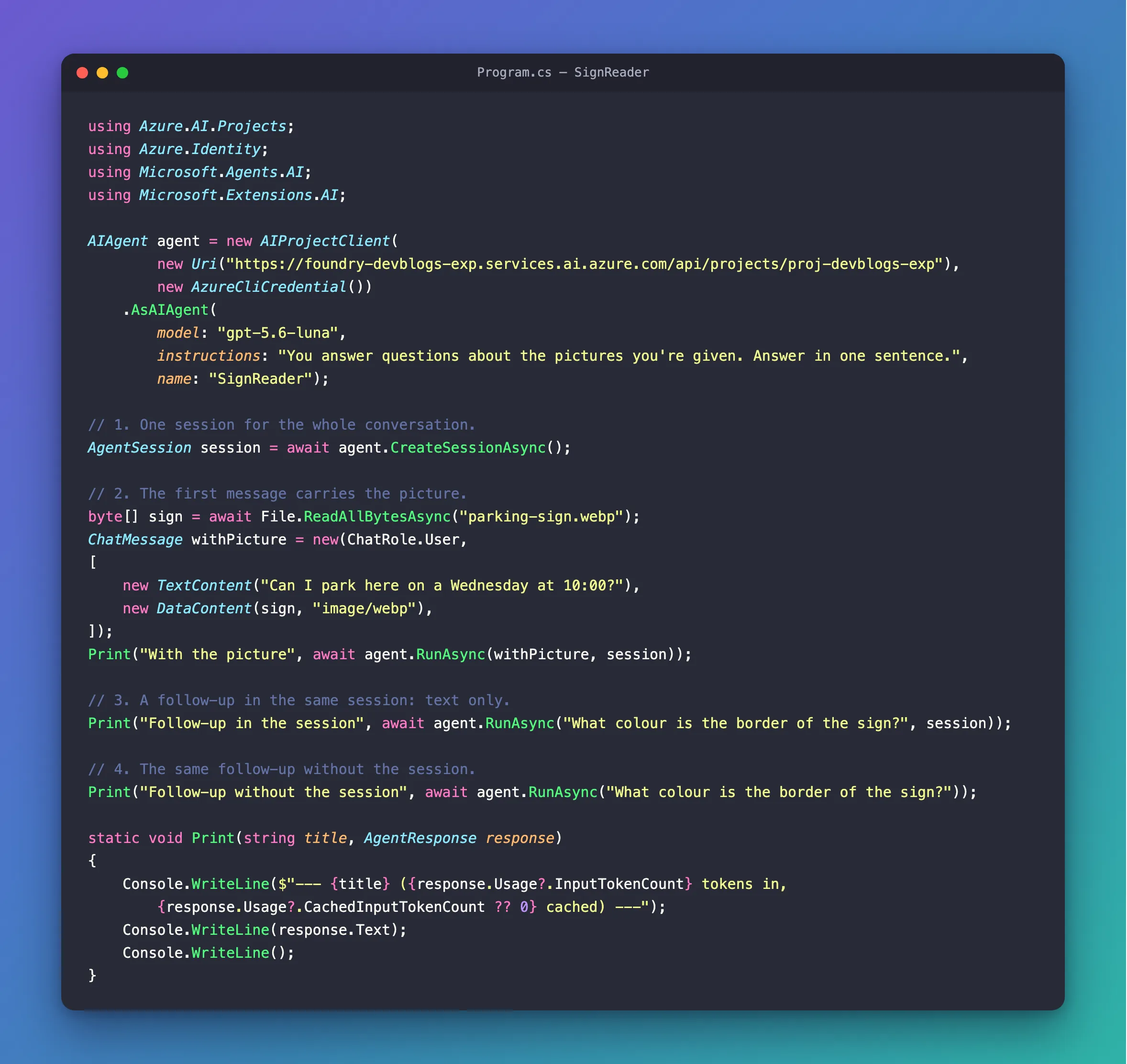
The Complete File
using Azure.AI.Projects;
using Azure.Identity;
using Microsoft.Agents.AI;
using Microsoft.Extensions.AI;

AIAgent agent = new AIProjectClient(
        new Uri("https://foundry-devblogs-exp.services.ai.azure.com/api/projects/proj-devblogs-exp"),
        new AzureCliCredential())
    .AsAIAgent(
        model: "gpt-5.6-luna",
        instructions: "You answer questions about the pictures you're given. Answer in one sentence.",
        name: "SignReader");

// 1. One session for the whole conversation.
AgentSession session = await agent.CreateSessionAsync();

// 2. The first message carries the picture.
byte[] sign = await File.ReadAllBytesAsync("parking-sign.webp");
ChatMessage withPicture = new(ChatRole.User,
[
    new TextContent("Can I park here on a Wednesday at 10:00?"),
    new DataContent(sign, "image/webp"),
]);
Print("With the picture", await agent.RunAsync(withPicture, session));

// 3. A follow-up in the same session: text only.
Print("Follow-up in the session", await agent.RunAsync("What colour is the border of the sign?", session));

// 4. The same follow-up without the session.
Print("Follow-up without the session", await agent.RunAsync("What colour is the border of the sign?"));

static void Print(string title, AgentResponse response)
{
    Console.WriteLine($"--- {title} ({response.Usage?.InputTokenCount} tokens in, {response.Usage?.CachedInputTokenCount ?? 0} cached) ---");
    Console.WriteLine(response.Text);
    Console.WriteLine();
}
Common Mistakes
| Mistake | What happens | Do this instead |
|---|---|---|
| Asking the follow-up without the session | The model doesn't have the picture and may answer anyway: here it said black for a green border | Pass the same session to every run of the conversation |
| Expecting follow-ups to cost only their own words | Every follow-up's input includes the conversation, picture included: 374 tokens for an eight-word question | Start a new session when the conversation moves on from the picture |
FAQ
Why does every run say 0 cached?
Microsoft's prompt caching needs requests of A minimum of 1,024 tokens in length, and these are shorter. With a bigger picture or a longer conversation, part of each follow-up's input can come from the cache, which is billed at a discount.
Conclusion
A follow-up question about a picture needs the picture, and a session keeps it. Send the picture once in a DataContent, pass the same AgentSession to every run, and ask the next questions as plain text: the model looked at the sign again and said green. Without the session, it saw no sign and still answered, with the wrong colour.
Additional Resources
- Session — what an
AgentSessionholds. - Using images with an agent — sending a picture to an agent.
- Prompt caching — when input tokens come from the cache.
