How to Approve or Reject an AG-UI Tool Call Interrupt in ASP.NET Core

An agent behind an AG-UI endpoint can't stop and ask a question the way a console app can. When it calls a tool that needs approval, the run ends with an interrupt, and your client answers it in the next request. This guide builds a tiny ASP.NET Core API that does exactly that, and answers it from an .http file.
Syntax
The answer is a new run of the same thread, with no new message and one resume entry:
{
  "threadId": "<thread id>",
  "runId": "<new run id>",
  "parentRunId": "<run id of the interrupted run>",
  "messages": [],
  "resume": [
    {
      "interruptId": "<interrupt id>",
      "status": "resolved",
      "payload": {
        "approved": <true or false>,
        "toolCall": {
          "callId": "<tool call id>",
          "name": "<tool name>",
          "arguments": <the call's arguments, as a JSON object>
        }
      }
    }
  ]
}
| Part | What it is |
|---|---|
threadId | The conversation of the interrupted run |
runId, parentRunId | A new ID for this run, and the run it continues |
messages | Empty: the person isn't saying anything new, they're answering |
interruptId | The id of the interrupt, from the interrupted run's RUN_FINISHED event |
status | resolved: the person made a decision |
approved | true to run the tool, false to reject the call |
toolCall | The call being answered: its callId is the interrupt's toolCallId, name is the tool, and arguments are the ones from TOOL_CALL_ARGS |
The interrupt's own schema asks only for approved. The toolCall is needed too, with the AG-UI server library that Agent Framework uses today; the FAQ explains why.
The Example
A coffee-shop agent has one tool, place_order(drink, cups), and the tool needs approval. You order Two flat whites, please., see the interrupt, and approve it. Then you order a cappuccino and reject it. Everything runs on your machine, with no sign-in.
Prerequisites
- A model deployment in a Microsoft Foundry project, and the Foundry User role on the Foundry resource for your account. The API calls the model as you.
- The .NET 10 SDK (
dotnet --versionprints a version that starts with10.0) and the Azure CLI, signed in withaz login. - A way to send
.httpfiles: Visual Studio, or VS Code with the REST Client extension.
Step 1: Create the API
In a terminal, in the folder where you keep your projects, run:
dotnet new web -n CoffeeOrders
cd CoffeeOrders
dotnet add package Microsoft.Agents.AI.Foundry --version 1.28.0-preview.261106.1
dotnet add package Microsoft.Agents.AI.Hosting --version 1.28.0-preview.261106.1
dotnet add package Microsoft.Agents.AI.Hosting.AGUI.AspNetCore --version 1.28.0-preview.261106.1
dotnet add package Azure.Identity --version 1.21.0
| Package | What it gives the API |
|---|---|
Microsoft.Agents.AI.Foundry | AsAIAgent, which turns a model in a Foundry project into an agent |
Microsoft.Agents.AI.Hosting | AddAIAgent, which registers the agent in the app, and the session store |
Microsoft.Agents.AI.Hosting.AGUI.AspNetCore | AddAGUIServer and MapAGUIServer: the AG-UI endpoint |
Azure.Identity | AzureCliCredential, which signs the API in to Foundry with your Azure CLI sign-in |
Agent Framework's Foundry and hosting packages for release 1.28.0 are previews, so each needs its exact --version. Open the CoffeeOrders folder in VS Code, or CoffeeOrders.csproj in Visual Studio.
Step 2: Host an Agent with a Tool That Needs Approval
Replace everything in Program.cs:
using System.ComponentModel;
using Azure.AI.Projects;
using Azure.Identity;
using Microsoft.Agents.AI;
using Microsoft.Agents.AI.Hosting;
using Microsoft.Agents.AI.Hosting.AGUI.AspNetCore;
using Microsoft.Extensions.AI;

var builder = WebApplication.CreateBuilder(args);

// 1. The agent, with one tool that needs a person's approval before it runs.
var coffeeAgent = builder.AddAIAgent("coffee", (services, name) =>
    new AIProjectClient(
            new Uri("https://foundry-devblogs-exp.services.ai.azure.com/api/projects/proj-devblogs-exp"),
            new AzureCliCredential())
        .AsAIAgent(
            model: "gpt-5.6-luna",
            instructions: "You take coffee orders. Use your tools to place them.",
            name: name,
            tools: [new ApprovalRequiredAIFunction(AIFunctionFactory.Create(PlaceOrder, name: "place_order"))]));

// 2. The call that waits for approval is kept in the conversation's session, so the API must
//    remember sessions between requests. In memory, for a local example without sign-in.
coffeeAgent.WithInMemorySessionStore(withIsolation: false);

// 3. AG-UI: the protocol that streams the agent's events, and carries the approval back.
builder.Services.AddAGUIServer();

var app = builder.Build();
app.MapAGUIServer(coffeeAgent, "/agents/coffee");
app.Run();

[Description("Places a coffee order and returns its number.")]
static string PlaceOrder(
    [Description("The drink, such as 'flat white'.")] string drink,
    [Description("How many cups.")] int cups) => $"Order 1042 is placed: {cups} x {drink}.";
new ApprovalRequiredAIFunction(...)wraps the tool, so the model can callplace_orderbut it doesn't run until someone approves the call. Use your own Foundry project endpoint and model deployment.WithInMemorySessionStoreis what makes the answer possible. The interrupted run ends, and the waiting call stays in the conversation's session until the next request brings the answer. Without a session store, the API forgets the conversation between requests.withIsolation: falsekeeps every conversation in one shared space, which is fine on your machine with no sign-in. An API that people sign in to keeps each person's conversations apart instead.MapAGUIServerserves the agent over AG-UI at/agents/coffee, and turns the waiting call into an interrupt.
This API has no sign-in, so anyone who can reach it can order and approve. Microsoft's security guidance for AG-UI is clear that AG-UI does not include a built-in authorization mechanism: authenticate the endpoint before anyone else can reach it, and put a trusted server between it and the browser.
Step 3: Give the API a Fixed Address
dotnet new web picks a random port. So that the .http file works for everyone, open Properties/launchSettings.json and change two values in the http profile:
    "http": {
      "commandName": "Project",
      "dotnetRunMessages": true,
      "launchBrowser": false,
      "applicationUrl": "http://localhost:5299",
      "environmentVariables": {
        "ASPNETCORE_ENVIRONMENT": "Development"
      }
    },
applicationUrl is where the API listens, and launchBrowser: false stops Visual Studio from opening a browser on a page the API doesn't have. Then start it:
- VS Code
- Visual Studio
In the terminal, in the CoffeeOrders folder, run:
dotnet run
Select http in the drop-down list next to the green Start button (▶), and press Ctrl+F5 (Debug > Start Without Debugging).
info: Microsoft.Hosting.Lifetime[14]
      Now listening on: http://localhost:5299
info: Microsoft.Hosting.Lifetime[0]
      Application started. Press Ctrl+C to shut down.
Step 4: Order a Coffee
Create CoffeeOrders.http next to Program.cs, with the first request:
@baseUrl = http://localhost:5299

# 1. Order a coffee. place_order needs approval, so the run ends with an interrupt instead of an order.
POST {{baseUrl}}/agents/coffee
Content-Type: application/json
Accept: text/event-stream

{
  "threadId": "order-1",
  "runId": "run-1",
  "messages": [
    {
      "id": "message-1",
      "role": "user",
      "content": "Two flat whites, please."
    }
  ]
}
Send it: Send Request above the POST line in VS Code, Send request in Visual Studio. The response streams back as AG-UI events. Here it is with each rawEvent replaced with {…}:
data: {"type":"RUN_STARTED","threadId":"order-1","runId":"run-1"}

data: {"type":"REASONING_ENCRYPTED_VALUE","subtype":"message","entityId":"msg_Om3gbekRERzsIpBo5p964dWR","encryptedValue":"gAAAAABr…","rawEvent":{…}}

data: {"type":"TOOL_CALL_START","toolCallId":"call_3GplwsBPHYLqt7n9fNTsPHXN","toolCallName":"place_order","rawEvent":{…}}

data: {"type":"TOOL_CALL_ARGS","toolCallId":"call_3GplwsBPHYLqt7n9fNTsPHXN","delta":"{\"drink\":\"flat white\",\"cups\":2}","rawEvent":{…}}

data: {"type":"TOOL_CALL_END","toolCallId":"call_3GplwsBPHYLqt7n9fNTsPHXN","rawEvent":{…}}

data: {"type":"RUN_FINISHED","threadId":"order-1","runId":"run-1","outcome":{"type":"interrupt","interrupts":[{"id":"ficc_call_3GplwsBPHYLqt7n9fNTsPHXN","reason":"tool_call","message":"Approval required for tool call: place_order","toolCallId":"call_3GplwsBPHYLqt7n9fNTsPHXN","responseSchema":{"type":"object","properties":{"approved":{"type":"boolean"}},"required":["approved"]}}]},"usage":[{"model":"gpt-5.6-luna-2026-07-09","inputTokens":85,"outputTokens":34,"totalTokens":119,"reasoningTokens":9,"cachedInputTokens":0}]}
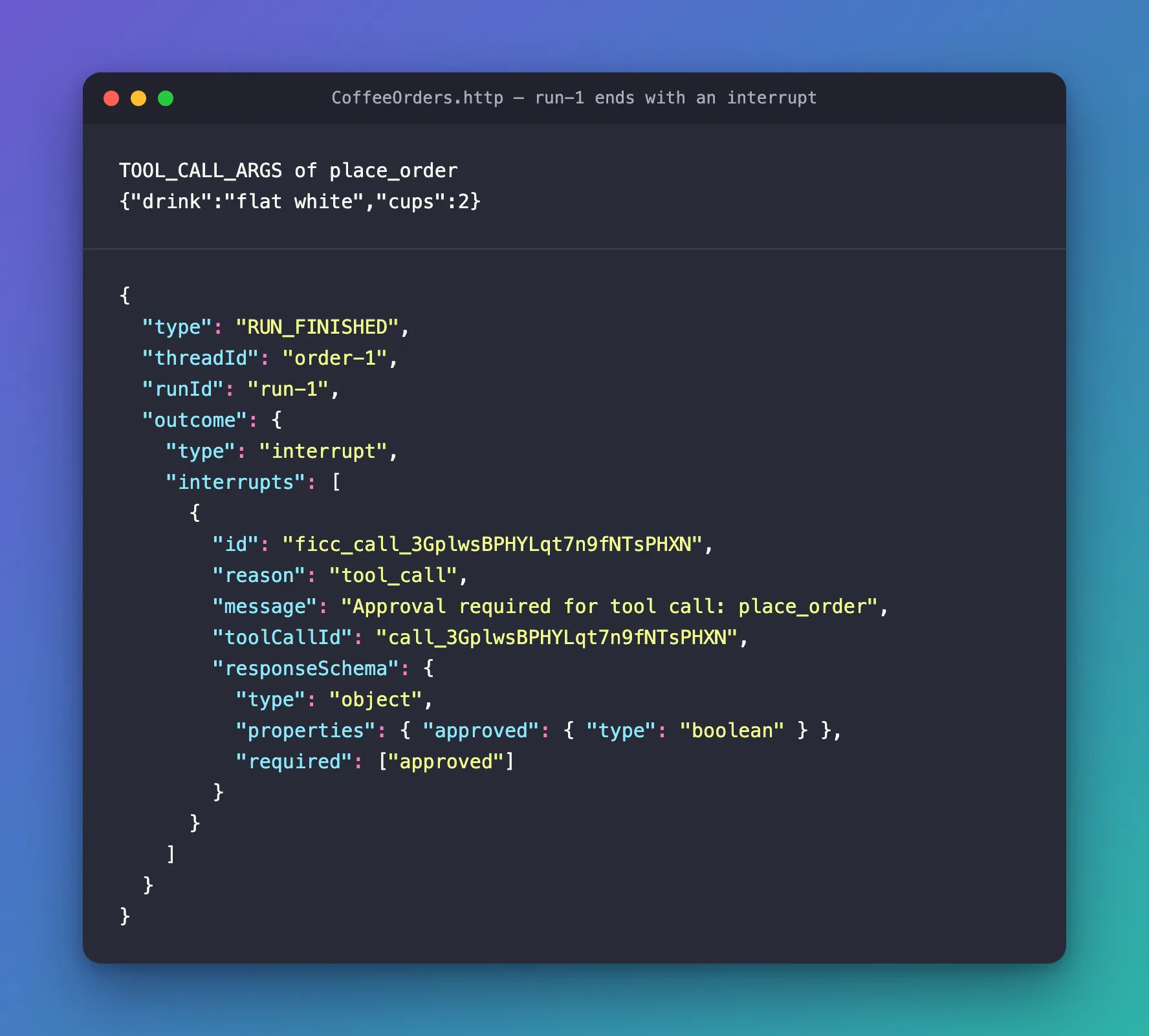
The model called place_order with two flat whites, but no order was placed: there's no TOOL_CALL_RESULT. The run ended with an outcome of type interrupt. Three values in it are what you'll answer with: the interrupt's id, its toolCallId, and the arguments from TOOL_CALL_ARGS. Your IDs differ on every run.
Step 5: Approve It
Add the answer to the file:
###

# 2. Approve it. From run-1's events, paste the interrupt's id, its toolCallId, and the arguments
#    from TOOL_CALL_ARGS.
POST {{baseUrl}}/agents/coffee
Content-Type: application/json
Accept: text/event-stream

{
  "threadId": "order-1",
  "runId": "run-2",
  "parentRunId": "run-1",
  "messages": [],
  "resume": [
    {
      "interruptId": "PASTE-THE-INTERRUPT-ID",
      "status": "resolved",
      "payload": {
        "approved": true,
        "toolCall": {
          "callId": "PASTE-THE-TOOL-CALL-ID",
          "name": "place_order",
          "arguments": PASTE-THE-ARGUMENTS
        }
      }
    }
  ]
}
Replace the three placeholders with your values from Step 4:
PASTE-THE-INTERRUPT-IDwith the interrupt'sid, such asficc_call_3GplwsBPHYLqt7n9fNTsPHXN.PASTE-THE-TOOL-CALL-IDwith itstoolCallId, such ascall_3GplwsBPHYLqt7n9fNTsPHXN.PASTE-THE-ARGUMENTSwith thedeltaofTOOL_CALL_ARGS, without the backslashes and the outer quotes:{"drink":"flat white","cups":2}.argumentsis a JSON object, not a string.
Send it:
data: {"type":"RUN_STARTED","threadId":"order-1","runId":"run-2","parentRunId":"run-1"}

data: {"type":"TOOL_CALL_START","toolCallId":"call_3GplwsBPHYLqt7n9fNTsPHXN","toolCallName":"place_order","parentMessageId":"eaf84a74d1284f9ea7d435327c771ced","rawEvent":{…}}

data: {"type":"TOOL_CALL_ARGS","toolCallId":"call_3GplwsBPHYLqt7n9fNTsPHXN","delta":"{\"drink\":\"flat white\",\"cups\":2}","rawEvent":{…}}

data: {"type":"TOOL_CALL_END","toolCallId":"call_3GplwsBPHYLqt7n9fNTsPHXN","rawEvent":{…}}

data: {"type":"TOOL_CALL_RESULT","messageId":"call_3GplwsBPHYLqt7n9fNTsPHXN","toolCallId":"call_3GplwsBPHYLqt7n9fNTsPHXN","content":"\"Order 1042 is placed: 2 x flat white.\"","rawEvent":{…}}

data: {"type":"TEXT_MESSAGE_START","messageId":"msg_03d619bf…","role":"assistant","name":"coffee","rawEvent":{…}}

data: {"type":"TEXT_MESSAGE_CONTENT","messageId":"msg_03d619bf…","delta":"Your","rawEvent":{…}}

data: {"type":"TEXT_MESSAGE_CONTENT","messageId":"msg_03d619bf…","delta":" order","rawEvent":{…}}

data: {"type":"TEXT_MESSAGE_CONTENT","messageId":"msg_03d619bf…","delta":" is","rawEvent":{…}}

… 13 more TEXT_MESSAGE_CONTENT events …

data: {"type":"TEXT_MESSAGE_CONTENT","messageId":"msg_03d619bf…","delta":"**.","rawEvent":{…}}

data: {"type":"TEXT_MESSAGE_END","messageId":"msg_03d619bf…"}

data: {"type":"RUN_FINISHED","threadId":"order-1","runId":"run-2","outcome":{"type":"success"},"usage":[{"model":"gpt-5.6-luna-2026-07-09","inputTokens":144,"outputTokens":22,"totalTokens":166,"reasoningTokens":0,"cachedInputTokens":0}]}
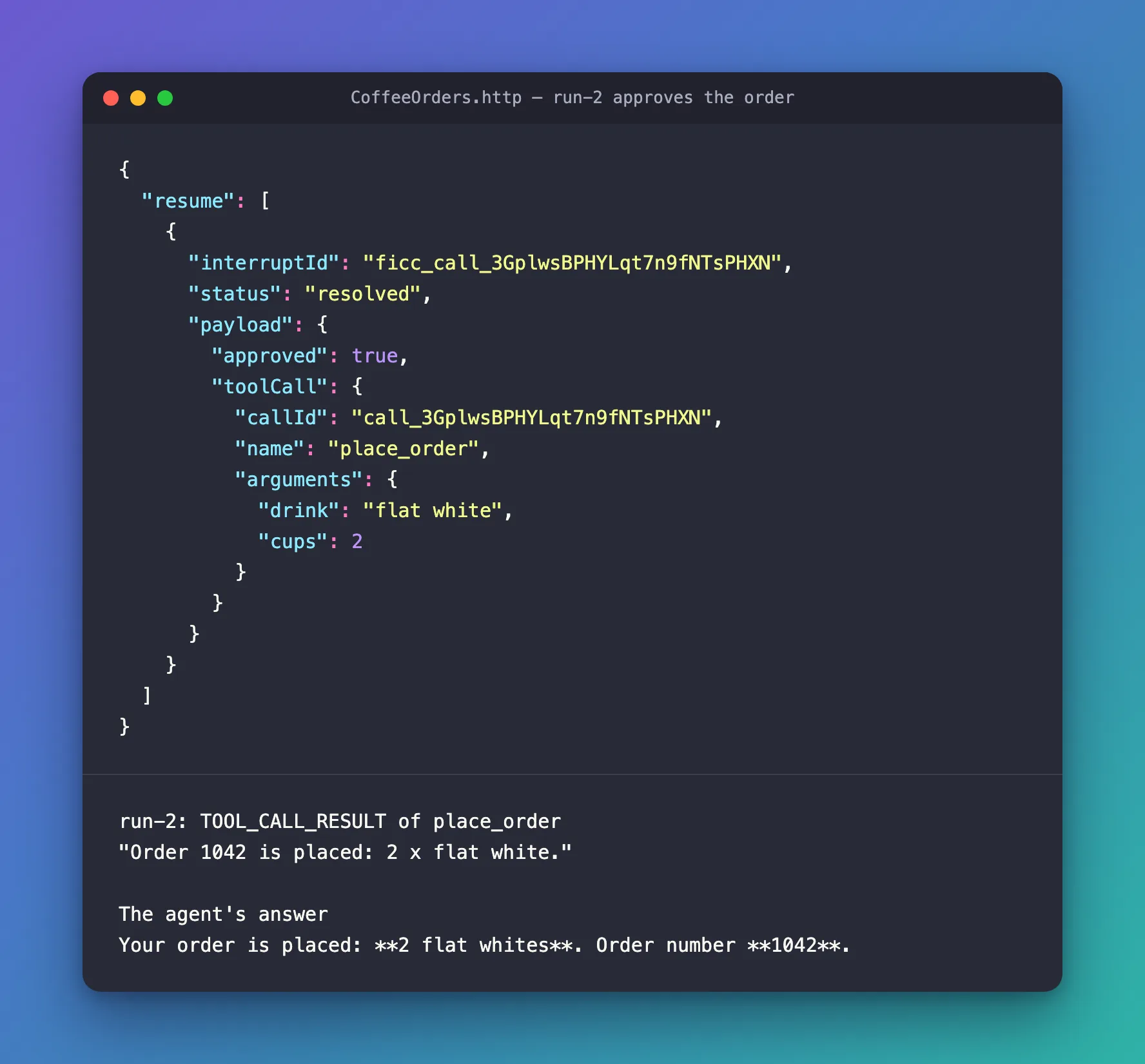
The run starts with the approved call, TOOL_CALL_START to TOOL_CALL_END with the same toolCallId, then TOOL_CALL_RESULT: the tool ran, and the order was placed. The model wrote its answer from that result, and the run ended with success. Put together, the text events say Your order is placed: **2 flat whites**. Order number **1042**., Markdown included.
Step 6: Reject One
Add the last two requests: a new order in a new conversation, and its rejection.
###

# 3. Order again in a new conversation, to try the other answer.
POST {{baseUrl}}/agents/coffee
Content-Type: application/json
Accept: text/event-stream

{
  "threadId": "order-2",
  "runId": "run-1",
  "messages": [
    {
      "id": "message-1",
      "role": "user",
      "content": "One cappuccino, please."
    }
  ]
}

###

# 4. Reject it: the same answer with "approved": false.
POST {{baseUrl}}/agents/coffee
Content-Type: application/json
Accept: text/event-stream

{
  "threadId": "order-2",
  "runId": "run-2",
  "parentRunId": "run-1",
  "messages": [],
  "resume": [
    {
      "interruptId": "PASTE-THE-INTERRUPT-ID",
      "status": "resolved",
      "payload": {
        "approved": false,
        "toolCall": {
          "callId": "PASTE-THE-TOOL-CALL-ID",
          "name": "place_order",
          "arguments": PASTE-THE-ARGUMENTS
        }
      }
    }
  ]
}
Send the order, paste its three values into the rejection, and send that:
data: {"type":"RUN_STARTED","threadId":"order-2","runId":"run-2","parentRunId":"run-1"}

data: {"type":"TOOL_CALL_START","toolCallId":"call_7XtlaGrcPm9NDcTcRqWTAFcL","toolCallName":"place_order","parentMessageId":"d0a5b5d7d4fb4d19b10d695c47517146","rawEvent":{…}}

data: {"type":"TOOL_CALL_ARGS","toolCallId":"call_7XtlaGrcPm9NDcTcRqWTAFcL","delta":"{\"drink\":\"cappuccino\",\"cups\":1}","rawEvent":{…}}

data: {"type":"TOOL_CALL_END","toolCallId":"call_7XtlaGrcPm9NDcTcRqWTAFcL","rawEvent":{…}}

data: {"type":"TOOL_CALL_RESULT","messageId":"call_7XtlaGrcPm9NDcTcRqWTAFcL","toolCallId":"call_7XtlaGrcPm9NDcTcRqWTAFcL","content":"Tool call invocation was rejected by the approver and must not be retried.","rawEvent":{…}}

data: {"type":"TEXT_MESSAGE_START","messageId":"msg_049bb732…","role":"assistant","name":"coffee","rawEvent":{…}}

data: {"type":"TEXT_MESSAGE_CONTENT","messageId":"msg_049bb732…","delta":"Sorry","rawEvent":{…}}

data: {"type":"TEXT_MESSAGE_CONTENT","messageId":"msg_049bb732…","delta":",","rawEvent":{…}}

data: {"type":"TEXT_MESSAGE_CONTENT","messageId":"msg_049bb732…","delta":" I","rawEvent":{…}}

… 7 more TEXT_MESSAGE_CONTENT events …

data: {"type":"TEXT_MESSAGE_CONTENT","messageId":"msg_049bb732…","delta":".","rawEvent":{…}}

data: {"type":"TEXT_MESSAGE_END","messageId":"msg_049bb732…"}

data: {"type":"RUN_FINISHED","threadId":"order-2","runId":"run-2","outcome":{"type":"success"},"usage":[{"model":"gpt-5.6-luna-2026-07-09","inputTokens":147,"outputTokens":15,"totalTokens":162,"reasoningTokens":0,"cachedInputTokens":0}]}
place_order didn't run. In its place, the model got Tool call invocation was rejected by the approver and must not be retried., and answered Sorry, I couldn't place the cappuccino order. The apology makes your decision sound like a failure: Fixed: Microsoft Agent Framework Agent Calls a Rejected Tool Approval a Failure shows the line of instructions that changes it.
The Complete Code
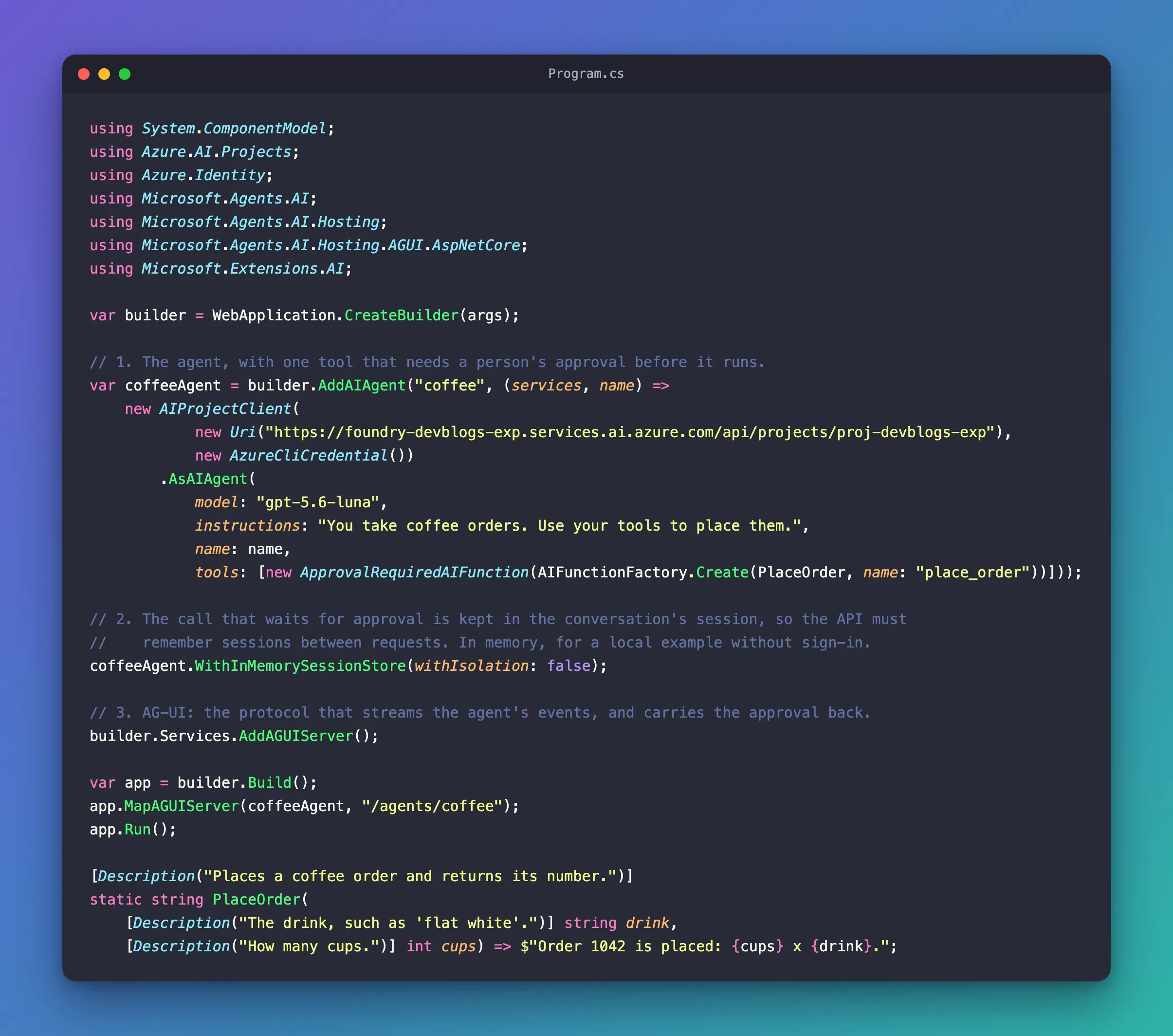
Program.cs is the file from Step 2, and CoffeeOrders.http holds the four requests from Steps 4 to 6.
Common Mistakes
| Mistake | What happens | Do this instead |
|---|---|---|
Answering with only "approved": true, as the interrupt's schema suggests | The tool's result is No approval response was provided for this approval required tool call., and nothing runs | Send the toolCall too |
| Pasting the arguments as a string, with the backslashes | The answer isn't valid for arguments, which is a JSON object | Paste {"drink":"flat white","cups":2} |
A new threadId for the answer | No call is waiting in that conversation | Answer in the thread of the interrupted run |
| No session store | The API forgets the waiting call as soon as the run ends | Add a session store, as Step 2 does |
| Restarting the API between the order and the answer | The in-memory store loses the waiting call | Answer before you restart, or use a durable session store |
FAQ
Why does the answer need the toolCall when the schema asks only for approved?
Because of the AG-UI server library underneath. Agent Framework's AG-UI hosting package, 1.28.0-preview.261106.1, uses AGUI.Server 1.0.0, which turns a resume entry into an approval only when its payload carries the toolCall. Without it, the agent can't match the answer to the waiting call, and rejects the call. The AG-UI project tracks this as issue #2815 and has fixed it in its source, but no released version has the fix yet. The whole story: Fixed: No approval response was provided for this approval required tool call.
Can the answer change the arguments, such as approve ten cups instead of two?
No. I approved an order of two flat whites with "cups": 10 in the answer's toolCall. The approved run's TOOL_CALL_ARGS repeated the model's own {"drink":"flat white","cups":2}, and the result was Order 1042 is placed: 2 x flat white. The answer approves the call that is waiting, not a new one.
What does a .NET client send?
The AG-UI .NET client, AGUIChatClient, turns a ToolApprovalResponseContent into this same resume entry, toolCall included, so a .NET client works with request.CreateResponse(true) and the same session. A JavaScript client sends the entry itself.
Conclusion
When an agent behind MapAGUIServer calls a tool wrapped in ApprovalRequiredAIFunction, the run ends with a RUN_FINISHED whose outcome is an interrupt. Answer it with a new run of the same thread: no messages, and a resume entry with the interrupt's id, status resolved, and a payload with approved and the toolCall. Keep a session store, so the waiting call is still there when the answer arrives.
Additional Resources
- Human-in-the-Loop with AG-UI — approvals over AG-UI in Agent Framework.
- Using function tools with human in the loop approvals —
ApprovalRequiredAIFunctionand the approval types. - Getting Started with AG-UI —
MapAGUIServerand the .NET client. - Security Considerations for AG-UI — authentication, the trusted frontend server, and approvals for sensitive operations.
- AG-UI issue #2815 — why the
resumepayload needs thetoolCallwithAGUI.Server1.0.0.
