How to Add Tags to an MLflow Run

Tags are labels on a run: the model type, the dataset, who owns it. Unlike parameters, you can change them later, and unlike metrics, they're text. MLflow also adds its own tags to every run, such as who ran it and which Git commit the code was at. This guide sets tags, overwrites one, adds a run description, and lists everything MLflow recorded, with real output from MLflow 3.18.0.
Syntax
mlflow.set_tag("<key>", <value>)
mlflow.set_tags({"<key>": <value>, "<key>": <value>})
| Part | What it means |
|---|---|
mlflow.set_tag(key, value) | Sets one tag on the active run. Setting it again replaces the value |
mlflow.set_tags(dictionary) | Sets several at once |
key | The tag's name, with the same allowed characters as a parameter's. Names that start with mlflow. are MLflow's own |
value | Any value, stored as text |
Prerequisites
- MLflow in a uv project and a running tracking server at
http://127.0.0.1:8080: see How to Start an MLflow Tracking Server on Your Computer. - Optional: a Git repository. The script below runs from one, so MLflow can record the commit.
Step 1: Set Tags
Create tags_demo.py:
import mlflow

mlflow.set_tracking_uri("http://127.0.0.1:8080")
mlflow.set_experiment("tags-demo")

with mlflow.start_run(run_name="tags-demo") as run:
    mlflow.set_tag("model_type", "random_forest")
    mlflow.set_tags({"dataset": "california_housing", "owner": "data-team"})
    mlflow.set_tag("mlflow.note.content", "Baseline run with the default settings.")
    mlflow.set_tag("model_type", "gradient_boosting")

for key, value in sorted(mlflow.get_run(run.info.run_id).data.tags.items()):
    print(f"{key} = {value}")
mlflow.set_tag(key, value)sets one tag;mlflow.set_tags(dict)sets several.mlflow.note.contentis a special tag: its value is the run's description.- The last
set_taggivesmodel_typea new value. Tags can change; parameters can't.
uv run python tags_demo.py
2026/11/13 17:08:42 INFO mlflow.tracking.fluent: Experiment with name 'tags-demo' does not exist. Creating a new experiment.
🏃 View run tags-demo at: http://127.0.0.1:8080/#/experiments/7/runs/e27baeb3f0e249e197abf77c7324d299
🧪 View experiment at: http://127.0.0.1:8080/#/experiments/7
dataset = california_housing
mlflow.note.content = Baseline run with the default settings.
mlflow.runName = tags-demo
mlflow.source.git.branch = main
mlflow.source.git.commit = 08ee202798775b8b1efbee4533f43d584056a14c
mlflow.source.name = tags_demo.py
mlflow.source.type = LOCAL
mlflow.user = you
model_type = gradient_boosting
owner = data-team
Step 2: Read the Tags
Your three tags are there, and model_type has its new value, gradient_boosting. The rest, starting with mlflow., are system tags MLflow set by itself:
| System tag | What it records |
|---|---|
mlflow.runName | The run's name |
mlflow.user | Your computer's user name (you on this page) |
mlflow.source.name | The script or command that ran |
mlflow.source.type | LOCAL, for code run on your computer |
mlflow.source.git.commit | The Git commit the code was at, when you run it inside a Git repository |
mlflow.source.git.branch | The Git branch |
mlflow.note.content | The description, here set by the script |
The Git tags are worth a lot: they tie each run to the exact code that produced it. They only appear when the code runs inside a Git repository with at least one commit.
Step 3: See Them in the UI
The run page shows your own tags under Tags, and the description at the top. System tags aren't in the Tags list, but the Source row shows three of them: the script, the Git branch and the short commit:
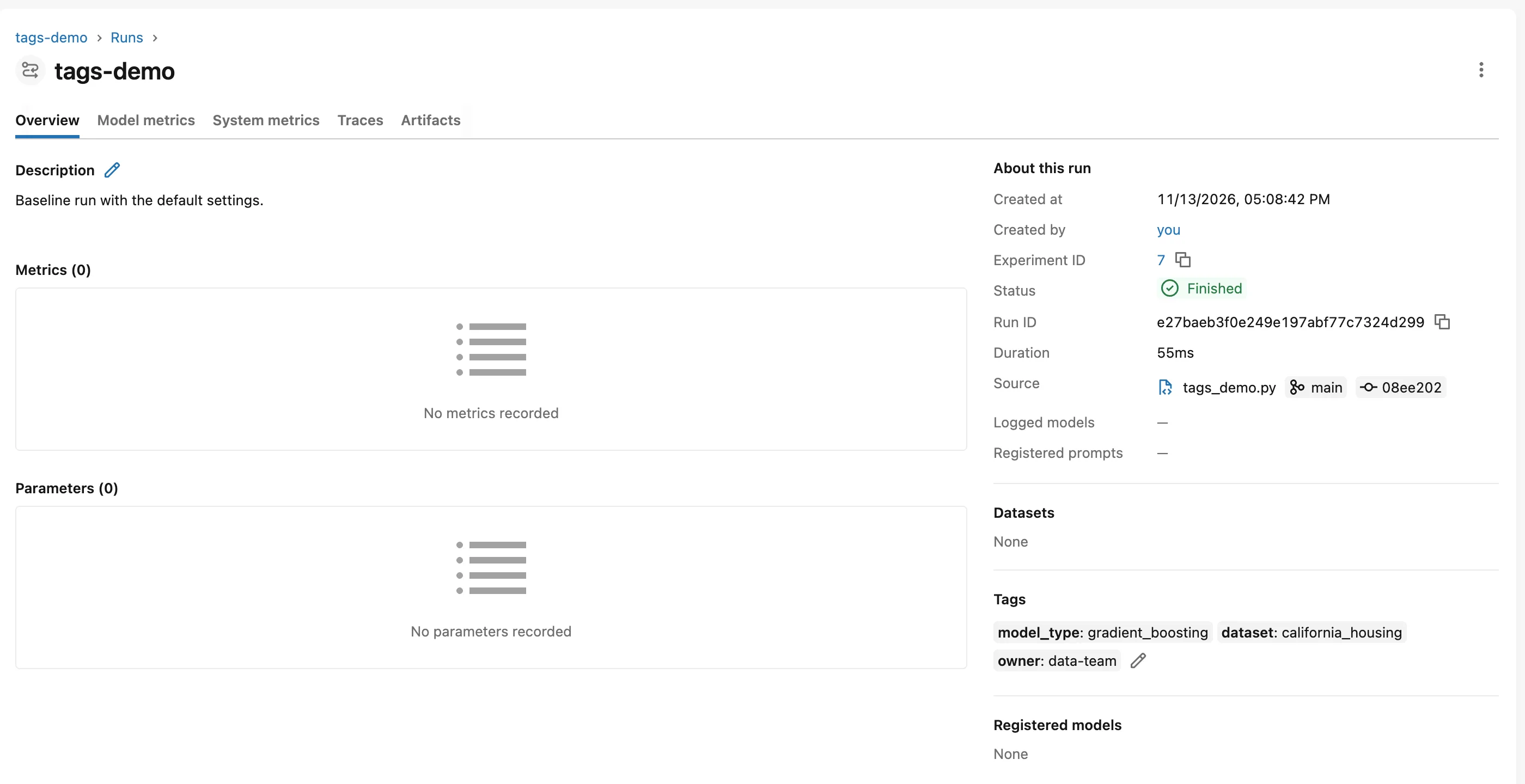
The pencil icons next to Tags and Description edit them by hand, which is handy for adding a note after you've compared runs.
Common Mistakes
| Mistake | What happens | Do this instead |
|---|---|---|
| Logging a setting as a tag | It can be changed later, so it doesn't reliably describe how the run was set up | Log settings as parameters |
Naming your own tags mlflow.something | You can overwrite MLflow's system tags | Use your own names, such as model_type |
| Expecting Git tags outside a repository | They're missing | Run the code from a Git repository with a commit |
Troubleshooting
| Symptom | Likely cause | Fix |
|---|---|---|
No mlflow.source.git.commit tag | The code didn't run in a Git repository, or the repository has no commits yet | Commit your code, then run again |
| The description is empty | mlflow.note.content wasn't set | Set it in code, or use the pencil icon in the UI |
FAQ
What's the difference between tags and parameters?
Parameters are a run's settings, logged once and fixed. Tags are labels you can add or change at any time: How to Log Parameters in MLflow.
Can I filter runs by tag?
Yes. In the runs table's search box, tags.model_type = "random_forest" shows only those runs.
Why does mlflow.user show you?
MLflow records your computer's user name; on this page it's you. You'll see your own.
Conclusion
mlflow.set_tag() and mlflow.set_tags() labeled the run, a second set_tag() changed model_type, and mlflow.note.content became the run's description. MLflow added its own system tags: the run name, the user, the source, and, inside a Git repository, the commit and branch.
Additional Resources
- mlflow.set_tag and mlflow.set_tags — the API reference.
- System Tags Reference — MLflow's list of the tags it sets.
