How to Add Summaries and Tags to an OpenAPI Document in a Minimal API

ASP.NET Core can generate an OpenAPI document from your endpoints, and what it can work out by itself is a list of paths. It can't know that an endpoint "deletes a category that has no products", or that it can answer 409. Four small methods add what's missing. This guide uses them, and shows the JSON that comes out.
Prerequisites
- An ASP.NET Core minimal API with
AddOpenApiandMapOpenApi, which thedotnet new webapitemplate sets up. The examples use .NET 10, and Scalar to read the document.
Step 1: See the Defaults
With nothing added, each endpoint gets a tag chosen for it, and a Results-style lambda has only this:
"/demo/results-style/{id}": {
  "get": {
    "tags": [
      "Dewiride.Inventory.Api"
    ],
A lambda's tag was the project's name, and a method's tag was its class name. DemoEndpoints showed up that way for another endpoint. Neither is a good heading on a documentation page.
Step 2: Add Tags and Summaries
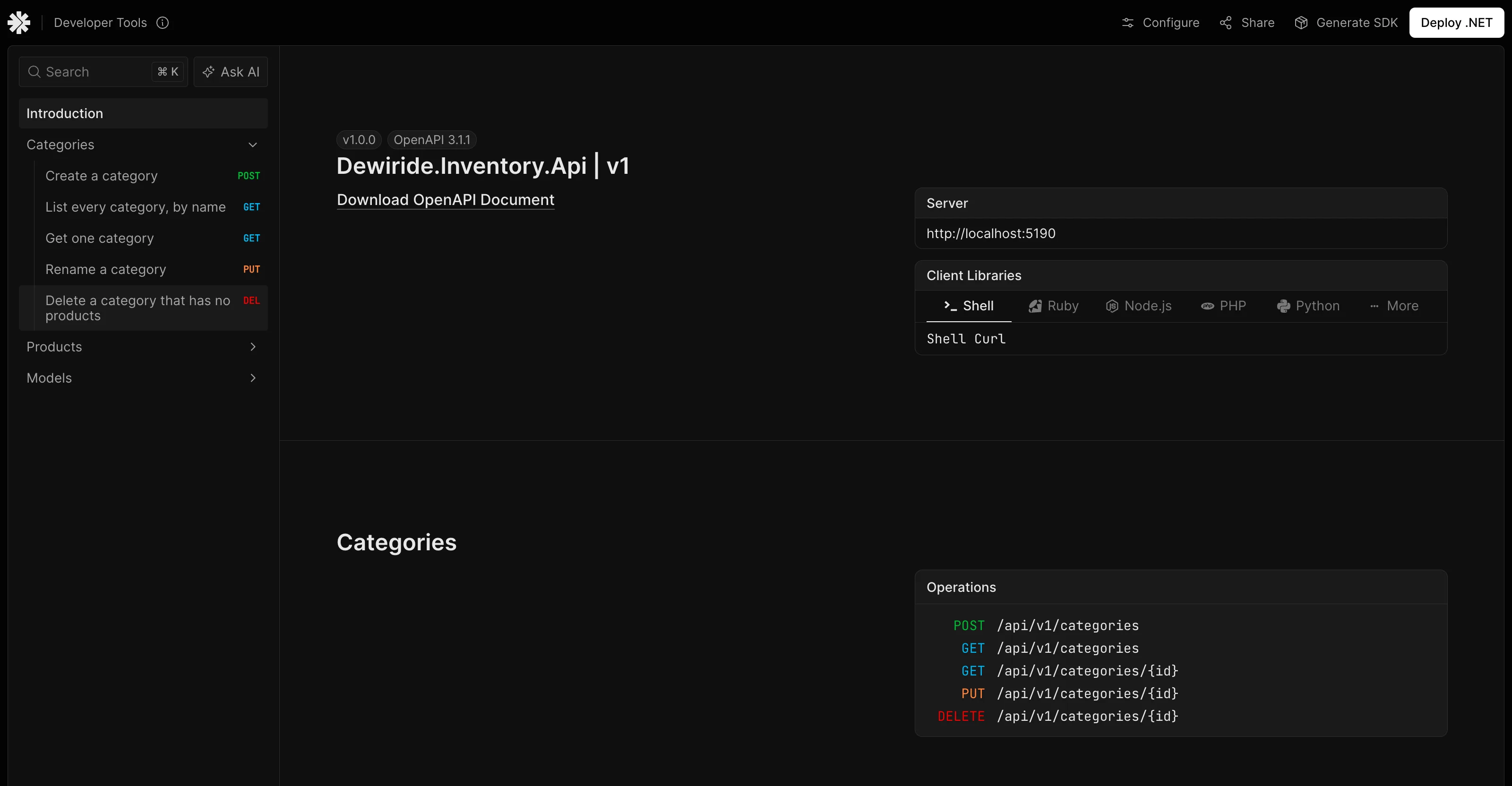
WithTags on a group applies to all of its endpoints. WithSummary goes on each endpoint:
var group = routes.MapGroup("/categories").WithTags("Categories");

group.MapPost("/", CreateAsync).WithSummary("Create a category");
group.MapGet("/", ListAsync).WithSummary("List every category, by name");
group.MapGet("/{id:int}", GetAsync).WithSummary("Get one category");
group.MapPut("/{id:int}", UpdateAsync).WithSummary("Rename a category");
group.MapDelete("/{id:int}", DeleteAsync).WithSummary("Delete a category that has no products");
ASP.NET Core's OpenAPI metadata page has the same options, as attributes too: "The endpoint summary and description can be set using the [EndpointSummary] and [EndpointDescription] attributes, or in Minimal APIs, using the WithSummary and WithDescription extension methods."
Here's the result, for one endpoint:
{
  "tags": [
    "Categories"
  ],
  "summary": "Get one category",
  "responses": {
    "200": {
      "description": "OK",
      "content": {
        "application/json": {
          "schema": {
            "$ref": "#/components/schemas/CategoryResponse"
          }
        }
      }
    },
    "404": {
      "description": "Not Found"
    }
  }
}
The responses are already there, from TypedResults. I've left out parameters here to keep it short.
Step 3: List the Errors It Can't See
Look at this API's POST /api/v1/categories, which can answer 409 and 400. Its document says otherwise:
"responses": {
  "201": {
    "description": "Created",
    "content": {
      "application/json": {
        "schema": {
          "$ref": "#/components/schemas/CategoryResponse"
        }
      }
    }
  }
}
ProblemHttpResult doesn't say which status it carries, and AddValidation answers before the handler runs. Two more methods add them. This endpoint has all of them on one route:
d.MapPost("/documented", DocumentedAsync)
    .WithTags("Demo")
    .WithSummary("Create a category")
    .WithDescription("Creates a category. The name must be unique, ignoring case.")
    .ProducesProblem(StatusCodes.Status409Conflict)
    .ProducesValidationProblem();
{
  "tags": [
    "Demo"
  ],
  "summary": "Create a category",
  "description": "Creates a category. The name must be unique, ignoring case.",
  "requestBody": {
    "content": {
      "application/json": {
        "schema": {
          "$ref": "#/components/schemas/CategoryRequest"
        }
      }
    },
    "required": true
  },
  "responses": {
    "201": {
      "description": "Created",
      "content": {
        "application/json": {
          "schema": {
            "$ref": "#/components/schemas/CategoryResponse"
          }
        }
      }
    },
    "409": {
      "description": "Conflict",
      "content": {
        "application/problem+json": {
          "schema": {
            "$ref": "#/components/schemas/ProblemDetails"
          }
        }
      }
    },
    "400": {
      "description": "Bad Request",
      "content": {
        "application/problem+json": {
          "schema": {
            "$ref": "#/components/schemas/HttpValidationProblemDetails"
          }
        }
      }
    }
  }
}
Now the document says what really happens.
Common Mistakes
| Mistake | What happens | Do this instead |
|---|---|---|
Long text in WithSummary | Summaries are shown as a name in lists | One short line, with the rest in WithDescription |
| Setting a tag per endpoint | They can go out of step | Set it on the group |
Assuming Results<…> covers every error | ProblemHttpResult adds nothing | Add ProducesProblem |
Mapping the document outside IsDevelopment() by accident | Anyone can read your API's map | Keep MapOpenApi inside the check |
FAQ
Do these change how the endpoint behaves?
No. They only add metadata that the document reads. ProducesProblem doesn't make an endpoint return a problem, and it's up to you to keep them true.
Can XML comments do this?
Microsoft's OpenAPI XML documentation comment page covers that route. This API uses the methods above, which sit right beside each route.
Conclusion
Put WithTags on each group and WithSummary on each endpoint, use WithDescription for anything longer, and add ProducesProblem and ProducesValidationProblem for the errors TypedResults can't declare. The generated document, and every page built from it, then says what your API really does.
Additional Resources
- Include OpenAPI metadata — every option.
- Overview of OpenAPI support — generating the document.
