How to Add Optional Filters to an EF Core Query

A list endpoint usually has optional filters: a category, a search term, a checkbox. Since an EF Core query doesn't run until the end, you can add each Where only when its filter is present, and get SQL with exactly those conditions. This guide builds that, and shows the SQL for different requests.
Prerequisites
- A .NET C# project with EF Core. The examples use EF Core 10, Oracle's
MySql.EntityFrameworkCore, MySQL 9.7, and aproductstable. SQL logging is on, as in How to See the SQL That EF Core Sends.
Step 1: Start from the Table, as a Query
IQueryable<Product> products = db.Products;
The type matters. IQueryable<Product> is a description of a query, so you can keep adding to it. Declaring it explicitly lets you reassign it with Where, which returns IQueryable, not DbSet.
Step 2: Add Each Filter Only When It's Given
if (!query.IncludeArchived)
{
    products = products.Where(p => !p.IsArchived);
}

if (query.CategoryId is int categoryId)
{
    products = products.Where(p => p.CategoryId == categoryId);
}

if (!string.IsNullOrWhiteSpace(query.Search))
{
    var search = query.Search.Trim();
    products = products.Where(p => p.Name.Contains(search) || p.Sku.Contains(search));
}
Nothing has gone to MySQL yet. EF Core's How Queries Work page says the query "is only sent to the database when the results are consumed." The record query comes from the query string, as in How to Bind Query String Parameters.
Step 3: Run It, and Read the SQL
Run it at the end, with ToListAsync or CountAsync:
var totalCount = await products.CountAsync(cancellationToken);
With no filters in the request, GET /api/v1/products, only the default IsArchived filter applies:
info: Microsoft.EntityFrameworkCore.Database.Command[20101]
      Executed DbCommand (3ms) [Parameters=[], CommandType='Text', CommandTimeout='30']
      SELECT COUNT(*)
      FROM `products` AS `p`
      WHERE NOT (`p`.`IsArchived`)
With a category, ?categoryId=2, the conditions join with AND:
info: Microsoft.EntityFrameworkCore.Database.Command[20101]
      Executed DbCommand (1ms) [Parameters=[@categoryId='?' (DbType = Int32)], CommandType='Text', CommandTimeout='30']
      SELECT COUNT(*)
      FROM `products` AS `p`
      WHERE NOT (`p`.`IsArchived`) AND (`p`.`CategoryId` = @categoryId)
With a search, ?search=usb-c&sort=-price:
info: Microsoft.EntityFrameworkCore.Database.Command[20101]
      Executed DbCommand (3ms) [Parameters=[@search='?' (Size = 200), @search0='?' (Size = 32)], CommandType='Text', CommandTimeout='30']
      SELECT COUNT(*)
      FROM `products` AS `p`
      WHERE NOT (`p`.`IsArchived`) AND (((@search LIKE '') OR (LOCATE(@search, `p`.`Name`) > 0)) OR ((@search0 LIKE '') OR (LOCATE(@search0, `p`.`Sku`) > 0)))
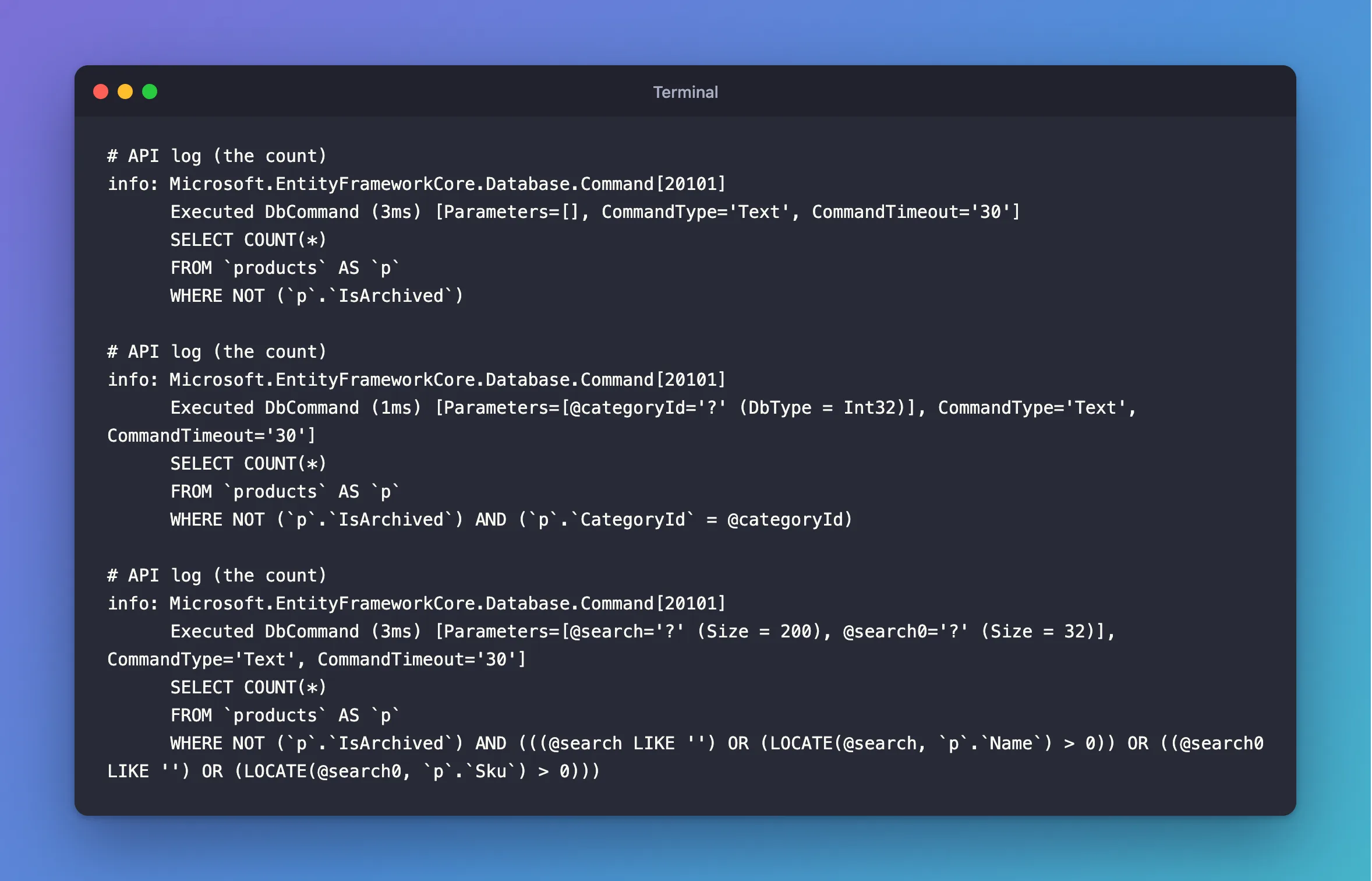
Each request got its own WHERE, with no leftovers. Several Where calls in a row become one WHERE … AND ….
Why Not One Big Where?
You might write all the filters in one condition, with checks for "not given":
products = products.Where(p =>
    (categoryId == null || p.CategoryId == categoryId) &&
    (search == null || p.Name.Contains(search)));
I expected that to send MySQL conditions that only exist to switch themselves off. It doesn't. With no filters, EF Core leaves them out:
info: Microsoft.EntityFrameworkCore.Database.Command[20101]
      Executed DbCommand (3ms) [Parameters=[], CommandType='Text', CommandTimeout='30']
      SELECT COUNT(*)
      FROM `products` AS `p`
With ?categoryId=2, only the category's condition is left:
info: Microsoft.EntityFrameworkCore.Database.Command[20101]
      Executed DbCommand (1ms) [Parameters=[@categoryId='?' (DbType = Int32)], CommandType='Text', CommandTimeout='30']
      SELECT COUNT(*)
      FROM `products` AS `p`
      WHERE `p`.`CategoryId` = @categoryId
So the SQL is just as clean here, and this comes down to the code. Pieces are easier to read as filters are added, and they have room for the steps a condition can't hold, such as the Trim() and IsNullOrWhiteSpace above.
Common Mistakes
| Mistake | What happens | Do this instead |
|---|---|---|
var products = db.Products; | Where returns IQueryable, so the assignment doesn't compile | Declare IQueryable<Product> |
Forgetting to assign the result of Where | The filter is silently lost: Where doesn't change the query it's called on | products = products.Where(…) |
Calling ToListAsync first | Every row loads, and filters run in C# | Run the query last |
Treating "" as a search | Contains("") matches everything | Use IsNullOrWhiteSpace |
FAQ
Can I use OR between optional filters?
Not by chaining Where, which always means AND. Put the || inside one Where, as the search does, or use a library that builds predicates.
Is the SQL cached?
EF Core caches each query shape it has translated, so several shapes are fine. It's only a concern if you have an enormous number of filter combinations.
Conclusion
Start with IQueryable<Product> products = db.Products;, add products = products.Where(…) inside an if for each filter, and run the query at the end. MySQL gets a WHERE with exactly the conditions that request needed.
Additional Resources
- How Queries Work — when a query runs.
- Complex Query Operators — what else you can compose.
