How to Add Liveness and Readiness Health Checks to a .NET C# Web API

A health check is a small endpoint that answers one question: is this API working? Hosting platforms, load balancers and monitoring tools call it every few seconds and act on the answer. This guide adds two of them to a .NET 10 C# minimal API, one that only checks that the API is running and one that also checks the database, and shows their real answers when the database goes down.
Liveness and Readiness
Microsoft's health checks documentation describes two kinds of answer an app can give:
- Liveness "indicates if an app has crashed and must be restarted."
- Readiness "indicates if the app is running normally but isn't ready to receive requests."
The difference matters when something the API depends on fails. If the database is down, restarting the API doesn't help, so liveness should still pass. Readiness should fail, so traffic goes elsewhere until the database is back. That's why this guide builds both:
| Endpoint | Checks | Fails when |
|---|---|---|
/health/live | Nothing beyond "the API answers" | The API process is stuck or gone |
/health/ready | The database connection | The API can't reach its database |
Prerequisites
- An ASP.NET Core minimal API on .NET 10. The examples use the inventory API from How to Connect a .NET C# Web API to a MySQL Database — Part 1, which runs on
http://localhost:5190. - An EF Core
DbContextregistered withAddDbContext, for the database check. That part createsInventoryDbContextfor MySQL; any EF Core provider works the same way. - curl, built into macOS, Linux, and Windows 10 and 11.
Step 1: Add the Database Check Package
The health check services are part of ASP.NET Core. The EF Core database check comes from a Microsoft package:
dotnet package add Microsoft.Extensions.Diagnostics.HealthChecks.EntityFrameworkCore --version 10.0.14 --project src/Dewiride.Inventory.Api
Use the version that matches your EF Core version; this project uses EF Core 10.0.14.
Step 2: Register the Checks
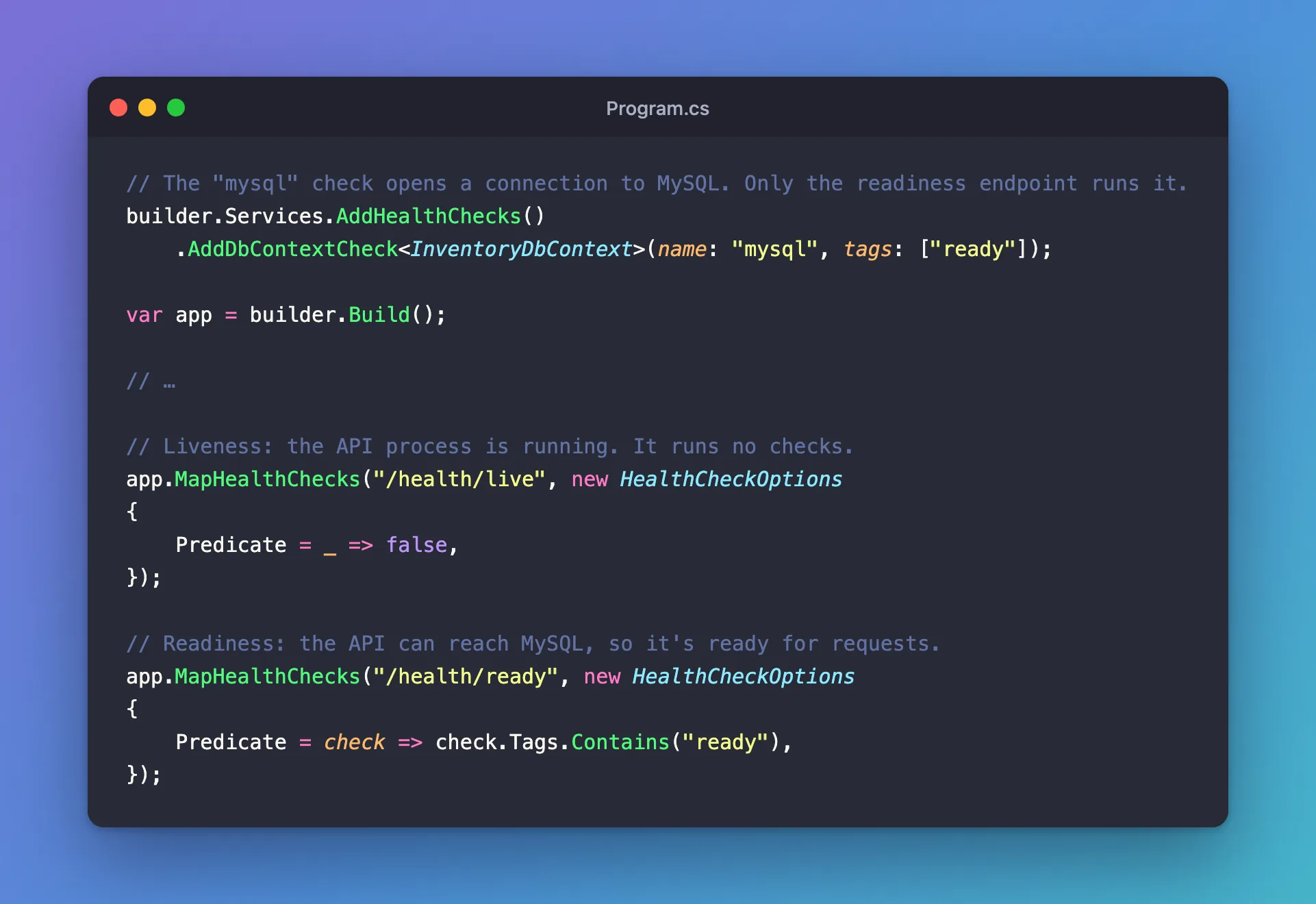
In Program.cs, before builder.Build(), register the health check services and the database check:
// The "mysql" check opens a connection to MySQL. Only the readiness endpoint runs it.
builder.Services.AddHealthChecks()
    .AddDbContextCheck<InventoryDbContext>(name: "mysql", tags: ["ready"]);
AddHealthChecks()adds the health check services.AddDbContextCheck<InventoryDbContext>adds a check that, in Microsoft's words, "calls EF Core'sCanConnectAsyncmethod": it asks the database provider whether it can connect, using the same connection string and settings as the rest of the app.name: "mysql"names the check in log messages. Without it, the name is the class name,InventoryDbContext.tags: ["ready"]labels the check, so an endpoint can choose to run only the checks with that label.
Step 3: Map the Two Endpoints
After builder.Build(), map one endpoint for each kind of check:
// Liveness: the API process is running. It runs no checks.
app.MapHealthChecks("/health/live", new HealthCheckOptions
{
    Predicate = _ => false,
});

// Readiness: the API can reach MySQL, so it's ready for requests.
app.MapHealthChecks("/health/ready", new HealthCheckOptions
{
    Predicate = check => check.Tags.Contains("ready"),
});
MapHealthChecks creates an endpoint that runs checks and answers with the result. Predicate chooses which checks run: _ => false runs none, so /health/live answers as long as the API can answer at all, and check.Tags.Contains("ready") runs only the checks tagged ready. HealthCheckOptions needs using Microsoft.AspNetCore.Diagnostics.HealthChecks; at the top of the file.
The complete Program.cs:
using Dewiride.Inventory.Data;
using Microsoft.AspNetCore.Diagnostics.HealthChecks;

var builder = WebApplication.CreateBuilder(args);

// Add services to the container.
// Learn more about configuring OpenAPI at https://aka.ms/aspnet/openapi
builder.Services.AddOpenApi();

// The MySQL database, through EF Core. The connection string comes from configuration:
// dotnet user-secrets in development, an environment variable everywhere else.
builder.Services.AddInventoryData(builder.Configuration);

// The "mysql" check opens a connection to MySQL. Only the readiness endpoint runs it.
builder.Services.AddHealthChecks()
    .AddDbContextCheck<InventoryDbContext>(name: "mysql", tags: ["ready"]);

var app = builder.Build();

// Configure the HTTP request pipeline.
if (app.Environment.IsDevelopment())
{
    app.MapOpenApi();
}

// Liveness: the API process is running. It runs no checks.
app.MapHealthChecks("/health/live", new HealthCheckOptions
{
    Predicate = _ => false,
});

// Readiness: the API can reach MySQL, so it's ready for requests.
app.MapHealthChecks("/health/ready", new HealthCheckOptions
{
    Predicate = check => check.Tags.Contains("ready"),
});

app.Run();
AddInventoryData is the method that registers the DbContext; the MySQL series explains it.
Step 4: Call Both Endpoints
Start the API with dotnet run --project src/Dewiride.Inventory.Api, and call each endpoint from a second terminal:
- macOS / Linux
- Windows (PowerShell)
curl -i http://localhost:5190/health/live
curl -i http://localhost:5190/health/ready
curl.exe -i http://localhost:5190/health/live
curl.exe -i http://localhost:5190/health/ready
In Windows PowerShell, curl on its own is a different command, so type curl.exe.
Both answer the same way, apart from the time. This is /health/ready:
HTTP/1.1 200 OK
Content-Type: text/plain
Date: Mon, 02 Nov 2026 16:25:13 GMT
Server: Kestrel
Cache-Control: no-store, no-cache
Expires: Thu, 01 Jan 1970 00:00:00 GMT
Pragma: no-cache
Transfer-Encoding: chunked

Healthy
- The body is plain text:
Healthy,DegradedorUnhealthy. - The status code follows the result. By default,
HealthyandDegradedanswer200 OK, andUnhealthyanswers503 Service Unavailable, so a tool that only looks at the status code still gets it right. - The three no-cache headers come from the middleware, which by default sets them "to prevent response caching", so a proxy never serves an old answer.
Step 5: Take the Database Away
This is the test that matters. With the API running, stop the database. Here it's MySQL in Docker:
docker compose stop
Then call both endpoints again. Liveness still passes:
HTTP/1.1 200 OK
Content-Type: text/plain
Date: Mon, 02 Nov 2026 16:44:55 GMT
Server: Kestrel
Cache-Control: no-store, no-cache
Expires: Thu, 01 Jan 1970 00:00:00 GMT
Pragma: no-cache
Transfer-Encoding: chunked

Healthy
Readiness fails:
HTTP/1.1 503 Service Unavailable
Content-Type: text/plain
Date: Mon, 02 Nov 2026 16:44:56 GMT
Server: Kestrel
Cache-Control: no-store, no-cache
Expires: Thu, 01 Jan 1970 00:00:00 GMT
Pragma: no-cache
Transfer-Encoding: chunked

Unhealthy
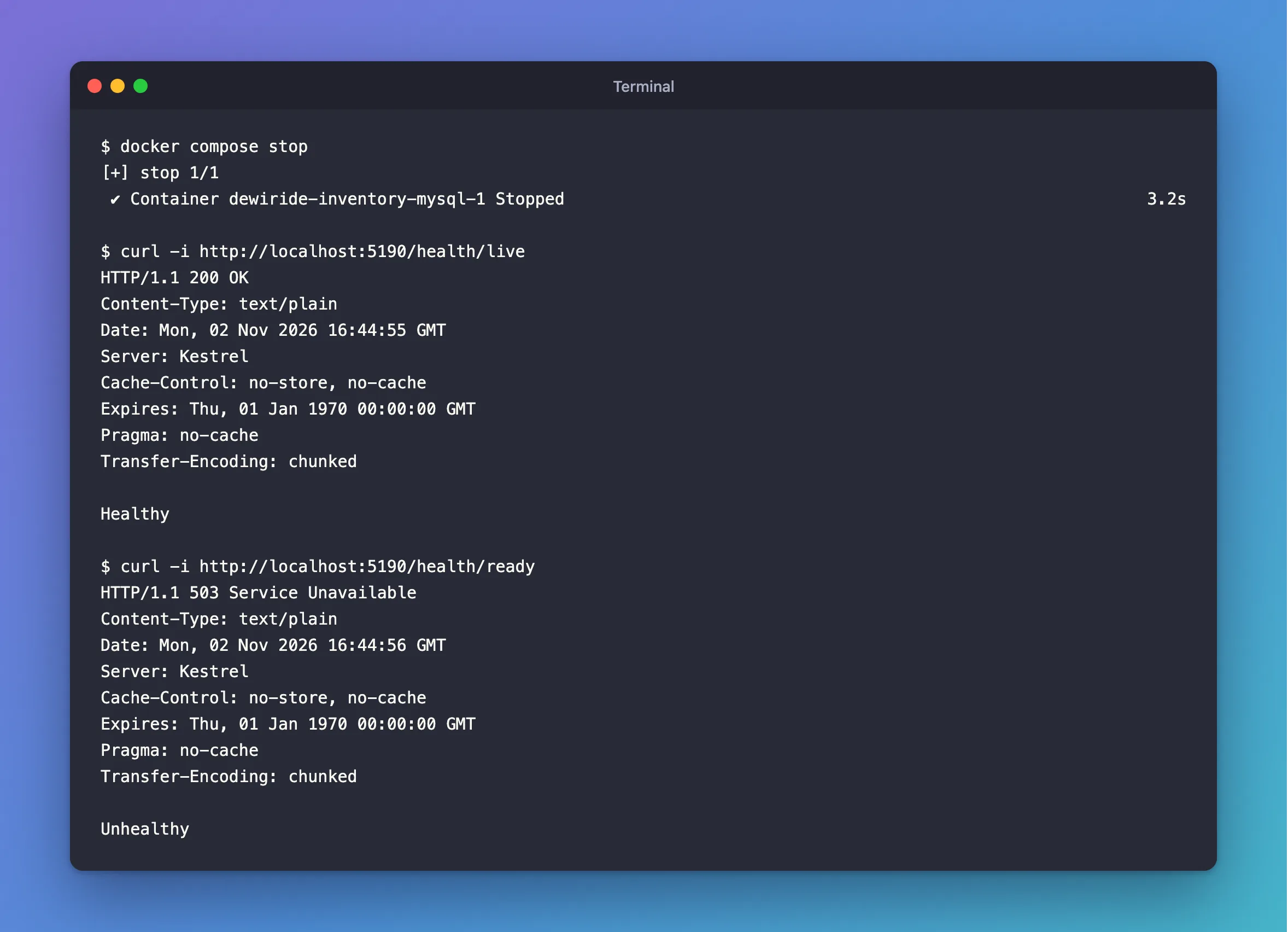
And the API logs which check failed:
fail: Microsoft.Extensions.Diagnostics.HealthChecks.DefaultHealthCheckService[103]
      Health check mysql with status Unhealthy completed after 21.9302ms with message '(null)'
mysql is the name from Step 2. The message is (null) because CanConnectAsync only answers yes or no. Start the database again (docker compose start --wait), and the next readiness call answers 200 OK with Healthy, without restarting the API.
Make It Safe to Expose
Health endpoints answer anyone who can reach the API. The plain Healthy text reveals almost nothing, which is one reason to keep the default output. If you customize it, Microsoft's documentation shows how to:
- Write JSON with per-check details using
HealthCheckOptions.ResponseWriter. Details such as error messages belong on an internal endpoint, not a public one. - Answer only on one port with
.RequireHost("*:5001"), so the endpoint can be reachable from the monitoring network only. - Require authentication with
.RequireAuthorization().
Common Mistakes
| Mistake | What happens | Do this instead |
|---|---|---|
| Checking the database in the liveness endpoint | A database outage makes the platform restart a healthy API, over and over | Keep liveness free of dependencies |
Forgetting Predicate on /health/ready | It runs every check, which is fine until you add checks that shouldn't block traffic | Tag the readiness checks and filter on the tag |
| Running a heavy query in a custom check | Every probe, every few seconds, loads the database | Microsoft says connecting is usually enough; if you must query, use something like SELECT 1 |
| Leaving out the EF Core package | AddDbContextCheck doesn't exist | Add Microsoft.Extensions.Diagnostics.HealthChecks.EntityFrameworkCore |
Troubleshooting
| Symptom | Likely cause | Fix |
|---|---|---|
/health/ready always answers 503 | The database is down, the connection string is wrong, or the database doesn't exist | Check the database, then the connection string |
/health/ready answers 200 with the database stopped | The readiness endpoint runs no checks | Make sure the check has the ready tag and the predicate filters on it |
404 Not Found | The path doesn't match MapHealthChecks | Compare the URL with the mapped path |
FAQ
How often do health checks run?
Only when the endpoint is called. Microsoft's documentation says they "don't run on a timer by default"; each request runs the checks again.
What does the EF Core check send to the database?
It calls CanConnectAsync, and what that sends depends on the provider. With Oracle's MySQL provider, it connects and runs SHOW DATABASES LIKE 'inventory'; the MySQL series shows that from inside MySQL.
Do I need both endpoints?
For a platform that restarts unhealthy apps, yes. With only one endpoint that checks the database, a database outage would make the platform restart a perfectly healthy API.
Conclusion
Two calls set up both checks: AddHealthChecks().AddDbContextCheck<T>() registers a tagged database check, and two MapHealthChecks calls with predicates turn it into /health/live and /health/ready. When the database stopped, liveness kept answering 200 and readiness answered 503, which is exactly what a hosting platform needs to make the right decision.
Additional Resources
- Health checks in ASP.NET Core — every option, including custom checks and JSON output.
- Configure Liveness, Readiness and Startup Probes — how Kubernetes uses the two endpoints.
