How to Add Instructions to One Microsoft Agent Framework Agent Run in C#

An agent's instructions go with every run. Sometimes one run needs something extra, such as a different tone or language, without changing the agent. ChatClientAgentRunOptions does that: extra instructions for one run, on top of the agent's own.
Syntax
ChatClientAgentRunOptions <options> = new(new ChatOptions { Instructions = "<extra instructions>" });

AgentResponse <response> = await <agent>.RunAsync(<message>, options: <options>);
| Part | What it is |
|---|---|
ChatOptions | Settings for one call to the model, from Microsoft.Extensions.AI |
Instructions = "<extra instructions>" | The instructions to add for this run |
ChatClientAgentRunOptions | Run options for a ChatClientAgent, the kind of agent AsAIAgent creates. Its constructor takes the ChatOptions |
options: <options> | Passes the options to this one run |
Microsoft's guide to running agents says these ChatOptions are merged with any agent level options before being passed to the IChatClient. The example shows what that means for instructions.
The Example
An agent answers questions about the planets in one sentence. It's asked How big is Jupiter? three times: normally, with the extra instruction Talk like a pirate., and normally again. Each answer shows the input tokens it took.
Prerequisites
- A model deployment in a Microsoft Foundry project, and the Foundry User role on the Foundry resource for your account. The app calls the model as you.
- The .NET 10 SDK (
dotnet --versionprints a version that starts with10.0) and the Azure CLI, signed in withaz login.
Step 1: Create a Console App
dotnet new console -n PlanetFacts
cd PlanetFacts
dotnet add package Microsoft.Agents.AI.Foundry --version 1.28.0-preview.261106.1
dotnet add package Azure.Identity --version 1.21.0
Microsoft.Agents.AI.Foundry turns a model in a Foundry project into an agent, and brings in Agent Framework and Microsoft.Extensions.AI. Azure.Identity signs the app in with your Azure CLI sign-in. Open the folder in VS Code, or PlanetFacts.csproj in Visual Studio.
Step 2: Run with and without Extra Instructions
Replace everything in Program.cs:
using Azure.AI.Projects;
using Azure.Identity;
using Microsoft.Agents.AI;
using Microsoft.Extensions.AI;

AIAgent agent = new AIProjectClient(
        new Uri("https://foundry-devblogs-exp.services.ai.azure.com/api/projects/proj-devblogs-exp"),
        new AzureCliCredential())
    .AsAIAgent(model: "gpt-5.6-luna", instructions: "You answer questions about the planets in one sentence.", name: "PlanetFacts");

// 1. A normal run: only the agent's own instructions.
Print("A normal run", await agent.RunAsync("How big is Jupiter?"));

// 2. Extra instructions for this one run, on top of the agent's own.
ChatClientAgentRunOptions likeAPirate = new(new ChatOptions { Instructions = "Talk like a pirate." });
Print("With extra instructions", await agent.RunAsync("How big is Jupiter?", options: likeAPirate));

// 3. The next run is normal again: run options belong to one run.
Print("The next run", await agent.RunAsync("How big is Jupiter?"));

static void Print(string title, AgentResponse response)
{
    Console.WriteLine($"--- {title} ({response.Usage?.InputTokenCount} tokens in) ---");
    Console.WriteLine(response.Text);
    Console.WriteLine();
}
- The agent's instructions ask for one sentence. That rule is how you'll see whether they still apply in the second run.
likeAPirateholds the extra instruction, and only the secondRunAsyncgets it.Printshows each answer with its input tokens, the tokens that went to the model.
Use your own Foundry project endpoint and model deployment.
Step 3: Run It
Run dotnet run in VS Code's terminal, or press Ctrl+F5 in Visual Studio:
--- A normal run (25 tokens in) ---
Jupiter is the largest planet, with a diameter of about 139,820 kilometers (86,881 miles).

--- With extra instructions (30 tokens in) ---
Jupiter be the largest planet, with a diameter of about 86,881 miles (139,820 kilometers), arrr!

--- The next run (25 tokens in) ---
Jupiter is the largest planet, with a diameter of about 139,820 kilometers (86,881 miles).
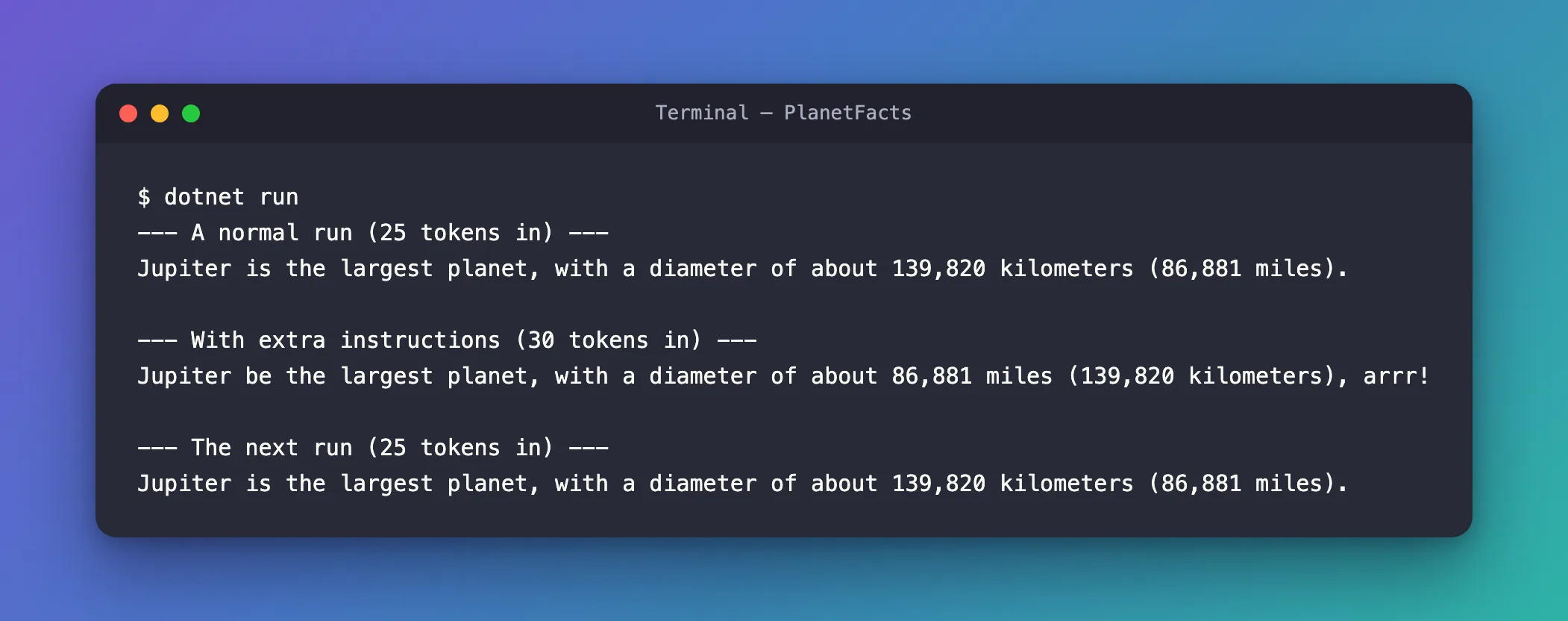
- The extra instruction worked: the second answer talks like a pirate.
- The agent's own instruction still applied: it's still one sentence.
- The tokens show they were added, not swapped in: 25 tokens without the extra instruction, 30 with it. If the run's instructions had replaced the agent's, the count would have gone down.
- The next run was normal again, at 25 tokens: the options belonged to that one run.
A second run of the app gave the same counts, 25, 30 and 25, with a different pirate sentence.
The Complete File
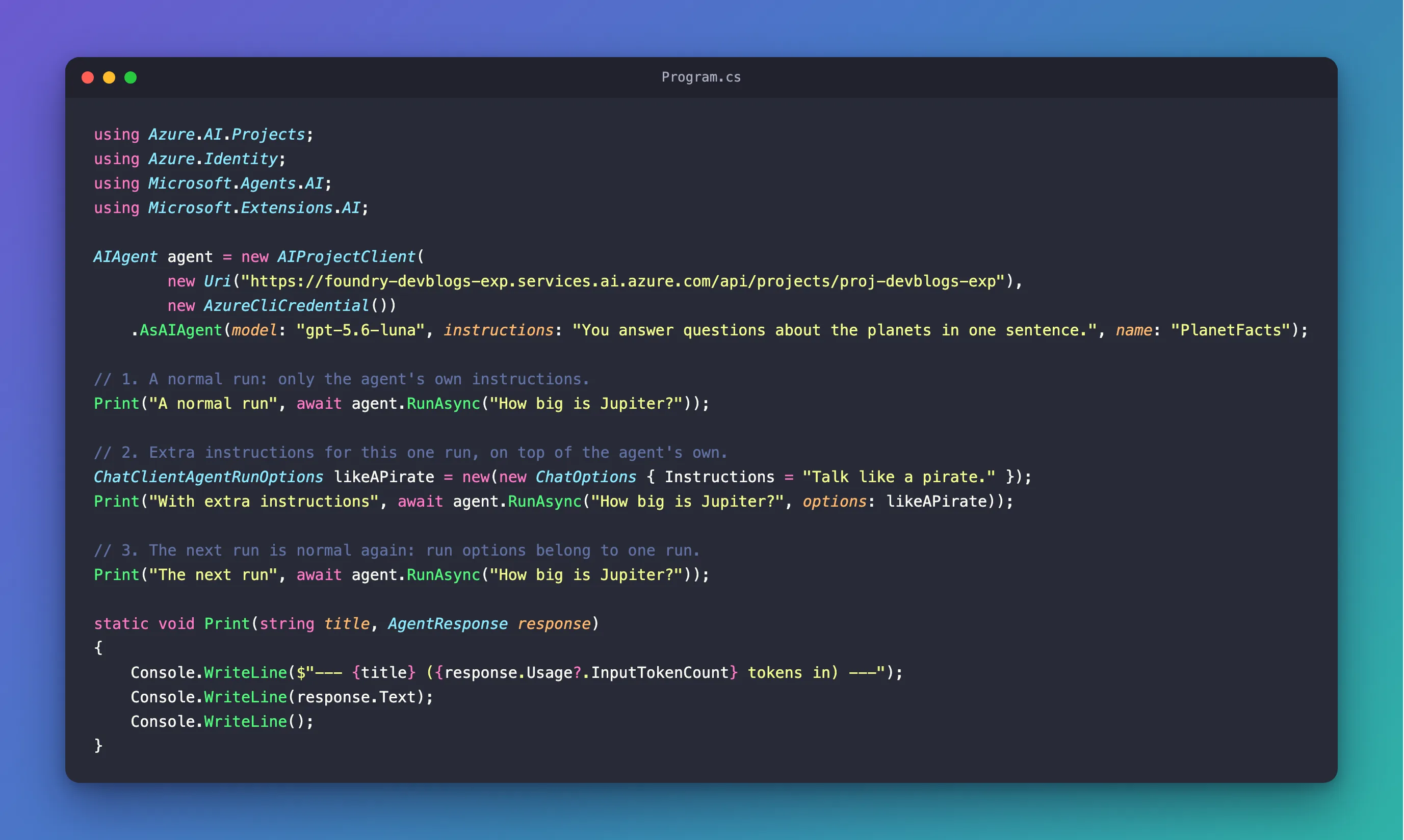
Program.cs from Step 2 is the whole program.
Common Mistakes
| Mistake | What happens | Do this instead |
|---|---|---|
| Creating the options but not passing them | The run has only the agent's instructions | Pass them as options: to that RunAsync |
| Repeating the agent's instructions in the run's | They're sent twice, and cost twice | Put only the extra instructions in the run's options |
| Using run options for a lasting change | Every run has to repeat them | Change the agent's own instructions, or create another agent |
Putting a user's text in ChatOptions.Instructions | User input gets the weight of your own instructions | Keep instructions in your own words, and user text in messages |
FAQ
Do run options work with every agent?
They work with agents created from a model, such as AsAIAgent creates. Microsoft's migration guide puts it this way: Not all AIAgents support ChatClientAgentRunOptions. ChatClientAgent is provided to build agents based on underlying inference services, and therefore supports inference options like MaxOutputTokens.
What else can a run change?
Anything ChatOptions holds that the model supports, such as MaxOutputTokens. Microsoft's guide to running agents also shows a run that adds a tool with ChatOptions.Tools.
Conclusion
To give one run extra instructions, create ChatClientAgentRunOptions with new ChatOptions { Instructions = "…" } and pass it to RunAsync with options:. Agent Framework adds them to the agent's own instructions, as the token counts show, and the next run without options is back to normal.
Additional Resources
- Running Agents — agent run options and
ChatClientAgentRunOptions. - ChatClientAgentRunOptions class — run options for agents created from a model.
- ChatOptions class — every setting a run can change.
