How to Add Hours to a Date in Excel with TIME

TIME(hours, minutes, seconds) makes a time from numbers, and adding it to a date gives a date and time: =B6+TIME(1,0,0) is 01:00 on the date in B6. Give the result a format that shows times, or you'll only see the date.
The example is from the Clock change sheet in How to Calculate Hours Worked Across a Daylight Saving Time Change in Excel. The UK's clocks go forward at 01:00 on the last Sunday of March and back at 02:00 on the last Sunday of October, so the sheet adds those hours to the two Sundays.
Prerequisites
- A date in a cell, here the last Sundays from How to Find the Last Sunday of a Month in Excel: 29/03/2026 in B6 and 25/10/2026 in C6.
Step 1: Add TIME to the Date
In B7 and C7:
=B6+TIME(1,0,0)
=C6+TIME(2,0,0)
TIME(1,0,0) is 1 hour, 0 minutes and 0 seconds. Microsoft's TIME function page says it returns a decimal number, a fraction of a day; 12:00 PM is 0.5, so one hour is 1/24.
Step 2: Show the Time
The results showed 29/03/2026 and 25/10/2026, with no time: Excel had copied the date-only format from B6 and C6:
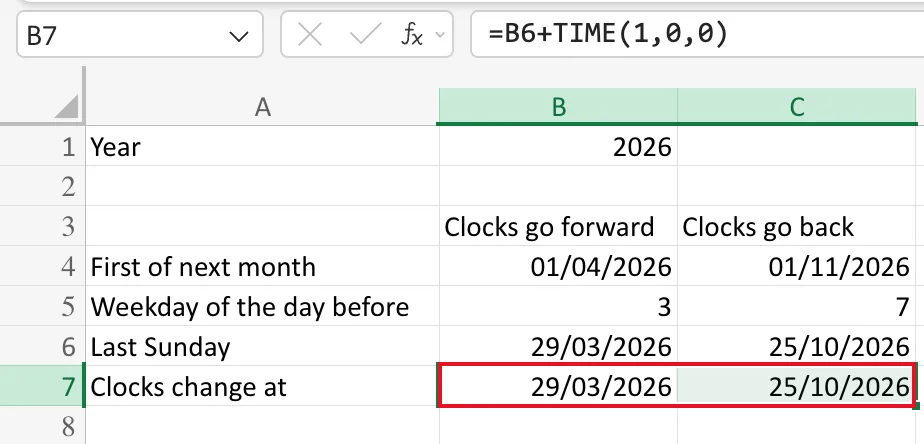
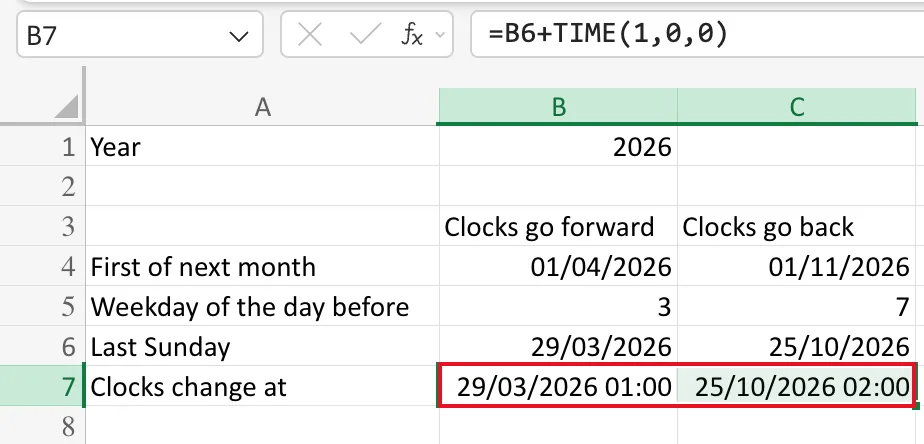
The time was there, just not shown. I gave B7:C7 the custom format dd/mm/yyyy hh:mm (Number Format → More Number Formats → Custom), as Fixed: Excel Shows Only the Date After Adding a Time to a Date shows step by step. Now the cells read 29/03/2026 01:00 and 25/10/2026 02:00:
Common Mistakes
| Mistake | What happens | Do this instead |
|---|---|---|
Adding 1 for one hour | 1 is a whole day | TIME(1,0,0) or 1/24 |
| Leaving the date-only format | The time is hidden | Use dd/mm/yyyy hh:mm |
TIME(25,0,0) for 25 hours | TIME returns less than a day, so it wraps to 01:00 | Add whole days separately |
Troubleshooting
| Symptom | Likely cause | Fix |
|---|---|---|
| Only the date shows | Date-only format | Custom dd/mm/yyyy hh:mm |
| Only the time shows | Time-only format | The same custom format |
FAQ
Is TIME(1,0,0) the same as 1/24?
Yes, both are one hour as a fraction of a day. TIME is easier to read, especially with minutes: TIME(1,30,0).
Can I take time off a date?
Yes: =B6-TIME(1,0,0) is an hour earlier, 23:00 on the day before.
Conclusion
=date+TIME(h,m,s) puts a time on a date. Give the cell a date-and-time format to see it.
