How to Add Days to a Date in Power Automate with addDays

A due date a week from today, the day before a deadline, the morning after a night shift: addDays() moves a date forward or back by a number of days, and can return the result as just the date.
Syntax
addDays('<timestamp>', <days>, '<format>'?)
From Microsoft's functions reference:
<timestamp>(required): text that contains the date, or a date and time.<days>(required): the whole number of days to add. A negative number subtracts.<format>(optional): the format of the result. Without it, the result is in the formato,yyyy-MM-ddTHH:mm:ss.fffffffK.- The result is text: the timestamp plus the days.
Microsoft's examples: addDays('2018-03-15T00:00:00Z', 10) returns 2018-03-25T00:00:00.0000000Z, and addDays('2018-03-15T00:00:00Z', -5) returns 2018-03-10T00:00:00.0000000Z.
The example is Import Old Overtime Timesheet, a flow of the Overtime Timesheet app that reads the rows of an old Excel timesheet. Each row has one Date, a Start and a Finish. When a shift runs past midnight, its finish is on the next day: Aisha Khan's shift on 10 October 2026 ran from 20:00 to 01:30.
Step 1: Add a Day to the Date
The row's Date reaches the flow as 2026-10-10T00:00:00.000Z (How to Get Excel Dates as Dates, Not Numbers, in Power Automate). One day later, as a date only:
addDays(items('For_each_old_row')?['Date'], 1, 'yyyy-MM-dd')
items('For_each_old_row')?['Date']is the row's date, inside the loop over the rows (How to Use the items() Function in Power Automate).1is the number of days to add.'yyyy-MM-dd'returns2026-10-11instead of2026-10-11T00:00:00.0000000Z.
Step 2: Add the Day Only When Needed
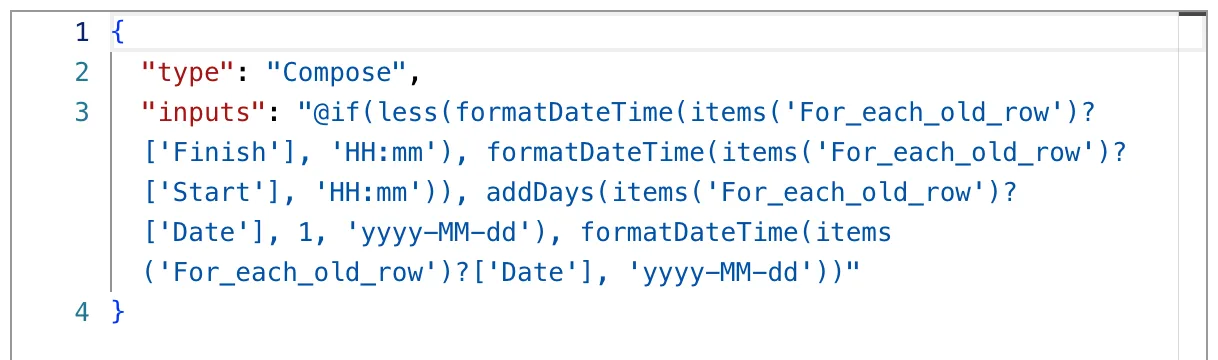
A shift that ends earlier in the day than it started has crossed midnight. The flow's Compose named Finish date chooses between the next day and the same day (How to Use the if() Function in Power Automate, How to Use the less() Function in Power Automate):
if(less(formatDateTime(items('For_each_old_row')?['Finish'], 'HH:mm'), formatDateTime(items('For_each_old_row')?['Start'], 'HH:mm')), addDays(items('For_each_old_row')?['Date'], 1, 'yyyy-MM-dd'), formatDateTime(items('For_each_old_row')?['Date'], 'yyyy-MM-dd'))
Both answers are in the same format, yyyy-MM-dd, so the next step can use either the same way. Code view shows the expression as saved:
The Result
In the test run, Aisha's row of 10 October, 20:00 to 01:30, got the next day:

The flow then builds the shift's end from it, 2026-10-11 and 01:30, and converts that to UTC (How to Convert Local Time to UTC in Power Automate with convertToUtc).
Common Mistakes
| Mistake | What happens | Do this instead |
|---|---|---|
| Leaving out the format | The result has a time and Z: 2026-10-11T00:00:00.0000000Z | Add 'yyyy-MM-dd' |
'yyyy-mm-dd' | mm is minutes | 'yyyy-MM-dd' |
| A number of days with decimals for hours | The reference describes <days> as an integer | addHours() or addMinutes() |
| Adding a day to a time-only value | The date is 30 December 1899 | Add the day to the date column |
Troubleshooting
| Symptom | Likely cause | Fix |
|---|---|---|
| The result is a day early or late | The days are counted from a different date | Check the timestamp in the run |
A date with T00:00:00 in it | No format given | Add 'yyyy-MM-dd' |
| This expression has a problem when you add it | The designer showed it for correct expressions too | Select Add again (Fixed: "This expression has a problem" in Power Automate) |
FAQ
How do I subtract days?
Use a negative number: addDays(utcNow(), -7) is a week ago.
Is there an addMonths()?
Not by that name. addToTime() adds a number of a unit you choose, and the reference lists Month among its units.
Does addDays() know about clock changes?
It adds whole days to the timestamp it's given. The example adds a day to a date at midnight and works out the time zone afterwards, with convertToUtc().
Conclusion
addDays(timestamp, days, format) moves a date by whole days, forward or back, and 'yyyy-MM-dd' returns just the date. With if() and less(), it gives a night shift the right finish date.
Additional Resources
- Reference guide to functions in expressions: addDays
- Date and time functions:
addHours,addToTimeand the others
