How to Add an Alias to a Model Version in the MLflow UI

An alias is a name you give one version of a registered model, such as production, so code can load "the production version" without knowing its number. Moving the alias to another version changes what that code loads. This guide adds an alias in the MLflow Model Registry page, then moves it, with real screens from MLflow 3.18.0.
Prerequisites
- An MLflow tracking server with a database backend, such as
mlflow server --port 8080with its default SQLite database. The registry needs one.
The Example
The registered model is diabetes-forecaster, with two versions: a linear regression and a ridge regression on scikit-learn's diabetes data, registered by a short script:
import mlflow
from sklearn.datasets import load_diabetes
from sklearn.linear_model import LinearRegression, Ridge

mlflow.set_tracking_uri("http://127.0.0.1:8080")
mlflow.set_experiment("alias-ui-example")

X, y = load_diabetes(return_X_y=True, as_frame=True)
for model in (LinearRegression(), Ridge(alpha=1.0)):  # versions 1 and 2
    with mlflow.start_run():
        mlflow.sklearn.log_model(
            model.fit(X, y), name="model", registered_model_name="diabetes-forecaster", input_example=X.head(3)
        )
uv run python register_two_versions.py
Registered model 'diabetes-forecaster' already exists. Creating a new version of this model...
2026/11/25 09:50:04 INFO mlflow.store.model_registry.abstract_store: Waiting up to 300 seconds for model version to finish creation. Model name: diabetes-forecaster, version 2
Created version '2' of model 'diabetes-forecaster'.
🏃 View run defiant-shrew-564 at: http://127.0.0.1:8080/#/experiments/25/runs/1109f80ebedd4e12b47344091193f947
🧪 View experiment at: http://127.0.0.1:8080/#/experiments/25
Step 1: Open the Registered Model
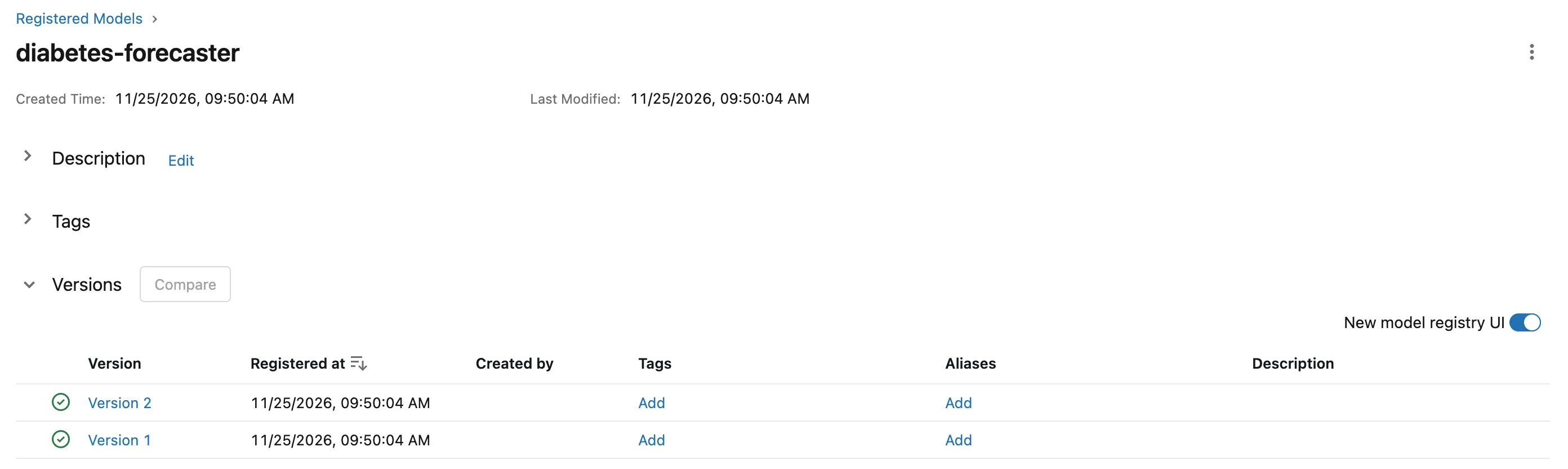
In the MLflow UI, click Model registry, then diabetes-forecaster. Its Versions table lists both versions, newest first, each with an Add link under Aliases:
Step 2: Add the Alias
Click Add in the Aliases column of Version 1. Type production and press Enter, which turns it into a tag in the field:
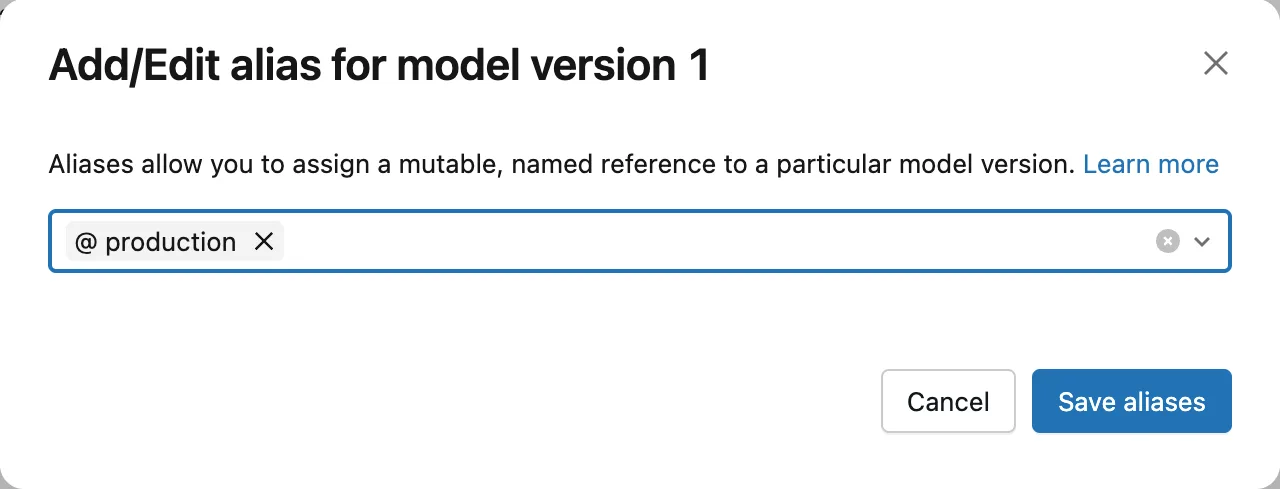
Click Save aliases. The table doesn't change on its own in MLflow 3.18.0 (I reported it to MLflow as issue #28120), so reload the page: Fixed: The MLflow Model Registry Doesn't Show a New Alias Until You Reload the Page. Version 1 now shows the alias:
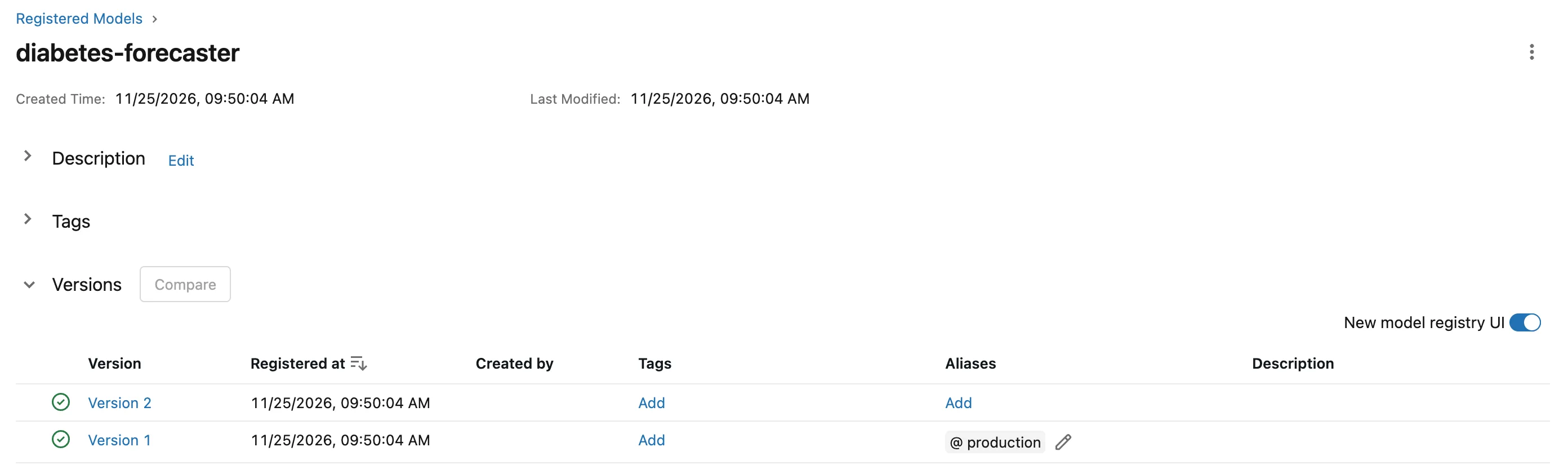
@ production on Version 1. The pencil next to it opens the same dialog again, with the alias in it.
Step 3: Move the Alias to Another Version
An alias points to one version at a time. To move production to Version 2, click Add in the Aliases column of Version 2 and enter production again. The dialog warns before you save:
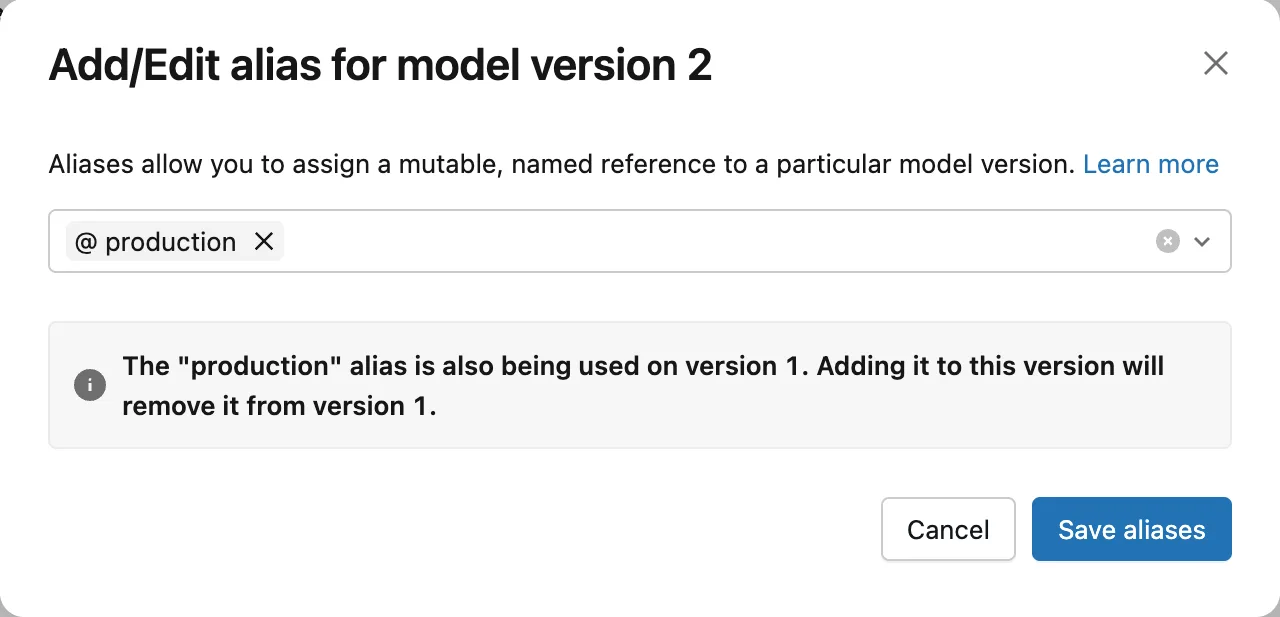
"The "production" alias is also being used on version 1. Adding it to this version will remove it from version 1." Click Save aliases and reload the page:
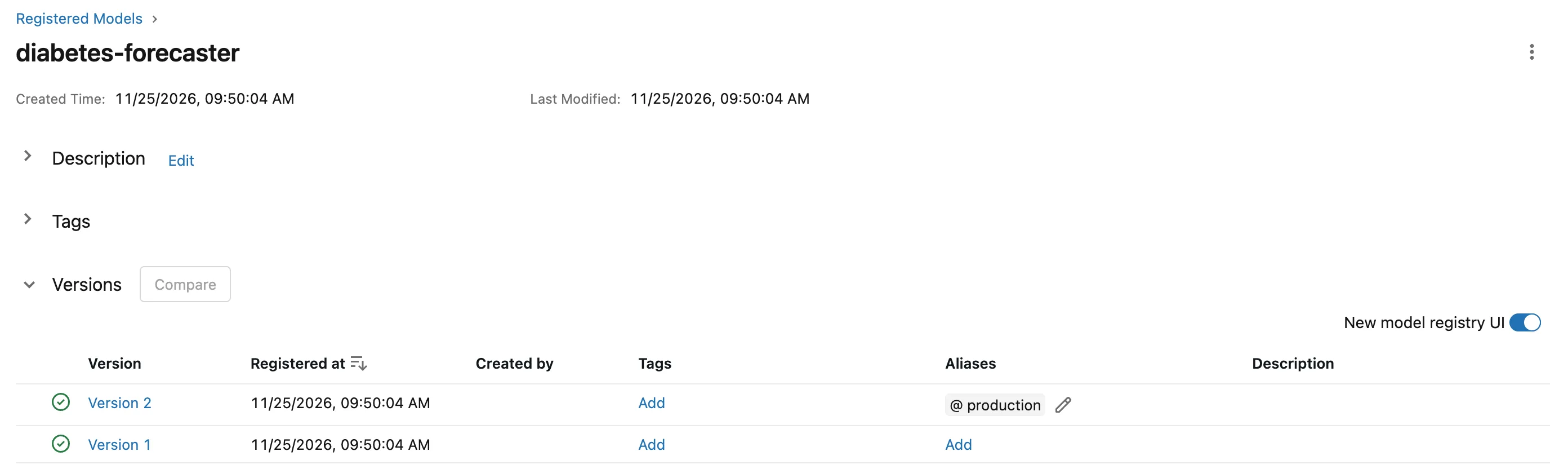
The alias moved: code that loads models:/diabetes-forecaster@production now gets version 2, without any change to that code.
Common Mistakes
| Mistake | What happens | Do this instead |
|---|---|---|
| Taking the unchanged table for a failed save | You add the alias again | Reload the page first |
| Expecting two versions to share an alias | Adding it to one removes it from the other | Use different aliases, such as champion and challenger |
Troubleshooting
| Symptom | Likely cause | Fix |
|---|---|---|
| The alias doesn't show after Save aliases | The page hasn't loaded the model again | Reload the page |
| The alias is gone after a reload | The dialog was closed with Cancel | Add it again and click Save aliases |
FAQ
Can a version have more than one alias?
Yes. MLflow's Model Registry workflows page says "more than one alias can be applied to any given model version", while each alias points to one version.
Can I do this in code?
Yes, with MlflowClient().set_registered_model_alias(name, alias, version): How to Set an Alias on a Model Version in MLflow with Python.
Conclusion
The Add link in the Aliases column gave Version 1 of diabetes-forecaster the alias production, and adding production to Version 2 moved it there, after a warning naming the version it would leave.
Additional Resources
- Model Registry workflows — aliases and tags in the UI.
- MLflow Model Registry — what a model alias is.
