How to Add a Project Reference in .NET C# with the CLI

A web API that keeps its database code in a class library needs one line to use it: a project reference. Without it, the API can't see a single type from the library. The .NET CLI adds, lists and removes references for you, so you never edit the .csproj by hand. This guide does all three, and shows what the build says when the reference is missing.
What a Project Reference Is
A project reference says "this project uses that one". When you build the API, MSBuild builds the library first and gives the compiler its output, so the API's code can use the library's public types. The dotnet reference add page describes the command: "After running the command, the <ProjectReference> elements are added to the project file."
The reference has a direction. Here the API references the library; the library knows nothing about the API.
Prerequisites
- The .NET 10 SDK. The noun-first command,
dotnet reference add, is new in .NET 10; the page notes: "If you're using .NET 9 SDK or earlier, use the "verb first" form (dotnet add reference) instead." - Two projects, such as a web API and a class library. How to Create a .NET C# Web API Solution with a Class Library creates both.
The examples run in the solution folder, with the projects in src/Dewiride.Inventory.Api and src/Dewiride.Inventory.Data.
Step 1: Add the Reference
dotnet reference add src/Dewiride.Inventory.Data/Dewiride.Inventory.Data.csproj --project src/Dewiride.Inventory.Api/Dewiride.Inventory.Api.csproj
- The first path is the project to reference: the library.
--projectis the project that gets the reference: the API. Without it, the command uses the project in the current folder.
Reference `..\Dewiride.Inventory.Data\Dewiride.Inventory.Data.csproj` added to the project.
The API's project file now has a new item group:
  <ItemGroup>
    <ProjectReference Include="..\Dewiride.Inventory.Data\Dewiride.Inventory.Data.csproj" />
  </ItemGroup>
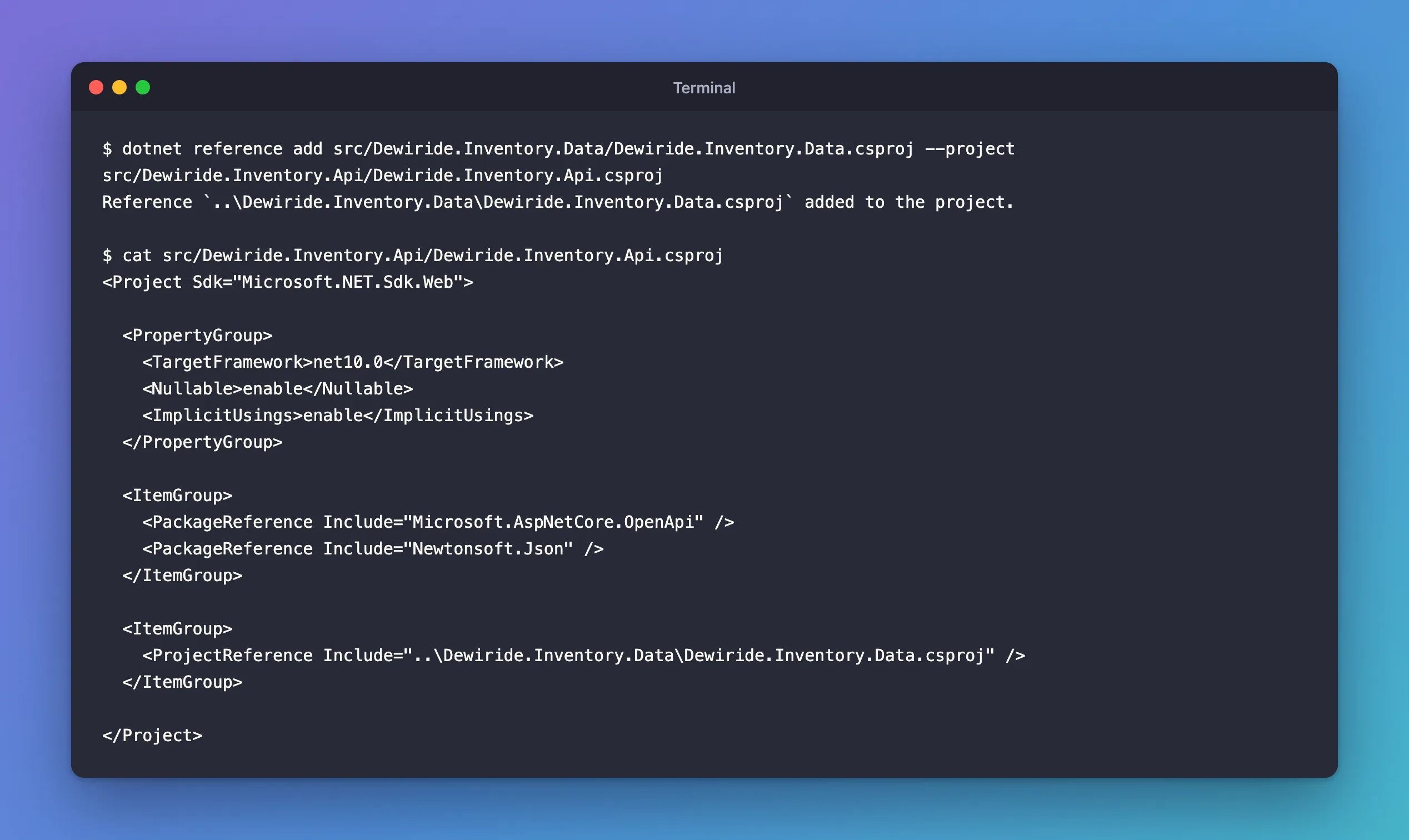
The path is relative to the API's project folder, and it uses backslashes even on macOS and Linux; MSBuild accepts both.
Step 2: Use a Type from the Library
The library has a settings class:
namespace Dewiride.Inventory.Data;

/// <summary>Settings for the database connection.</summary>
public sealed class DatabaseOptions
{
    public int CommandTimeoutSeconds { get; set; } = 30;
}
The API can now use it, with a using for the library's namespace:
using Dewiride.Inventory.Data;

var builder = WebApplication.CreateBuilder(args);

// DatabaseOptions lives in the class library.
builder.Services.Configure<DatabaseOptions>(builder.Configuration.GetSection("Database"));
  Dewiride.Inventory.Api net10.0 succeeded (0.5s) → src/Dewiride.Inventory.Api/bin/Debug/net10.0/Dewiride.Inventory.Api.dll

Build succeeded in 1.1s
Step 3: See What Happens Without It
To see what the reference does, I removed it and built again:
dotnet reference remove src/Dewiride.Inventory.Data/Dewiride.Inventory.Data.csproj --project src/Dewiride.Inventory.Api/Dewiride.Inventory.Api.csproj
dotnet build
Project reference `../Dewiride.Inventory.Data/Dewiride.Inventory.Data.csproj` removed.

  Dewiride.Inventory.Data net10.0 succeeded (0.0s) → src/Dewiride.Inventory.Data/bin/Debug/net10.0/Dewiride.Inventory.Data.dll
  Dewiride.Inventory.Api net10.0 failed with 1 error(s) (0.4s)
    /Users/you/projects/dewiride-inventory-api/src/Dewiride.Inventory.Api/Program.cs(1,7): error CS0246: The type or namespace name 'Dewiride' could not be found (are you missing a using directive or an assembly reference?)

Build failed with 1 error(s) in 2.4s
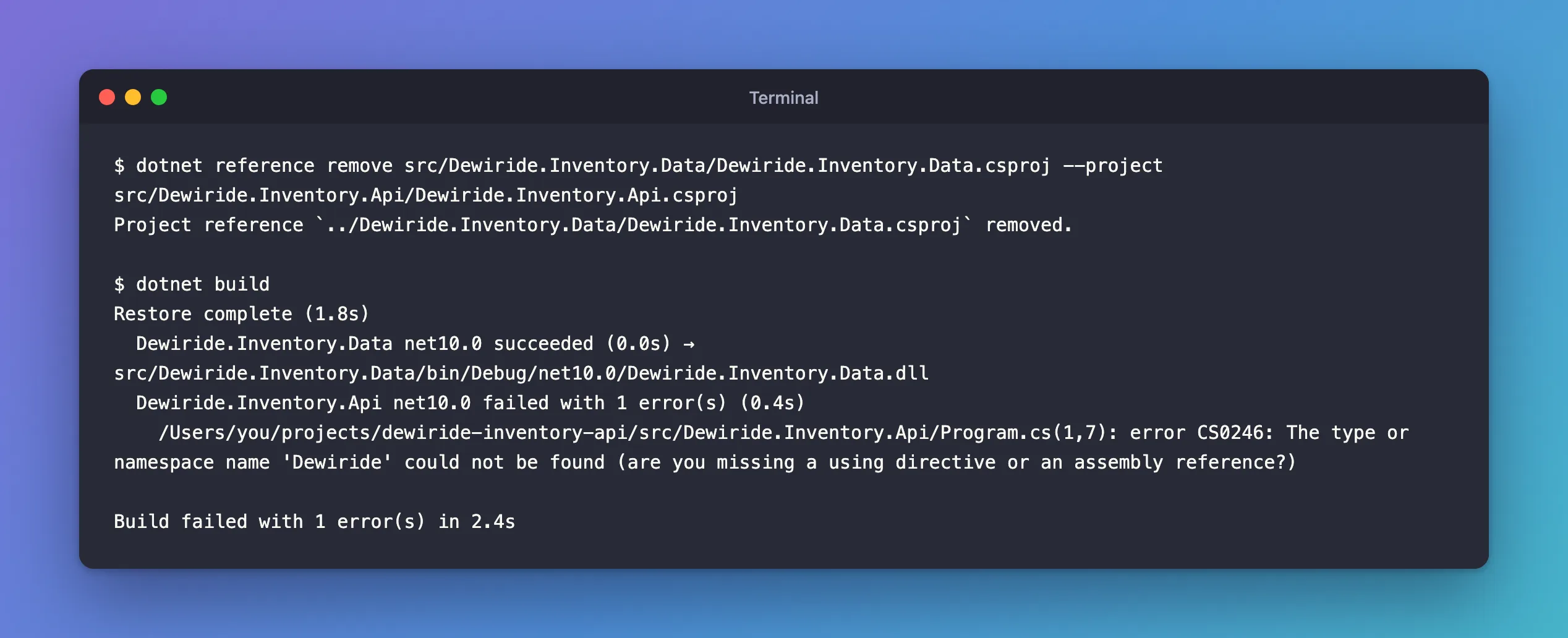
Both projects are still in the solution, so the library still builds, but the compiler compiles the API without it, and the using Dewiride.Inventory.Data; on line 1 names something it can't find. Fixed: error CS0246 covers that error in full.
Step 4: List the References
After adding the reference back with the command from Step 1, the build succeeded again. dotnet reference list shows what a project references:
dotnet reference list --project src/Dewiride.Inventory.Api/Dewiride.Inventory.Api.csproj
Project reference(s)
--------------------
../Dewiride.Inventory.Data/Dewiride.Inventory.Data.csproj
It lists project references only; NuGet packages are listed by dotnet package list.
The Older Command Form
.NET 10 added "noun first" commands, and kept the old ones. Microsoft's what's new page explains: "While the verb-first forms continue to work, it's better to use the noun-first forms for improved readability and consistency in scripts and documentation."
| .NET 10 form | Older form, still works |
|---|---|
dotnet reference add | dotnet add reference |
dotnet reference list | dotnet list reference |
dotnet reference remove | dotnet remove reference |
Common Mistakes
| Mistake | What happens | Do this instead |
|---|---|---|
| Swapping the two paths | The library references the API, and the API still can't see the library | The project to reference first, --project for the one that uses it |
| Adding both projects to the solution and stopping there | CS0246: a solution groups projects, it doesn't connect them | Add the project reference |
Referencing the library's .dll from bin | The reference breaks on a clean checkout, and changes to the library don't rebuild | Reference the .csproj |
| Making the library reference the API too | dotnet reference add accepts it, then dotnet build stops at restore with error MSB4006: There is a circular dependency in the target dependency graph involving target "_GenerateRestoreProjectPathWalk". | Keep references one way; move shared code into the library |
FAQ
Do I need to add the library's NuGet packages to the API as well?
No. The packages a library references flow to the projects that reference it, so the API can use the library's packages without its own reference. Add a package to the API only when the API's own code uses it.
Can I edit the .csproj by hand instead?
Yes: the command only adds the <ProjectReference> item shown in Step 1. The command is safer, because it writes the path relative to the right folder and checks that it exists. A mistyped path stops it with Could not find project or directory `src/Dewiride.Inventory.Dta/Dewiride.Inventory.Data.csproj`. It doesn't check for circular references, though: the build does that.
Conclusion
dotnet reference add <library.csproj> --project <app.csproj> adds one <ProjectReference> to the app's project file, and from then on the build compiles the library first and lets the app use its public types. dotnet reference list shows the references, dotnet reference remove takes one out, and the error you get without a reference is CS0246.
Additional Resources
- dotnet reference add
- dotnet reference list
- What's new in the SDK for .NET 10: more consistent command order
