How to Add a CHECK Constraint with EF Core and MySQL

Validation in your API stops most bad data, but not data from a script, a second app, or a bug that skips the validation. A CHECK constraint makes the database itself refuse a row that breaks a rule, such as a negative price. This guide adds three to a products table from EF Core's model, applies them with a migration, and proves MySQL enforces them on both inserts and updates.
What a CHECK Constraint Is
EF Core's docs describe it: "Check constraints are a standard relational feature that allows you to define a condition that must hold for all rows in a table; any attempt to insert or modify data that violates the constraint will fail." MySQL has enforced them since 8.0.16; before that it accepted the syntax and ignored it.
Prerequisites
- A .NET C# project using EF Core with MySQL 8.0.16 or later. The examples use EF Core 10 with Oracle's
MySql.EntityFrameworkCoreand MySQL 9.7, from How to Connect a .NET C# Web API to a MySQL Database — Part 1. - The EF Core tools: How to Install dotnet-ef as a Local Tool in a .NET C# Project.
Step 1: Add the Constraints to the Model
Check constraints belong to a table, so EF Core configures them inside ToTable. In the product's configuration:
builder.ToTable("products", table =>
{
    // MySQL checks these on every INSERT and UPDATE, whatever program sends them.
    table.HasCheckConstraint("CK_products_UnitPrice", "`UnitPrice` >= 0");
    table.HasCheckConstraint("CK_products_QuantityOnHand", "`QuantityOnHand` >= 0");
    table.HasCheckConstraint("CK_products_ReorderLevel", "`ReorderLevel` >= 0");
});
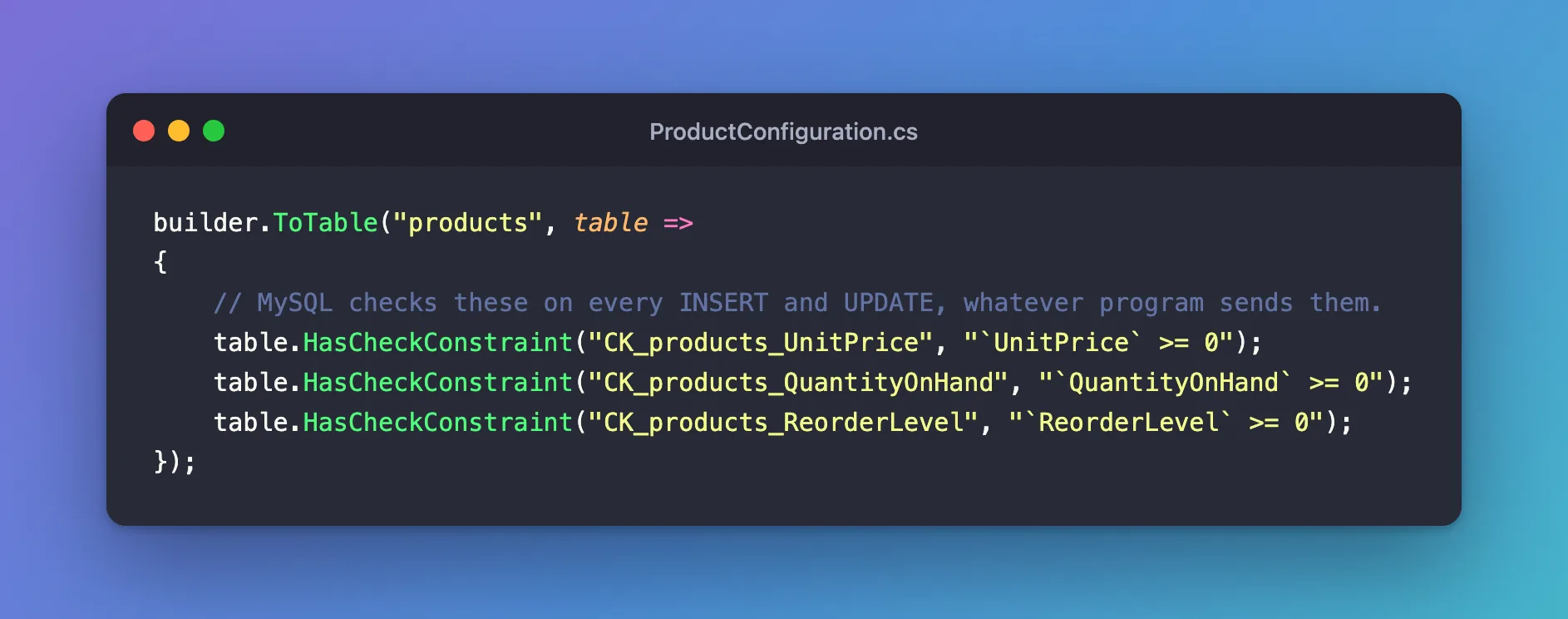
Each HasCheckConstraint takes two arguments:
- A name, here
CK_<table>_<column>. In MySQL, CHECK constraint names must be unique in the whole database, not just the table, so including the table name avoids clashes. - A SQL condition, written in MySQL's SQL. EF Core passes it through as-is: "You can use the Fluent API to specify a check constraint on a table, provided as a SQL expression". Quote column names with backticks, MySQL's quoting. EF Core's own example uses
[Price], SQL Server's style, which MySQL doesn't accept.
As the docs say, "Multiple check constraints can be defined on the same table, each with their own name."
Step 2: Create the Migration
dotnet ef migrations add AddProductCheckConstraints --project src/Dewiride.Inventory.Data --startup-project src/Dewiride.Inventory.Api
migrationBuilder.AddCheckConstraint(
    name: "CK_products_QuantityOnHand",
    table: "products",
    sql: "`QuantityOnHand` >= 0");

migrationBuilder.AddCheckConstraint(
    name: "CK_products_ReorderLevel",
    table: "products",
    sql: "`ReorderLevel` >= 0");

migrationBuilder.AddCheckConstraint(
    name: "CK_products_UnitPrice",
    table: "products",
    sql: "`UnitPrice` >= 0");
One AddCheckConstraint per rule, in alphabetical order of name.
Step 3: Apply It, After Checking the Data
Adding a constraint checks the rows already in the table, and MySQL refuses to add a rule the table already breaks. On a table with data, look for offenders first, with the opposite of each rule:
SELECT Id, Sku, QuantityOnHand FROM products
WHERE QuantityOnHand < 0 OR UnitPrice < 0 OR ReorderLevel < 0;
On this table, one product had -3 in stock, and the first attempt to apply the migration failed with Check constraint 'CK_products_QuantityOnHand' is violated. Fixed: ERROR 3819 (HY000): Check constraint … is violated walks through finding and correcting such rows. With the data fixed:
dotnet ef database update --project src/Dewiride.Inventory.Data --startup-project src/Dewiride.Inventory.Api
Applying migration '20261103044219_AddProductCheckConstraints'.
      ALTER TABLE `products` ADD CONSTRAINT `CK_products_QuantityOnHand` CHECK (`QuantityOnHand` >= 0);
      ALTER TABLE `products` ADD CONSTRAINT `CK_products_ReorderLevel` CHECK (`ReorderLevel` >= 0);
      ALTER TABLE `products` ADD CONSTRAINT `CK_products_UnitPrice` CHECK (`UnitPrice` >= 0);
Done.
Step 4: Prove MySQL Enforces Them
From the mysql client, try a negative price on insert, and an update that would take more stock than there is:
INSERT INTO products (Sku, Name, CategoryId, UnitPrice, QuantityOnHand, ReorderLevel, IsArchived, CreatedAtUtc, UpdatedAtUtc)
VALUES ('CHG-USBC-20W', 'USB-C charger, 20 W', 5, -15.00, 6, 2, 0, UTC_TIMESTAMP(6), UTC_TIMESTAMP(6));
UPDATE products SET QuantityOnHand = QuantityOnHand - 10 WHERE Sku = 'ADP-HDMI-01';
ERROR 3819 (HY000): Check constraint 'CK_products_UnitPrice' is violated.
ERROR 3819 (HY000): Check constraint 'CK_products_QuantityOnHand' is violated.
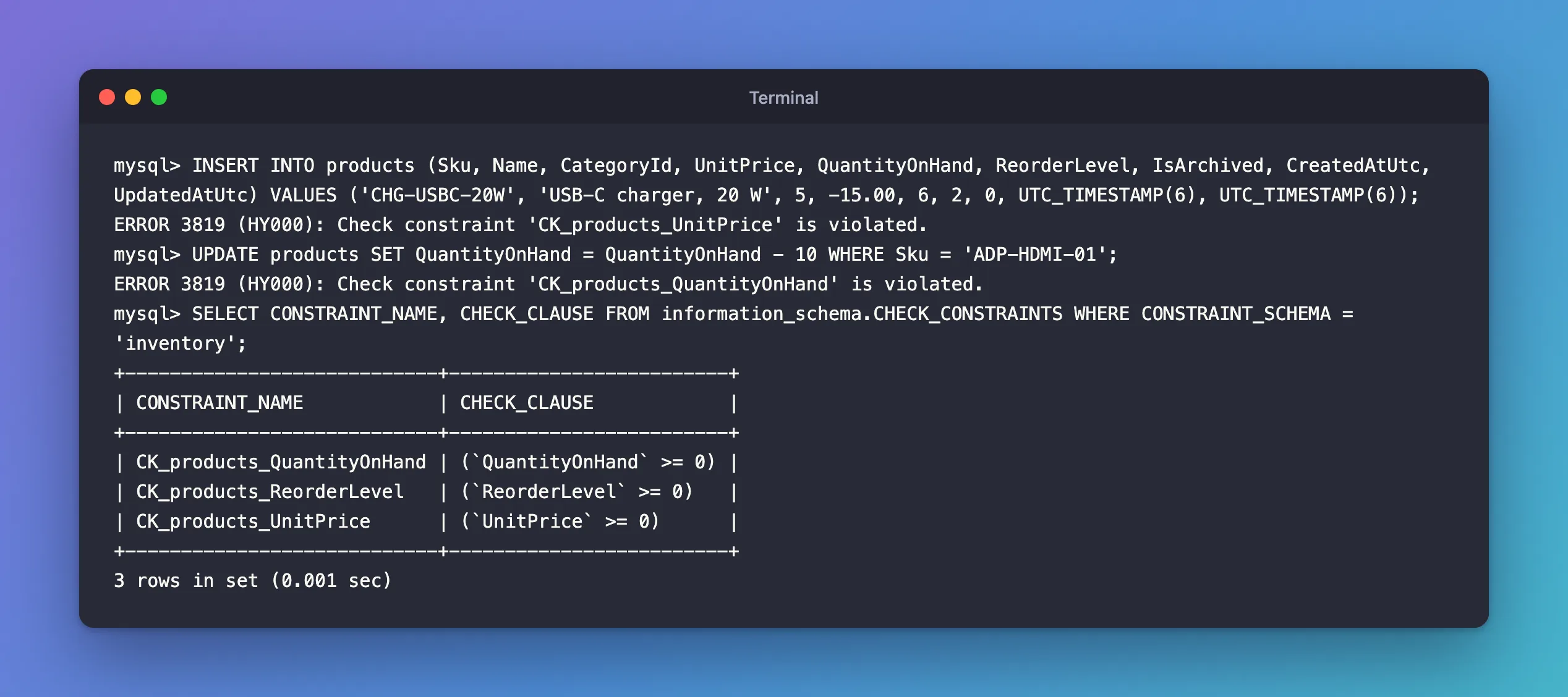
The update case is the valuable one: product ADP-HDMI-01 had 8 in stock, and no program, however buggy, can now make it negative. From a .NET C# API, the same refusal arrives as a DbUpdateException with an inner MySqlException whose Number is 3819; the fixes post shows how to turn it into a 400 Bad Request.
MySQL also lists what it enforces:
SELECT CONSTRAINT_NAME, CHECK_CLAUSE FROM information_schema.CHECK_CONSTRAINTS WHERE CONSTRAINT_SCHEMA = 'inventory';
+----------------------------+-------------------------+
| CONSTRAINT_NAME            | CHECK_CLAUSE            |
+----------------------------+-------------------------+
| CK_products_QuantityOnHand | (`QuantityOnHand` >= 0) |
| CK_products_ReorderLevel   | (`ReorderLevel` >= 0)   |
| CK_products_UnitPrice      | (`UnitPrice` >= 0)      |
+----------------------------+-------------------------+
3 rows in set (0.001 sec)
How to List the CHECK Constraints in MySQL adds the table names and whether each is enforced.
Common Mistakes
| Mistake | What happens | Do this instead |
|---|---|---|
| Square brackets from SQL Server examples | MySQL rejects the SQL when the migration runs | Use backticks |
| Reusing a constraint name on another table | MySQL refuses: names are unique per database | Include the table name, CK_<table>_<column> |
| Adding constraints without checking existing rows | The migration fails on the first offending row | Run the opposite query first |
| Relying on the constraint instead of validation | Users get a database error instead of a clear message | Validate in the API too; keep the constraint as the last line of defence |
Troubleshooting
| Symptom | Likely cause | Fix |
|---|---|---|
Check constraint '…' is violated when applying the migration | Existing rows break the rule | Correct the rows, then apply again |
| The constraint exists but nothing is refused | It was created as NOT ENFORCED, or MySQL is older than 8.0.16 | Check ENFORCED in TABLE_CONSTRAINTS; upgrade |
| A syntax error in the migration's SQL | The condition uses another database's syntax | Write it in MySQL's SQL |
FAQ
Can a constraint compare two columns?
Yes. The condition is any SQL expression on the row, such as "`DiscountedPrice` <= `Price`".
Does EF Core check the condition before saving?
No. EF Core only creates the constraint; MySQL enforces it. Validate input in your app so users get a useful message.
Conclusion
table.HasCheckConstraint("CK_products_UnitPrice", "`UnitPrice` >= 0") inside ToTable adds a CHECK constraint that MySQL enforces on every insert and update, from any program. Write the condition in MySQL's SQL with backticks, give each constraint a name unique across the database, check existing rows before applying the migration, and keep validating input in the API.
Additional Resources
- Indexes and Constraints: Check constraints —
HasCheckConstraint. - CHECK Constraints — how MySQL evaluates them.
