How to Add a Catch-All Route in the Microsoft 365 Agents SDK in C#

Every agent gets messages it doesn't understand, and silence is the worst answer to them. A catch-all route answers them for you. In the Microsoft 365 Agents SDK, one argument decides whether that route catches only the leftovers or every message.
Syntax
OnActivity(ActivityTypes.Message, handler, rank: RouteRank.Last);
OnActivityis a method ofAgentApplicationthat matches every activity of one type. Call it in your agent's constructor.ActivityTypes.Messageis the type to match: every message, whatever its text.handleris the method that runs, with the signatureTask Name(ITurnContext turnContext, ITurnState turnState, CancellationToken cancellationToken).rank: RouteRank.Lastputs the route after every other route. Routes are tried from the lowest rank to the highest, andRouteRank.Lastis the highest,65535. Without it, the route gets the default rank,RouteRank.Unspecified(32767), like every route you register without one.
The Example
The agent for this post knows one message, hello. Everything else goes to its catch-all:
using Microsoft.Agents.Builder;
using Microsoft.Agents.Builder.App;
using Microsoft.Agents.Builder.State;
using Microsoft.Agents.Core.Models;

namespace FallbackDemo;

public class GreeterAgent : AgentApplication
{
    public GreeterAgent(AgentApplicationOptions options) : base(options)
    {
        OnMessage("hello", HelloAsync);

        // The catch-all: every message, tried after all other routes.
        OnActivity(ActivityTypes.Message, FallbackAsync, rank: RouteRank.Last);
    }

    private async Task HelloAsync(ITurnContext turnContext, ITurnState turnState, CancellationToken cancellationToken)
    {
        await turnContext.SendActivityAsync("Hello to you too!", cancellationToken: cancellationToken);
    }

    private async Task FallbackAsync(ITurnContext turnContext, ITurnState turnState, CancellationToken cancellationToken)
    {
        await turnContext.SendActivityAsync($"Sorry, I don't understand \"{turnContext.Activity.Text}\" yet. Try **hello**.", cancellationToken: cancellationToken);
    }
}
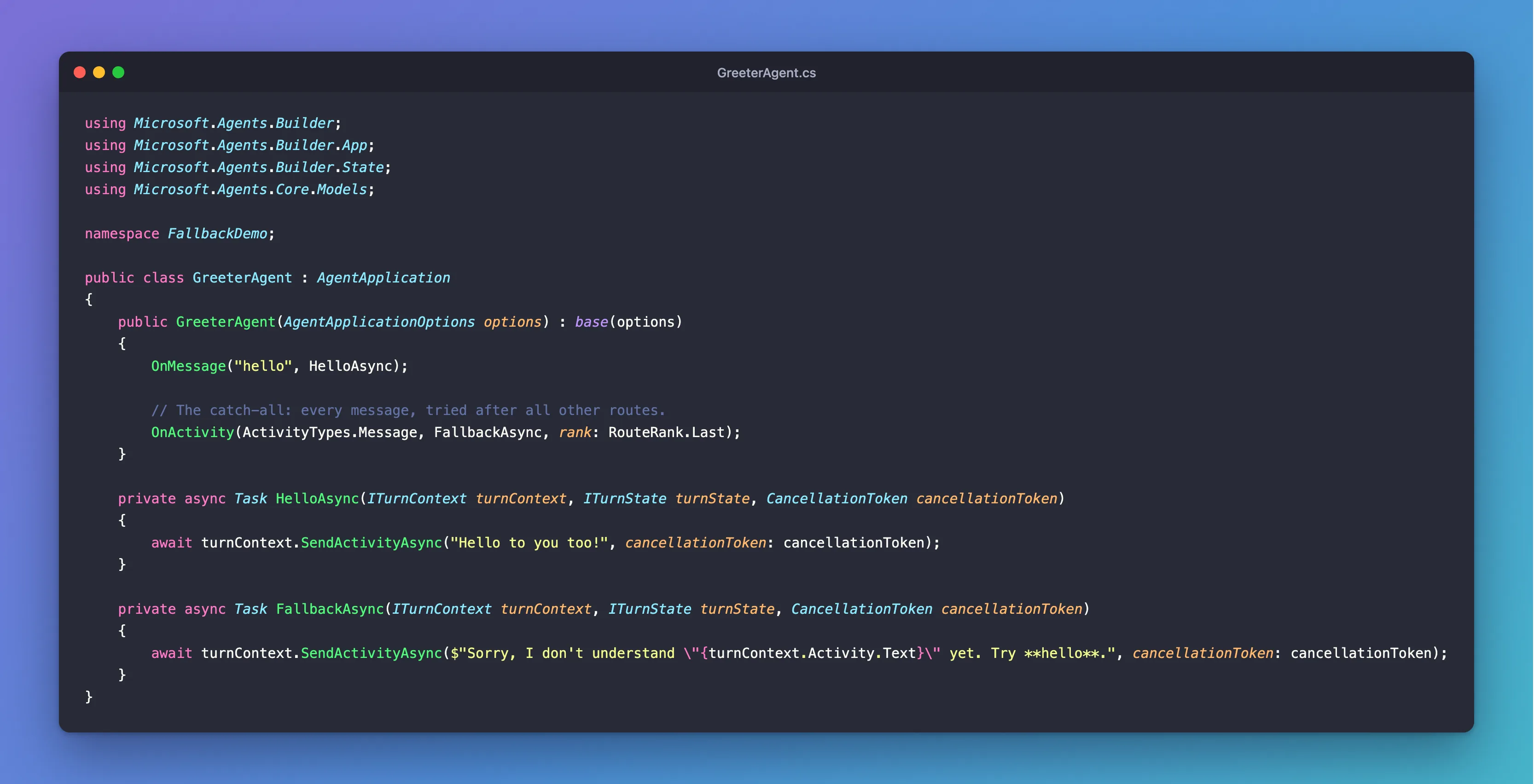
It's one class in an ASP.NET Core project with the Agents SDK, hosted with AddAgent<GreeterAgent>() and listening on port 3978.
Prerequisites
- The Microsoft 365 Agents Playground, to send the agent messages on your own machine.
agentsplayground --versionshould print0.2.30; if the command isn't found, install it withnpm install -g @microsoft/m365agentsplayground.
Step 1: Register Your Specific Routes
Register the routes for the messages your agent understands. This one has a single route, for the exact text hello in any capitalization:
OnMessage("hello", HelloAsync);
Step 2: Add the Catch-All
Then register the catch-all, with the last rank:
// The catch-all: every message, tried after all other routes.
OnActivity(ActivityTypes.Message, FallbackAsync, rank: RouteRank.Last);
OnActivity(ActivityTypes.Message, ...) alone would match every message, hello included. rank: RouteRank.Last makes it the last route tried, so it only gets the messages no other route took. The handler repeats the user's text and suggests what to try, which tells the user both what went wrong and what works.
Step 3: Try It
Run the agent with dotnet run, start the Agents Playground in a second terminal, and send hello, Hello and what can you do?:
agentsplayground -e http://localhost:3978/api/messages -c emulator
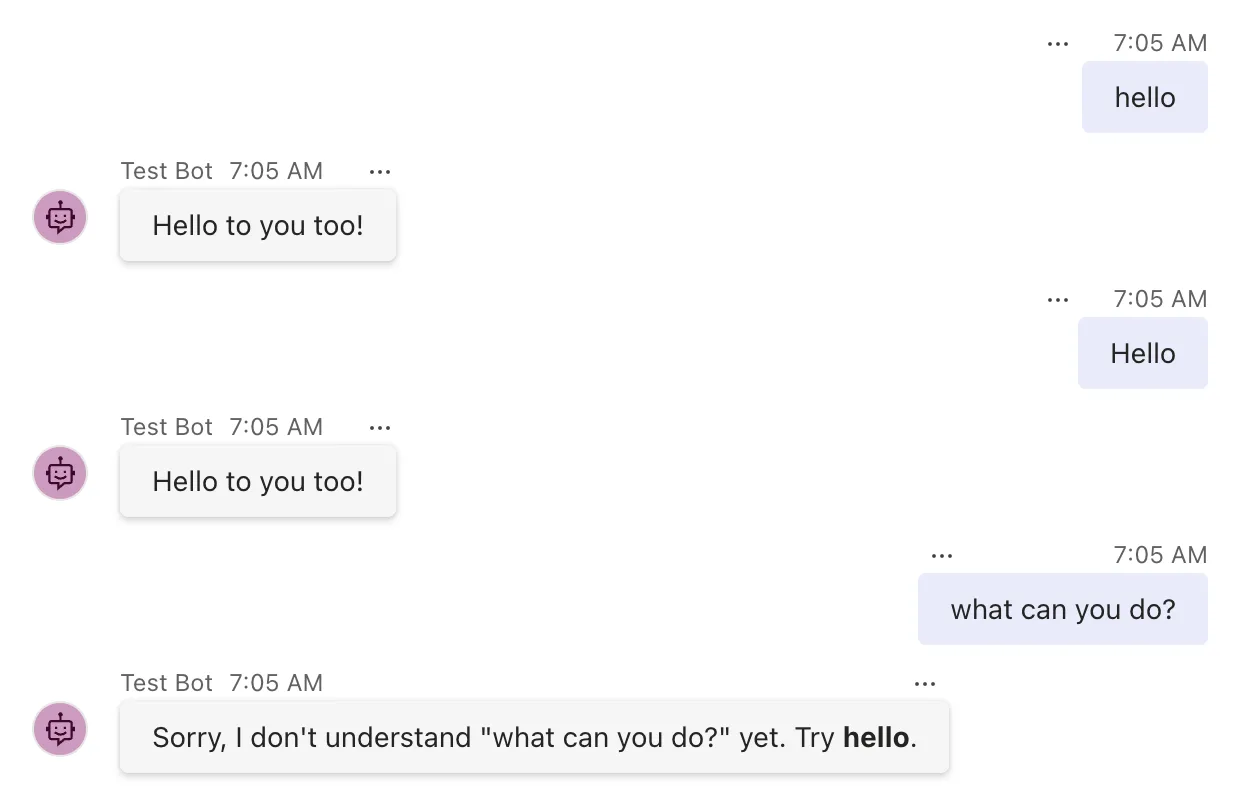
hello and Hello went to the hello route; what can you do? matched no specific route and fell through to the catch-all. The Playground's opening conversationUpdate got no answer: this catch-all only takes messages.
Step 4: See What Happens Without the Rank
The rank is the whole point, so it's worth seeing what happens without it. Move the catch-all above the hello route and leave out its rank:
public GreeterAgent(AgentApplicationOptions options) : base(options)
{
    // The catch-all, registered first and without a rank.
    OnActivity(ActivityTypes.Message, FallbackAsync);

    OnMessage("hello", HelloAsync);
}
Restart the agent and send hello:
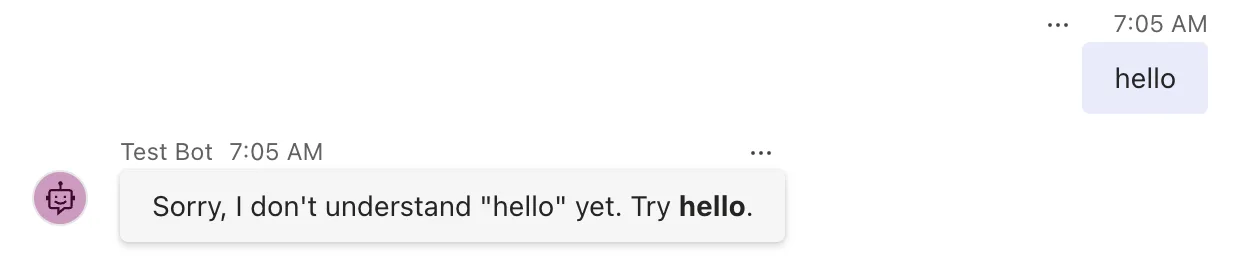
The agent now claims not to understand the very word it suggests. Both routes have the default rank, so they're tried in the order they were registered, and the catch-all comes first. Its selector says yes to every message, the first route to say yes handles the message, and the hello route is never asked. Put the rank back, and the catch-all returns to last place wherever its line is.
Common Mistakes
| Mistake | What happens | Do this instead |
|---|---|---|
| A catch-all without a rank, registered first | It answers every message, and your other routes never run | Give it rank: RouteRank.Last |
| Relying on registration order instead of the rank | Moving one line later breaks the agent | Use the rank, which works wherever the line is |
| An unhelpful fallback, such as Error | The user doesn't know what to try | Say what the agent understands |
| Expecting the message catch-all to answer other activities | Conversation updates and events still get no answer | Register routes for those types too |
Troubleshooting
| Symptom | Likely cause | Fix |
|---|---|---|
| Every message gets the fallback answer | The catch-all is tried before your other routes | Add rank: RouteRank.Last |
| Some messages get no answer at all | No catch-all, or it's registered for another type | Register OnActivity(ActivityTypes.Message, ..., rank: RouteRank.Last) |
| A specific route still loses to another one | Two specific routes match the same message | Check your routes' order and give them ranks |
FAQ
Is there a shorter way to write a catch-all?
A route builder without a filter does the same: AddRoute(MessageRouteBuilder.Create().WithHandler(FallbackAsync).Build()) matches every message and gets RouteRank.Last automatically, because it has no text to match. The same goes for [MessageRoute] on a method with no text. OnActivity with a type doesn't, so it needs the explicit rank.
Can I check which order my routes are tried in?
Yes. The SDK logs its route list on every turn at the Debug level: How to Log the Order of Your Routes in the Microsoft 365 Agents SDK in C# shows how to turn it on and read it.
Should the catch-all call an AI model?
It can. The catch-all is where an agent sends everything its specific routes don't handle, which is exactly where an AI model takes over in most agents. The route works the same way whatever the handler does.
Conclusion
A catch-all is OnActivity(ActivityTypes.Message, handler, rank: RouteRank.Last). The rank is what makes it a catch-all rather than a black hole: with it, the route gets only the messages your other routes don't take, wherever you register it; without it, it can take every message.
Additional Resources
- AgentApplication in Microsoft 365 Agents SDK — route evaluation order and
RouteRank. - RouteRank class — the
First,UnspecifiedandLastconstants.
