How to Add a Cancel Button That Skips Validation to an Adaptive Card

Put a Cancel button on an Adaptive Card that has a required field, and people can't cancel: the card insists they fill in the field first. One property on the button fixes it. "associatedInputs": "none" tells the card that this button has nothing to do with the inputs, so it neither checks nor sends them.
The Property
associatedInputs is a property of Action.Submit, added in version 1.3 of the card format. It takes one of two values:
| Value | What happens when the button is selected |
|---|---|
auto, the default | The inputs on the card are checked, and their values are sent with the button's data |
none | No inputs are checked and none are sent; only the button's data is sent |
The Example
The card for this post asks for feedback: a required comment, a Send feedback button, and a Not now button for people who'd rather not:
{
  "type": "AdaptiveCard",
  "$schema": "https://adaptivecards.io/schemas/adaptive-card.json",
  "version": "1.5",
  "body": [
    {
      "type": "Input.Text",
      "id": "comment",
      "label": "What could we do better?",
      "isMultiline": true,
      "isRequired": true,
      "errorMessage": "Write a short comment first."
    }
  ],
  "actions": [
    {
      "type": "Action.Submit",
      "title": "Send feedback",
      "data": { "verb": "sendFeedback" }
    },
    {
      "type": "Action.Submit",
      "title": "Not now",
      "data": { "verb": "skipFeedback" }
    }
  ]
}
A small agent sends it when someone types feedback, and has a submit route for each verb: sendFeedback thanks the person, and skipFeedback answers No problem. The routes work as in How to Handle Adaptive Card Submit Actions in the Microsoft 365 Agents SDK in C#.
Prerequisites
- The Microsoft 365 Agents Playground, to try the card.
agentsplayground --versionshould print0.2.30; if the command isn't found, install it withnpm install -g @microsoft/m365agentsplayground.
Step 1: See the Button Blocked
With the agent running on port 3978, start the Agents Playground:
agentsplayground -e http://localhost:3978/api/messages -c emulator
Send feedback, and select Not now without writing a comment:
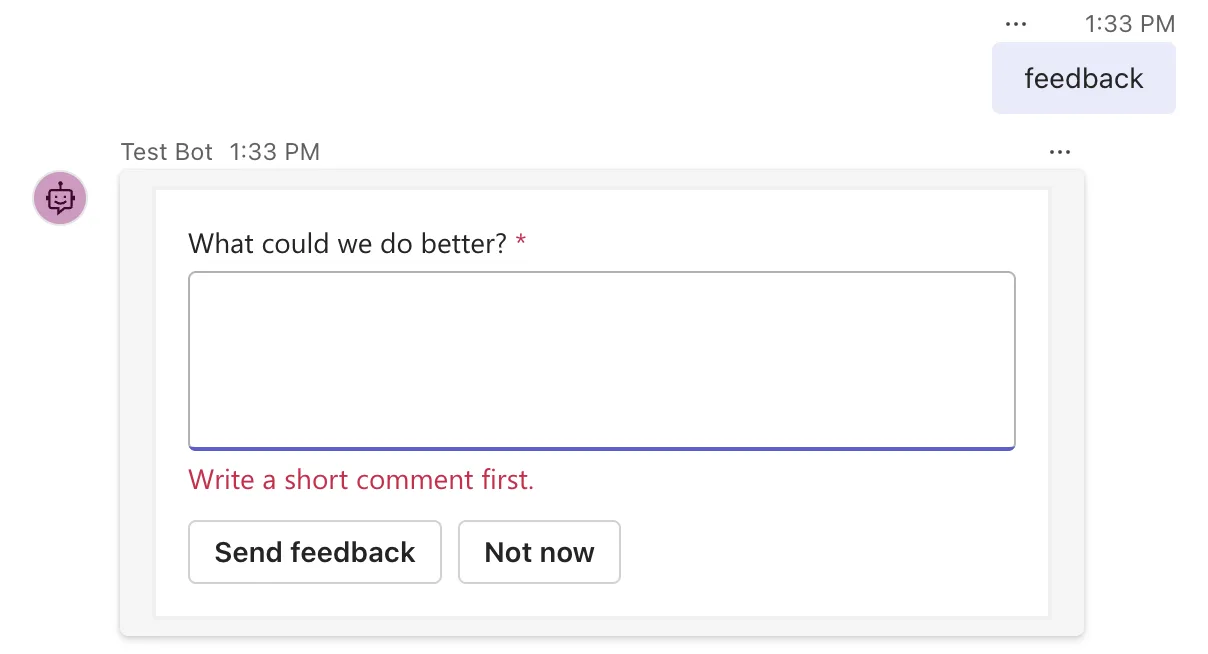
The card checked the comment and refused, even though the person was trying to say no thanks. Nothing reached the agent: the Playground's Log Panel has no new entry.
Step 2: Set associatedInputs on the Button
Add "associatedInputs": "none" to the Not now button:
    {
      "type": "Action.Submit",
      "title": "Not now",
      "associatedInputs": "none",
      "data": { "verb": "skipFeedback" }
    }
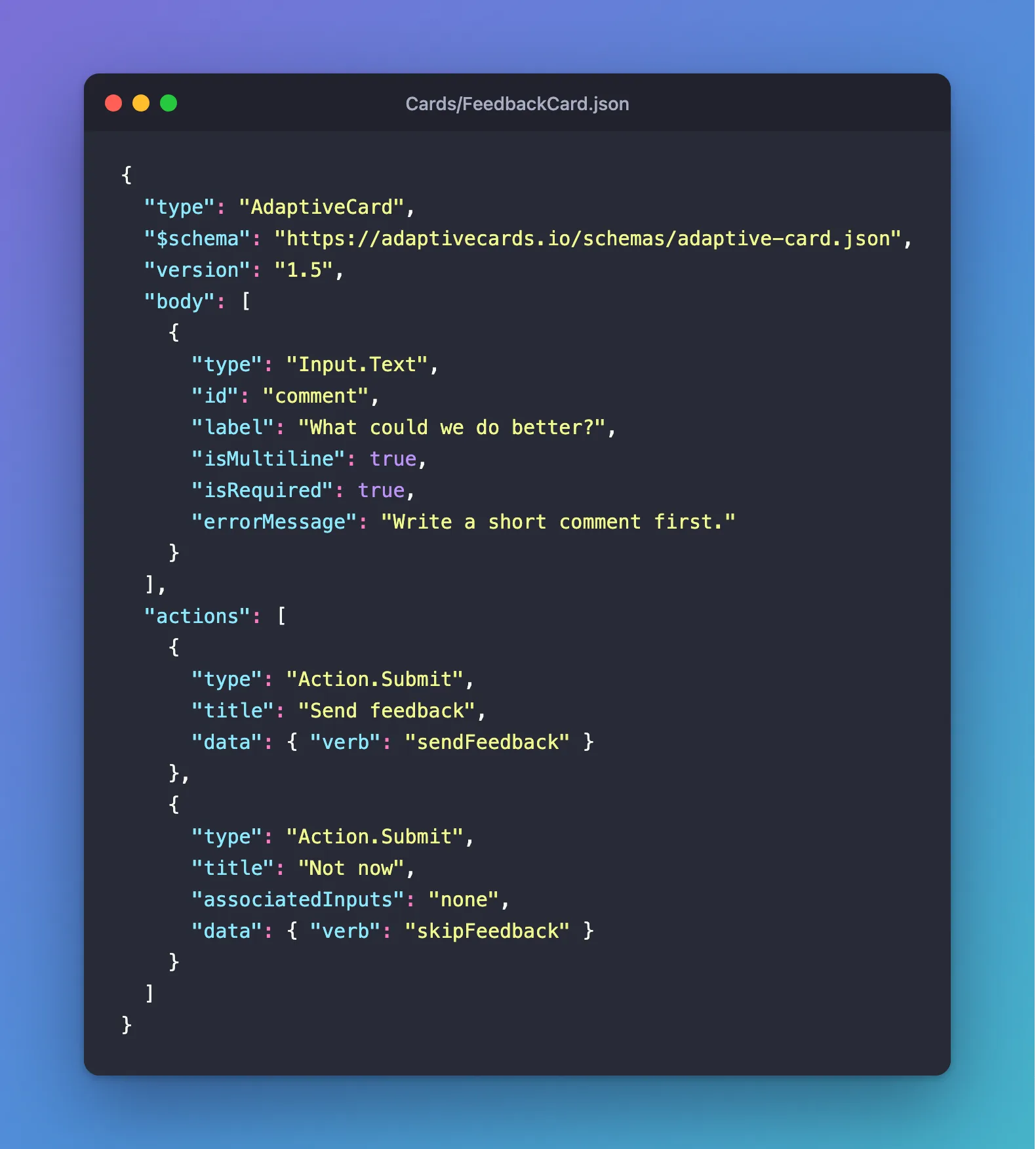
Leave Send feedback as it is: it should still insist on a comment.
Step 3: Try It Again
Build and run the agent again, so the changed card file is copied to the build output, then send feedback and select Not now:
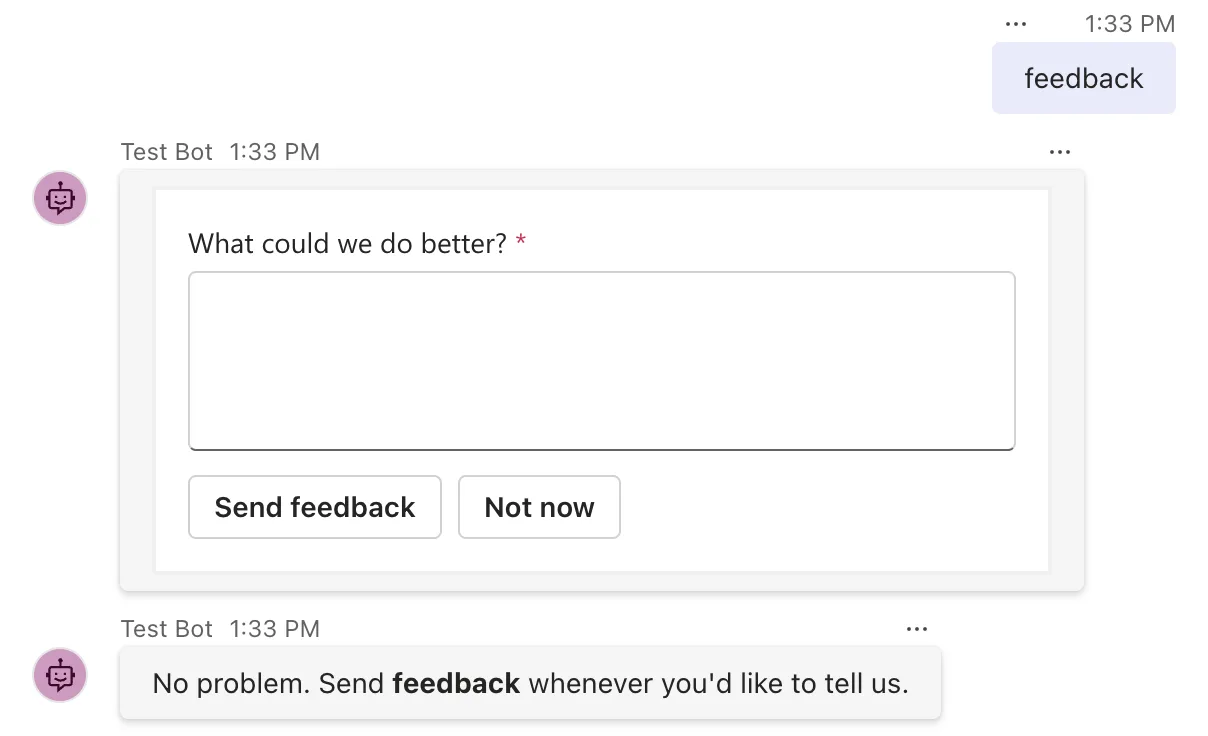
This time the card sent at once, with no error, and the agent answered. The Log Panel shows what Not now sent, only the button's own data:
"value": {
  "verb": "skipFeedback"
}
Common Mistakes
| Mistake | What happens | Do this instead |
|---|---|---|
Setting associatedInputs on the wrong button | The real submit button sends without its checks | Set it only on buttons that don't need the inputs |
Expecting the inputs' values from a none button | They aren't sent | Use auto when the agent needs the values |
| A card version below 1.3 | The property was added in 1.3 | Use 1.3 or later; 1.5 for Teams and Microsoft 365 Copilot Chat |
Troubleshooting
| Symptom | Likely cause | Fix |
|---|---|---|
| The button is still blocked | The property is on another button, or the old card file is still in the build output | Check the button, then build again |
| The agent answers with its help message | No submit route for the button's verb | Add AdaptiveCards.OnActionSubmit for it |
FAQ
Is associatedInputs only for Cancel buttons?
No. Any button that doesn't need the inputs can use it: Not now, Remind me later, Show me an example. Each still sends its own data, so the agent knows which one it was.
Does associatedInputs work with Action.Execute?
The Adaptive Card format defines associatedInputs on Action.Submit, since version 1.3, and on Action.Execute, since 1.4. This post tested it with Action.Submit.
Conclusion
Required inputs protect a card's main button, but they also block every other button on the card. Set "associatedInputs": "none" on the buttons that don't need the inputs, and they send just their own data, straight away.
Additional Resources
- Action.Submit —
associatedInputsand its values, with an example of a Cancel button. - Input validation — which inputs a submit checks and sends.
