How to Accept Activities Only from Your Tenant in the Microsoft 365 Agents SDK in C#

A bot registered for Teams can usually be installed by people in any organization. If yours is meant for your own organization only, check the tenant ID of every incoming activity, and drop the ones from anywhere else before your agent sees them. A small middleware in the Microsoft 365 Agents SDK does that in one place.
The Teams Developer Portal and the Teams developer CLI both create multitenant bots, and Microsoft's guidance on agent tenancy is direct: Agents intended for use only in a single tenant, or a known set of tenants, should always validate the tenant ID of incoming activity payloads in their application code. Configuring an agent to be single-tenant or configuring sign in audience restrictions are not substitutes for performing tenant validation in code.
Every activity from Teams says which organization it comes from. The Bot Framework connector describes conversation.tenantId as This conversation's tenant ID, and Teams documents channelData.tenant.id as the Microsoft Entra tenant ID passed in all contexts. Microsoft's Teams SDK reads both, in that order, and explains why: Reading only conversation.tenantId silently misses the ones that arrive as channelData.tenant depending on the activity.
A middleware is the right place for the check: it runs on every activity, before any route of your agent, and when it doesn't pass the activity on, the agent never sees it.
The Example
An echo agent, TenantEcho, answers You said: … to every message. It should accept only my organization's tenant, shown as 11111111-1111-1111-1111-111111111111. To test the filter, the Microsoft 365 Agents Playground plays Teams: it sends activities on the msteams channel with a test tenant of its own, 00000000-0000-0000-0000-0000000000001, which isn't on the list.
Prerequisites
- An ASP.NET Core agent that uses the
Microsoft.Agents.Hosting.AspNetCorepackage, version 1.9.205. - The Microsoft 365 Agents Playground, to test the agent locally:
npm install -g @microsoft/m365agentsplaygroundinstalls it. This guide uses version 0.2.30, which Microsoft still labels a preview.
Step 1: Write the Middleware
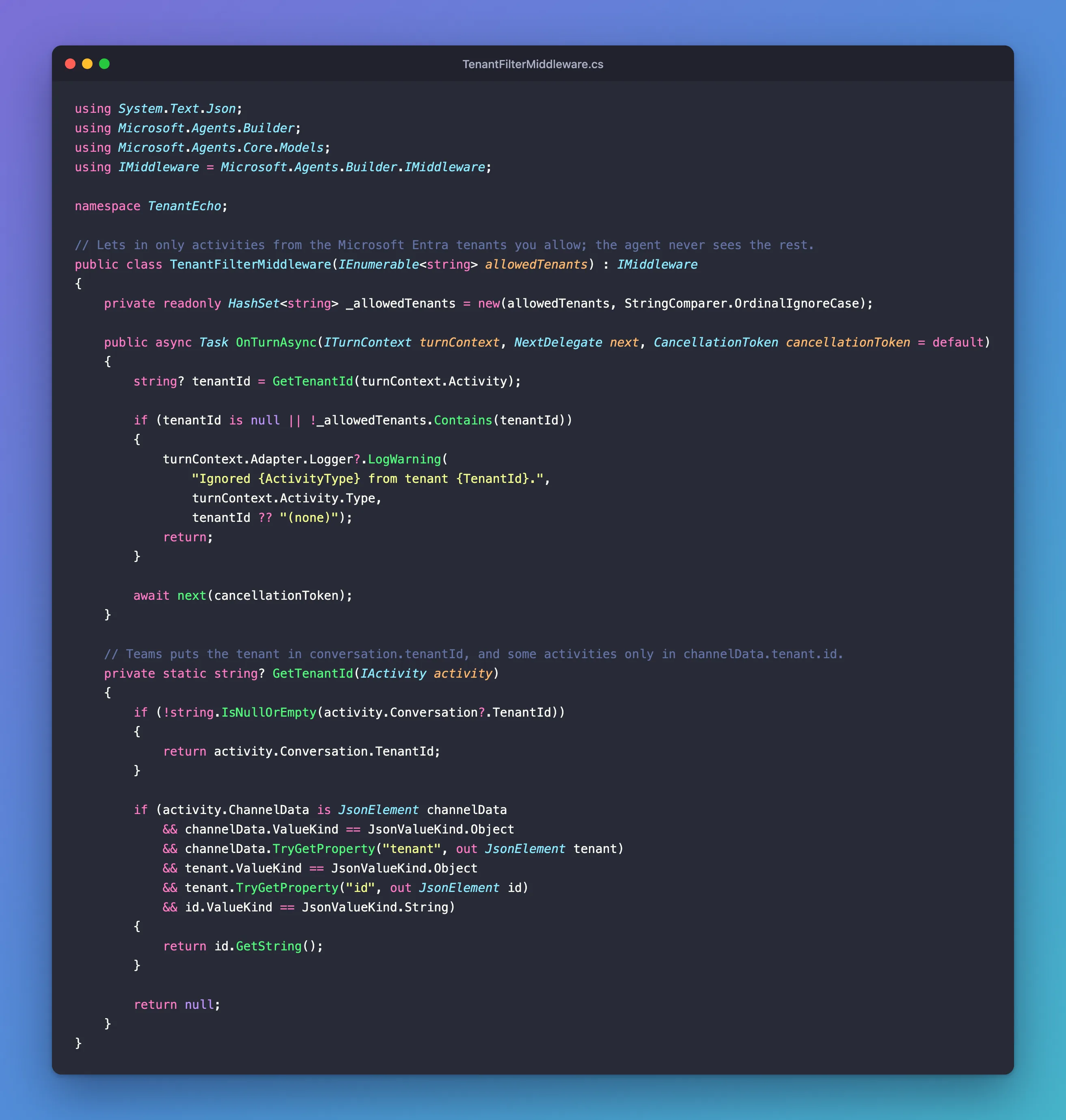
Create TenantFilterMiddleware.cs:
using System.Text.Json;
using Microsoft.Agents.Builder;
using Microsoft.Agents.Core.Models;
using IMiddleware = Microsoft.Agents.Builder.IMiddleware;

namespace TenantEcho;

// Lets in only activities from the Microsoft Entra tenants you allow; the agent never sees the rest.
public class TenantFilterMiddleware(IEnumerable<string> allowedTenants) : IMiddleware
{
    private readonly HashSet<string> _allowedTenants = new(allowedTenants, StringComparer.OrdinalIgnoreCase);

    public async Task OnTurnAsync(ITurnContext turnContext, NextDelegate next, CancellationToken cancellationToken = default)
    {
        string? tenantId = GetTenantId(turnContext.Activity);

        if (tenantId is null || !_allowedTenants.Contains(tenantId))
        {
            turnContext.Adapter.Logger?.LogWarning(
                "Ignored {ActivityType} from tenant {TenantId}.",
                turnContext.Activity.Type,
                tenantId ?? "(none)");
            return;
        }

        await next(cancellationToken);
    }

    // Teams puts the tenant in conversation.tenantId, and some activities only in channelData.tenant.id.
    private static string? GetTenantId(IActivity activity)
    {
        if (!string.IsNullOrEmpty(activity.Conversation?.TenantId))
        {
            return activity.Conversation.TenantId;
        }

        if (activity.ChannelData is JsonElement channelData
            && channelData.ValueKind == JsonValueKind.Object
            && channelData.TryGetProperty("tenant", out JsonElement tenant)
            && tenant.ValueKind == JsonValueKind.Object
            && tenant.TryGetProperty("id", out JsonElement id)
            && id.ValueKind == JsonValueKind.String)
        {
            return id.GetString();
        }

        return null;
    }
}
How it works:
IMiddlewareis the Agents SDK's middleware interface, with one method,OnTurnAsync. Theusing IMiddleware = …line picks the Agents SDK's interface, because an ASP.NET Core project also sees ASP.NET Core's ownIMiddleware. Microsoft's migration guide gives the same advice for ambiguous interfaces—such asIMiddlewareorIStorage._allowedTenantsholds the allowed tenant IDs, compared without regard to upper or lower case.OnTurnAsyncfinds the activity's tenant. If there's none, or it isn't allowed, it logs a warning and returns without callingnext, so nothing after it runs: no route, no reply. Otherwiseawait next(cancellationToken)hands the activity on to the agent.turnContext.Adapter.Loggeris the adapter's own logger, so the warning shows up in the console without any extra setup.GetTenantIdreadsconversation.tenantIdfirst andchannelData.tenant.idsecond, checking each step of the JSON before reading it, so an activity with unexpected channel data can't throw.
An activity without any tenant is dropped too. That's deliberate: if your agent should only serve your organization, an activity that can't say where it's from doesn't qualify.
Step 2: List the Allowed Tenants
Add the list to appsettings.json, with your organization's tenant ID. How to Find Your Microsoft Entra Tenant ID shows where it is.
{
  "Logging": {
    "LogLevel": {
      "Default": "Information",
      "Microsoft.AspNetCore": "Warning"
    }
  },
  "AllowedHosts": "*",
  "AllowedTenants": [
    "11111111-1111-1111-1111-111111111111"
  ]
}
Step 3: Register the Middleware
In Program.cs, read the list and add the middleware with AddAgentMiddleware:
using Microsoft.Agents.Hosting.AspNetCore;
using Microsoft.Agents.Storage;
using TenantEcho;

var builder = WebApplication.CreateBuilder(args);

string[] allowedTenants = builder.Configuration.GetSection("AllowedTenants").Get<string[]>() ?? [];

builder.AddAgentDefaults()
    .AddAgent<EchoAgent>()
    .AddAgentMiddleware(new TenantFilterMiddleware(allowedTenants));
builder.Services.AddSingleton<IStorage, MemoryStorage>();

var app = builder.Build();

app.UseAgents();
app.MapDefaultAgentEndpoints();

app.Run();
GetSection("AllowedTenants").Get<string[]>() reads the JSON array as a string array, and ?? [] turns a missing section into an empty list, which lets nothing in. The agent is a plain echo:
using Microsoft.Agents.Builder;
using Microsoft.Agents.Builder.App;
using Microsoft.Agents.Builder.State;
using Microsoft.Agents.Core.Models;

namespace TenantEcho;

public class EchoAgent : AgentApplication
{
    public EchoAgent(AgentApplicationOptions options) : base(options)
    {
        OnActivity(ActivityTypes.Message, EchoAsync);
    }

    private Task EchoAsync(ITurnContext turnContext, ITurnState turnState, CancellationToken cancellationToken)
        => turnContext.SendActivityAsync($"You said: {turnContext.Activity.Text}", cancellationToken: cancellationToken);
}
Step 4: Send a Message from Another Tenant
Start the agent:
dotnet run
In a second terminal, start the Playground on the Teams channel. -e is your agent's endpoint and -c msteams makes the Playground behave like Teams:
agentsplayground -e http://localhost:3978/api/messages -c msteams
It opens in your browser. Send hello. The message goes out, and nothing comes back:

The Playground's log shows that the agent did accept the requests: 202 for each activity, including the message:
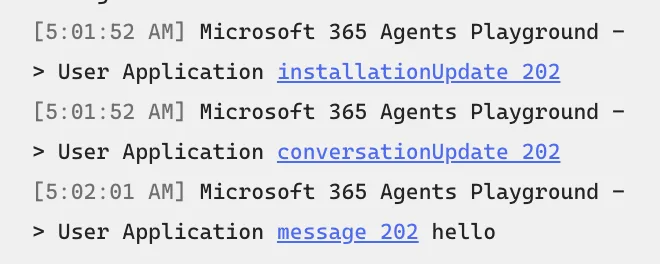
The agent's console says what happened to them:
warn: Microsoft.Agents.Hosting.AspNetCore.CloudAdapter[0]
      Ignored conversationUpdate from tenant 00000000-0000-0000-0000-0000000000001.
warn: Microsoft.Agents.Hosting.AspNetCore.CloudAdapter[0]
      Ignored installationUpdate from tenant 00000000-0000-0000-0000-0000000000001.
warn: Microsoft.Agents.Hosting.AspNetCore.CloudAdapter[0]
      Ignored message from tenant 00000000-0000-0000-0000-0000000000001.
The middleware dropped all three: the install, the conversation update and the message. A sender from another organization gets no reply and no error, and your agent's code never ran for them.
Step 5: Allow a Tenant and Try Again
To see the other side, add the Playground's test tenant to the list:
  "AllowedTenants": [
    "11111111-1111-1111-1111-111111111111",
    "00000000-0000-0000-0000-0000000000001"
  ]
Restart the agent, reload the Playground page so it starts a new conversation, and send hello again. This time it answers:

Remove the Playground's tenant from the list again when you've finished testing, so the deployed agent's list holds only the organizations it serves.
Common Mistakes
| Mistake | What happens | Do this instead |
|---|---|---|
| Relying on a single-tenant app registration alone | Microsoft says it's no substitute for checking in code | Keep the middleware too |
Reading only conversation.tenantId | Activities that carry the tenant only in channel data look tenant-less | Fall back to channelData.tenant.id |
| Checking the tenant inside one route | Other routes and events still run for other tenants | Check in a middleware, before every route |
Leaving AllowedTenants out of the configuration | The list is empty, and every activity is dropped | Add your tenant ID |
Troubleshooting
| Symptom | Likely cause | Fix |
|---|---|---|
| The agent never answers, and the log says Ignored … from tenant | The tenant isn't on the list | Compare the logged ID with AllowedTenants |
| Ignored … from tenant (none) | The activity carries no tenant | Check which channel sent it; non-Teams channels may not have one |
| error CS0104: 'IMiddleware' is an ambiguous reference | Two IMiddleware interfaces are in scope | Keep the using IMiddleware = … line |
FAQ
Why not reply with an error to other tenants?
A reply would tell an outsider that your agent exists and is listening. Dropping the activity quietly gives them nothing, and the warning in your log still tells you it happened.
Does this replace token validation?
No. Token validation proves a request really comes from the channel for your bot; the tenant check decides which organizations may use it. A forged request without a valid token should never get as far as the middleware.
Where should the list of tenants live?
In configuration, as here, so that adding an organization doesn't need a new build. For a list that changes often, read it from a store your team manages.
Conclusion
Teams bots are multitenant unless your code says otherwise. A middleware that reads conversation.tenantId, falls back to channelData.tenant.id, and calls next only for tenants on your list keeps every other organization out, before any of your agent's routes run.
Additional Resources
- Agent tenancy (single-tenant and multi-tenant agents) — why the check belongs in code.
- Teams channel data — where Teams puts the tenant ID.
