How Autocommit Works in MySQL

You run an UPDATE, and it's saved. You didn't ask for that, and that's autocommit doing its job. It's on by default, and turning it off changes what every later statement does in that session. Here's each setting at work, and the surprise waiting when you close the client.
Prerequisites
- MySQL, and a way to run SQL. The examples use MySQL 9.7.4 in Docker, and the
mysqlclient from How to Connect to MySQL in a Docker Container. - Two terminals, each with its own
mysqlsession. - An InnoDB table. The examples use
products.
What Autocommit Means
MySQL's autocommit page begins with: "In InnoDB, all user activity occurs inside a transaction." So there's always a transaction. Autocommit decides who ends it: "If autocommit mode is enabled, each SQL statement forms a single transaction on its own."
Check the setting of your session:
SELECT @@autocommit;
+--------------+
| @@autocommit |
+--------------+
|            1 |
+--------------+
1 row in set (0.001 sec)
1 means on, the default.
Step 1: Autocommit On
UPDATE products SET QuantityOnHand = 51 WHERE Id = 3;
The other session sees it straight away:
SELECT Id, Sku, QuantityOnHand FROM products WHERE Id = 3;
+----+-------------+----------------+
| Id | Sku         | QuantityOnHand |
+----+-------------+----------------+
|  3 | CBL-HDMI-2M |             51 |
+----+-------------+----------------+
1 row in set (0.001 sec)
Step 2: Autocommit Off
SET autocommit = 0;
UPDATE products SET QuantityOnHand = 52 WHERE Id = 3;
SELECT Id, Sku, QuantityOnHand FROM products WHERE Id = 3;
+----+-------------+----------------+
| Id | Sku         | QuantityOnHand |
+----+-------------+----------------+
|  3 | CBL-HDMI-2M |             51 |
+----+-------------+----------------+
1 row in set (0.001 sec)
The other session still sees 51. The change is waiting for a COMMIT, and you can take it back:
ROLLBACK;
SELECT Id, Sku, QuantityOnHand FROM products WHERE Id = 3;
+----+-------------+----------------+
| Id | Sku         | QuantityOnHand |
+----+-------------+----------------+
|  3 | CBL-HDMI-2M |             51 |
+----+-------------+----------------+
1 row in set (0.001 sec)
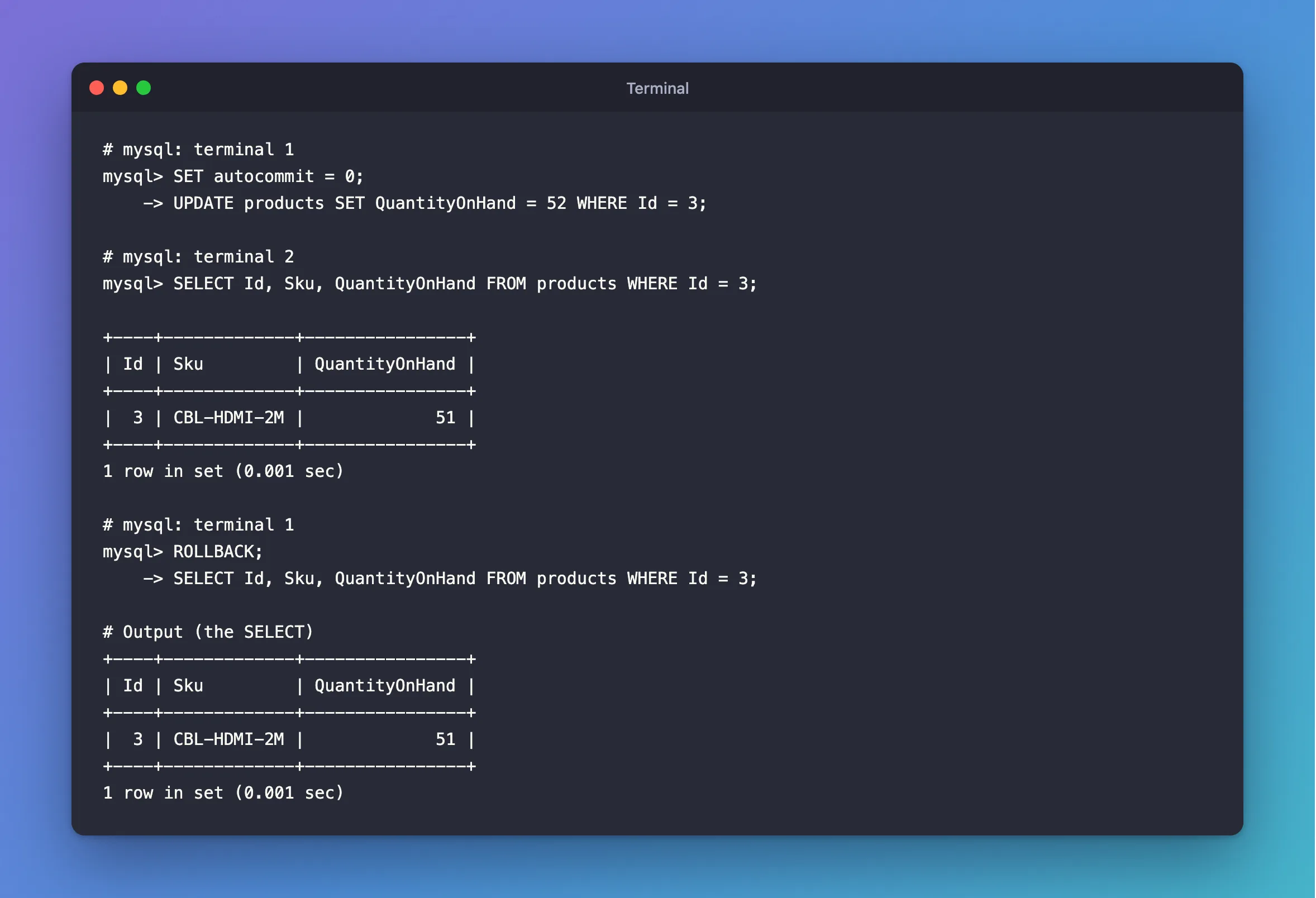
With autocommit off, a transaction starts by itself at your first statement, and it stays open until you end it. Everything that follows belongs to it, so its locks stay held the whole time.
Step 3: Turning It Back On Commits
UPDATE products SET QuantityOnHand = 53 WHERE Id = 3;
SET autocommit = 1;
There was no COMMIT, but look:
SELECT Id, Sku, QuantityOnHand FROM products WHERE Id = 3;
+----+-------------+----------------+
| Id | Sku         | QuantityOnHand |
+----+-------------+----------------+
|  3 | CBL-HDMI-2M |             53 |
+----+-------------+----------------+
1 row in set (0.001 sec)
Setting it back to 1 committed the open transaction.
Step 4: Closing the Client Rolls Back
This is the opposite surprise. The quantity is 50 here:
SET autocommit = 0;
UPDATE products SET QuantityOnHand = 54 WHERE Id = 3;
exit
SELECT Id, Sku, QuantityOnHand FROM products WHERE Id = 3;
+----+-------------+----------------+
| Id | Sku         | QuantityOnHand |
+----+-------------+----------------+
|  3 | CBL-HDMI-2M |             50 |
+----+-------------+----------------+
1 row in set (0.001 sec)
The 54 is gone. The page says it plainly: "If a session that has autocommit disabled ends without explicitly committing the final transaction, MySQL rolls back that transaction."
Common Mistakes
| Mistake | What happens | Do this instead |
|---|---|---|
Leaving a session on autocommit = 0 | Your first statement holds its locks until you commit, and others wait | Use START TRANSACTION when you need a transaction |
Closing the client without COMMIT | The work is rolled back | Commit first |
Assuming a SET autocommit = 0 affects everyone | It applies to your session only | Set it per session |
| Reading the old value from another session and assuming the update failed | It's waiting for a COMMIT | Check the session that ran it |
Troubleshooting
| Symptom | Likely cause | Fix |
|---|---|---|
| My changes disappeared after I closed the client | Autocommit was off and there was no COMMIT | Commit before you exit |
| Other sessions wait on rows I'm not changing any more | Autocommit is off, and my transaction is still open | Run COMMIT, or find the open transaction |
| An app's writes aren't saved | It set autocommit off and never commits | Commit in the app, or use explicit transactions |
FAQ
Should I turn autocommit off?
Usually not. START TRANSACTION gives you a transaction exactly where you want one, and it ends with the COMMIT. How to Use a Transaction in MySQL shows it.
What does EF Core do?
It leaves autocommit on, and sends BEGIN and COMMIT around its own work. Does EF Core's SaveChanges Use a Transaction? shows the statements.
Conclusion
Autocommit on means each statement is its own transaction. Autocommit off means one long transaction that you have to end: a COMMIT or setting it back to 1 keeps your work, and closing the session throws it away.
Additional Resources
- autocommit, Commit, and Rollback — how InnoDB handles each case.
- START TRANSACTION, COMMIT, and ROLLBACK Statements — the statements themselves.
