Fixed: "Timeout expired. The timeout period elapsed prior to obtaining a connection from the pool" with MySql.Data

A request that normally takes a millisecond failed after exactly 15 seconds with error connecting: Timeout expired. The timeout period elapsed prior to obtaining a connection from the pool. MySQL itself was fine and nearly idle. All the app's connections were taken, by requests that were never going to finish.
What I Was Doing
My .NET C# Web API uses EF Core and MySql.Data 26.10.0, and its connection string allows 3 pooled connections:
Server=127.0.0.1;Port=3306;Database=inventory;User ID=inventory_app;Password=…;SslMode=Required;Maximum Pool Size=3
Three requests had gone unanswered by then. Then I sent a plain one:
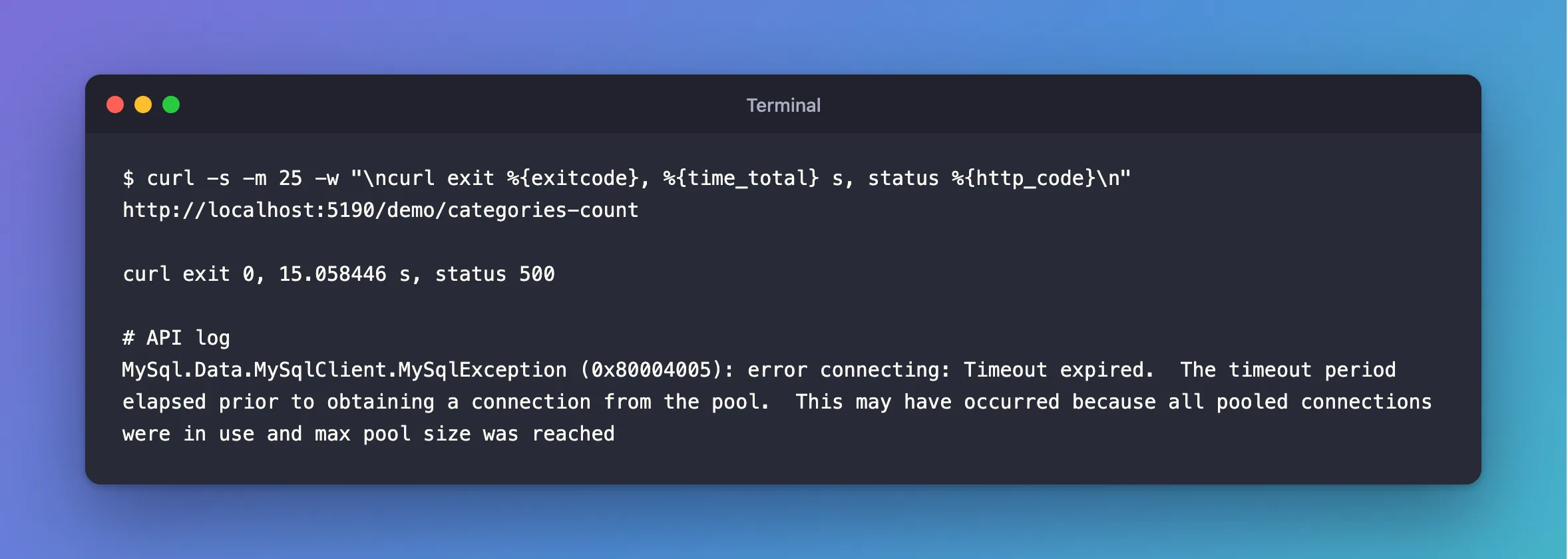
curl -s -m 25 -w "\ncurl exit %{exitcode}, %{time_total} s, status %{http_code}\n" http://localhost:5190/demo/categories-count
What I Expected
A count, in a few milliseconds.
What I Got
curl exit 0, 15.058446 s, status 500
MySql.Data.MySqlClient.MySqlException (0x80004005): error connecting: Timeout expired. The timeout period elapsed prior to obtaining a connection from the pool. This may have occurred because all pooled connections were in use and max pool size was reached
What I Checked
What MySQL saw.
SELECT PROCESSLIST_ID, PROCESSLIST_COMMAND, PROCESSLIST_TIME, LEFT(PROCESSLIST_INFO,40) AS statement
FROM performance_schema.threads
WHERE PROCESSLIST_USER='inventory_app';
+----------------+---------------------+------------------+-----------+
| PROCESSLIST_ID | PROCESSLIST_COMMAND | PROCESSLIST_TIME | statement |
+----------------+---------------------+------------------+-----------+
|             29 | Sleep               |               12 | NULL      |
|             32 | Sleep               |                8 | NULL      |
|             34 | Sleep               |                4 | NULL      |
+----------------+---------------------+------------------+-----------+
Three connections, the whole pool, all idle. So MySQL wasn't busy. The connections were open and not being used for anything.
What had happened to the earlier requests. They had each run a statement that took longer than the command timeout, and they'd never answered:
curl exit 28, 4.004666 s, status 000
curl exit 28, 4.003708 s, status 000
curl exit 28, 4.006129 s, status 000
The 15 seconds. That's the connection timeout in the connection string, whose default is 15. The request waited that long for a free connection.
Whether retries help. This error has number 0, the same as a dropped connection, so a retry list with 0 in it retries this too. Each attempt waits the whole 15 seconds again:
curl exit 0, 64.543691 s, status 500
Over a minute, for a request with nothing to wait for.
Why It Happens
Each hung request kept its connection, so nothing went back to the pool. When the pool is full, a new request waits, and then fails with this message. I hit it with a limit of 3, and with the default maximum of 100, you'd hit it after 100 stuck requests, at a moment that looks unrelated.
The cause here was a statement outlasting CommandTimeout. Other things keep connections out of the pool too: an unfinished DataReader or a DbContext that's never disposed, or simply more simultaneous work than the pool holds. That last one can do far more than fail a request: while they wait here, requests block threads, and a burst can end the whole process.
The Fix
Fix what's holding the connections. Raising Maximum Pool Size only delays this.
In this case, that means removing the hang:
// No time limit in the driver: an async statement that runs past it never returns.
// MySqlSessionLimitsInterceptor sets the limits on the server instead.
mySql.CommandTimeout(0);
If you've ruled out leaks and your app really needs more simultaneous connections, raise the pool's limit, and keep the server's max_connections in mind. Either way, limit the requests running at once to the size of the pool, so that nothing waits inside the driver. How to Size the MySql.Data Connection Pool helps you pick the number.
And don't retry this error. A dropped connection also has number 0, but its exception has an inner exception that says why, and this one doesn't, so a custom strategy can tell them apart:
// Number 0 is the driver's own error. It's a dropped connection when an inner exception says
// why, and a full connection pool when there's none: a retry would only wait for the pool again.
protected override bool ShouldRetryOn(Exception exception) =>
    exception is MySqlException { Number: 0, InnerException: not null }
        or MySqlException
        {
            Number:
                1040 or // Too many connections.
                1042 or // Unable to connect to any of the specified MySQL hosts.
                1053 or // Server shutdown in progress.
                1213    // Deadlock found: MySQL rolled the transaction back.
        };
After the Fix
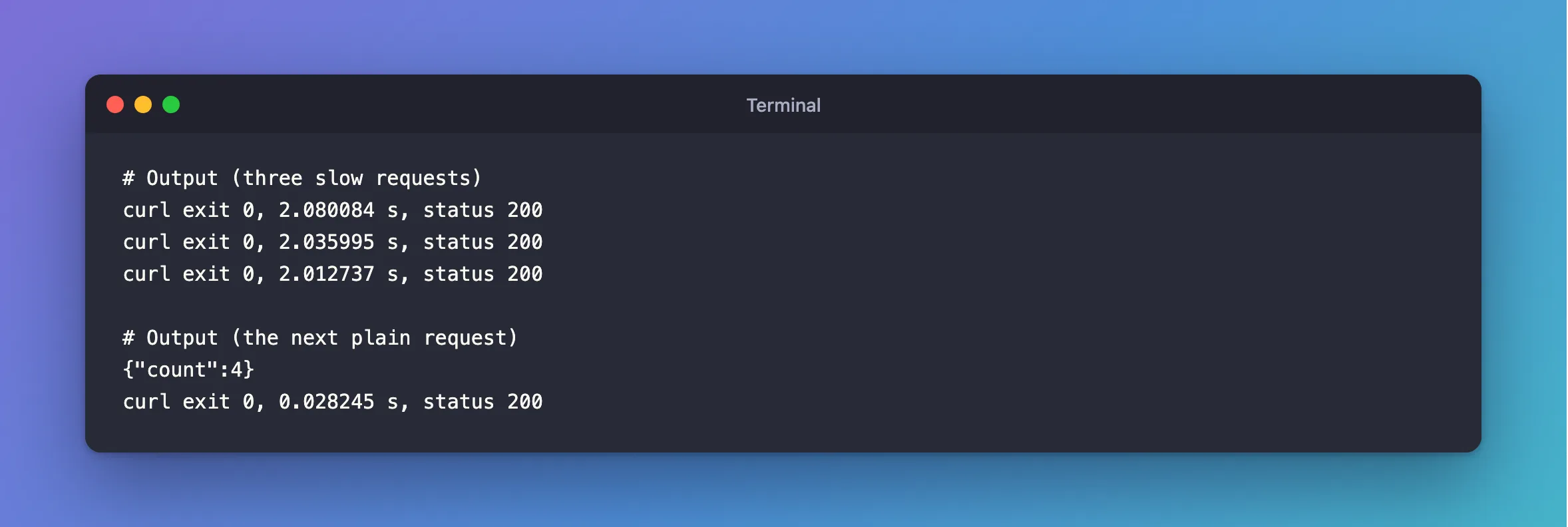
With the same 3-connection pool, the slow requests now answer, and give their connections back:
curl exit 0, 2.080084 s, status 200
curl exit 0, 2.035995 s, status 200
curl exit 0, 2.012737 s, status 200
{"count":4}
curl exit 0, 0.028245 s, status 200
If the pool does fill up, for whatever reason, the request now fails after one wait, and my handler tells the client to come back:
HTTP/1.1 503 Service Unavailable
Retry-After: 5
curl exit 0, 15.127497 s, status 503
Common Mistakes
| Mistake | What happens | Do this instead |
|---|---|---|
Raising Maximum Pool Size first | The leak uses up the bigger pool too | Look at performance_schema.threads first |
| Restarting the app, and moving on | It comes back | Find the cause |
| Long work inside a transaction | The connection is held the whole time | Keep them short |
Troubleshooting
| Symptom | Likely cause | Fix |
|---|---|---|
The connections are all Sleep | They're held by the app, doing nothing | Look for hung requests |
| The connections are all running queries | The database is the bottleneck | Find the slow query, or the lock |
| The failure takes exactly the connection timeout | That's this error | Connect Timeout in the connection string sets the wait |
| The failure takes over a minute | 0 is in your retry list | Tell it apart from a dropped connection |
Too many connections | The server's limit, not the pool's | The fix |
Conclusion
This error means every connection in the pool is taken. See what MySQL says they're doing. If they're idle, the app is holding them, and in my case hung requests were. Fix that, and the pool looks after itself.
Additional Resources
- Connection Pooling with Connector/NET — how the pool works.
- Connector/NET Connection Options —
Maximum Pool Size.
