Fixed: The splatting operator '@' cannot be used to reference variables in an expression in PowerShell

A curl command that reads the body of a request from a file, curl ... --data @post.json, works in zsh and bash. In PowerShell it stops before curl even starts, with ParserError: The splatting operator '@' cannot be used to reference variables in an expression, because a word that starts with @ means something else to PowerShell. Putting the argument in quotes fixes it.
What I Was Doing
I was checking the PowerShell version of every command in How to Serve a Registered Model by Alias with mlflow models serve. One step sends a JSON file to a model server with curl. curl reads the body of a request from a file when the file name comes after an @; its manual: "If you start the data with the letter @, the rest should be a filename to read the data from". In PowerShell 7.6.10, the line --data @first_patient.json failed before curl started.
It happens with any file and any web address, so this post shows it with a small example of its own: post.json, sent to JSONPlaceholder, a free fake API for testing that answers a new post by sending it back with an id.
{
  "title": "Hello",
  "body": "My first post",
  "userId": 1
}
curl https://jsonplaceholder.typicode.com/posts -H "Content-Type: application/json" --data @post.json
What I Expected
The post sent back, as zsh and bash both printed it for the same command:
{
  "title": "Hello",
  "body": "My first post",
  "userId": 1,
  "id": 101
}
What I Got
ParserError:
Line |
   1 |  … icode.com/posts -H "Content-Type: application/json" --data @post.json
     |                                                               ~~~~~
     | The splatting operator '@' cannot be used to reference variables in an expression. '@post' can be used only as an argument to a command. To reference variables in an expression use '$post'.
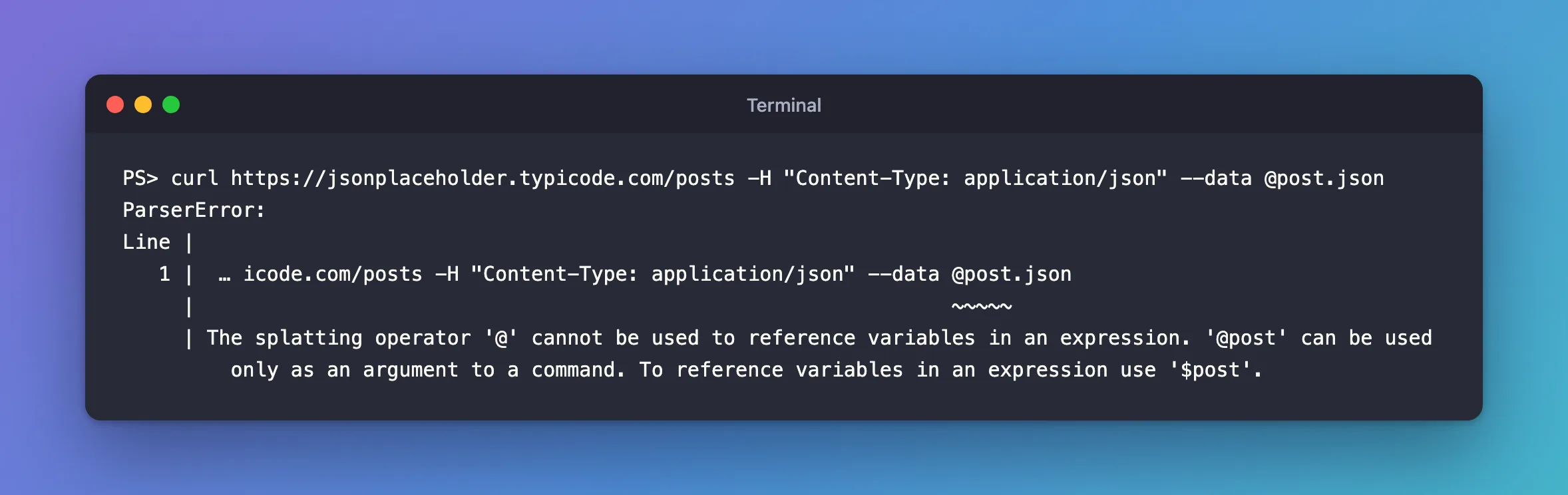
Nothing was sent: the error came from PowerShell itself, not from curl.
What I Checked
Where the marker points. The ~~~~~ under the line covers @post, five characters, and stops before .json. PowerShell had taken @post for something of its own, and the message names it: the splatting operator.
What splatting is. The about_Splatting page: "Splatting is a method of passing a collection of parameter values to a command as a unit. PowerShell associates each value in the collection with a command parameter. Splatted parameter values are stored in named splatting variables, which look like standard variables, but begin with an At symbol (@) instead of a dollar sign ($)." To PowerShell, @post meant the values stored in a variable named $post.
What PowerShell passes to a program. /bin/echo prints its arguments back with a space between them, so it shows exactly what a program such as curl receives. Four ways of writing the argument:
/bin/echo --data '@post.json'
/bin/echo --data "@post.json"
/bin/echo --data `@post.json
/bin/echo --data @post
--data @post.json
--data @post.json
--data @post.json
--data
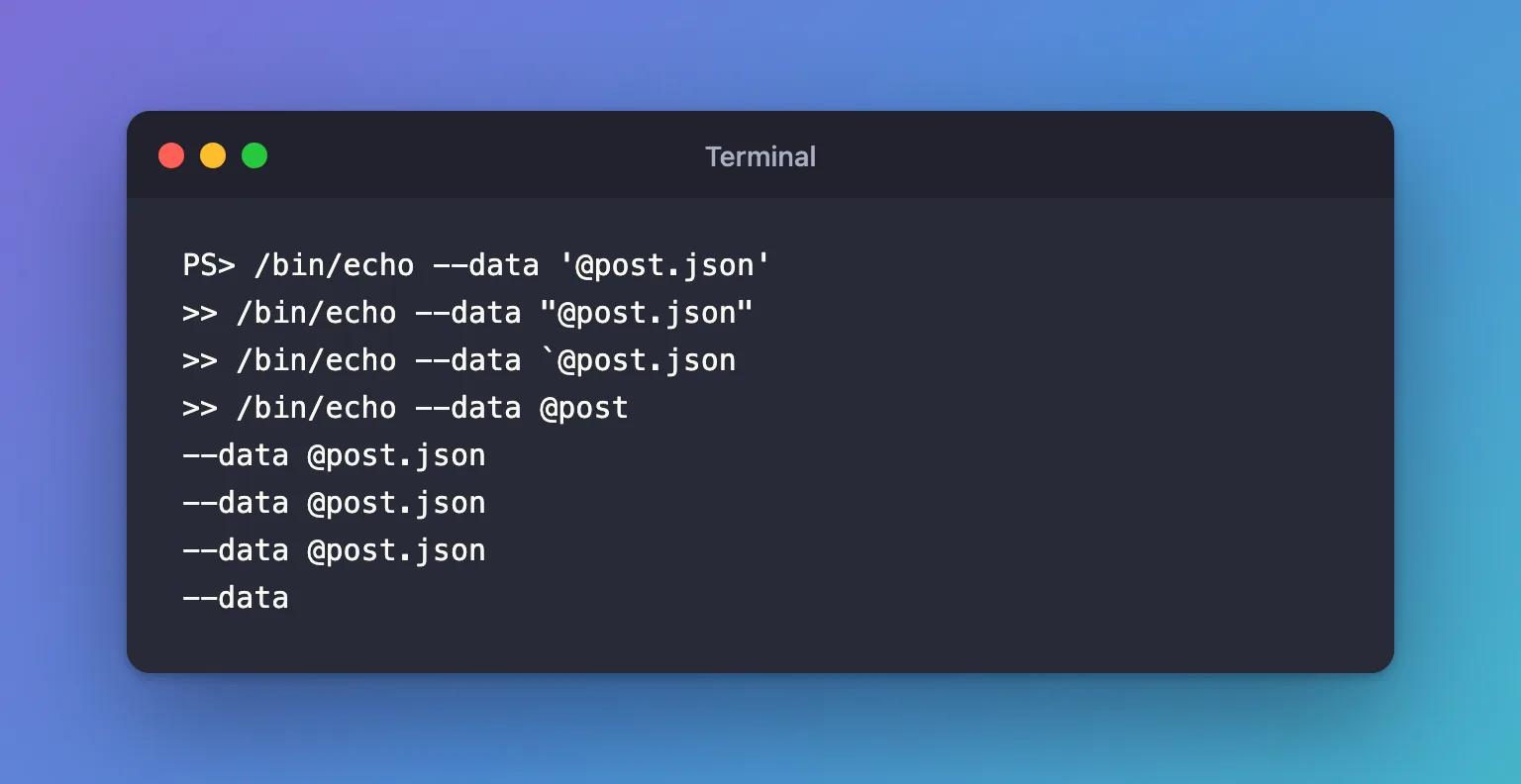
In single quotes, in double quotes, or after a backtick, which is PowerShell's escape character, @post.json arrived whole. Without the .json, @post didn't fail at all: PowerShell read it as the splatted variable $post, which doesn't exist, so nothing arrived after --data.
Microsoft's Azure CLI documentation. The Azure CLI also reads files with @, and its guide Considerations for running the Azure CLI in a PowerShell scripting language describes the same problem: "There are special characters of PowerShell, such as the at (@) symbol which is a splatting operator in PowerShell." It lists the same three ways around it: a backtick, single quotes or double quotes.
Why It Happens
PowerShell reads the whole line itself before it starts curl, and in that reading, a word that begins with @ isn't plain text. The Argument mode section of about_Parsing: "Initial at sign (@) begins expression syntaxes such as splatting (@args), arrays (@(1,2,3)), and hash table literals (@{a=1;b=2})."
So PowerShell read @post as splatting the variable $post. With .json right after it, that became an expression, as the message says, and the page's Expression mode section explains the rest: "Variable references are evaluated to their values but splatting is forbidden and causes a parser error." A parser error stops the whole line, which is why curl never ran. zsh and bash passed @post.json to curl unchanged, which is why the same command works there.
The Fix
Put the whole argument, @ included, in single quotes:
curl https://jsonplaceholder.typicode.com/posts -H "Content-Type: application/json" --data '@post.json'
The about_Quoting_Rules page: "A string enclosed in single quotation marks is a verbatim string. The string is passed to the command exactly as you type it. No substitution is performed." PowerShell removes the quotes and curl receives @post.json, the same as in zsh. The quoted line also runs unchanged in zsh and bash, so you can write it this way everywhere.
After the Fix
{
  "title": "Hello",
  "body": "My first post",
  "userId": 1,
  "id": 101
}
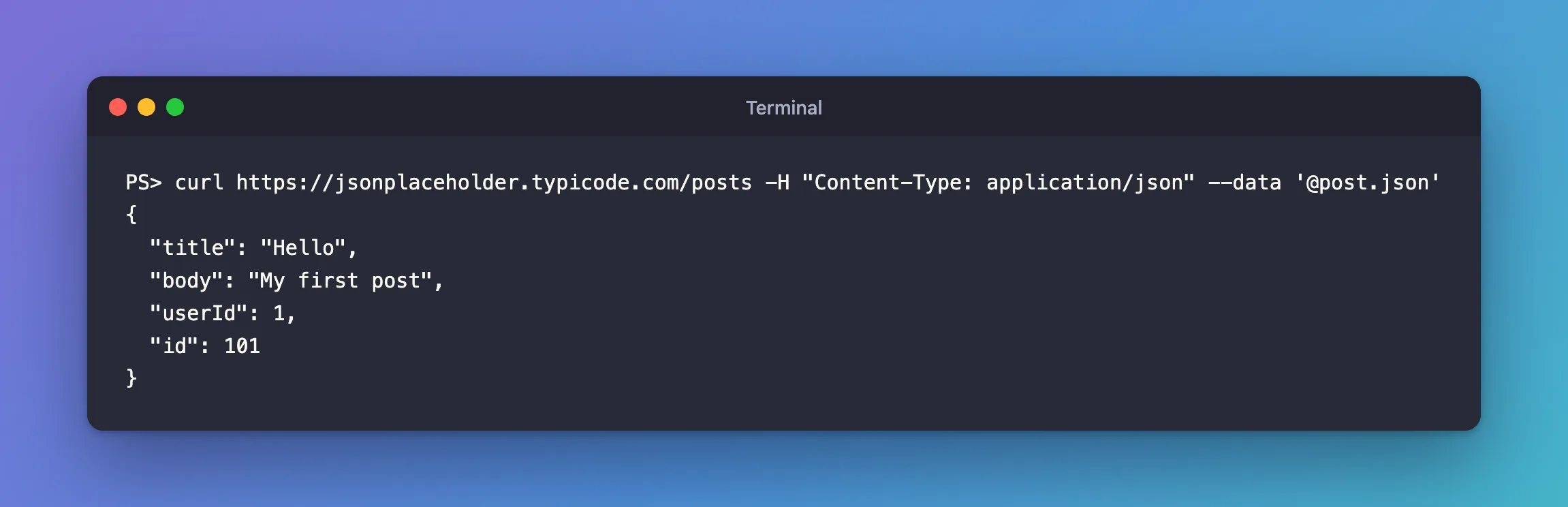
curl read the file, and JSONPlaceholder sent the post back with "id": 101, exactly as in zsh and bash.
Common Mistakes
| Mistake | What happens | Do this instead |
|---|---|---|
Quoting only the file name: @'post.json' | @' starts a here-string, so PowerShell stops with No characters are allowed after a here-string header but before the end of the line. | Quote the whole argument, @ included: '@post.json' |
Leaving a file name without an extension unquoted: --data @post | There's no ParserError: PowerShell splats the variable $post, nothing arrives after --data, and curl fails with curl: option --data: requires parameter | Quote it the same way: '@post' |
Troubleshooting
| Symptom | Likely cause | Fix |
|---|---|---|
ParserError: The splatting operator '@' cannot be used to reference variables in an expression | An unquoted argument starts with @, with a . after the name | Put the argument in single quotes |
curl: option --data: requires parameter in PowerShell, although the line has a value after --data | An unquoted @name was read as a splatted variable that doesn't exist | Put the argument in single quotes |
| The same command works in zsh or bash | They pass @post.json to curl unchanged; PowerShell reads the leading @ as splatting | Quote it, and it works in all three |
FAQ
Do double quotes work too?
Yes. --data "@post.json" sent the post as well, and JSONPlaceholder answered with "id": 101. Inside double quotes, though, PowerShell still replaces variables. about_Quoting_Rules: "Variable names preceded by a dollar sign ($) are replaced with the variable's value before the string is passed to the command for processing." Single quotes pass the text exactly as typed, so they're the safer habit for a file name.
Can I escape the @ instead of quoting it?
Yes. The backtick is PowerShell's escape character, and `@post.json reached /bin/echo as @post.json in the check above. Quotes are easier to read, though, and the quoted line works unchanged in zsh and bash.
Can I send the file without curl?
Yes, with PowerShell's own Invoke-RestMethod, which reads the body from a file with -InFile, so there's no @ to quote:
Invoke-RestMethod https://jsonplaceholder.typicode.com/posts -Method Post -ContentType "application/json" -InFile post.json
title body          userId  id
----- ----          ------  --
Hello My first post      1 101
Conclusion
The splatting operator '@' cannot be used to reference variables in an expression means PowerShell read the @ at the start of @post.json as splatting, and stopped before curl ever ran. Putting the argument in single quotes, '@post.json', passes it to curl as it is, and the same line works in zsh and bash.
Additional Resources
- about_Splatting — what a leading
@means to PowerShell. - about_Parsing: argument mode — how PowerShell reads the words of a command.
- about_Quoting_Rules — single quotes, double quotes and the backtick.
- curl's manual: -d, --data — reading the body of a request from a file with
@. - Considerations for running the Azure CLI in a PowerShell scripting language — the same
@problem with the Azure CLI.
