Fixed: "The requested image's platform (linux/amd64) does not match the detected host platform (linux/arm64/v8)" with an MLflow Model Image

docker run on an image I'd built with mlflow models build-docker printed WARNING: The requested image's platform (linux/amd64) does not match the detected host platform (linux/arm64/v8) and no specific platform was requested. My Mac has an Apple silicon chip, and MLflow builds every model image for linux/amd64, the architecture of most servers. The container still ran, under emulation. Saying the platform with --platform linux/amd64 fixed the warning.
What I Was Doing
In Part 9 of the MLflow series, I built an image of the shopper project's champion model with mlflow models build-docker, MLflow 3.18.0, and named it shopper-purchase-prediction:2. Then I started it in the background on Docker Desktop 4.100.1, on an Apple silicon Mac, with two workers and its port published on my own computer only:
docker run -d --name shopper-api -e MLFLOW_MODELS_WORKERS=2 -p 127.0.0.1:5001:8080 shopper-purchase-prediction:2
What I Expected
The new container's ID, and nothing else.
What I Got
A warning first:
WARNING: The requested image's platform (linux/amd64) does not match the detected host platform (linux/arm64/v8) and no specific platform was requested
e6ff0c21c687dca6fa65f345b3723fa755639c77691e0d65b12f73e483d7b01a
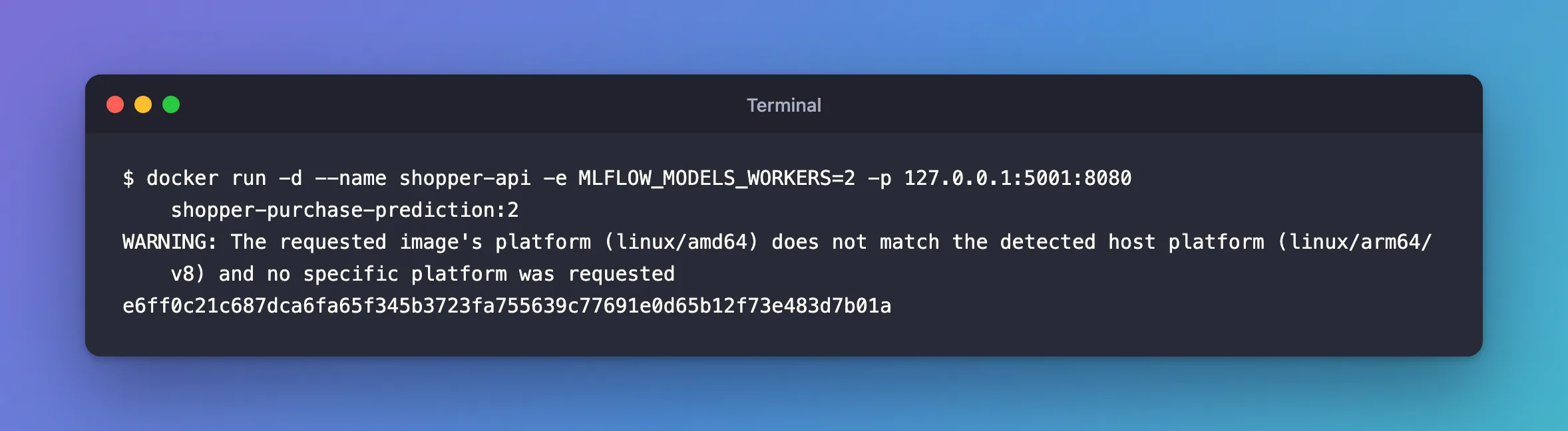
The container started anyway, and its /ping answered after a few seconds.
What I Checked
The image's platform and my Docker's:
docker image inspect --format '{{.Os}}/{{.Architecture}}' shopper-purchase-prediction:2
docker version --format '{{.Server.Os}}/{{.Server.Arch}}'
linux/amd64
linux/arm64
The image is for amd64 (Intel and AMD processors); Docker Desktop on this Mac runs arm64 Linux.
Why MLflow built amd64. I hadn't asked for it. MLflow 3.18.0's mlflow/models/docker_utils.py adds the platform to every docker build it runs:
    # In Docker < 19, `docker build` doesn't support the `--platform` option
    is_platform_supported = docker_version >= 19
    # Enforcing the AMD64 architecture build for Apple M1 users
    platform_option = ["--platform", "linux/amd64"] if is_platform_supported else []
What Docker says about it. Docker's page on multi-platform builds: "Containers share the host kernel, which means that the code that's running inside the container must be compatible with the host's architecture. This is why you can't run a linux/amd64 container on an arm64 host (without using emulation)". Docker Desktop's setting Use Rosetta for x86_64/amd64 emulation on Apple Silicon is that emulation.
Why It Happens
MLflow builds model images for linux/amd64 on purpose, so they run on the servers most images are deployed to. On an Apple silicon Mac, Docker can run that image only by emulating an Intel processor, and docker run warns when it has to choose that by itself: "no specific platform was requested".
The Fix
Request the image's platform yourself:
docker run -d --name shopper-api --platform linux/amd64 -e MLFLOW_MODELS_WORKERS=2 -p 127.0.0.1:5001:8080 shopper-purchase-prediction:2
The command is the same in PowerShell. --platform is, in the words of the docker run reference, "Set platform if server is multi-platform capable". On an Intel or AMD computer, it matches the computer and changes nothing.
After the Fix
255dec639009cfafd68bafb320b5015ce80856ecc6ac92cd7b3371a13a74a4f4
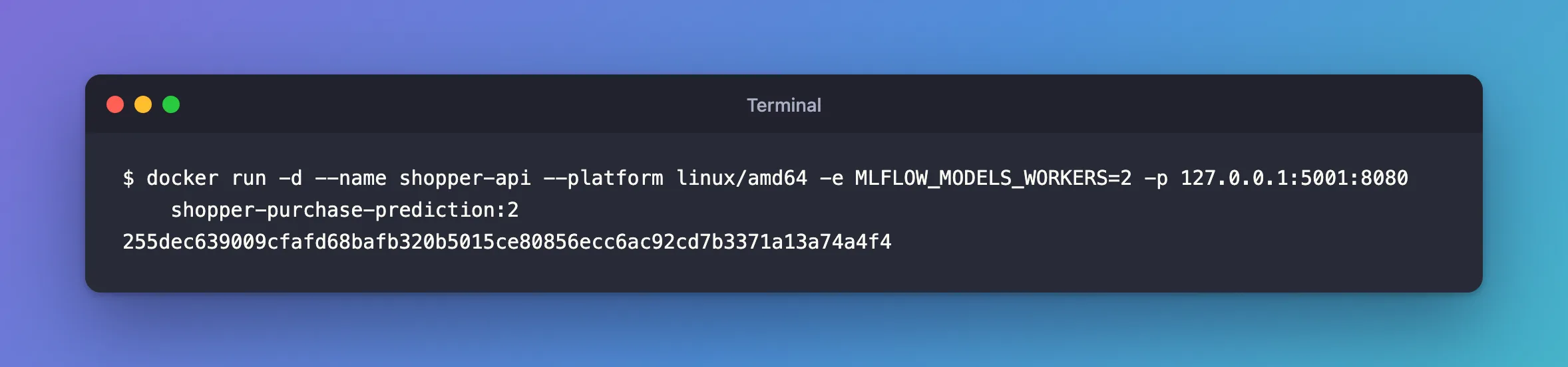
Only the container's ID, and the container answered /ping with 200 OK. The image itself is the same, and it still runs under emulation on this Mac: --platform states the choice instead of leaving it to Docker.
Common Mistakes
| Mistake | What happens | Do this instead |
|---|---|---|
--platform linux/arm64 on an Apple silicon Mac | The image has no arm64 variant, so Docker reports Unable to find image ... locally and tries to download it | --platform linux/amd64, the image's own platform |
| Treating the warning as a failed start | The container is running; the warning is printed before its ID | Check with docker ps, or call its /ping |
Troubleshooting
| Symptom | Likely cause | Fix |
|---|---|---|
pull access denied for shopper-purchase-prediction, repository does not exist | --platform linux/arm64 made Docker look for that variant on Docker Hub | Run it with --platform linux/amd64 |
| The warning comes back for another MLflow image | Every build-docker image is linux/amd64 | Add --platform linux/amd64 to each docker run |
FAQ
Can MLflow build an arm64 image instead?
Not with build-docker: the platform is written into its docker build command. mlflow models generate-dockerfile writes the same Dockerfile without building it, and you choose the platform when you build it yourself: How to Generate a Dockerfile for an MLflow Model.
Do the predictions change under emulation?
Not in a way that matters here: the shopper model's rounded purchase probabilities were the same in the container as with mlflow models serve, 0.8931, 0.0009 and 0.0033. A small regression model I served both ways differed only in the last digits, such as 4.1316498270767426 and 4.13164982707675.
Conclusion
MLflow builds every model image for linux/amd64, so on an Apple silicon Mac docker run warned that the image's platform doesn't match the computer's. --platform linux/amd64 asked for that platform on purpose, and the container started without the warning.
Additional Resources
- docker container run — the
--platformoption. - Multi-platform builds — why an image has a platform.
- Docker Desktop settings — Rosetta emulation on Apple silicon.
