Fixed: "The query uses a row limiting operator ('Skip'/'Take') without an 'OrderBy' operator" in EF Core

My paging endpoint answered 200 OK, and the log had a warning: The query uses a row limiting operator ('Skip'/'Take') without an 'OrderBy' operator. This may lead to unpredictable results. It's right to warn. Without ORDER BY, MySQL returned the rows in the order of whichever index it happened to read, so the next query could give a different page. Adding a fully unique sort fixes it.
What I Was Doing
In a .NET 10 Web API with EF Core 10, Oracle's MySQL provider and MySQL 9.7, I added paging to a list of product codes:
app.MapGet("/demo/page-noorder", async (int page, int size, InventoryDbContext db) =>
    Results.Ok(await db.Products
        .Skip((page - 1) * size)
        .Take(size)
        .Select(p => p.Sku)
        .ToListAsync()));
GET http://localhost:5190/demo/page-noorder?page=1&size=3
What I Expected
The first three products, in the order they were created, without any warning.
What I Got
HTTP/1.1 200 OK
Content-Type: application/json; charset=utf-8

[
  "ADP-HDMI-VGA",
  "ADP-USBC-USBA",
  "CBL-HDMI-2M"
]
warn: Microsoft.EntityFrameworkCore.Query[10102]
      The query uses a row limiting operator ('Skip'/'Take') without an 'OrderBy' operator. This may lead to unpredictable results. If the 'Distinct' operator is used after 'OrderBy', then make sure to use the 'OrderBy' operator after 'Distinct' as the ordering would otherwise get erased.
warn: Microsoft.EntityFrameworkCore.Query[10102]
      The query uses a row limiting operator ('Skip'/'Take') without an 'OrderBy' operator. This may lead to unpredictable results. If the 'Distinct' operator is used after 'OrderBy', then make sure to use the 'OrderBy' operator after 'Distinct' as the ordering would otherwise get erased.
info: Microsoft.EntityFrameworkCore.Database.Command[20101]
      Executed DbCommand (1ms) [Parameters=[@p1='?' (DbType = Int32), @p='?' (DbType = Int32)], CommandType='Text', CommandTimeout='30']
      SELECT `p`.`Sku`
      FROM `products` AS `p`
      LIMIT @p1 OFFSET @p
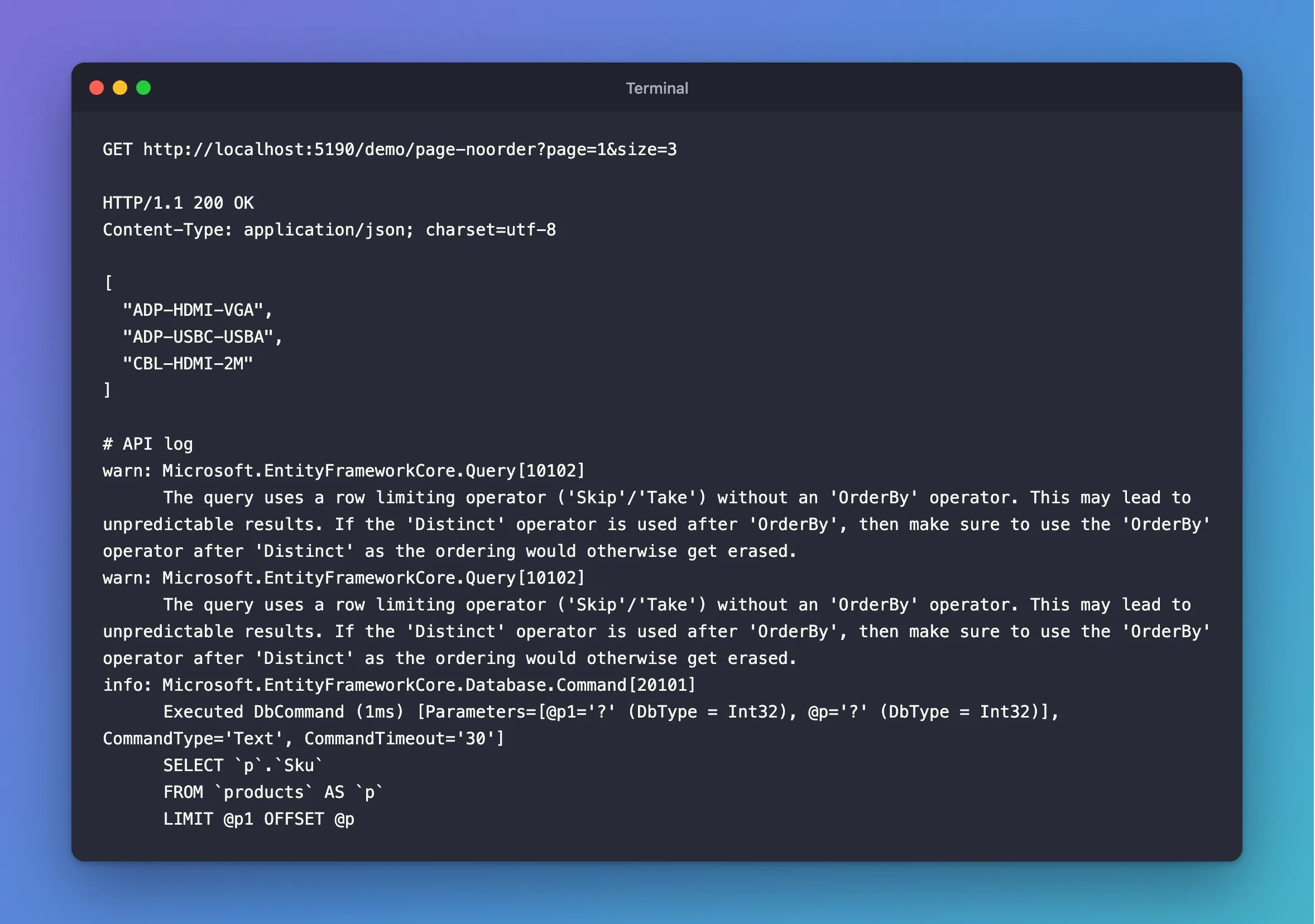
The first product created was CBL-USBC-2M, with ID 1, and it isn't here. The list came back alphabetically by SKU, which I never asked for.
What I Checked
Why alphabetical. The SQL only needs the Sku column, and the products table has a unique index on it. MySQL can answer the whole query from that index, so it reads it from the start, and an index is sorted. EXPLAIN shows the plan, here on a copy of the table with about 5,000 rows:
EXPLAIN SELECT Sku FROM products LIMIT 3\G
*************************** 1. row ***************************
EXPLAIN: -> Limit: 3 row(s)  (cost=497 rows=3)
    -> Covering index scan on products using IX_products_Sku  (cost=497 rows=4894)
Ask for one more column, and MySQL scans the table instead, because the index no longer has everything:
EXPLAIN SELECT Sku, Name FROM products LIMIT 3\G
*************************** 1. row ***************************
EXPLAIN: -> Limit: 3 row(s)  (cost=497 rows=3)
    -> Table scan on products  (cost=497 rows=4894)
And the rows change with it. On the small table, the same LIMIT 3 with one more column gave a different first row:
SELECT Sku, Name FROM products LIMIT 3;
+-------------+------------------+
| Sku         | Name             |
+-------------+------------------+
| CBL-USBC-2M | USB-C cable, 2 m |
| CBL-USBC-1M | USB-C cable, 1 m |
| CBL-HDMI-2M | HDMI cable, 2 m  |
+-------------+------------------+
3 rows in set (0.000 sec)
So this order is a side effect of how MySQL chose to run the query.
What EF Core says. Its pagination page warns that "relational databases do not apply any ordering by default, even on the primary key", and adds: "always make sure that your ordering is fully unique."
That it's a warning, not an error. The [10102] is the event's ID, and the warn: means the query ran normally. It printed twice in the log, once for Skip and once for Take.
Why It Happens
Skip and Take become LIMIT … OFFSET, which means "skip this many rows, take that many". Without ORDER BY, "this many rows" of what? MySQL can return rows in any order, and it's free to change that order when the data, the indexes or the query plan change. Page 2 might repeat rows from page 1, or miss some. EF Core can't see any of that coming, except that there's no OrderBy, so it warns about that.
The Fix
Sort before you page, and end the sort with something unique:
app.MapGet("/demo/page", async (int page, int size, InventoryDbContext db) =>
    Results.Ok(await db.Products
        .OrderBy(p => p.Name)
        .ThenBy(p => p.Id)
        .Skip((page - 1) * size)
        .Take(size)
        .Select(p => p.Sku)
        .ToListAsync()));
ThenBy(p => p.Id) matters when two products can have the same name: the pagination page explains that otherwise "results could be skipped when paginating as they're ordered differently across two paginating queries."
After the Fix
HTTP/1.1 200 OK
Content-Type: application/json; charset=utf-8

[
  "CBL-HDMI-2M",
  "ADP-HDMI-VGA",
  "CBL-LTNG-1M"
]
info: Microsoft.EntityFrameworkCore.Database.Command[20101]
      Executed DbCommand (1ms) [Parameters=[@p1='?' (DbType = Int32), @p='?' (DbType = Int32)], CommandType='Text', CommandTimeout='30']
      SELECT `p`.`Sku`
      FROM `products` AS `p`
      ORDER BY `p`.`Name`, `p`.`Id`
      LIMIT @p1 OFFSET @p
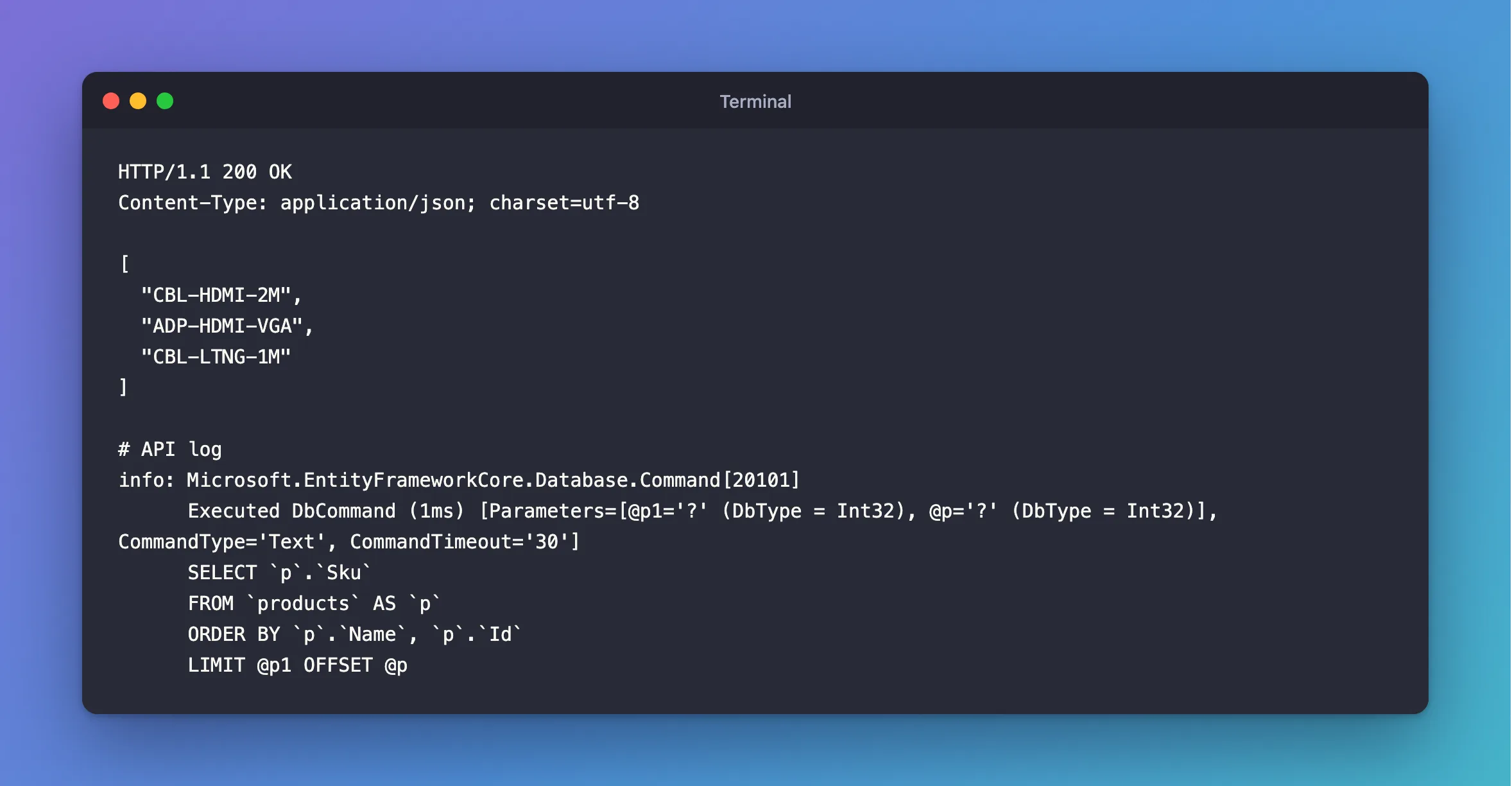
No warning, and page 2 continues where page 1 stopped:
HTTP/1.1 200 OK
Content-Type: application/json; charset=utf-8

[
  "CBL-USBC-1M",
  "CBL-USBC-2M",
  "CHG-USBC-20W"
]
Common Mistakes
| Mistake | What happens | Do this instead |
|---|---|---|
| Assuming rows come back in ID order | It holds until the plan changes | Always sort |
| Sorting by a column with repeated values only | Rows that tie can move between pages | Add .ThenBy(p => p.Id) |
Sorting after Skip and Take | The page is picked before the sort | Sort first |
| Hiding the warning in the log configuration | The bug stays | Add the sort |
Troubleshooting
| Symptom | Likely cause | Fix |
|---|---|---|
warn: Microsoft.EntityFrameworkCore.Query[10102] | Skip or Take with no OrderBy | Add OrderBy |
The warning stays after adding OrderBy | Distinct after OrderBy removes the order, as the message says | Put OrderBy after Distinct |
| The same rows on two pages | A sort that isn't unique, or rows added between requests | Add the key; consider keyset paging |
The query uses the 'First'/'FirstOrDefault' operator | The same idea for First | See that post |
FAQ
Is it safe to ignore if it looks right?
No. It looks right until MySQL chooses a different plan, which can happen after a new index or more rows.
Does the sort make it slower?
It can, without an index on the sort columns. EXPLAIN shows it as Using filesort. How to Check if a MySQL Query Uses an Index covers that.
Conclusion
"The query uses a row limiting operator ('Skip'/'Take') without an 'OrderBy' operator" means your pages have no defined order: MySQL returns whatever is convenient, here the order of the SKU index. Add OrderBy, and finish with ThenBy on a unique column, so a row can't appear twice or go missing.
Additional Resources
- Pagination in EF Core — offset and keyset paging.
- RowLimitingOperationWithoutOrderByWarning — the event in the API reference.
