Fixed: The MLflow Model Registry Doesn't Show a New Alias Until You Reload the Page

I gave a model version the alias champion in the MLflow Model Registry, clicked Save aliases, and the dialog closed, but the version's Aliases column still said Add. The alias was saved on the server all along; MLflow 3.18.0's page just didn't load the model again after the dialog closed. Reloading the page showed it.
What I Was Doing
I registered a small iris model as iris-alias-check, version 1:
import mlflow
from sklearn.datasets import load_iris
from sklearn.linear_model import LogisticRegression

mlflow.set_tracking_uri("http://127.0.0.1:8080")
mlflow.set_experiment("alias-refresh-example")

iris = load_iris(as_frame=True)
X, y = iris.data, iris.target_names[iris.target]
with mlflow.start_run():
    mlflow.sklearn.log_model(
        LogisticRegression(max_iter=1000).fit(X, y),
        name="model",
        registered_model_name="iris-alias-check",
        input_example=X.head(3),
    )
uv run python register_iris_model.py
Successfully registered model 'iris-alias-check'.
2026/11/25 09:50:08 INFO mlflow.store.model_registry.abstract_store: Waiting up to 300 seconds for model version to finish creation. Model name: iris-alias-check, version 1
Created version '1' of model 'iris-alias-check'.
🏃 View run delicate-moth-131 at: http://127.0.0.1:8080/#/experiments/26/runs/47dac29728494e7eab587abe1189fe82
🧪 View experiment at: http://127.0.0.1:8080/#/experiments/26
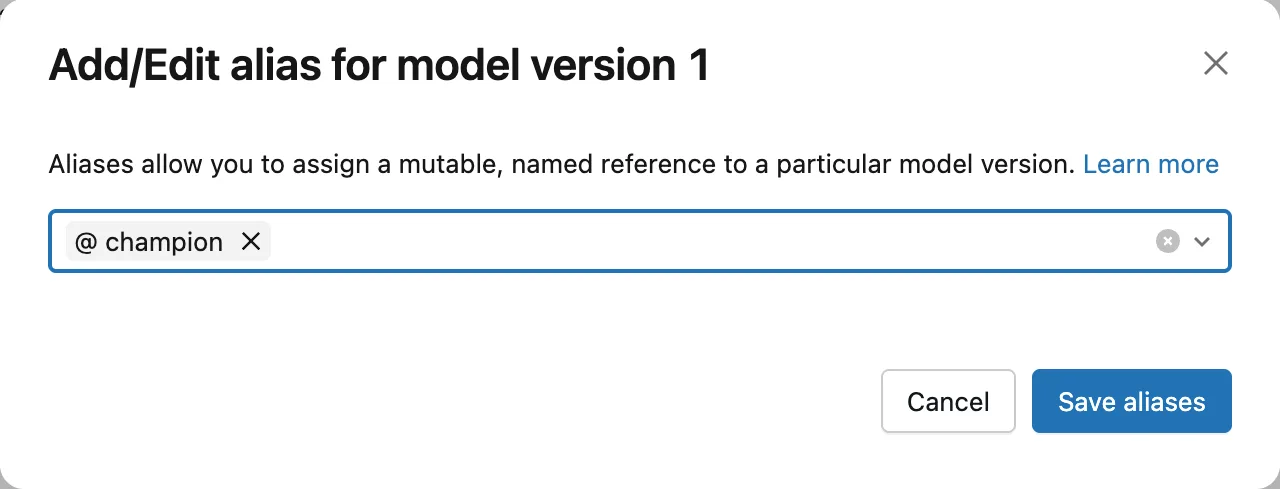
Then, in the MLflow UI, I opened Model registry, clicked iris-alias-check, and clicked Add in the Aliases column of Version 1. In the dialog I typed champion, pressed Enter to turn it into a tag, and clicked Save aliases:
What I Expected
@ champion in the Aliases column of Version 1, as soon as the dialog closed.
What I Got
The dialog closed, and nothing else changed. Twenty seconds later, the Aliases column still said Add:
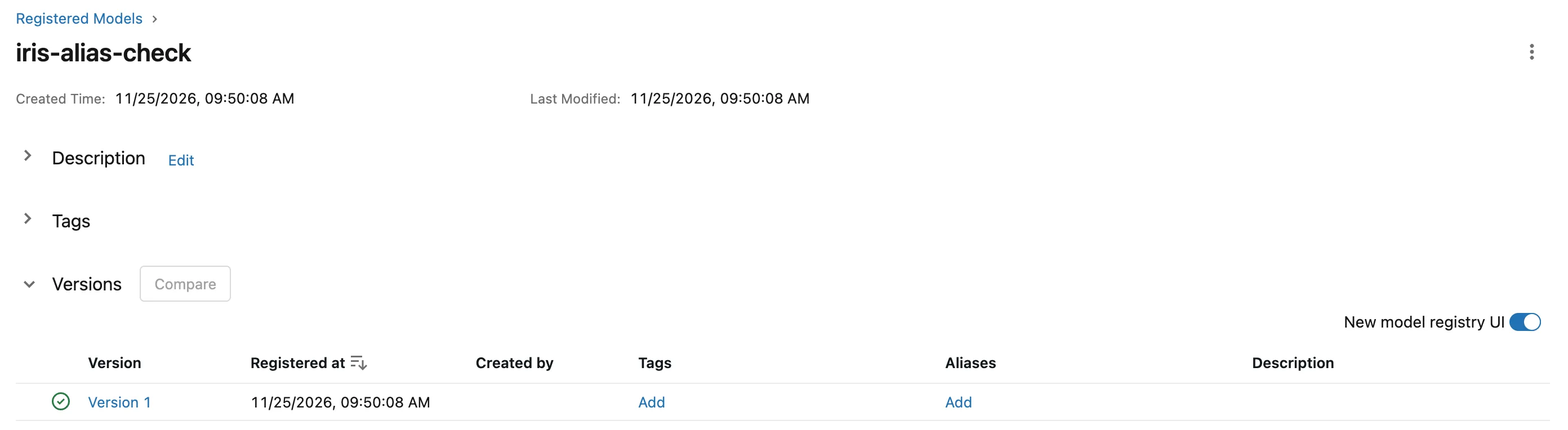
No error message appeared, so it looked as if the save had failed.
What I Checked
Whether the server has the alias. A short script asks the registry for the model's aliases:
import mlflow
from mlflow import MlflowClient

mlflow.set_tracking_uri("http://127.0.0.1:8080")
print(MlflowClient().get_registered_model("iris-alias-check").aliases)
uv run python check_alias.py
{'champion': '1'}
The alias was saved, and it points to version 1.
Whether another page shows it. I clicked Registered Models at the top of the page. The list showed @ champion : Version 1 for iris-alias-check, and when I clicked the model again, its versions table showed the alias too.
What the dialog says when it opens again. Before reloading, clicking Add in the same row opens the dialog again, and it shows an error that the save had kept to itself: Cannot read properties of undefined (reading 'loadPage').
What MLflow's documentation says. The Model Registry workflows page describes the step: "You can add or edit aliases and tags for a specific model version by clicking on the corresponding Add link or pencil icon in the model version table." It doesn't mention reloading the page.
Why It Happens
Saving the dialog sends the alias to the server, which stores it at once. The page should then load the model again, but in MLflow 3.18.0 that refresh step fails with the error above, so it never runs, and the dialog keeps the error to itself. MLflow's source shows why: the page hands the dialog its refresh function without the page it belongs to. The versions table keeps what it loaded when the page opened, and any page that loads the model afterwards shows the alias. I reported it to MLflow as issue #28120, with the cause.
The Fix
Load the model's page again: reload it in the browser (Cmd+R on a Mac, F5 on Windows), or click Registered Models and open the model from the list.
After the Fix
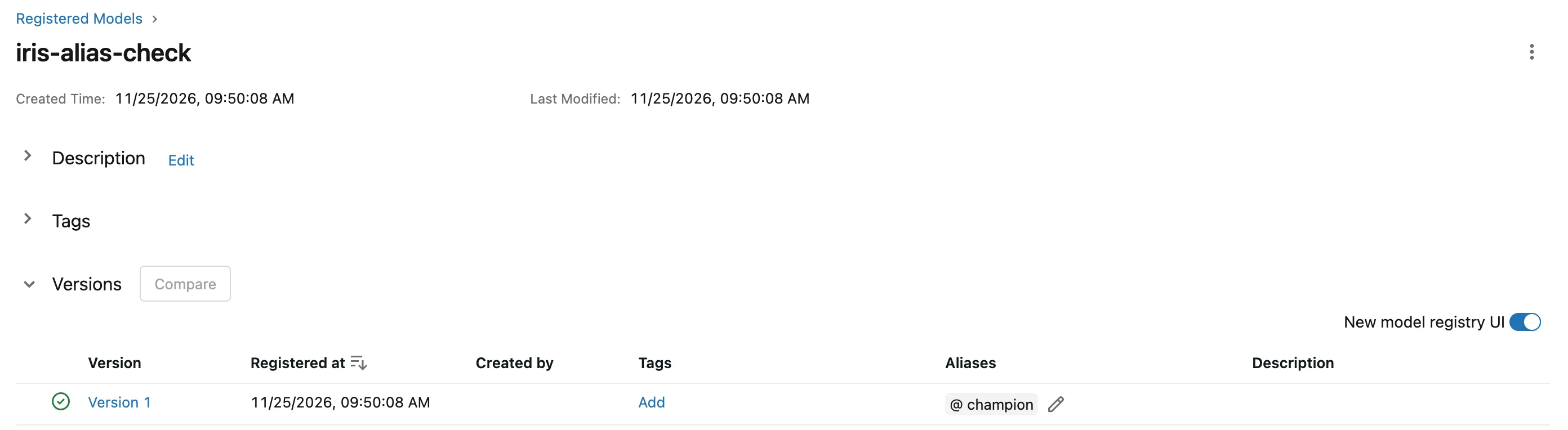
Version 1 shows @ champion, the alias the server had stored when I saved the dialog.
Common Mistakes
| Mistake | What happens | Do this instead |
|---|---|---|
| Taking the unchanged column as a failed save | You add the alias again, or give up on it | Reload the page: the alias is already saved |
| Checking an alias change only in the open page | You see the state from before the change | Reload, or ask the registry with get_registered_model |
Troubleshooting
| Symptom | Likely cause | Fix |
|---|---|---|
| The Aliases column still says Add after Save aliases | The page hasn't loaded the model again | Reload it, or open the model from Registered Models |
| The alias is missing after a reload too | The dialog was closed with Cancel or the X | Add it again and click Save aliases |
FAQ
Can my code use the alias before the page shows it?
Yes: the alias lives on the server, so models:/iris-alias-check@champion and get_registered_model see it however the page looks.
Does the same happen when an alias moves to another version?
Yes. When I moved an alias from one version to another in the same dialog, the table showed the old version until I reloaded the page.
Conclusion
The alias was saved the moment I clicked Save aliases; MLflow 3.18.0's model page just kept showing the versions as they were when it opened. Reloading the page, or opening the model again from Registered Models, showed @ champion on Version 1.
Additional Resources
- Model Registry workflows — adding aliases and tags in the UI.
- MLflow Model Registry — what aliases are.
