Fixed: "The instance of entity type cannot be tracked because another instance with the same key value is already being tracked" in EF Core

I loaded a row to check it existed, built a new object with the same ID and the changed values, and called db.Categories.Update. EF Core refused: The instance of entity type 'Category' cannot be tracked because another instance with the same key value for {'Id'} is already being tracked. A context allows one object per row. The simple fix is to change the object you loaded, with no Update call at all.
What I Was Doing
In a .NET 10 Web API with EF Core 10, I wrote a rename endpoint that loads the row first, to answer 404 when it's missing, and then saves a new object with the same ID:
app.MapPut("/demo/update-new-object/{id:int}", async (int id, InventoryDbContext db) =>
{
    var existing = await db.Categories.FirstOrDefaultAsync(c => c.Id == id);
    if (existing is null)
    {
        return Results.NotFound();
    }

    var updated = new Category { Id = id, Name = "Renamed by a new object", CreatedAtUtc = existing.CreatedAtUtc };
    db.Categories.Update(updated);
    await db.SaveChangesAsync();
    return Results.Ok(new { updated.Id, updated.Name });
});
What I Expected
200 OK, and the category renamed.
What I Got
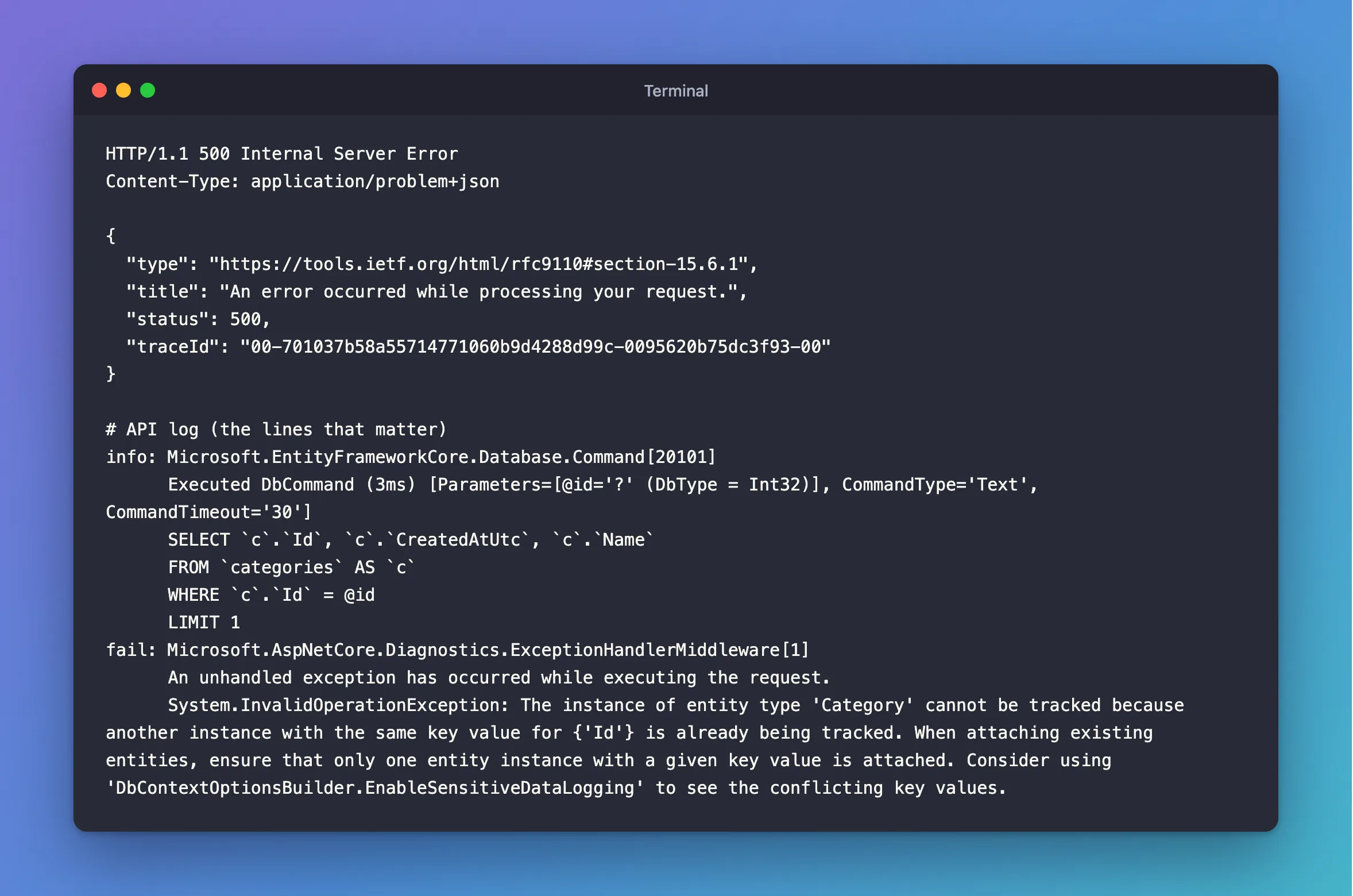
HTTP/1.1 500 Internal Server Error
Content-Type: application/problem+json

{
  "type": "https://tools.ietf.org/html/rfc9110#section-15.6.1",
  "title": "An error occurred while processing your request.",
  "status": 500,
  "traceId": "00-701037b58a55714771060b9d4288d99c-0095620b75dc3f93-00"
}
info: Microsoft.EntityFrameworkCore.Database.Command[20101]
      Executed DbCommand (3ms) [Parameters=[@id='?' (DbType = Int32)], CommandType='Text', CommandTimeout='30']
      SELECT `c`.`Id`, `c`.`CreatedAtUtc`, `c`.`Name`
      FROM `categories` AS `c`
      WHERE `c`.`Id` = @id
      LIMIT 1
fail: Microsoft.AspNetCore.Diagnostics.ExceptionHandlerMiddleware[1]
      An unhandled exception has occurred while executing the request.
      System.InvalidOperationException: The instance of entity type 'Category' cannot be tracked because another instance with the same key value for {'Id'} is already being tracked. When attaching existing entities, ensure that only one entity instance with a given key value is attached. Consider using 'DbContextOptionsBuilder.EnableSensitiveDataLogging' to see the conflicting key values.
The log shows the SELECT ran and no UPDATE did: the exception came from db.Categories.Update(updated) itself, before anything went to MySQL.
What I Checked
What "tracked" means here. EF Core's tracking page says: "When materializing an entity, EF Core returns the same entity instance from the change tracker if it's already being tracked." My FirstOrDefaultAsync had no Select or AsNoTracking, so existing was tracked.
Why two objects aren't allowed. EF Core's identity resolution page explains: "EF Core requires a single instance because: Property values may be different between multiple instances. When updating the database, EF Core needs to know which property values to use." Here, existing.Name and updated.Name were different, so which one should it save?
Whether Update works without the load. It does, on a fresh context:
var updated = new Category { Id = id, Name = "Renamed without loading", CreatedAtUtc = new DateTime(2026, 1, 1, 0, 0, 0, DateTimeKind.Utc) };
db.Categories.Update(updated);
await db.SaveChangesAsync();
info: Microsoft.EntityFrameworkCore.Database.Command[20101]
      Executed DbCommand (2ms) [Parameters=[@p2='?' (DbType = Int32), @p0='?' (DbType = DateTime), @p1='?' (Size = 100)], CommandType='Text', CommandTimeout='30']
      UPDATE `categories` SET `CreatedAtUtc` = @p0, `Name` = @p1
      WHERE `Id` = @p2;
      SELECT ROW_COUNT();
No error, but look at the SQL: it writes every column, including a CreatedAtUtc I'd have to know. And for a row that doesn't exist, it throws DbUpdateConcurrencyException instead of giving me a 404.
Why It Happens
A DbContext keeps one object per primary key. Update means "start tracking this object, and treat it as changed". With another object already tracked for that key, EF Core can't do that without guessing, so it stops.
The Fix
Don't make a second object. Change the one you loaded, and save:
var category = await db.Categories
    .FirstOrDefaultAsync(c => c.Id == id, cancellationToken);

if (category is null)
{
    return TypedResults.NotFound();
}

category.Name = request.Name.Trim();

await db.SaveChangesAsync(cancellationToken);
EF Core's Basic SaveChanges page says: "EF automatically detects changes made to an existing entity that is tracked by the context." So there's no Update call, and no second object.
After the Fix
info: Microsoft.EntityFrameworkCore.Database.Command[20101]
      Executed DbCommand (1ms) [Parameters=[@id='?' (DbType = Int32)], CommandType='Text', CommandTimeout='30']
      SELECT `c`.`Id`, `c`.`CreatedAtUtc`, `c`.`Name`
      FROM `categories` AS `c`
      WHERE `c`.`Id` = @id
      LIMIT 1
info: Microsoft.EntityFrameworkCore.Database.Command[20101]
      Executed DbCommand (2ms) [Parameters=[@p1='?' (DbType = Int32), @p0='?' (Size = 100)], CommandType='Text', CommandTimeout='30']
      UPDATE `categories` SET `Name` = @p0
      WHERE `Id` = @p1;
      SELECT ROW_COUNT();
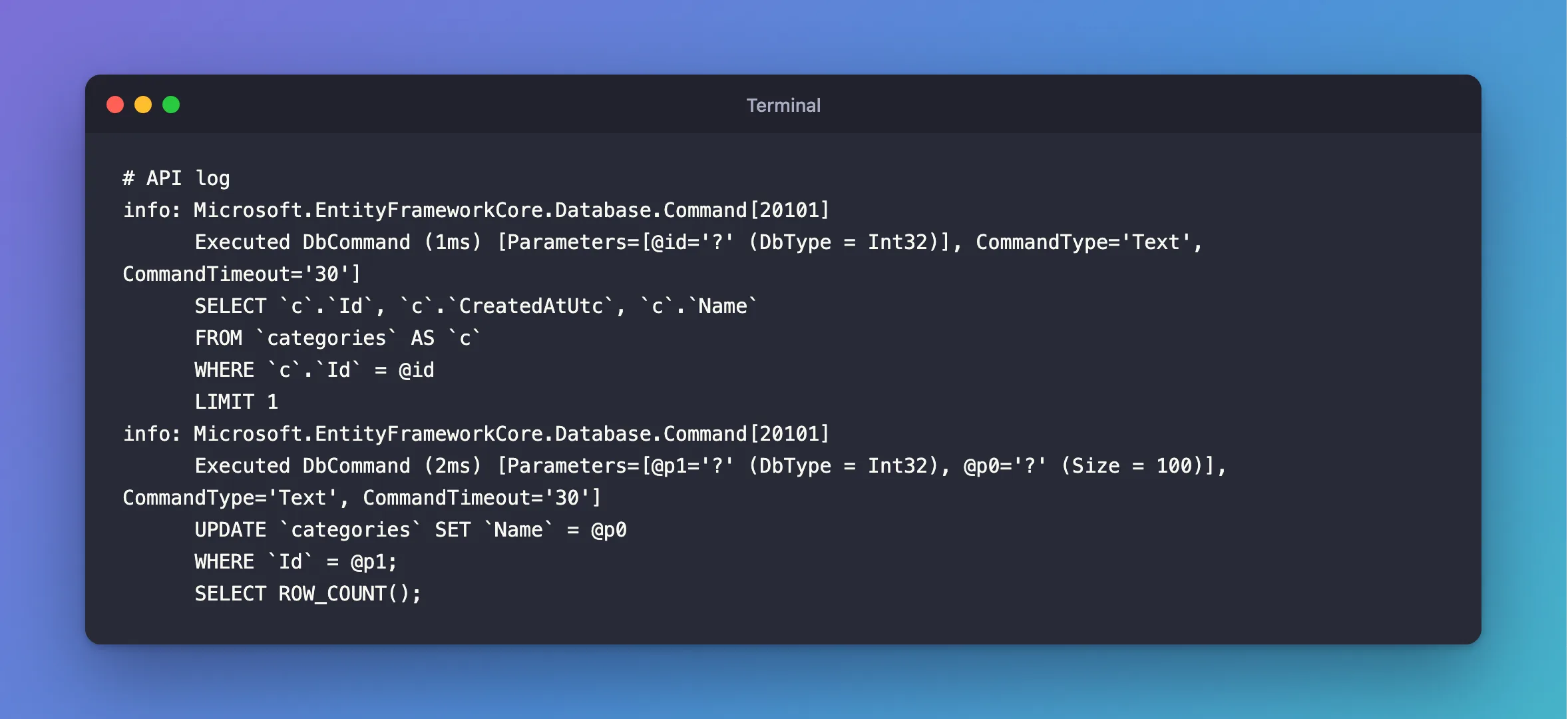
The UPDATE sets only Name, the column that changed. That's a better result than Update gave, not only an error gone.
Common Mistakes
| Mistake | What happens | Do this instead |
|---|---|---|
Calling Update on an object from a query | It's already tracked, so the call does nothing useful, and it marks every column changed | Just save |
Adding AsNoTracking to the load so Update works | The error goes, and the UPDATE now writes every column | Change the tracked object |
Calling ChangeTracker.Clear() before Update | Other changes in the same request are lost | Change the tracked object |
| Loading a row twice in one request and changing both | You get the same object both times, as the tracking page says | Load it once |
Troubleshooting
| Symptom | Likely cause | Fix |
|---|---|---|
The message appears at Update, Attach or Add | Another object with that key is tracked | Change the tracked object |
It appears in a foreach that adds rows | Two rows in the input have the same ID | Check the input for duplicates |
| It appears when adding a related object | The navigation holds a new object for an existing row | Set the foreign key ID instead |
It says for {'Id'} and you want the value | EF Core hides data by default | EnableSensitiveDataLogging, in development only |
FAQ
Is Update ever the right call?
Yes: when you have a complete object from elsewhere, nothing's tracked for that key, and you really mean to overwrite every column. In a Web API that loads the row first, you rarely need it.
Can I copy many properties at once?
Yes. db.Entry(category).CurrentValues.SetValues(source) copies matching properties onto the tracked object, and only those that differ get marked as changed.
Conclusion
"Cannot be tracked because another instance with the same key value is already being tracked" means you asked one DbContext to follow two objects for one row. Change the object you loaded and call SaveChangesAsync, with no Update. You also get an UPDATE that writes only the columns that changed.
Additional Resources
- Identity Resolution in EF Core — why there's one instance per row.
- Basic SaveChanges — updating tracked entities.
