Fixed: "The input parameter(s) of operation contains invalid expression(s)" in Power Automate

Publishing my flow failed with The input parameter(s) of operation 'Ask_the_manager' contains invalid expression(s). The expression was one Power Automate had written for me, from a token I picked. The cause was an apostrophe in the name of the action it read from, Get the employee's manager. Renaming that action and picking the token again fixed it.
What I Was Doing
I was building the approval flow of the Overtime Timesheet app. When the person who logged the overtime is their department's only approver, the flow asks their manager instead. In that branch, I added the Office 365 Users action Get manager (V2) and named it Get the employee's manager (How to Get a User's Manager in Power Automate).
Next came a Set variable action, Ask the manager, which puts the manager's email into the variable the approval goes to. For its Value, I picked the Mail token of Get the employee's manager from the dynamic content list:
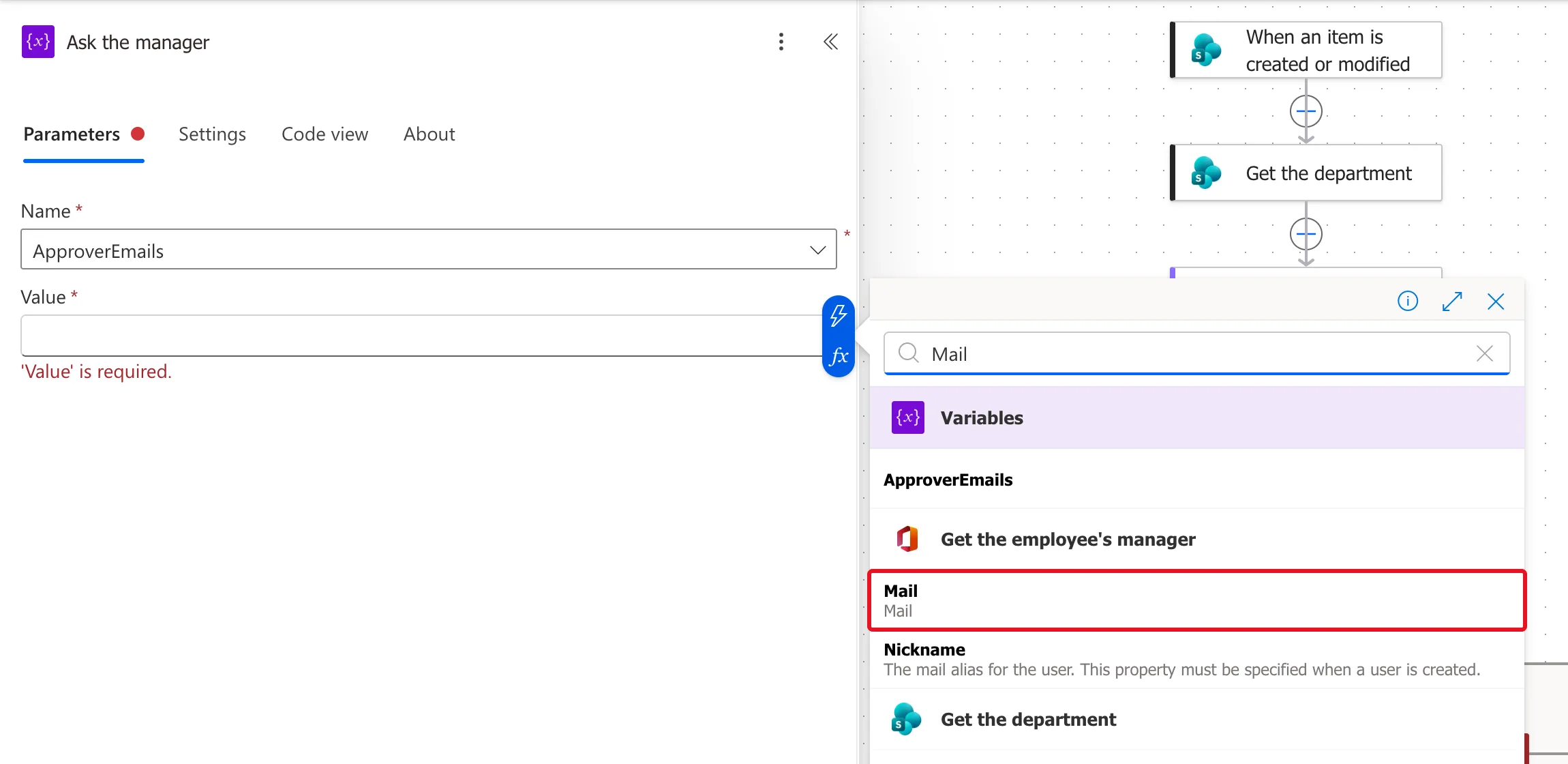
Then I selected Publish.
What I Expected
The flow to publish.
What I Got
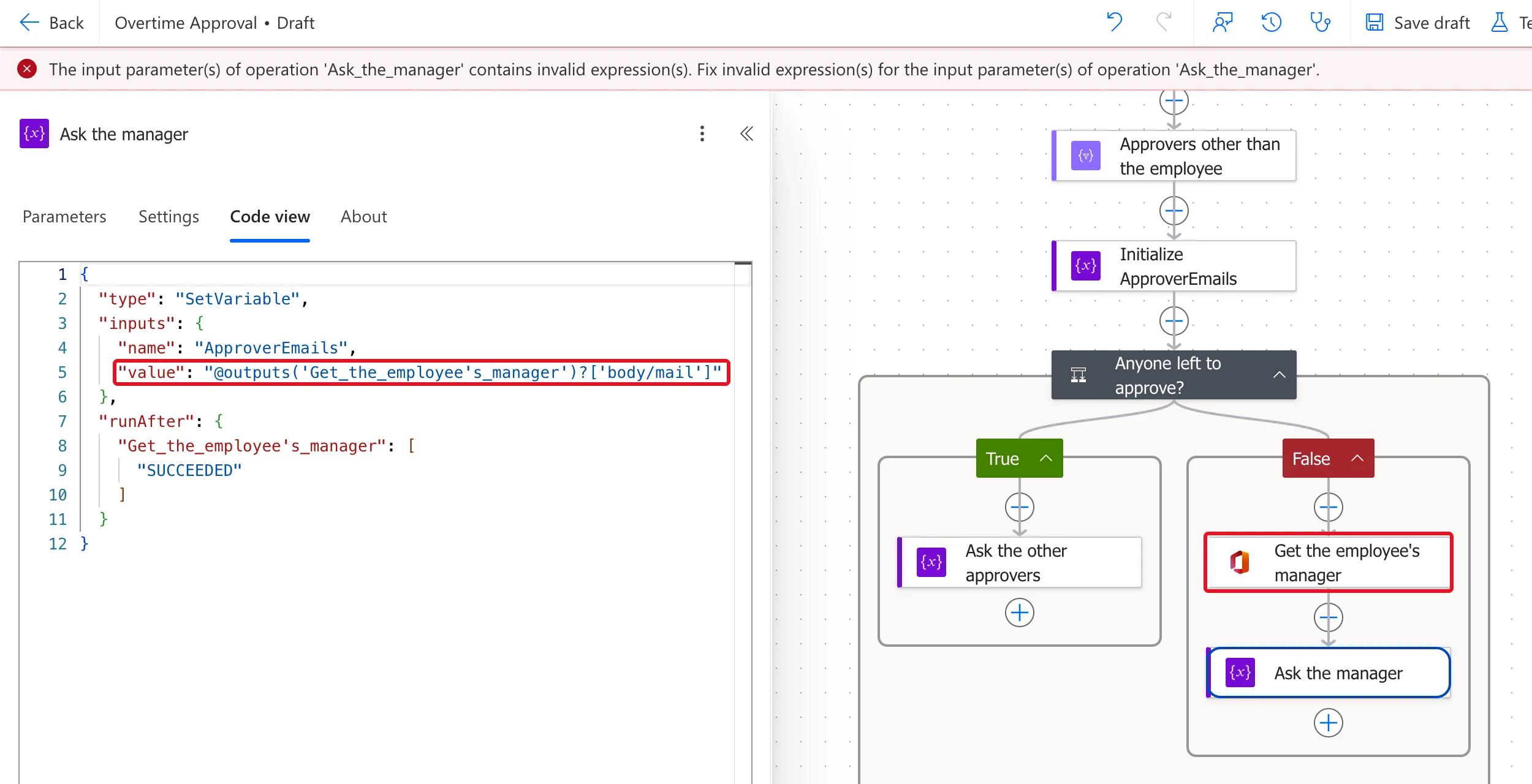
A red banner under the toolbar, and the flow stayed a draft:

The full text:
The input parameter(s) of operation 'Ask_the_manager' contains invalid expression(s). Fix invalid expression(s) for the input parameter(s) of operation 'Ask_the_manager'.
What I Checked
-
The action's Code view. I opened Ask the manager and selected Code view. The value the token had become was:
Ask the manager → Code view (value)@outputs('Get_the_employee's_manager')?['body/mail']An expression names an action by its name with underscores for spaces, inside single quotes. Here the name has its own single quote, the apostrophe:
-
Microsoft's documentation. The Workflow Definition Language schema, the language of these expressions, says: To use a string literal as input or in expressions and functions, wrap the string only with single quotation marks. So
'Get_the_employee'is a complete string, and thes_manager'after it isn't valid. Neither the schema nor the functions reference says how to put a single quote inside a string. -
Renaming on its own. I renamed the action Get the manager. In Code view, the
runAfterline followed the new name, but the Value kept the broken expression with the old name.
Why It Happens
The designer writes the action's name into the expression between single quotes. An apostrophe in the name ends the quoted text early, so the expression can't be read. The name looks fine on the card; only the expression breaks.
The Fix
-
Rename the action without an apostrophe. Select its title on the card and type the new name; I used Get the manager. Action names in this flow use only letters and spaces.
-
Pick the token again. In the action that reads it, here Ask the manager, remove the old Mail token and pick Mail from Get the manager again.
-
Check Code view for the new name:
Ask the manager → Code view (value), after the fix@outputs('Get_the_manager')?['body/mail'] -
Publish.
After the Fix
Code view showed the value reading Get_the_manager, and runAfter named the same action:
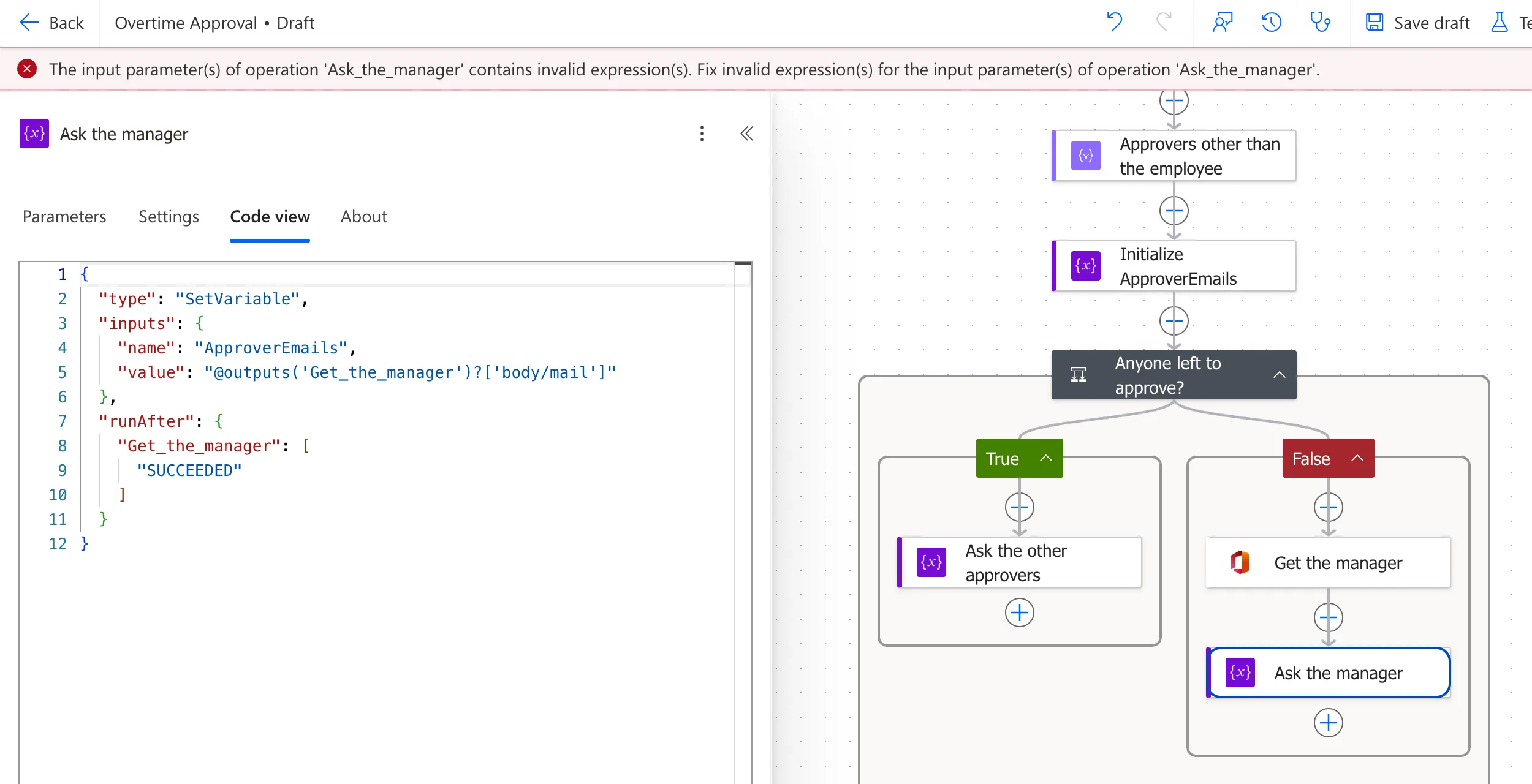
The next Publish got past this action and stopped at a different name, the condition Anyone left to approve?, for its question mark: Fixed: "The provided workflow run action name has these invalid characters" (InvalidWorkflowRunActionName) in Power Automate. After renaming that too, the flow published, and its runs read the manager's email from Get the manager.
Common Mistakes
| Mistake | What happens | Do this instead |
|---|---|---|
| An apostrophe in an action's name | Expressions that read the action are invalid | Use letters and spaces in action names |
| Renaming the action and stopping there | Existing tokens keep the broken expression | Pick each token from the renamed action again |
| Only reading the card | The name looks fine | Read the reading action's Code view |
Troubleshooting
| Symptom | Likely cause | Fix |
|---|---|---|
| contains invalid expression(s) naming an action | An expression in that action can't be read | Open its Code view |
A quote in the middle of an outputs('...') | An apostrophe in the source action's name | Rename it, pick the token again |
| The error names a different action after the fix | Another name has a character it doesn't accept | Read the new message |
FAQ
Can I escape the apostrophe instead?
Microsoft's expression documentation doesn't say how to put a single quote inside a string literal, so I didn't rely on one. Renaming the action needs no escaping, and the expressions stay easy to read.
Why does Power Automate let me use an apostrophe in a name?
The name field accepted it, and saving a draft didn't complain. The problem appeared only when an expression had to quote the name and the flow was published.
Conclusion
The input parameter(s) of operation contains invalid expression(s) named the action whose expression was broken, and Code view showed why: the source action's name, with its apostrophe, sat inside single quotes. Rename the source action without the apostrophe, pick the token again, and publish.
Additional Resources
- Workflow Definition Language schema: operators: string literals in single quotation marks.
- Reference guide to functions in expressions:
outputs()and the others.
