Fixed: "The First Argument to the GroupBy Function Cannot Be Blank" in Power Apps

A Power Apps screen showed a red banner, The first argument to the GroupBy function cannot be blank, as it opened, even though its totals were right underneath. A label grouped a context variable that the screen's first load hadn't set yet, and a variable that hasn't been set is blank. Testing it with IsBlank before grouping removed the banner.
What I Was Doing
I had published a new version of the Overtime Timesheet app and was checking its screens in a phone-sized browser window, 360 pixels wide. One of them is My Overtime, which shows a person's entries for a month with weekly totals (Part 7).
The screen loads its rows when it opens: its OnVisible selects the Refresh button, and that button's OnSelect stores the rows in a context variable, locLoadedMO (How to Run a Formula When a Screen Opens in Power Apps and How to Use the Select Function in Power Apps). A label, lblWeeksMO, groups those rows by week and totals each group (How to Total Each Group in Power Apps with GroupBy and Sum):
Concat(
    Sort(
        AddColumns(
            GroupBy(
                AddColumns(Filter(locLoadedMO, Status.Value <> "Rejected"), WeekStart, MondayOf(WorkDate)),
                WeekStart,
                WeekEntries
            ),
            WeekHours,
            Sum(WeekEntries, Hours)
        ),
        WeekStart
    ),
    $"{Text(WeekStart, "ddd dd/mm/yyyy")} to {Text(DateAdd(WeekStart, 6, TimeUnit.Days), "ddd dd/mm/yyyy")}: {Text(WeekHours, "0.00")} hours",
    Char(10)
)
What I Expected
The month, its total and its weekly totals, with no message.
What I Got
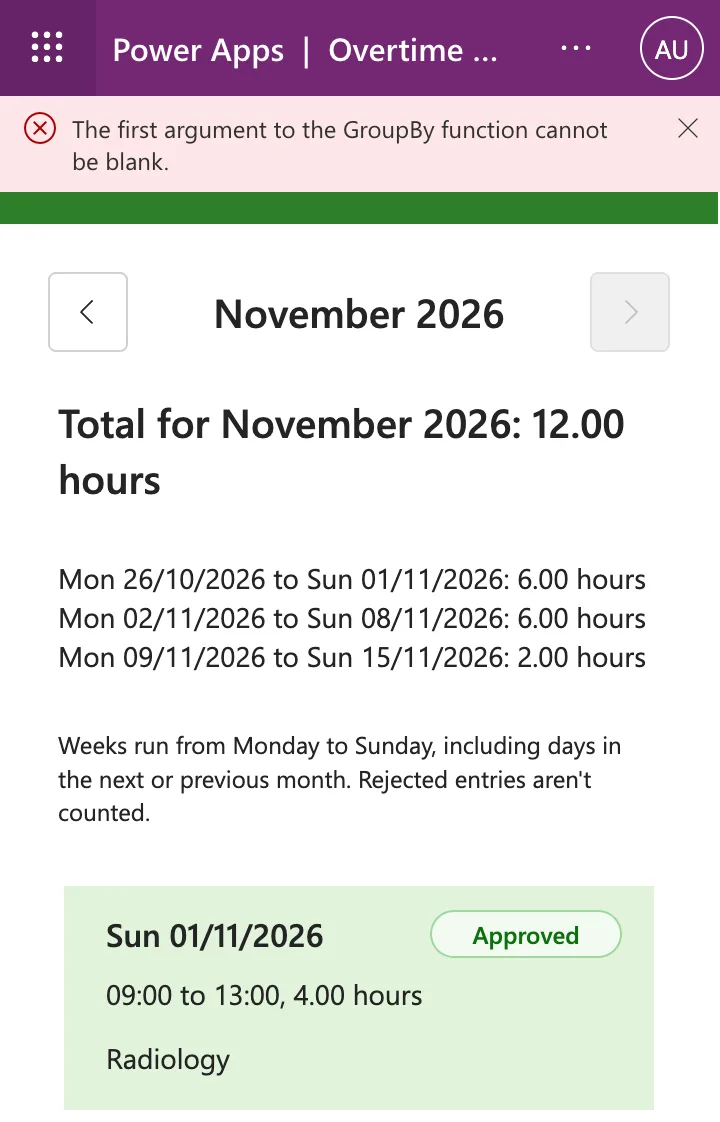
A red banner across the top of the screen as it opened:
The first argument to the GroupBy function cannot be blank.
The totals below it were right: Total for November 2026: 12.00 hours and three weekly lines.
What I Checked
Which formula groups. On this screen only lblWeeksMO uses GroupBy, and its first argument comes from locLoadedMO.
What a variable holds before it's set. Microsoft's Power Fx overview says: all uninitialized variables start with a blank value. locLoadedMO gets its rows only when the Refresh button's OnSelect runs. The label's formula had already run with the variable blank, and the totals appeared once the rows arrived. That's why the banner and the correct numbers were on screen together.
How to test for it. The IsBlank and IsEmpty reference says: The IsBlank function considers empty tables as not blank, and IsEmpty should be used to test a table. So IsBlank tells apart a variable that hasn't been set (blank) from a month with no entries (an empty table).
Why It Happens
A context variable has no value until UpdateContext sets it. Every formula that reads it before then gets blank, and GroupBy needs a table as its first argument. In lblWeeksMO, that blank reached GroupBy's first argument, as the message says, and the app showed its error banner.
The Fix
Test the variable before grouping, and show nothing until it's set (IsBlank vs IsEmpty in Power Apps):
If(
    IsBlank(locLoadedMO),
    "",
    Concat(
        Sort(
            AddColumns(
                GroupBy(
                    AddColumns(Filter(locLoadedMO, Status.Value <> "Rejected"), WeekStart, MondayOf(WorkDate)),
                    WeekStart,
                    WeekEntries
                ),
                WeekHours,
                Sum(WeekEntries, Hours)
            ),
            WeekStart
        ),
        $"{Text(WeekStart, "ddd dd/mm/yyyy")} to {Text(DateAdd(WeekStart, 6, TimeUnit.Days), "ddd dd/mm/yyyy")}: {Text(WeekHours, "0.00")} hours",
        Char(10)
    )
)
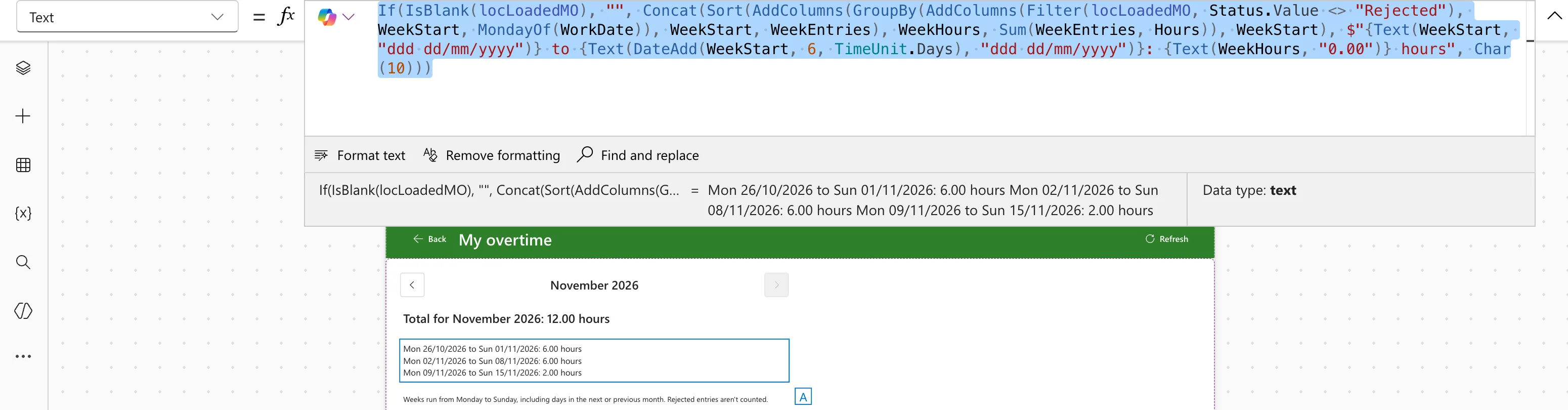
Once the first load has run, locLoadedMO is a table, even for a month with no entries, so the label works as before. In Studio, the formula's preview shows the three weekly totals:
After the Fix
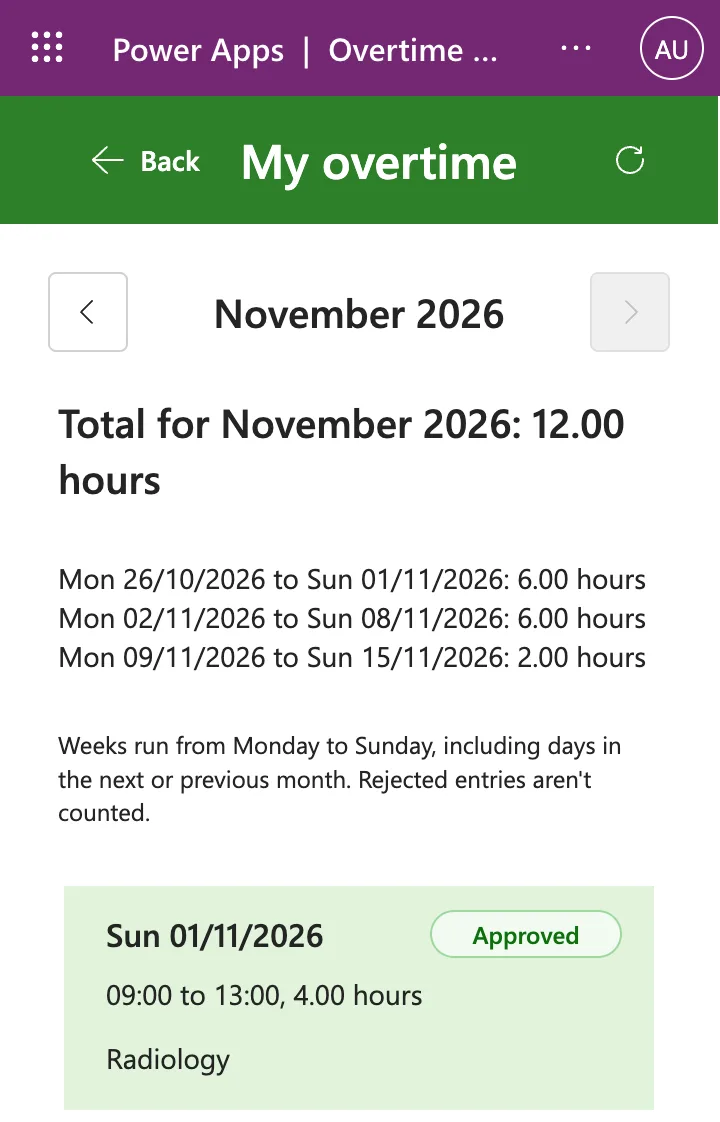
I published the app and opened the new version in a new session in the same 360-pixel window. My Overtime opened without the banner, with the same totals:
Common Mistakes
| Mistake | What happens | Do this instead |
|---|---|---|
| Reading a table variable before anything has set it | Functions that need a table, such as GroupBy, get blank | Test it with IsBlank first |
| Wrapping the whole formula in IfError | Other errors in the formula are hidden too | Test for the one case you expect, the blank variable |
| Using IsBlank to check whether a loaded table has rows | An empty table isn't blank, so the test is false | Use IsEmpty for rows, IsBlank for "not set yet" |
Troubleshooting
| Symptom | Likely cause | Fix |
|---|---|---|
| The first argument to the GroupBy function cannot be blank. as a screen opens | GroupBy reads a variable the screen hasn't set yet | Wrap the formula in If(IsBlank(variable), "", ...) |
| The banner shows, but the totals below it are right | The error came from the first run, before the load finished | The same fix |
| The totals never appear after the fix | The variable is never set | Check that the screen's OnVisible runs the load |
FAQ
Why did Power Apps show a banner instead of an empty label?
Power Apps reports an error that no formula handles with its default banner (Error handling). Testing for the blank variable means there's no error to report.
What about a month with no entries?
After the first load, locLoadedMO holds a table even when it has no rows, and IsBlank treats an empty table as not blank. The guard only skips the moment before the first load.
Conclusion
A label grouped a context variable that the screen hadn't set yet, and GroupBy doesn't accept blank. Testing the variable with IsBlank and showing nothing until it's set removed the banner, and the weekly totals stayed the same.
Additional Resources
- Power Fx overview: design principles: uninitialized variables start blank.
- Blank, Coalesce, IsBlank and IsEmpty functions: blank values and empty tables.
- GroupBy and Ungroup functions: what GroupBy expects.
