Fixed: "StarletteDeprecationWarning: starlette.middleware.wsgi is deprecated" When You Start the MLflow Server

Starting MLflow 3.18.0's tracking server printed StarletteDeprecationWarning: starlette.middleware.wsgi is deprecated four times. Nothing was wrong with my setup: the warning comes from MLflow's own code meeting Starlette 1.10.0, and the server works. One PYTHONWARNINGS filter hides this warning, and only this one, until MLflow changes its code.
What I Was Doing
I was starting a local MLflow tracking server for the MLflow series, on macOS with Python 3.15.2, in a uv project with MLflow 3.18.0:
uv run mlflow server --port 5000
What I Expected
MLflow's startup lines, ending with Application startup complete.
What I Got
Between the startup lines, the same warning, four times:
/Users/you/source/mlflow-server/.venv/lib/python3.15/site-packages/mlflow/server/fastapi_app.py:24: StarletteDeprecationWarning: starlette.middleware.wsgi is deprecated and will be removed in a future release. Please refer to https://github.com/abersheeran/a2wsgi as a replacement.
  from starlette.middleware.wsgi import WSGIResponder, build_environ
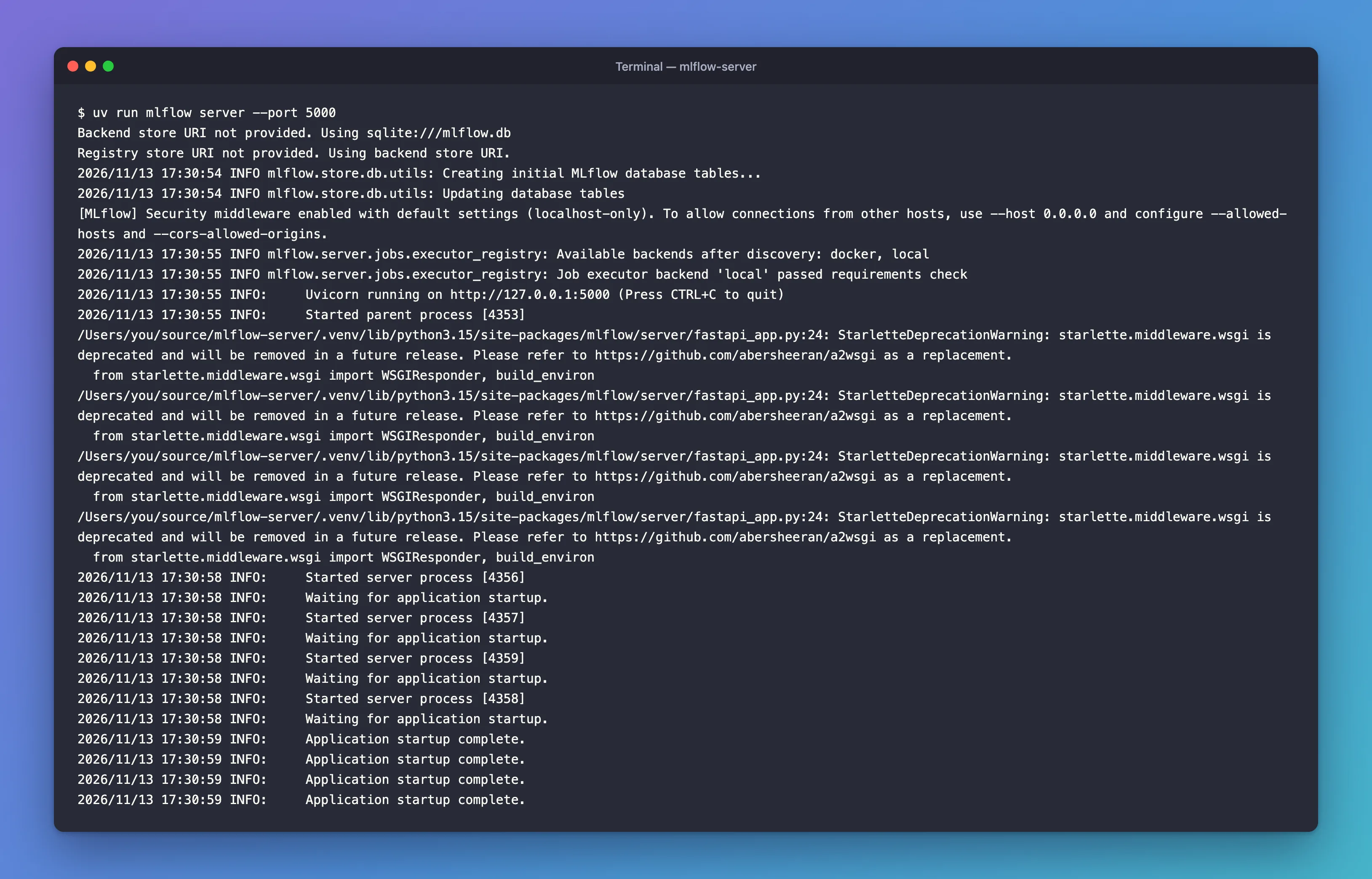
The server still started, and it answered requests: the log showed "GET /version HTTP/1.1" 200 OK.
What I Checked
Whose code the warning points at. The path is mlflow/server/fastapi_app.py, line 24, inside MLflow's installed package, not in my project. That line is:
from starlette.middleware.wsgi import WSGIResponder, build_environ
MLflow's server is a FastAPI app with MLflow's older Flask app mounted inside it, and MLflow wraps Flask with Starlette's WSGI tools (fastapi_app.mount("/", _EfficientWSGIMiddleware(flask_app)) further down the same file).
Where the warning is raised. Starlette 1.10.0 warns as soon as anything imports its WSGI module, in starlette/middleware/wsgi.py:
warnings.warn(
    "starlette.middleware.wsgi is deprecated and will be removed in a future release. "
    "Please refer to https://github.com/abersheeran/a2wsgi as a replacement.",
    StarletteDeprecationWarning,
    stacklevel=2,
)
stacklevel=2 makes Python report the warning at the line that did the importing: MLflow's line 24.
Which Starlette is installed. MLflow installs Starlette itself, as a dependency:
uv pip show starlette
Name: starlette
Version: 1.10.0
Location: /Users/you/source/mlflow-server/.venv/lib/python3.15/site-packages
Requires: anyio
Required-by: fastapi, mlflow-skinny
Why four times. The server starts four worker processes, and the log showed four Started server process lines. Each worker loads MLflow's app, and each prints the warning once.
MLflow's issue tracker. The warning is reported as mlflow/mlflow#24074, "[BUG] fastapi_app.py:17: StarletteDeprecationWarning: starlette.middleware.wsgi is deprecated", opened on June 18, 2026, and still open when I checked on November 13, 2026. The issue quotes line 17 from an older MLflow; in 3.18.0 the import is on line 24.
Why It Happens
Starlette has deprecated its WSGI middleware: it still works, but a future release will remove it, and every import now warns. MLflow 3.18.0 still imports it to run its Flask app, so every server start prints the warning, once per worker. A deprecation warning is a notice about the future, not an error: the code works today.
The Fix
There's nothing to repair in your project; the real fix is MLflow moving off Starlette's WSGI middleware, tracked in #24074. Until then, you can hide this one warning with the PYTHONWARNINGS environment variable, set in the terminal before you start the server:
- macOS / Linux
- Windows (PowerShell)
export PYTHONWARNINGS="ignore:starlette.middleware.wsgi is deprecated::mlflow.server.fastapi_app"
uv run mlflow server --port 8090
$env:PYTHONWARNINGS = "ignore:starlette.middleware.wsgi is deprecated::mlflow.server.fastapi_app"
uv run mlflow server --port 8090
I used port 8090 because my main server was already running on 8080; use your own port. The filter has the form action:message:category:module:
ignore: don't print matching warnings.starlette.middleware.wsgi is deprecated: the start of the warning's text. Python's documentation: inPYTHONWARNINGS, the message "is a literal string that the start of the warning message must match (case-insensitively)".- The empty category (
::) matches any kind of warning. mlflow.server.fastapi_app: the module the warning is reported from. Here the documentation says the module "is a literal string that the fully qualified module name must be equal to", so the filter can't hide the same warning from any other package.
The variable lasts until you close the terminal. Worker processes inherit it, so all four stay quiet.
After the Fix
The server started on port 8090 with no warning at all:
Backend store URI not provided. Using sqlite:///mlflow.db
Registry store URI not provided. Using backend store URI.
[MLflow] Security middleware enabled with default settings (localhost-only). To allow connections from other hosts, use --host 0.0.0.0 and configure --allowed-hosts and --cors-allowed-origins.
2026/11/13 17:32:36 INFO mlflow.server.jobs.executor_registry: Available backends after discovery: docker, local
2026/11/13 17:32:36 INFO mlflow.server.jobs.executor_registry: Job executor backend 'local' passed requirements check
2026/11/13 17:32:36 INFO:     Uvicorn running on http://127.0.0.1:8090 (Press CTRL+C to quit)
2026/11/13 17:32:36 INFO:     Started parent process [5938]
2026/11/13 17:32:39 INFO:     Started server process [5944]
2026/11/13 17:32:39 INFO:     Waiting for application startup.
2026/11/13 17:32:39 INFO:     Started server process [5943]
2026/11/13 17:32:39 INFO:     Waiting for application startup.
2026/11/13 17:32:39 INFO:     Started server process [5941]
2026/11/13 17:32:39 INFO:     Waiting for application startup.
2026/11/13 17:32:39 INFO:     Started server process [5942]
2026/11/13 17:32:39 INFO:     Waiting for application startup.
2026/11/13 17:32:39 INFO:     Application startup complete.
2026/11/13 17:32:39 INFO:     Application startup complete.
2026/11/13 17:32:39 INFO:     Application startup complete.
2026/11/13 17:32:39 INFO:     Application startup complete.
2026/11/13 17:32:40 INFO:     127.0.0.1:54749 - "GET /version HTTP/1.1" 200 OK
Common Mistakes
| Mistake | What happens | Do this instead |
|---|---|---|
Hiding every warning with PYTHONWARNINGS=ignore | Warnings you need, from your own code too, disappear | Filter this one warning by message and module |
Editing fastapi_app.py in .venv | The change is lost the next time the package is installed | Leave installed packages alone |
| Installing an older Starlette to silence it | You run an older release than the one MLflow resolved | Keep the versions MLflow resolves |
Troubleshooting
| Symptom | Likely cause | Fix |
|---|---|---|
| The warning still appears | The variable was set in another terminal, or after the server started | Set it in the same terminal, then start the server |
| Still there with the variable set | A typo in the module or message part | Copy the filter exactly; the module must be mlflow.server.fastapi_app |
| It's back in a new terminal | Environment variables last only for the terminal session | Set it again, or add it to your shell's profile |
FAQ
Is it safe to ignore?
Yes, for now. A deprecation warning says something will be removed in a later release; with Starlette 1.10.0, the server works.
Does it affect my training code?
No. It appears when the tracking server starts, because only the server imports fastapi_app. The training runs in the MLflow series never printed it.
When will it go away?
When MLflow stops importing starlette.middleware.wsgi. Follow mlflow/mlflow#24074 and check MLflow's release notes when you upgrade.
Conclusion
StarletteDeprecationWarning: starlette.middleware.wsgi is deprecated comes from MLflow 3.18.0's own server code importing Starlette 1.10.0's deprecated WSGI module, once per worker. The server works. PYTHONWARNINGS="ignore:starlette.middleware.wsgi is deprecated::mlflow.server.fastapi_app" hides exactly that warning until MLflow fixes it.
Additional Resources
- mlflow/mlflow#24074 — the issue for this warning.
- warnings — Warning control — the
PYTHONWARNINGSfilter format. - MLflow Tracking Server — starting the server.
