Fixed: "[SSL: CERTIFICATE_VERIFY_FAILED] certificate verify failed: unable to get local issuer certificate" in Python on macOS

A Python script on my Mac couldn't open an HTTPS address: ssl.SSLCertVerificationError: [SSL: CERTIFICATE_VERIFY_FAILED] certificate verify failed: unable to get local issuer certificate. curl opened the same address without a problem. Python from python.org brings its own OpenSSL, which doesn't use the Mac's certificates, and the fix is a script that comes with it: Install Certificates.
What I Was Doing
I first got this error in a small Python script that checks image addresses over HTTPS, run with an older Python from python.org. It's the same with the newest one, Python 3.15.2, installed with python.org's macOS installer. This script opens one address and prints the HTTP status:
import urllib.request

url = "https://www.python.org/"
with urllib.request.urlopen(url, timeout=30) as response:
    print(response.status, url)
python3 --version
python3 check_url.py
What I Expected
Python 3.15.2, then 200 https://www.python.org/.
What I Got
Python 3.15.2
Traceback (most recent call last):
  ...
ssl.SSLCertVerificationError: [SSL: CERTIFICATE_VERIFY_FAILED] certificate verify failed: unable to get local issuer certificate (_ssl.c:1147)

During handling of the above exception, another exception occurred:

Traceback (most recent call last):
  ...
urllib.error.URLError: <urlopen error [SSL: CERTIFICATE_VERIFY_FAILED] certificate verify failed: unable to get local issuer certificate (_ssl.c:1147)>
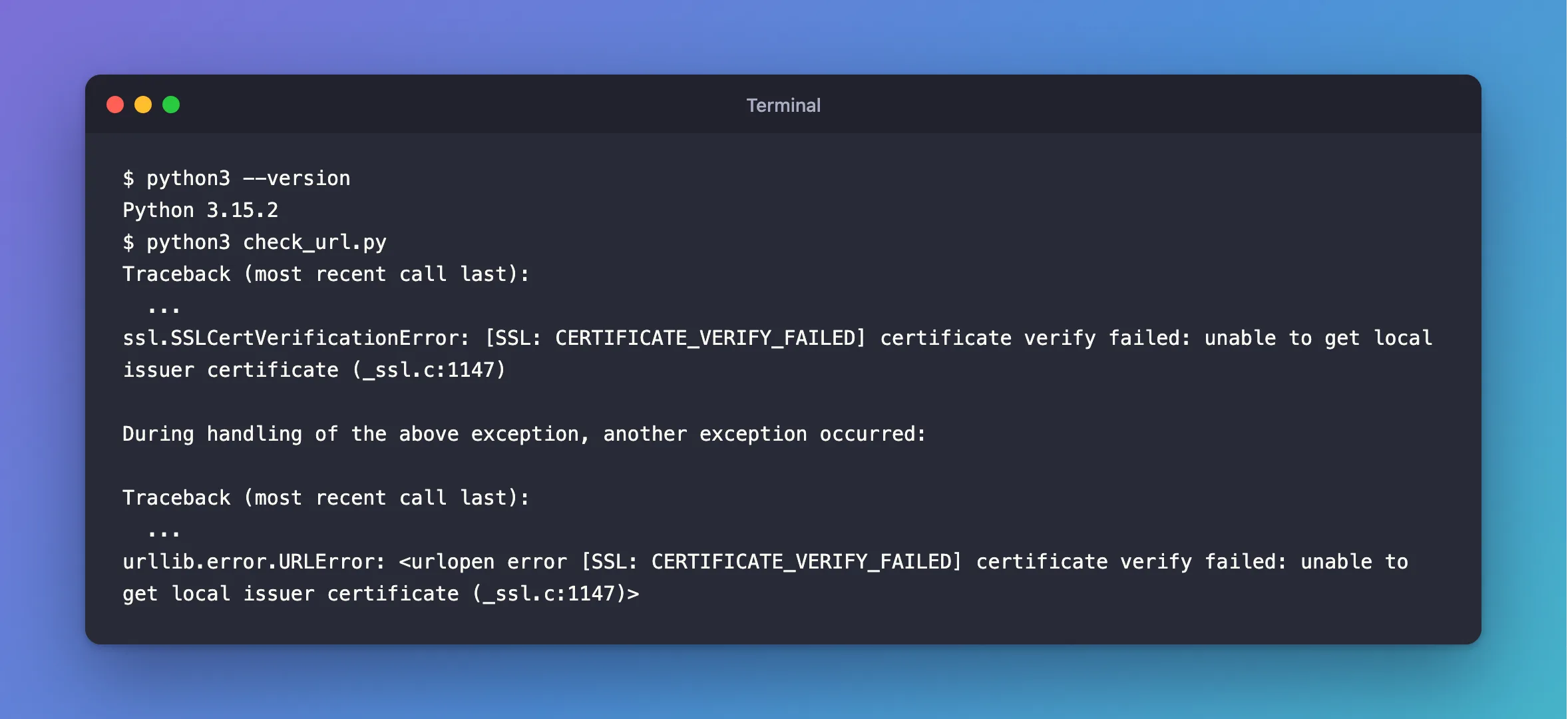
Two errors, one cause: the ssl module refused the server's certificate during the TLS handshake, and urllib passed that on as a URLError.
What I Checked
Whether the site and the network were fine. curl, which comes with macOS, asked the same address for its headers:
curl -sI https://www.python.org/ | head -1
HTTP/2 200
So the server's certificate was valid for curl. The problem was in Python.
Where Python looks for certificates. The ssl module can say which OpenSSL it uses and where that OpenSSL looks for trusted certificates:
python3 -c "import ssl; print(ssl.OPENSSL_VERSION); print(ssl.get_default_verify_paths())"
OpenSSL 3.5.9 29 Sep 2026
DefaultVerifyPaths(cafile=None, capath=None, openssl_cafile_env='SSL_CERT_FILE', openssl_cafile='/Library/Frameworks/Python.framework/Versions/3.15/etc/openssl/cert.pem', openssl_capath_env='SSL_CERT_DIR', openssl_capath='/Library/Frameworks/Python.framework/Versions/3.15/etc/openssl/certs')
Python's own OpenSSL 3.5.9 expects a file of trusted certificates at /Library/Frameworks/Python.framework/Versions/3.15/etc/openssl/cert.pem.
What's in that folder.
ls -la /Library/Frameworks/Python.framework/Versions/3.15/etc/openssl/
total 0
drwxrwxr-x@ 2 root  admin  64 Oct 26 02:53 .
drwxrwxr-x@ 3 root  admin  96 Oct 26 02:53 ..
Empty: no cert.pem, so this OpenSSL trusted no certificate authority at all.
What python.org says. The installer's ReadMe, also in /Applications/Python 3.15/ReadMe.rtf: "This package includes its own private copy of OpenSSL 3. The trust certificates in system and user keychains managed by the Keychain Access application and the security command line utility are not used as defaults by the Python ssl module. A sample command script is included in /Applications/Python 3.15 to install a curated bundle of default root certificates from the third-party certifi package". Python's own Using Python on macOS page lists it as the last step of installing: "Double-click on the Install Certificates.command icon or file in the /Applications/Python 3.15/ window to complete the installation."
Why It Happens
Python from python.org's macOS installer uses its own copy of OpenSSL, not the Mac's certificate store. That OpenSSL trusts the certificates in one file, cert.pem in the Python version's etc/openssl folder, and the installer doesn't create it. Without it, Python can't link any server's certificate to an authority it trusts, the "local issuer" in the message, so every HTTPS request from the ssl module fails. The installer leaves that step to the Install Certificates script.
The Fix
Run the Install Certificates script that came with this Python version: double-click Install Certificates.command in the /Applications/Python 3.15 folder, or run it from Terminal:
"/Applications/Python 3.15/Install Certificates.command"
 -- pip install --upgrade certifi
Collecting certifi
  Downloading certifi-2026.10.23-py3-none-any.whl.metadata (2.5 kB)
Downloading certifi-2026.10.23-py3-none-any.whl (135 kB)
Installing collected packages: certifi
Successfully installed certifi-2026.10.23
 -- removing any existing file or link
 -- creating symlink to certifi certificate bundle
 -- setting permissions
 -- update complete
The script does two things, both visible in its output:
- It installs certifi with pip, a package that carries a curated set of root certificates. pip could download it before the fix because, as the ReadMe says, "The bundled pip has its own default certificate store for verifying download connections."
- It links
cert.pemto certifi's certificate file, the file Python's OpenSSL was looking for:
total 0
drwxrwxr-x@ 3 root  admin  96 Nov  3 14:41 .
drwxrwxr-x@ 3 root  admin  96 Oct 26 02:53 ..
lrwxr-xr-x  1 you   admin  53 Nov  3 14:41 cert.pem -> ../../lib/python3.15/site-packages/certifi/cacert.pem
Each python.org Python version has its own etc/openssl folder and its own Install Certificates script. On this Mac, the older versions differed: two of them had a cert.pem, two didn't. Run the script for every version you use.
After the Fix
The same script, run again:
200 https://www.python.org/
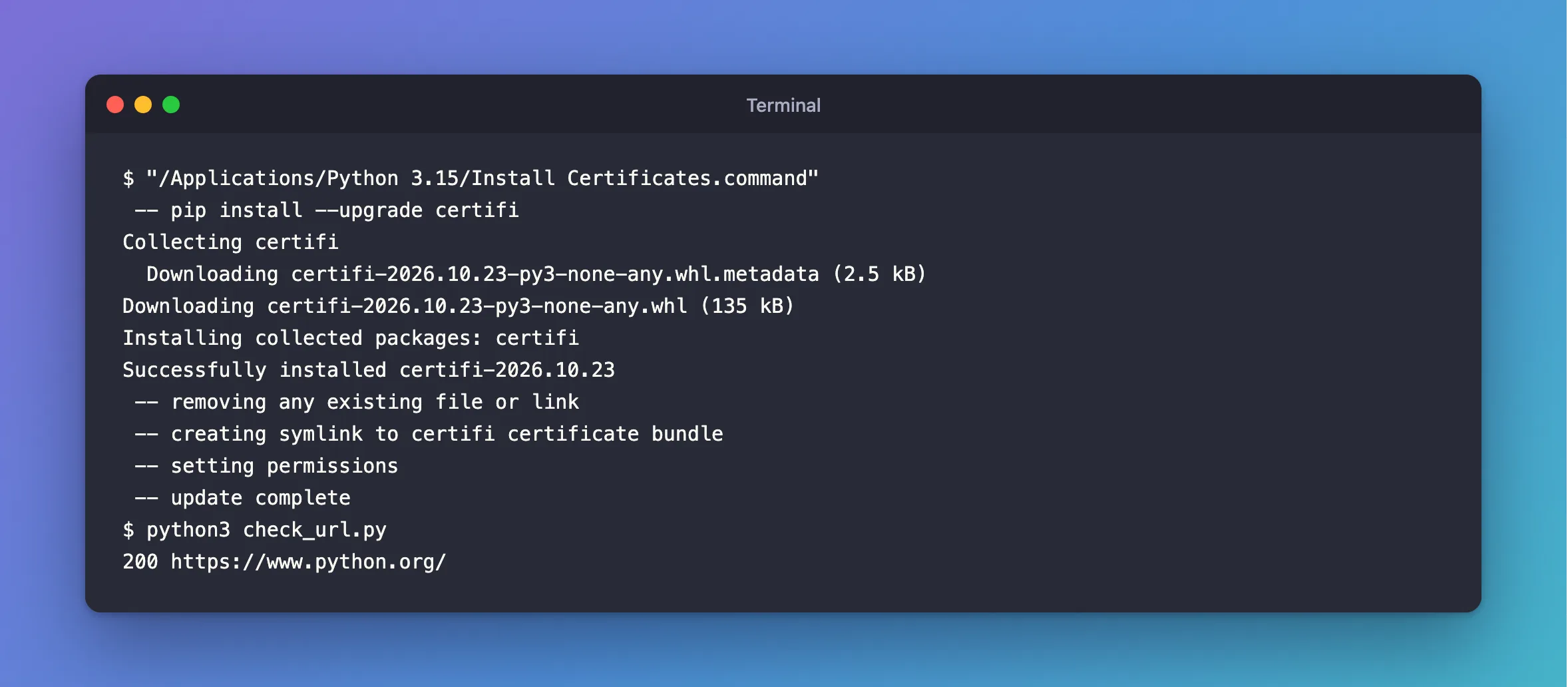
200: Python verified python.org's certificate and opened the page.
Common Mistakes
| Mistake | What happens | Do this instead |
|---|---|---|
| Turning off certificate checks in the code | Any server can pretend to be the one you asked for | Install the certificates |
| Running Install Certificates for one Python version only | The other python.org versions keep failing | Run each version's own script |
| Testing the address with curl and concluding it can't be a certificate problem | curl uses different certificates than python.org's Python | Check ssl.get_default_verify_paths() |
Troubleshooting
| Symptom | Likely cause | Fix |
|---|---|---|
[SSL: CERTIFICATE_VERIFY_FAILED] certificate verify failed: unable to get local issuer certificate with python.org's Python on macOS | Its OpenSSL has no certificate file yet | Run Install Certificates for that version |
| curl opens the address, Python doesn't | Python uses its own OpenSSL and its own certificate file | The same fix |
The etc/openssl folder of your version has no cert.pem | Install Certificates hasn't run for that version | Run it |
| It worked until you installed a newer Python | python3 now runs the new version, which has its own empty certificate folder | Run the new version's Install Certificates |
FAQ
Do I need to run it again later?
Run it again to update the certificates: the script runs pip install --upgrade certifi, and a newer certifi brings the current set of root certificates.
Why did pip work before the fix?
The ReadMe explains it: "The bundled pip has its own default certificate store for verifying download connections." That's how the script could download certifi in the first place.
Conclusion
"[SSL: CERTIFICATE_VERIFY_FAILED] certificate verify failed: unable to get local issuer certificate" in Python on macOS, when curl reaches the same address, means python.org's Python has no certificates to trust yet: its private OpenSSL looks for cert.pem in the version's etc/openssl folder, and nothing put one there. Run Install Certificates.command from /Applications/Python 3.x, once per version, and HTTPS works.
Additional Resources
- Using Python on macOS — the installation steps, including Install Certificates.
- ssl.get_default_verify_paths — where Python's OpenSSL looks for certificates.
- certifi on PyPI — the certificate package the script installs.
