Fixed: "Should at least contain one trigger and one action" When Saving a Flow in Power Automate

Power Automate wouldn't save my new flow. A red banner said Should at least contain one trigger and one action, and the flow had only its trigger. A flow needs at least one action before it can be saved, so I added its first real step, and Save worked.
What I Was Doing
I was creating the approval flow of the Overtime Timesheet app inside its solution: New > Automation > Cloud flow > Automated, named Overtime Approval, with the SharePoint trigger When an item is created or modified (How to Create an Automated Cloud Flow in a Solution in Power Automate).
The flow opened in the classic designer. I chose the site and the OvertimeEntries list in the trigger, and selected Save, to keep the trigger before adding anything else.
What I Expected
The flow to save, with only its trigger.
What I Got
The header changed to Overtime Approval • Saving…, and a red banner appeared above the trigger:
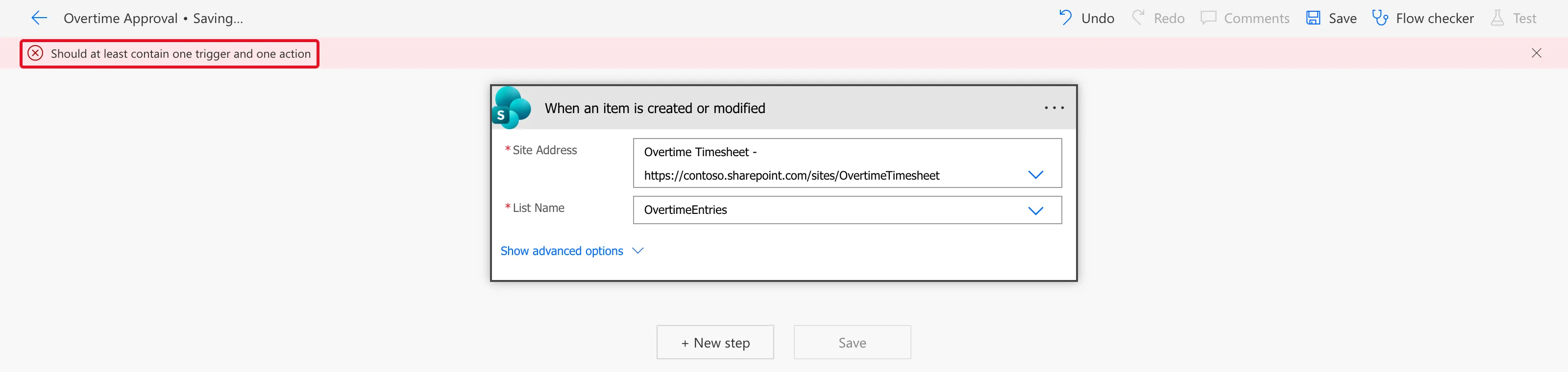
The flow wasn't saved.
What I Checked
- The trigger. Both of its required fields had values, and neither was marked red. Nothing in the trigger was wrong.
- Microsoft's documentation. Triggers and actions says: To save a cloud flow, it must have at least a trigger and one action. Its section on replacing a trigger says the same: If you want to save your flow, you need to add at least one action.
Why It Happens
A cloud flow is saved only when it has a trigger and at least one action. A flow with just a trigger is incomplete, so Power Automate refuses to save it, whatever the trigger's settings.
The Fix
Add the first action the flow needs, then save.
- Under the trigger, select + New step.
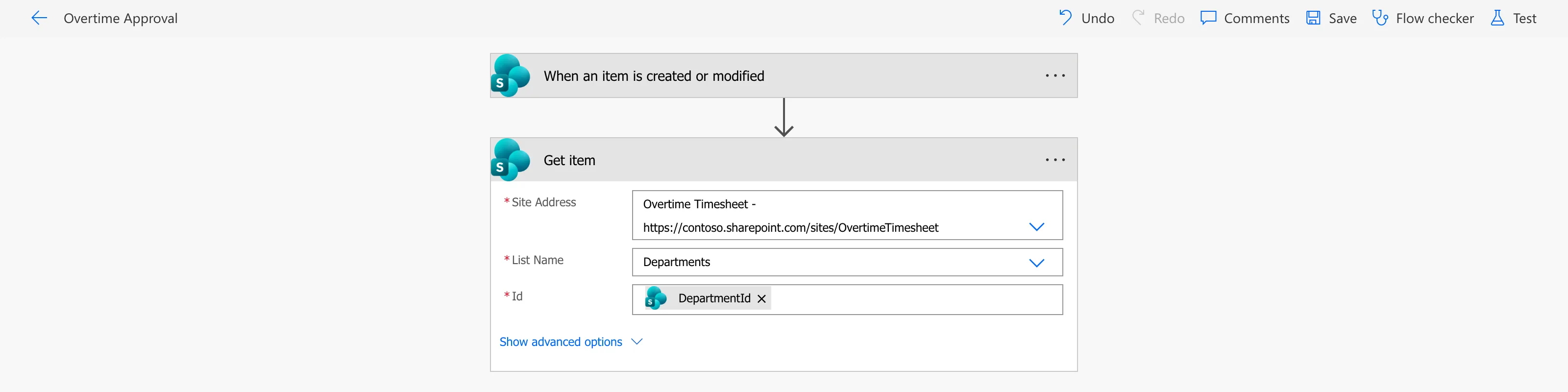
- Add the action the flow does first. Here, that was the SharePoint action Get item, which reads the entry's department: Site Address the same site, List Name Departments, and Id the DepartmentId of the item that started the flow (How to Get a SharePoint List Item by ID in Power Automate).
- Select Save.
After the Fix
The flow saved. The header read Overtime Approval, with no banner, and the Get item card sat under the trigger:
Common Mistakes
| Mistake | What happens | Do this instead |
|---|---|---|
| Saving a new flow with only its trigger | Should at least contain one trigger and one action | Add the first action, then save |
| Looking for a problem in the trigger | The trigger is fine; nothing to find | Read the message: it's about the missing action |
| Closing the designer after the error | The unsaved trigger settings are lost | Add an action and save before leaving |
Troubleshooting
| Symptom | Likely cause | Fix |
|---|---|---|
| Should at least contain one trigger and one action | The flow has no actions | Add one, then Save |
| The header stays on Saving… | The save failed | Read the banner under the header |
| A different red message after adding an action | A required field of the new action is empty | Fill in the fields marked with an asterisk |
FAQ
Does the new designer do the same?
I saw this message in the classic designer, where the new flow opened. The new designer has Save draft, and Microsoft's drafts article says Save a draft of a flow whenever you want, even with errors. I didn't try saving a trigger-only flow there.
Can I save the trigger on its own and come back later?
Not as a cloud flow. Add the action you know comes first, even if its fields need work later, and save.
Conclusion
Should at least contain one trigger and one action means what it says: a cloud flow needs at least one action before it can be saved. Add the flow's first step and select Save.
Additional Resources
- Triggers and actions: a flow needs a trigger and at least one action.
- Create a cloud flow in a solution: solution cloud flows.
