Fixed: SharePoint People Picker Shows a User's Old Job Title

Picking an approver in a SharePoint list, I typed "Olivia" and got Olivia Bennett, Head of Sales. Her job title had been changed to Emergency Department Manager in Microsoft Entra ID earlier the same day. Nothing was wrong with Entra: SharePoint keeps its own copy of each person's profile, and that copy hadn't caught up yet.
What I Was Doing
In Part 2 of the Overtime Timesheet series, I was adding the first department to the Departments list: Emergency Department, with Olivia Bennett as its approver. Approvers is a Person column, so in the New item form I typed "Olivia" and waited for the suggestions.
Earlier the same day, Part 1 had given the demo team new roles in Microsoft Entra ID. Olivia went from Head of Sales to Emergency Department Manager, and Daniel Brooks from Sales Manager to Radiology Manager.
What I Expected
Olivia Bennett, Emergency Department Manager, the title Microsoft Entra ID showed for her.
What I Got
Olivia Bennett, Head of Sales, her old title:

Typing "Daniel" for the second department did the same: Daniel Brooks, Sales Manager.
What I Checked
-
Microsoft Entra ID. Part 1's All users list shows the new titles, so the change itself was made and saved:
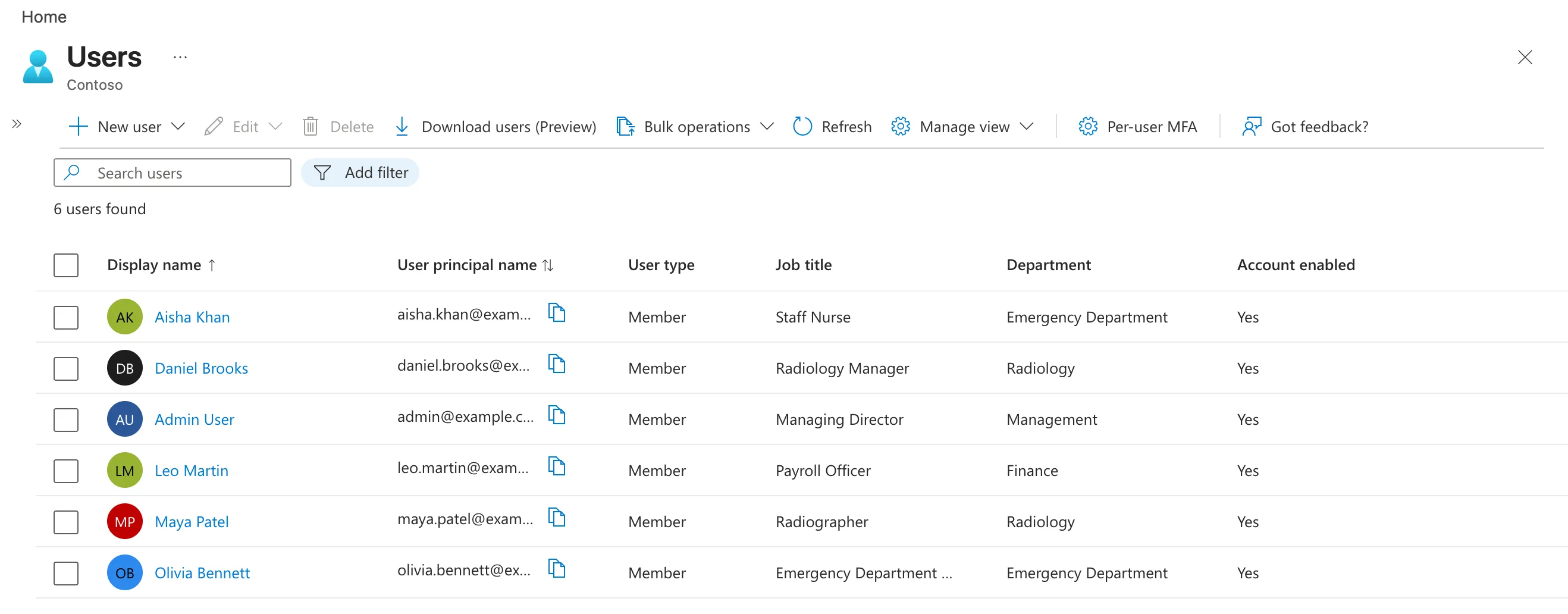
-
Whether the wrong person was suggested. It was the right person, Olivia Bennett, with the wrong title. Only the job title was out of date.
-
Microsoft's documentation. User profile synchronization explains that SharePoint keeps people's profiles in its own User Profile Application. Once a profile exists, "any modifications to these attributes will be synced as part of regularly scheduled sync process," and "synchronization times vary based on workloads." Its table of synced properties includes Title (shown as Job Title), Department and Manager, all of them synced to sites.
Why It Happens
There are two copies of a person's job title: the one in Microsoft Entra ID, where you change it, and SharePoint's copy, which SharePoint updates from Entra on its own schedule. Between a change and the next sync, SharePoint still shows the old value, and the picker's suggestions showed exactly that.
The Fix
Nothing to change: wait for the sync. Microsoft gives no fixed time, only that it varies with workload. Meanwhile:
- Pick the person anyway. A Person column stores the person, not the title, so the item is correct either way.
- Don't rely on SharePoint's copy for anything that matters. The Overtime Timesheet app reads job titles and departments from Microsoft 365 when it needs them, not from SharePoint profiles.
After the Fix
Twelve minutes later, I opened a new item form and typed "Olivia" in the same field. The suggestion showed her new title:

Daniel's showed Radiology Manager. The departments already saved didn't need changing: both items still pointed at the same two people.
Common Mistakes
| Mistake | What happens | Do this instead |
|---|---|---|
| Changing the title again in Entra | Nothing new: the sync still has to run | Wait for the scheduled sync |
| Picking a different person because the title looks wrong | The wrong person becomes the approver | Check the name and email, not the title |
| Using SharePoint profile data in an app for roles | Decisions made on old values | Read the person's details from Microsoft 365 |
Troubleshooting
| Symptom | Likely cause | Fix |
|---|---|---|
| The old job title in the picker | SharePoint's copy hasn't synced yet | Wait and try again |
| The old department in the picker | The same sync covers Department | Wait and try again |
| No change after a long wait | The account is blocked from signing in, or unlicensed | Microsoft's page says such accounts aren't processed: "The user must be enabled and licensed for changes to be processed." |
FAQ
Does the old title affect what's saved in the list?
No. A Person column saves the person. The title is only shown in the suggestion.
Can I make the sync run now?
Microsoft's User profile synchronization page describes it as a regularly scheduled process, and I found no way to start it from SharePoint. Plan for the delay instead.
Conclusion
The people picker shows SharePoint's copy of a profile, which Microsoft updates from Entra on a schedule. After a job title change, the old title can show for a while; it updated twelve minutes after I first saw it here.
Additional Resources
- User profile synchronization
- Add or update a user's profile information and settings in the Microsoft Entra admin center
