Fixed: SharePoint List Created from a CSV Shows Dates a Day Early

I created a SharePoint list from a CSV file whose dates read 2026-11-02, 2026-11-03 and so on. The list showed 11/1/2026 4:00 PM, 11/2/2026 4:00 PM: every date a day early, with a time the file never had. The site's time zone was eight hours behind UTC. Turning the time off didn't bring the days back; entering the dates again did.
What I Was Doing
I was building a small test list for some Power BI how-to guides: eight expense claims with a title, amount, date, status and category. To save typing, I wrote them in a CSV file, one claim per line:
Title,Amount,ExpenseDate,Status,Category
Train ticket,45.50,2026-11-02,Approved,Travel
Hotel room,120.00,2026-11-03,Approved,Travel
Printer ink,35.00,2026-11-04,Approved,Office
Team lunch,60.00,2026-11-05,Rejected,Meals
Taxi,18.20,2026-11-06,Approved,Travel
Notebooks,8.50,2026-11-09,Approved,Office
Client dinner,75.00,2026-11-10,Approved,Meals
Parking,6.00,2026-11-11,Submitted,Travel
On a SharePoint communication site, I selected New > List > From CSV, uploaded the file and created the list, keeping the column types SharePoint suggested. Microsoft's Create a list based on a spreadsheet describes this path.
What I Expected
ExpenseDate showing the dates in the file: 2 November for the train ticket, 3 November for the hotel room, and so on.
What I Got
Every date was the day before, at 4:00 PM:
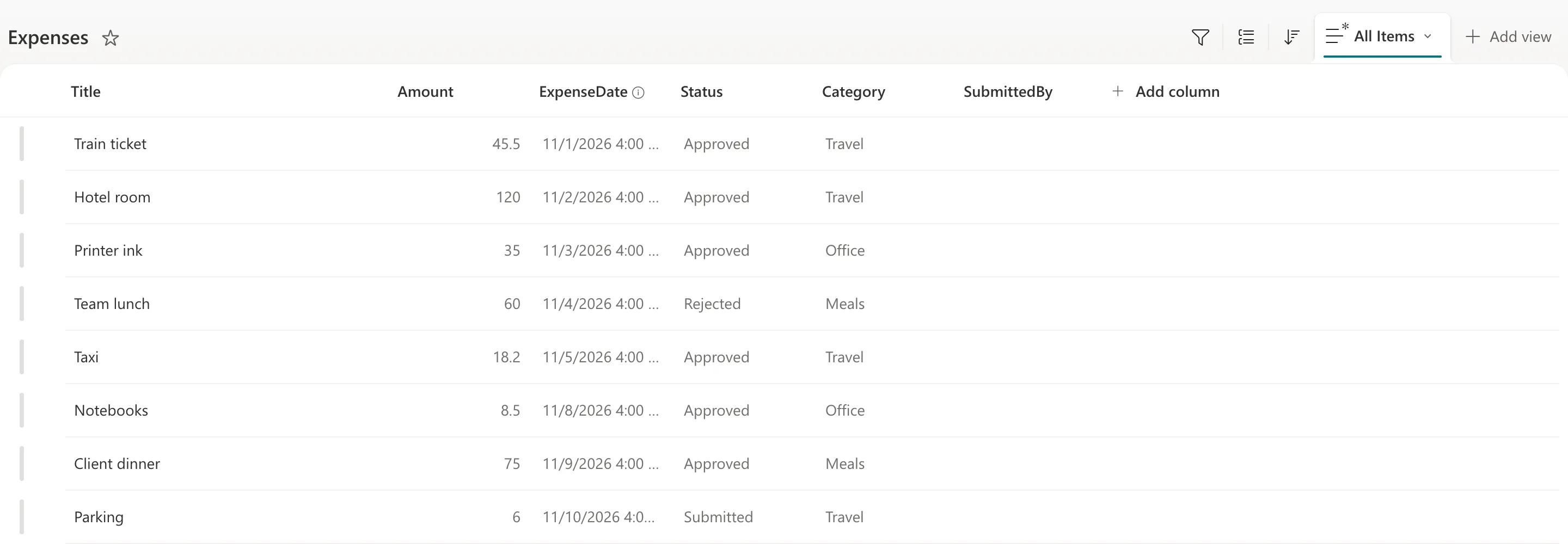
Hovering over a date showed its time zone: 11/1/2026 (UTC-08:00) Pacific Time (US and Canada).
What I Checked
The site's time zone. Site settings > Regional settings showed the site's Time zone, which Microsoft's Change regional settings for a site says controls the time zone for the site:

The arithmetic. 4:00 PM on 1 November in a zone eight hours behind UTC is midnight on 2 November in UTC. Every value was the file's date at midnight UTC, shown in the site's time zone.
The import's documentation. Microsoft's article says nothing about time zones. It does say: After you import a spreadsheet, check the columns of the list to make sure that the data was imported as you expected. The site wasn't mine to change, so changing its time zone wasn't an option.
Why It Happens
From what the list showed, the import read 2026-11-02 as midnight on 2 November UTC, and the site displays dates in its own time zone, Pacific, eight hours earlier. Microsoft's article doesn't describe how the import treats dates, so this is as far as the documentation and the evidence go.
The Fix
First, the time. I edited the column (ExpenseDate > Column settings > Edit) and turned Include Time off:
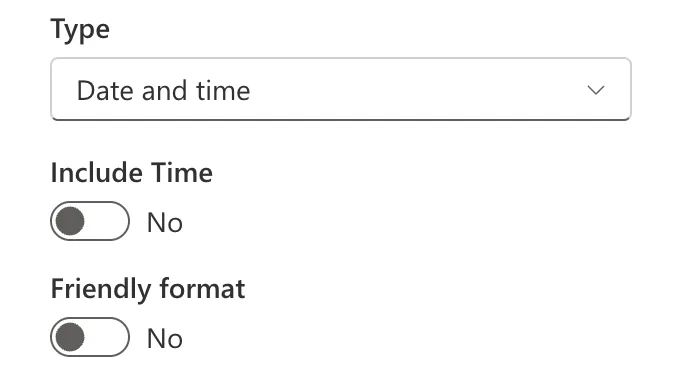
The time disappeared, but the days stayed one early: the train ticket still said 11/1/2026. Hiding the time changes how a date shows, not the date that's stored.
Then, the dates. With eight rows, I entered each date again: Edit in grid view, select each ExpenseDate cell, and type the right date. Dates typed in the list are in the site's own time zone, so they stay on their day.
After the Fix
Every date matches the file, and the list now shows November 2, November 3 and so on:
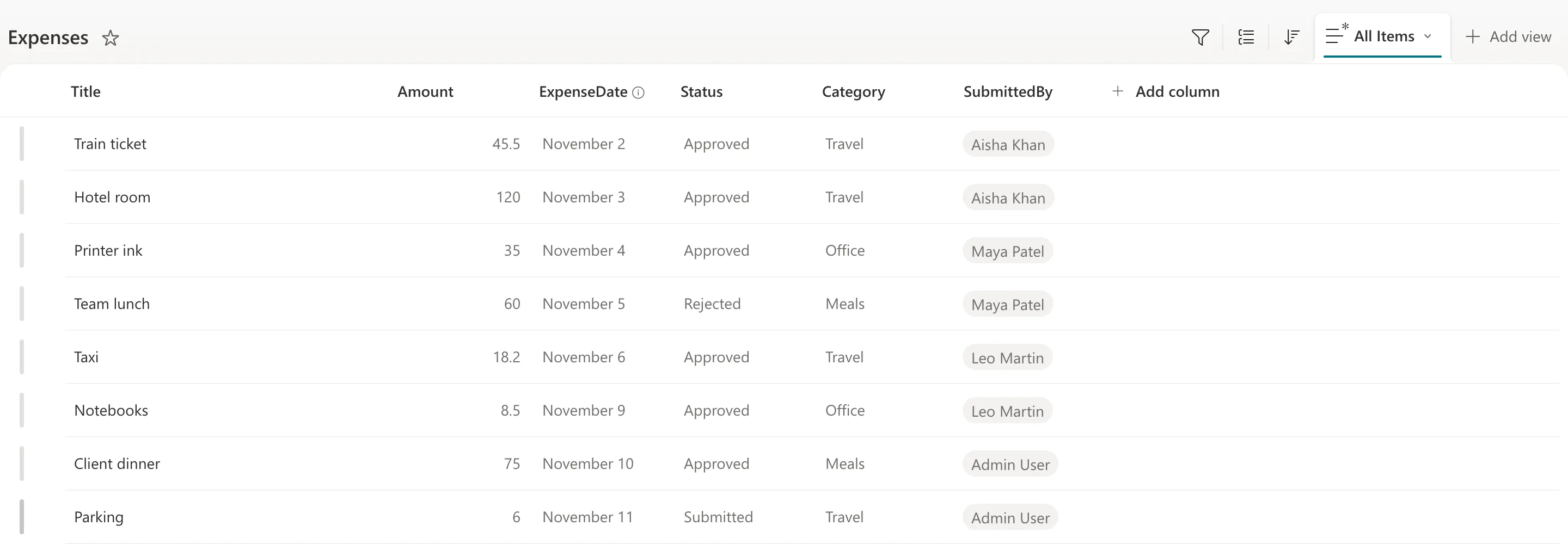
Read in Power Query, the column gave 02/11/2026 for the train ticket, the right day.
Common Mistakes
| Mistake | What happens | Do this instead |
|---|---|---|
| Trusting the import without looking | Every date can be a day off | Check the columns after importing, as Microsoft's article says |
| Turning Include Time off and stopping | The days stay wrong | Enter the dates again |
| Changing a shared site's time zone to fix one list | Every list and page on the site changes | Fix the list's values |
Troubleshooting
| Symptom | Likely cause | Fix |
|---|---|---|
| Dates a day early with a time like 4:00 PM | The site is behind UTC | Enter the dates again in the list |
| Dates right in the list but wrong in another tool | That tool shows them in another time zone | Check the time zone it uses |
| No From CSV option | No permission to create lists | Microsoft's article says the Upload file button is grey without it |
FAQ
Does this happen on a site that's ahead of UTC?
I tested only a site behind UTC. In a zone ahead of UTC, midnight UTC falls later on the same day, so the day itself would look right with a time added.
Where did the CSV file go?
Microsoft's article says the .csv file will be added to the Site Assets library of your site, which means other people will have access to the original .csv file data. Delete it there if it shouldn't stay.
Would a date-only column have avoided it?
I didn't test creating the column first. The import set up ExpenseDate as Date and time, as in the picture above.
Conclusion
A list created from a CSV file showed each date a day early at 4:00 PM, because the dates came in as midnight UTC and the site's time zone is eight hours behind. Turning Include Time off hid the time but not the shift; entering the dates again in the list fixed them.
