Fixed: "RetryLimitExceededException: The maximum number of retries (3) was exceeded" in EF Core with MySQL

A request took about 4 seconds, and then failed with RetryLimitExceededException: The maximum number of retries (3) was exceeded while executing database operations. That exception means EF Core did its job and ran out of attempts. The cause is one level down, and the client deserves a better answer than a 500.
What I Was Doing
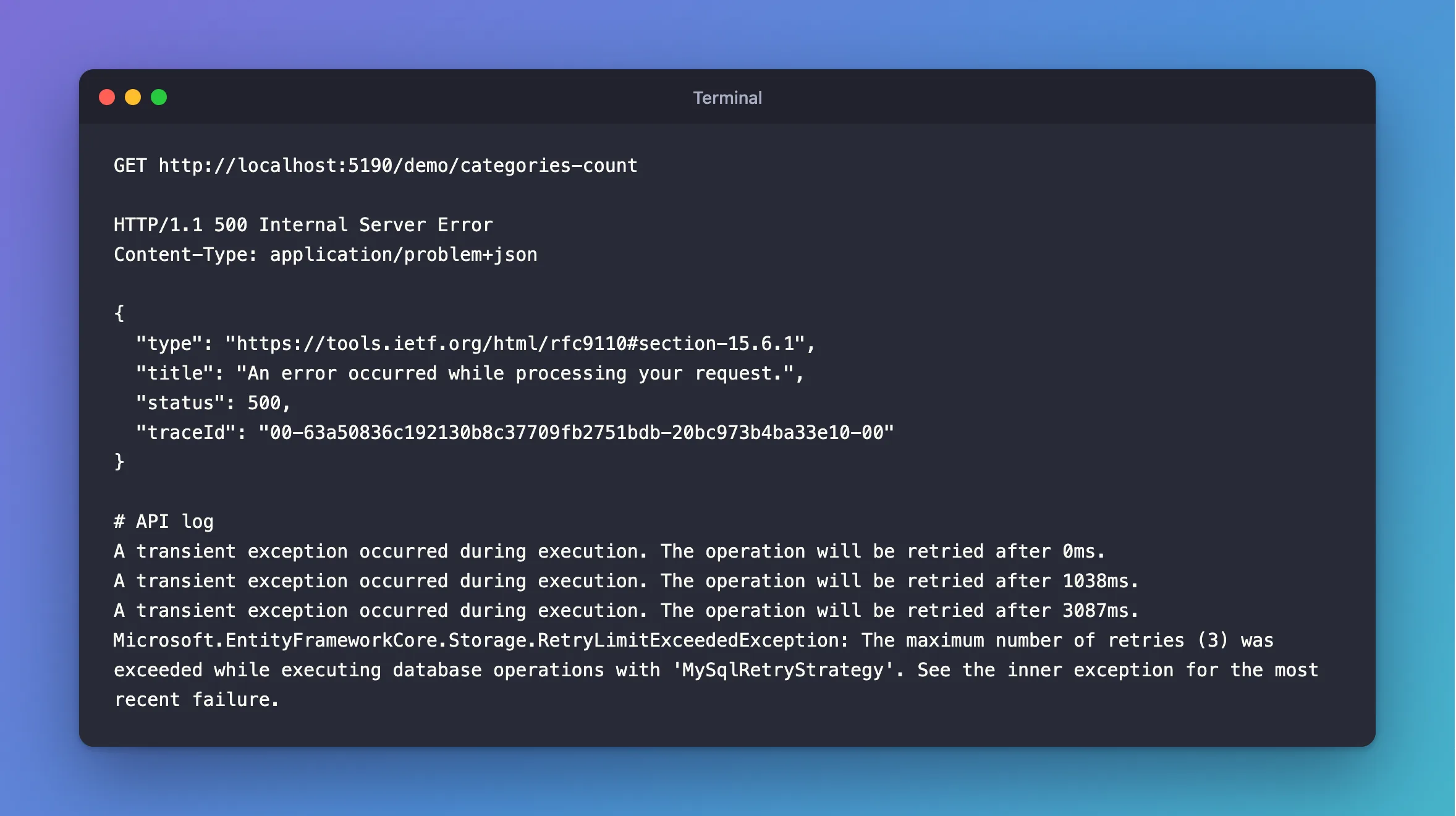
My .NET C# Web API uses EF Core 10.0.14 with a retry strategy that's allowed 3 retries. MySQL was stopped for a moment, and I sent a request:
GET http://localhost:5190/demo/categories-count
What I Expected
If the outage were short, the retries would cover it.
What I Got
HTTP/1.1 500 Internal Server Error
Content-Type: application/problem+json

{
  "type": "https://tools.ietf.org/html/rfc9110#section-15.6.1",
  "title": "An error occurred while processing your request.",
  "status": 500,
  "traceId": "00-63a50836c192130b8c37709fb2751bdb-20bc973b4ba33e10-00"
}
A transient exception occurred during execution. The operation will be retried after 0ms.
A transient exception occurred during execution. The operation will be retried after 1038ms.
A transient exception occurred during execution. The operation will be retried after 3087ms.
Microsoft.EntityFrameworkCore.Storage.RetryLimitExceededException: The maximum number of retries (3) was exceeded while executing database operations with 'MySqlRetryStrategy'. See the inner exception for the most recent failure.
What I Checked
The inner exception. The message says to look there, and it holds the real error:
MySql.Data.MySqlClient.MySqlException (0x80004005): Unable to connect to any of the specified MySQL hosts
---> MySql.Data.MySqlClient.MySqlException (0x80004005): Unable to connect to any of the specified MySQL hosts
The timing. The delays were 0ms, about 1 second and about 3 seconds, so 3 retries took a bit over 4 seconds:
500 4.734215s
So an outage shorter than that is covered, and a longer one isn't. A docker compose restart was short enough here, and every request got through.
Why It Happens
EF Core's execution strategy repeats a failed operation up to maxRetryCount times, with growing delays capped at maxRetryDelay. When the last attempt fails, it stops and throws this, with the last failure inside. It isn't an error of its own. It's a wrapper that says the outage lasted longer than the retries.
The Fix
First, deal with the inner exception. Here, MySQL was down, so start it. If it's Too many connections or a deadlock, the fix is different: read what's inside.
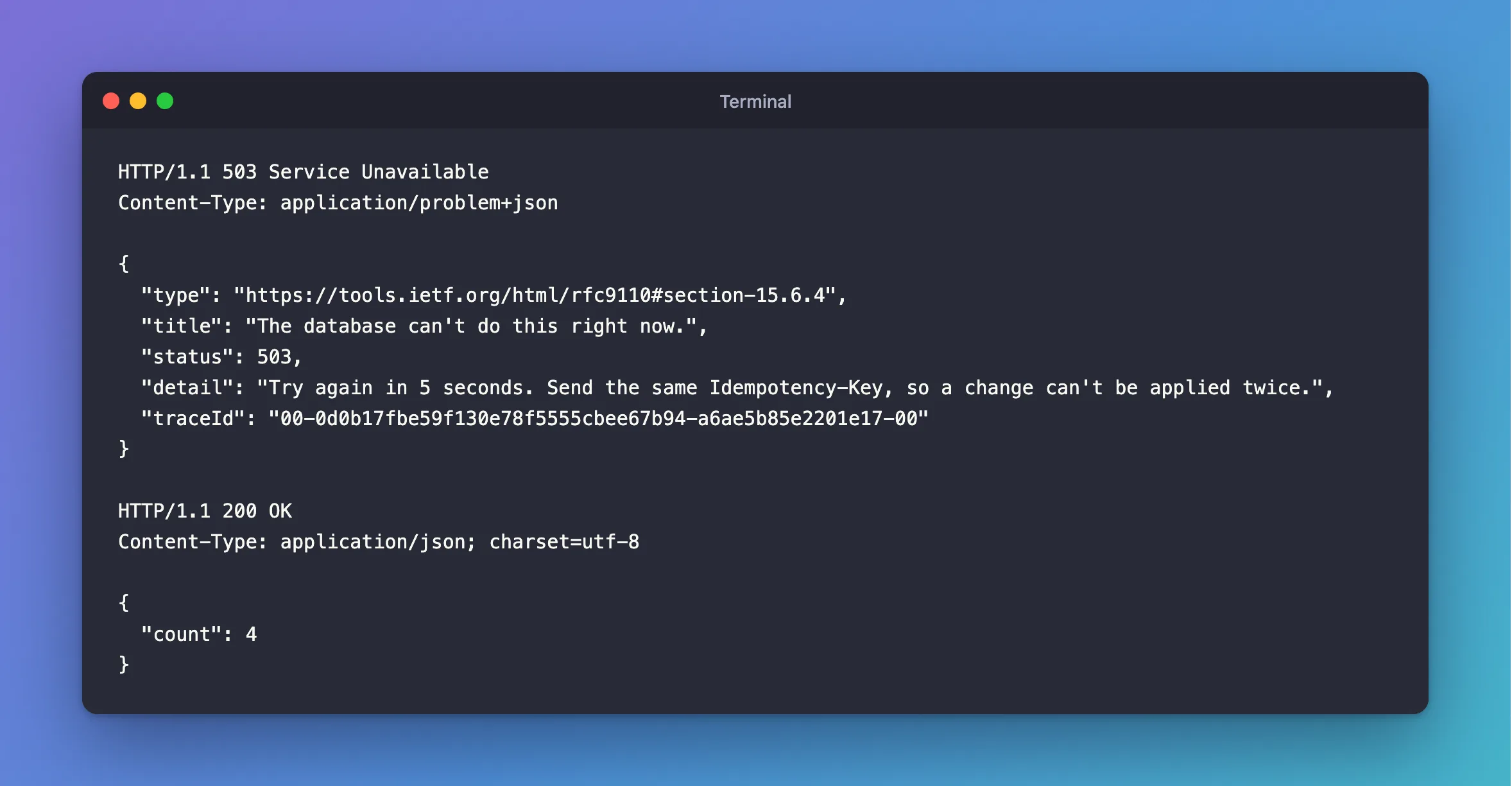
Then, give the client a useful answer. The database can't do this right now, and it isn't the client's fault. That's a 503, with a time to come back:
private static bool IsTemporary(Exception exception) =>
    exception is RetryLimitExceededException
    || exception.FindMySqlException() is { Number: 0 or 1205 or 3024 };
How to Return 503 with a Retry-After Header in ASP.NET Core has the whole handler.
If outages here are usually longer, raise MaxRetryCount in appsettings.json. Each retry keeps a request waiting, so don't raise it far.
After the Fix
HTTP/1.1 503 Service Unavailable
Content-Type: application/problem+json

{
  "type": "https://tools.ietf.org/html/rfc9110#section-15.6.4",
  "title": "The database can't do this right now.",
  "status": 503,
  "detail": "Try again in 5 seconds. Send the same Idempotency-Key, so a change can't be applied twice.",
  "traceId": "00-0d0b17fbe59f130e78f5555cbee67b94-a6ae5b85e2201e17-00"
}
With MySQL running again, the same request worked straight away:
HTTP/1.1 200 OK
Content-Type: application/json; charset=utf-8

{
  "count": 4
}
Common Mistakes
| Mistake | What happens | Do this instead |
|---|---|---|
| Reading only the outer message | You don't see the cause | Read the inner exception |
Raising MaxRetryCount to 50 | Requests hang for minutes | Keep it small, and answer 503 |
Answering 500 | Clients assume a bug, and don't retry | Answer 503 with Retry-After |
| Adding a lock wait error to the list | Each try waits the whole limit | Leave it out |
Troubleshooting
| Symptom | Likely cause | Fix |
|---|---|---|
The inner error is Unable to connect to any of the specified MySQL hosts | MySQL is down, or unreachable | The fix |
| The inner error is a deadlock | The same rows keep colliding | Fix the lock order |
| This never appears, and there are no retries | The errors aren't listed | List them |
Conclusion
RetryLimitExceededException means the retries ran out, and the real error is inside it. Fix that error, and answer 503 with Retry-After, so a client knows it's worth trying again.
Additional Resources
- Connection Resiliency — how retries work.
- RFC 9110: Retry-After — the header.
