Fixed: "Retrieval of the RSA public key is not enabled for insecure connections" Connecting .NET C# to MySQL

Retrieval of the RSA public key is not enabled for insecure connections is one of the most confusing MySQL errors in .NET, because it comes and goes: the same connection string fails after MySQL restarts and works again later. The cause is MySQL's default sign-in method, caching_sha2_password, meeting a connection without TLS. This post shows it happening in a small .NET C# program, explains why it's intermittent, and fixes it the right way.
What I Was Doing
I was connecting to MySQL 9.7 in Docker from a one-file C# program, run by .NET 10's dotnet run. The program reads the connection string from an environment variable, connects with MySql.Data 26.10.0, Oracle's ADO.NET driver, and asks MySQL who it is and whether the connection uses TLS:
#:package MySql.Data@26.10.0

using MySql.Data.MySqlClient;

// The connection string comes from an environment variable, so no password is written in the code.
var connectionString = Environment.GetEnvironmentVariable("MYSQL_CONNECTION_STRING")
    ?? throw new InvalidOperationException("Set the MYSQL_CONNECTION_STRING environment variable first.");

await using var connection = new MySqlConnection(connectionString);
await connection.OpenAsync();

// Ask MySQL who we are, which version it runs, and which TLS version this connection uses.
await using var command = new MySqlCommand(
    "SELECT CURRENT_USER(), VERSION(), " +
    "(SELECT VARIABLE_VALUE FROM performance_schema.session_status WHERE VARIABLE_NAME = 'Ssl_version')",
    connection);
await using var reader = await command.ExecuteReaderAsync();
await reader.ReadAsync();

var tls = reader.GetString(2);
Console.WriteLine($"Connected as {reader.GetString(0)} to MySQL {reader.GetString(1)}");
Console.WriteLine($"TLS: {(tls.Length == 0 ? "not used" : tls)}");
MySQL had just been restarted with docker compose restart, and the connection string had SslMode=Disabled:
Server=127.0.0.1;Port=3306;Database=inventory;User ID=inventory_app;Password=…;SslMode=Disabled
dotnet run test-connection.cs
What I Expected
Connected as inventory_app@%, without TLS.
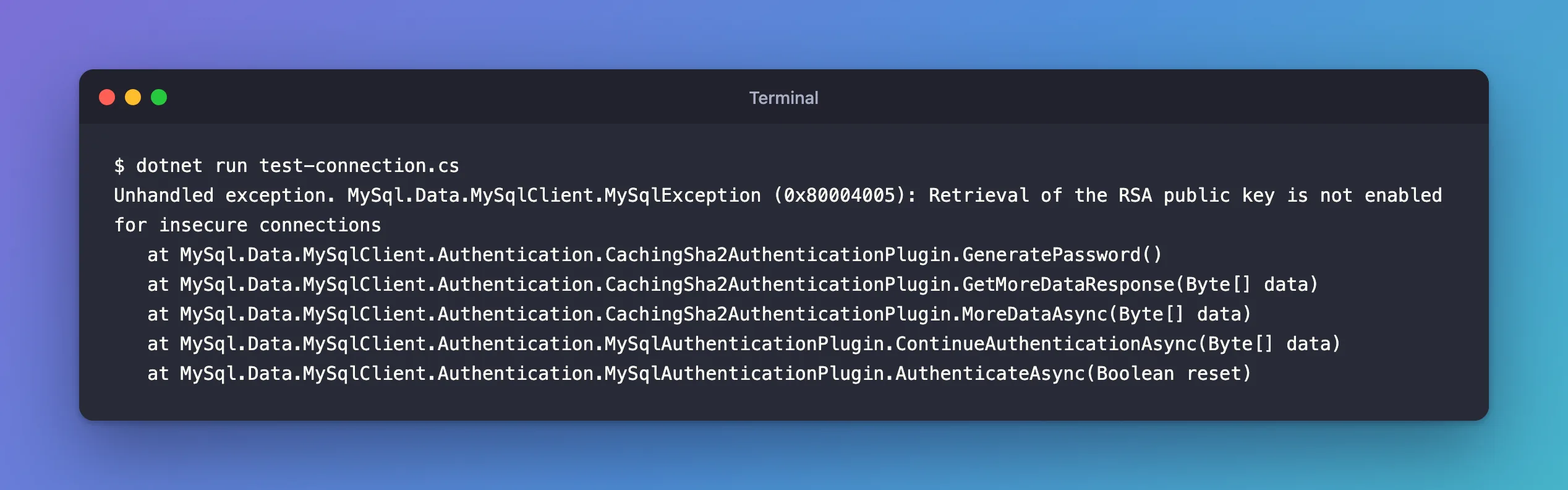
What I Got
Unhandled exception. MySql.Data.MySqlClient.MySqlException (0x80004005): Retrieval of the RSA public key is not enabled for insecure connections
   at MySql.Data.MySqlClient.Authentication.CachingSha2AuthenticationPlugin.GeneratePassword()
   at MySql.Data.MySqlClient.Authentication.CachingSha2AuthenticationPlugin.GetMoreDataResponse(Byte[] data)
   at MySql.Data.MySqlClient.Authentication.CachingSha2AuthenticationPlugin.MoreDataAsync(Byte[] data)
   at MySql.Data.MySqlClient.Authentication.MySqlAuthenticationPlugin.ContinueAuthenticationAsync(Byte[] data)
   at MySql.Data.MySqlClient.Authentication.MySqlAuthenticationPlugin.AuthenticateAsync(Boolean reset)
What I Checked
The stack trace names the sign-in plugin: CachingSha2AuthenticationPlugin, the client side of MySQL's caching_sha2_password. It failed while preparing the password, before any query ran.
The same settings, a minute later. After one connection with TLS had signed in successfully, I ran the program again with the very same SslMode=Disabled string:
Connected as inventory_app@% to MySQL 9.7.4
TLS: not used
It worked. Nothing in the connection string had changed; something on the server had.
Why It Happens
caching_sha2_password is MySQL's default sign-in method; the manual's page on it says "the default is to use caching_sha2_password." It protects the password in transit in one of two ways: "If the connection is secure, an RSA key pair is unnecessary and is not used", and "If the connection is not secure, an RSA key pair is used." With SslMode=Disabled, the connection isn't secure, so the driver needs the server's RSA public key to encrypt the password. By default, it doesn't fetch that key from the server, and that's the error.
Why does it work a minute later? The plugin keeps a cache. The manual: "Once the user authenticates successfully, the account is entered into the cache and subsequent connections do not require a secure connection or the RSA key pair, until another cache clearing event occurs that affects the account." And: "It empties the cache at server shutdown. (This means the cache is not persistent across server restarts.)"
So the sequence was:
- MySQL restarted: the cache was empty.
SslMode=Disabled: a full sign-in without TLS, which needs the RSA key. Error.- A sign-in that succeeded put the account in the cache.
SslMode=Disabledagain: a fast sign-in from the cache, no RSA key needed. It works, until the next restart.
That's why the error tends to appear right after a deployment or a database restart, and disappear "by itself". Oracle's Connector/NET options reference describes the same exception from the client's side: "Exceptions to the default behavior can occur when previous successful connection attempts were made or when pooling is enabled and a pooled connection can be reused."
The Fix
Use TLS. With an encrypted connection, the password travels inside TLS, no RSA key is needed, and the cache doesn't matter. Set SslMode=Required, or stricter, which is also what you want for the data itself:
Server=127.0.0.1;Port=3306;Database=inventory;User ID=inventory_app;Password=…;SslMode=Required
Connected as inventory_app@% to MySQL 9.7.4
TLS: TLSv1.2
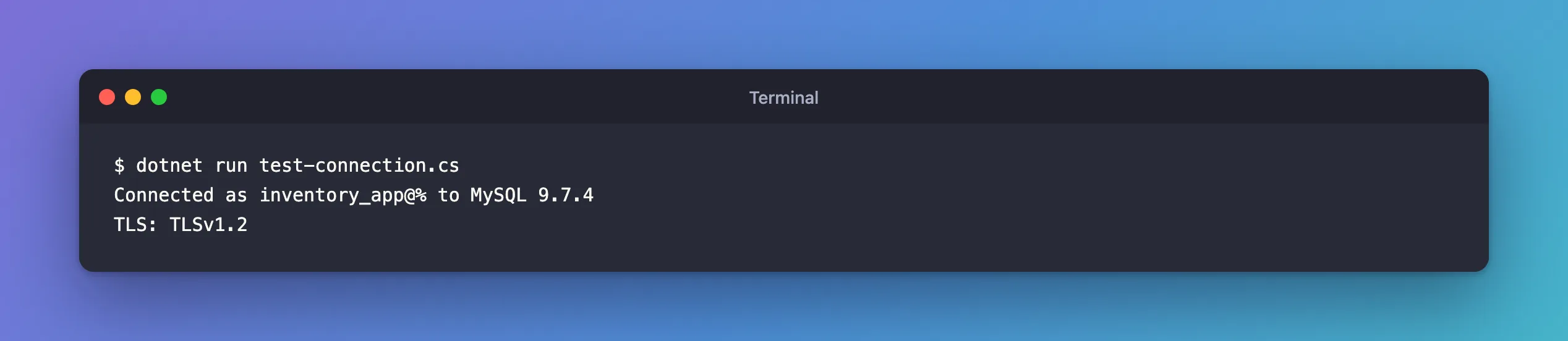
Required encrypts the connection but doesn't check the server's certificate; VerifyCA and VerifyFull do. The official MySQL Docker image creates its own self-signed certificates, so Required is what works out of the box on a development machine.
Why not AllowPublicKeyRetrieval=True?
Search results usually suggest adding AllowPublicKeyRetrieval=True. It does make the error go away: with SslMode=Disabled;AllowPublicKeyRetrieval=True, the program connected right after a restart, with TLS: not used. But Oracle's reference warns: "This option is prone to man-in-the-middle attacks, so it should be used only in situations where you can ensure by other means that your connections are made to trusted servers." The driver accepts whatever key the server sends, so an impostor server could send its own key and read the password. And with TLS off, every query and result travels in plain text anyway.
After the Fix
The connection uses TLS 1.2, signs in the same way right after a restart as an hour later, and the password never travels without encryption.
Common Mistakes
| Mistake | What happens | Do this instead |
|---|---|---|
Adding AllowPublicKeyRetrieval=True and moving on | The error goes away, the connection stays unencrypted | Use SslMode=Required or stricter |
| Testing only once after a restart | It passes after any earlier sign-in, then fails after the next restart | Test right after docker compose restart |
SslMode=None | Removed from MySql.Data in 9.6.0 | Use Disabled if you really mean no TLS |
The None row comes from the Connector/NET 9.6.0 release notes: "Removed the deprecated option, None, from MySqlSslMode."
Troubleshooting
| Symptom | Likely cause | Fix |
|---|---|---|
| The error appears after every deployment | The database restarts, emptying the cache | Use TLS |
| Works locally, fails in production | Production MySQL restarted, or has never seen this account sign in with TLS | Use TLS everywhere |
SslMode=Required fails with a TLS error | The server has no TLS set up | Enable TLS on the server; the official image has it by default |
FAQ
Does this happen with EF Core too?
Yes. Oracle's EF Core provider, MySql.EntityFrameworkCore, connects through the same MySql.Data driver, so the same connection string gives the same error.
What does the default SslMode do?
Oracle's authentication page says SslMode "is set to Preferred by default": TLS when the server offers it, which MySQL 9.7 does. The error appears when TLS is turned off, or isn't available.
Conclusion
"Retrieval of the RSA public key is not enabled for insecure connections" means a sign-in with caching_sha2_password needed the server's RSA key because the connection had no TLS. It comes and goes because a successful sign-in is cached until MySQL restarts. AllowPublicKeyRetrieval=True hides it at a security cost; SslMode=Required removes the cause, and encrypts everything else too.
Additional Resources
- Caching SHA-2 Pluggable Authentication — how the plugin, the cache and the RSA key work.
- Connector/NET Connection Options —
SslModeandAllowPublicKeyRetrieval.
