Fixed: "Response status code does not indicate success: 415 (Unsupported Media Type)" from Invoke-WebRequest

The same request worked from curl and failed from PowerShell: Invoke-WebRequest: Response status code does not indicate success: 415 (Unsupported Media Type). When a POST has no -ContentType, PowerShell labels it as form data, and my Microsoft 365 Agents SDK agent's endpoint only accepts JSON. Adding -ContentType "application/json" fixes it.
What I Was Doing
I was building the reminder agent for Part 6 of the Microsoft 365 Agents SDK Fundamentals, on Agents SDK 1.9.205 and .NET 10. Its Program.cs maps the SDK's proactive endpoints, so that another program, such as a calendar system, can make the agent post a meeting reminder into a chat:
if (app.Environment.IsDevelopment())
{
    // Open to anyone who can reach this port, so only map them on your own machine.
    app.MapAgentProactiveEndpoints<ReminderAgent>(requireAuth: false);
}
A reminder is a POST to /proactive/continue/meeting/<conversation ID>, with the meeting in the address and no body. From bash it worked:
curl -i -X POST "http://localhost:3978/proactive/continue/meeting/reminders-chat?title=Design%20review&minutes=5"
HTTP/1.1 200 OK
Content-Length: 0
Date: Tue, 24 Nov 2026 07:09:28 GMT
Server: Kestrel
Then I wrote the same call for PowerShell, for readers on Windows, and ran it in PowerShell 7.6.
What I Expected
200, and the reminder in the chat, as with curl.
What I Got
(Invoke-WebRequest -Method Post -Uri "http://localhost:3978/proactive/continue/meeting/reminders-chat?title=Design%20review&minutes=5").StatusCode
Invoke-WebRequest: Response status code does not indicate success: 415 (Unsupported Media Type).
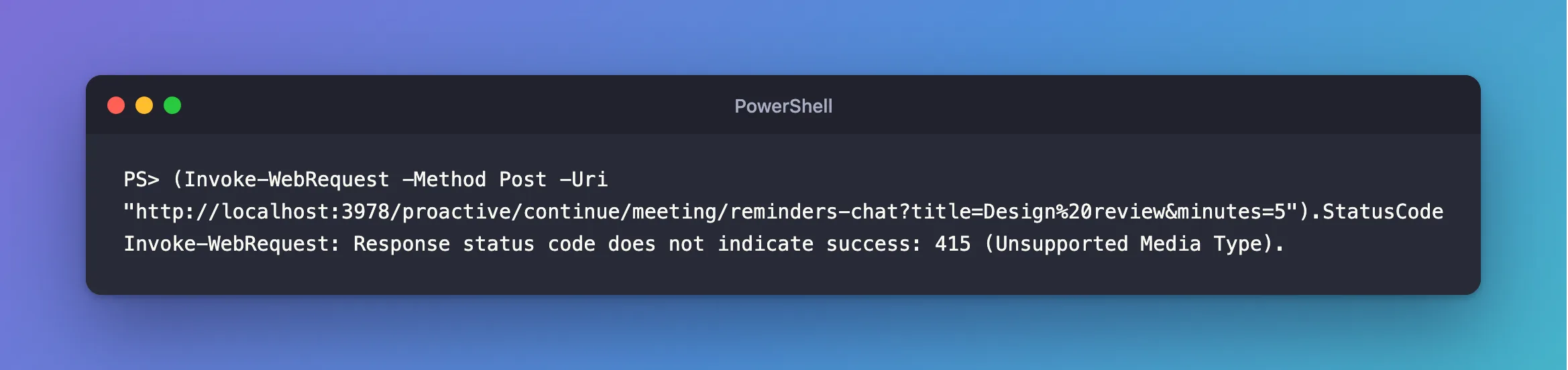
No reminder appeared, and nothing appeared in the agent's terminal: the request never reached the agent's code.
What I Checked
What 415 means. Unsupported Media Type: the server refused the request because of its Content-Type header, the label that says what kind of data a request carries.
What the endpoint accepts. In the Agents SDK's 1.9.205 source, MapAgentProactiveEndpoints maps every proactive endpoint with the same metadata: .WithMetadata(new AcceptsMetadata(["application/json"])). Microsoft's ASP.NET Core reference for IAcceptsMetadata.ContentTypes explains what that does: If the incoming request contains a Content-Type and the content type is not one of these values, the request will be rejected with a 415 response. If the incoming request does not contain a Content-Type header, the content type check will be bypassed.
What curl sent. I pointed the same curl command at a port where nc -l 5099 was listening, which prints whatever arrives:
POST /proactive/continue/meeting/reminders-chat?title=X&minutes=1 HTTP/1.1
Host: localhost:5099
User-Agent: curl/8.7.1
Accept: */*
No Content-Type at all, so the check was bypassed. To confirm, I sent the request from curl again, this time with a form content type:
curl -s -o /dev/null -w "%{http_code}\n" -X POST -H "Content-Type: application/x-www-form-urlencoded" "http://localhost:3978/proactive/continue/meeting/reminders-chat?title=X&minutes=1"
415
What PowerShell sent. Microsoft's reference for Invoke-WebRequest says, under -ContentType: If you omit the parameter, the content type may be different based on the HTTP method you use: For a POST method, the content type is application/x-www-form-urlencoded. So PowerShell labelled my empty POST as form data, and the endpoint, which only accepts JSON, refused it.
Why It Happens
The proactive endpoints only accept requests labelled application/json, or requests with no label at all. curl sends no label when there's no body. PowerShell's Invoke-WebRequest and Invoke-RestMethod label every POST without -ContentType as application/x-www-form-urlencoded, which isn't on the list, so ASP.NET Core answers 415 before the agent sees the request.
The Fix
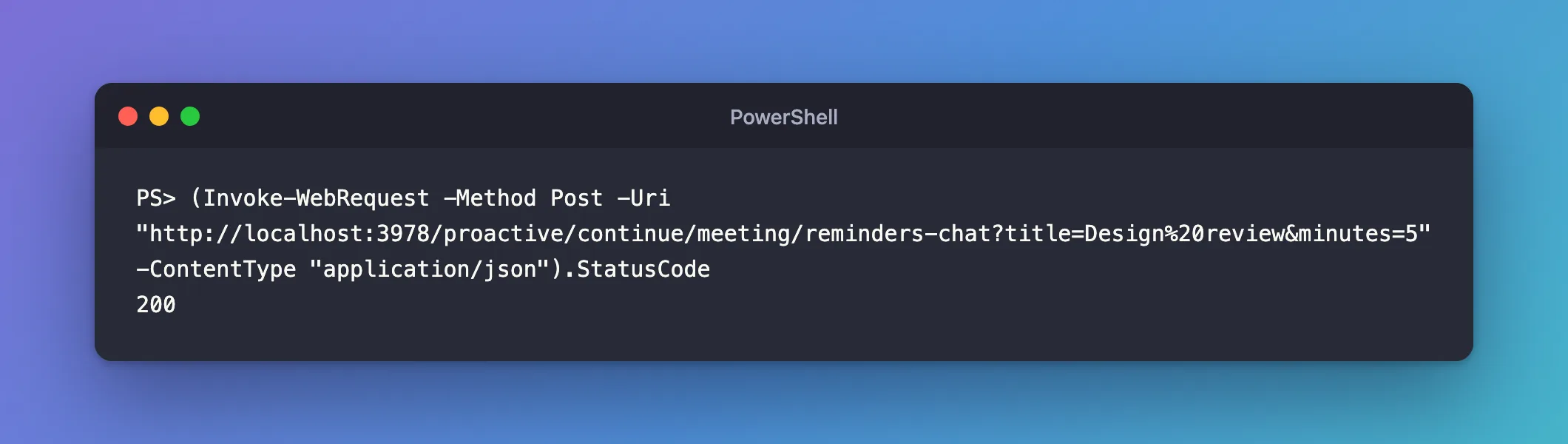
Tell PowerShell that the request is JSON, even when it has no body:
(Invoke-WebRequest -Method Post -Uri "http://localhost:3978/proactive/continue/meeting/reminders-chat?title=Design%20review&minutes=5" -ContentType "application/json").StatusCode
200
The same applies to Invoke-RestMethod, and to the endpoint that sends a plain message, which takes a JSON body anyway:
Invoke-RestMethod -Method Post -Uri "http://localhost:3978/proactive/sendactivity/reminders-chat" -ContentType "application/json" -Body '{"type":"message","text":"The design review has moved to room 4."}'
After the Fix
The PowerShell call returned 200. The endpoint only answers after the agent's handler has run, so the reminder went to the chat, the same as with curl. A call with a missing value now reached the agent too, and came back with the agent's own answer instead of 415:
Invoke-WebRequest:
{
  "error": {
    "code": "-2147024809",
    "message": "Add the minutes until the meeting starts, from 1 to 1440, as minutes=...",
    "helpLink": null
  }
}
Common Mistakes
| Mistake | What happens | Do this instead |
|---|---|---|
Leaving out -ContentType because the request has no body | 415: PowerShell still labels it as form data | Add -ContentType "application/json" |
Copying a curl command's headers into -Headers with a different content type | The label still isn't JSON | Use -ContentType "application/json" |
| Testing only with curl | The endpoint works for you and fails for PowerShell users | Test the PowerShell form too |
Troubleshooting
| Symptom | Likely cause | Fix |
|---|---|---|
| 415 from PowerShell, 200 from curl | PowerShell's default content type for POST | Add -ContentType "application/json" |
415 from curl with -d | curl's -d sends application/x-www-form-urlencoded unless you set a header | Add -H "Content-Type: application/json" |
| 404 with Conversation not found | The conversation ID in the address isn't stored | Store the conversation first, or check the ID |
FAQ
Why does an endpoint with no body care about the content type?
Because the check looks at the label, not at the body. The SDK declares all its proactive endpoints as accepting JSON, and ASP.NET Core rejects any request whose label says otherwise. A request without a label passes.
Does Invoke-RestMethod behave the same way?
Yes. Without -ContentType, an Invoke-RestMethod POST to an ASP.NET Core endpoint that expects JSON failed with the same 415 (Unsupported Media Type) message. With -ContentType "application/json", the sendactivity call above returned the activity's id.
Conclusion
415 (Unsupported Media Type) from Invoke-WebRequest against an endpoint that works from curl means PowerShell labelled the request as form data. The Agents SDK's proactive endpoints accept JSON or no label at all, and PowerShell's default for POST is neither. Add -ContentType "application/json" to every call, body or not.
Additional Resources
- Invoke-WebRequest — the
-ContentTypeparameter and its default for POST. - IAcceptsMetadata.ContentTypes property — when ASP.NET Core answers 415.
- Proactive messaging in the Agents SDK — the proactive HTTP endpoints.
