Fixed: Request blocked by Auth: principal does not have required RBAC permissions to perform action readMetadata

I turned off key-based authentication on a new Azure Cosmos DB account, created a database and a container in Data Explorer, and then couldn't open the container: Request blocked by Auth … does not have required RBAC permissions to perform action [Microsoft.DocumentDB/databaseAccounts/readMetadata]. My account could manage the Cosmos DB account, but it had no role on the data. A data-plane role, assigned with one Azure CLI command, fixed it.
What I Was Doing
I was setting up a container for an agent's conversations (Part 15: Persistent Conversations):
- In the Azure portal, I created an Azure Cosmos DB for NoSQL account, serverless, with Key-based Authentication set to Disable on the Security tab, so that only Microsoft Entra ID identities could use it.
- In the account's Data Explorer, I created the database
servicedeskand the containersessionswith New Container. - I expanded
sessionsand opened its Settings, to set a time to live.
What I Expected
The container's settings, and no errors. My account had just created the account, the database and the container, so I expected it to be able to read them too.
What I Got
The settings opened, but the bar at the bottom of Data Explorer said Error while reading container sessions, with one error counted. I opened the console to read it:
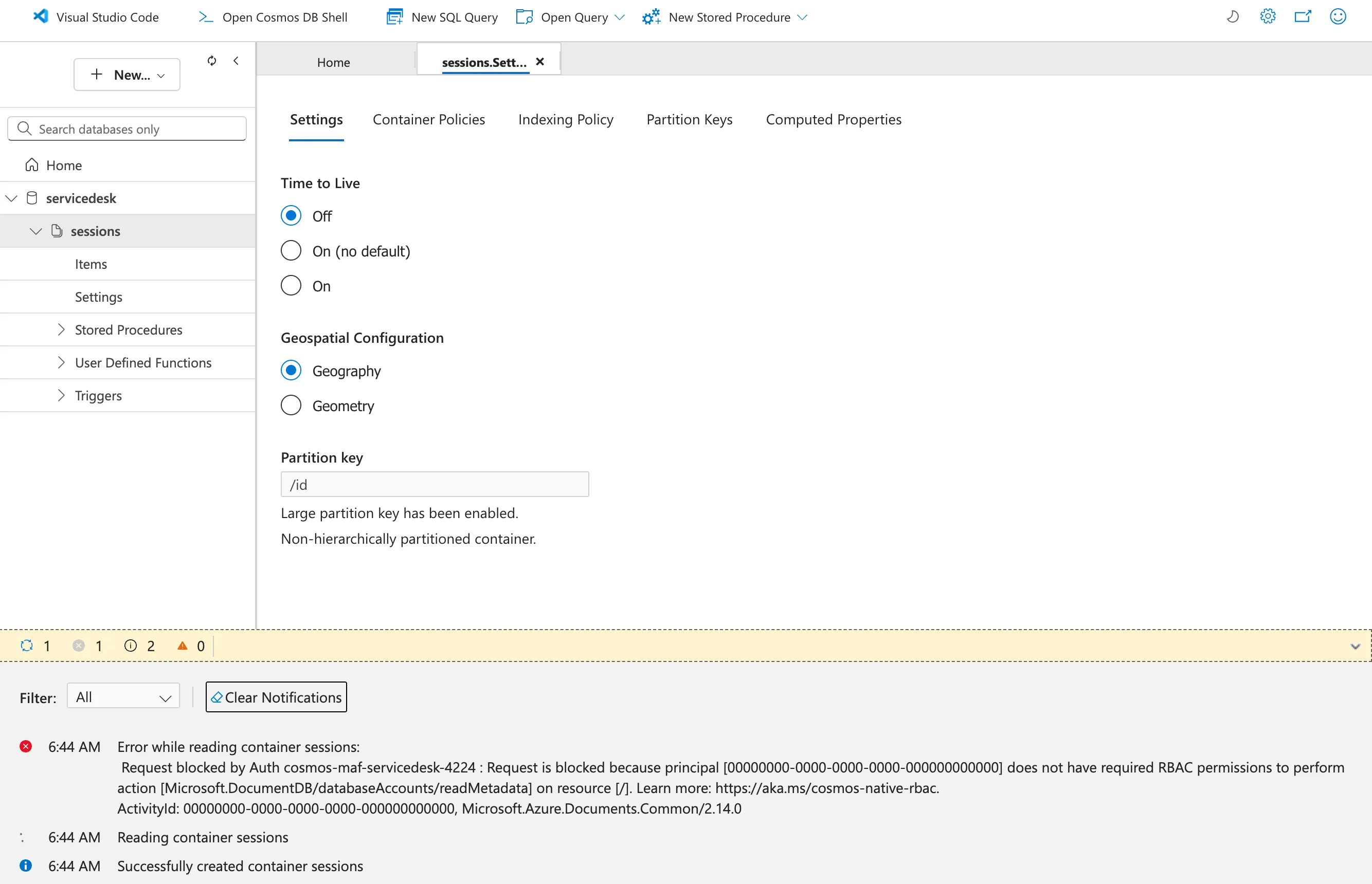
The full message:
Error while reading container sessions:
 Request blocked by Auth cosmos-maf-servicedesk-4224 : Request is blocked because principal [00000000-0000-0000-0000-000000000000] does not have required RBAC permissions to perform action [Microsoft.DocumentDB/databaseAccounts/readMetadata] on resource [/]. Learn more: https://aka.ms/cosmos-native-rbac.
ActivityId: 00000000-0000-0000-0000-000000000000, Microsoft.Azure.Documents.Common/2.14.0
The principal is my own account; I replaced its ID and the activity ID with zeros.
What I Checked
What worked and what didn't. The console listed Successfully created database servicedesk and Successfully created container sessions, then the error. Creating worked; reading didn't.

Microsoft's documentation on Cosmos DB and Entra ID. Connect to Azure Cosmos DB for NoSQL using role-based access control and Microsoft Entra ID separates two kinds of access:
- Control plane: managing the account, its databases and containers. Azure roles such as Owner and Contributor grant it.
- Data plane: the ability to read and write data within an Azure service without the ability to manage resources in the account, through Cosmos DB's own roles, such as Cosmos DB Built-in Data Reader and Cosmos DB Built-in Data Contributor.
The page also says: Managing data plane role-based access control isn't supported in the Azure portal. So the portal could create my container through the control plane, but nothing in the portal could give me the data plane.
The action in the message. Microsoft.DocumentDB/databaseAccounts/readMetadata is the first of the data actions in the documentation's example role, Can read account-level metadata. With keys off, Data Explorer reads the container as me, and I had no data-plane role at all.
The roles the account has. With the Azure CLI:
- bash / zsh
- PowerShell
az cosmosdb sql role definition list \
    --resource-group rg-maf-servicedesk \
    --account-name cosmos-maf-servicedesk-4224 \
    --query "[].{roleName:roleName, roleDefinitionId:name}" \
    --output table
az cosmosdb sql role definition list `
    --resource-group rg-maf-servicedesk `
    --account-name cosmos-maf-servicedesk-4224 `
    --query "[].{roleName:roleName, roleDefinitionId:name}" `
    --output table
RoleName                             RoleDefinitionId
-----------------------------------  ------------------------------------
Cosmos DB Built-in Data Reader       00000000-0000-0000-0000-000000000001
Cosmos DB Built-in Data Contributor  00000000-0000-0000-0000-000000000002
These two IDs are the same in every account.
Why It Happens
With key-based authentication turned off, every request for data needs a Microsoft Entra ID identity that has a data-plane role. Roles on the subscription or the resource group are control-plane roles: they let you create and configure the account, but they include no data actions. So the identity that created the container can't read it until it gets a data-plane role.
The Fix
Give your account a data-plane role. Data Contributor reads and writes items; Data Reader only reads. The command looks up your own object ID with az ad signed-in-user show and assigns the role:
- bash / zsh
- PowerShell
az cosmosdb sql role assignment create \
    --resource-group rg-maf-servicedesk \
    --account-name cosmos-maf-servicedesk-4224 \
    --role-definition-id 00000000-0000-0000-0000-000000000002 \
    --principal-id "$(az ad signed-in-user show --query id --output tsv)" \
    --scope "/dbs/servicedesk/colls/sessions"
az cosmosdb sql role assignment create `
    --resource-group rg-maf-servicedesk `
    --account-name cosmos-maf-servicedesk-4224 `
    --role-definition-id 00000000-0000-0000-0000-000000000002 `
    --principal-id "$(az ad signed-in-user show --query id --output tsv)" `
    --scope "/dbs/servicedesk/colls/sessions"
Use your own resource group, account, database and container names. --scope limits the role to one container: /dbs/<database>/colls/<container>. A scope of / covers every database in the account.
{
  "id": "…/databaseAccounts/cosmos-maf-servicedesk-4224/sqlRoleAssignments/00000000-0000-0000-0000-000000000000",
  "name": "00000000-0000-0000-0000-000000000000",
  "principalId": "00000000-0000-0000-0000-000000000000",
  "resourceGroup": "rg-maf-servicedesk",
  "roleDefinitionId": "…/databaseAccounts/cosmos-maf-servicedesk-4224/sqlRoleDefinitions/00000000-0000-0000-0000-000000000002",
  "scope": "…/databaseAccounts/cosmos-maf-servicedesk-4224/dbs/servicedesk/colls/sessions",
  "systemData": null,
  "type": "Microsoft.DocumentDB/databaseAccounts/sqlRoleAssignments"
}
An app gets its data-plane role the same way: its managed identity's principal ID in --principal-id.
After the Fix
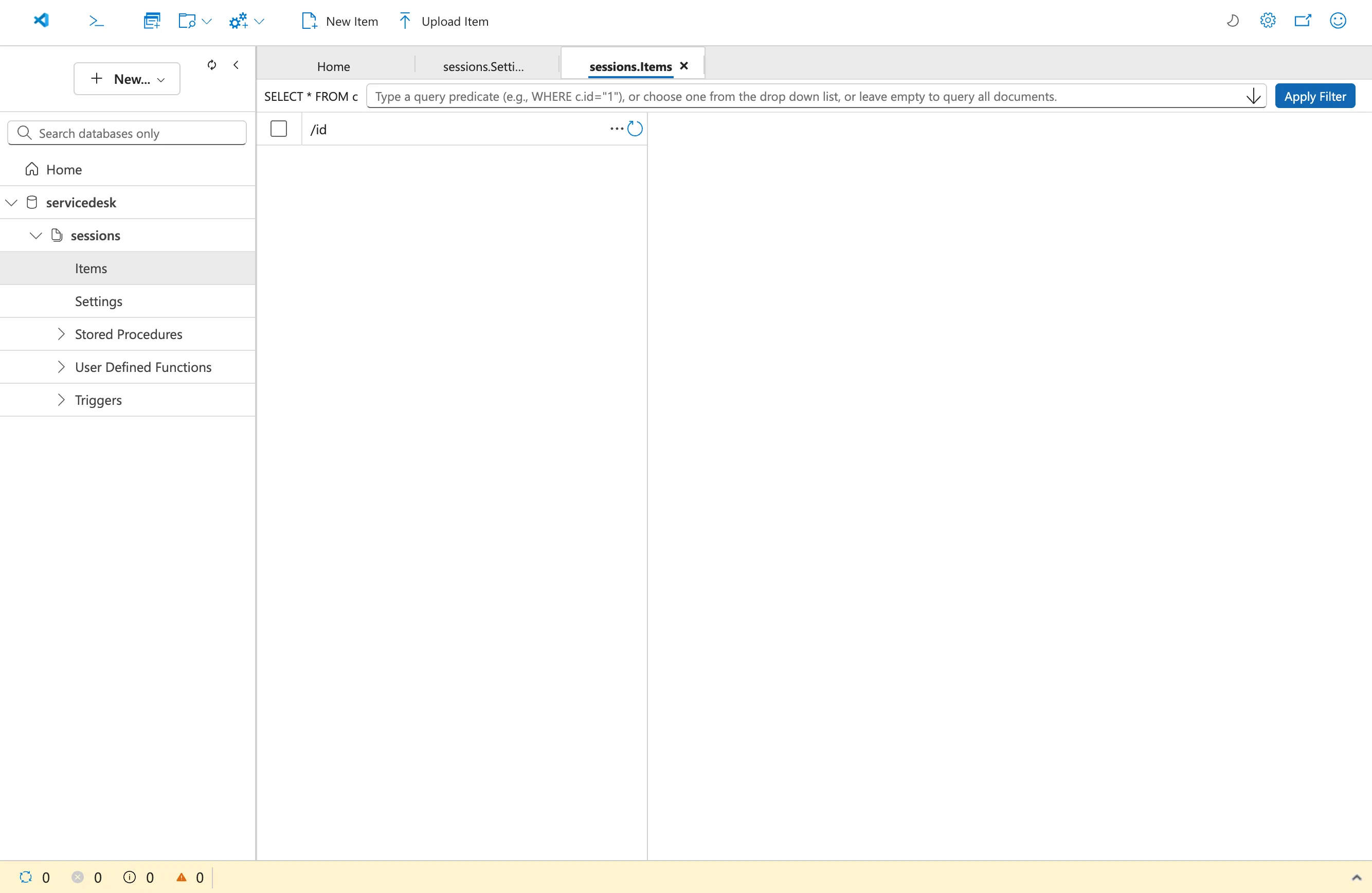
I reloaded the portal page about half a minute after the assignment and opened the container's Items. The list loaded, empty, and the console counted no errors:
Common Mistakes
| Mistake | What happens | Do this instead |
|---|---|---|
| Adding a role in the account's Access control (IAM) | That's Azure RBAC, the control plane, and data reads still fail | Assign a data-plane role with az cosmosdb sql role assignment create |
| Turning key-based authentication back on to make the error go away | Anyone with a key can read and write every database again | Keep keys off and assign a data-plane role |
Giving the role the scope / by default | The identity can reach every container in the account | Scope it to the database or container it needs |
| Scoping the role to one container, then reading another | The same error, with that container in on resource [...] | Check the resource in the message against the role's scope |
Troubleshooting
| Symptom | Likely cause | Fix |
|---|---|---|
| Request blocked by Auth … does not have required RBAC permissions to perform action [Microsoft.DocumentDB/databaseAccounts/readMetadata] on resource [/] | No data-plane role | Assign Data Reader or Data Contributor |
Your app gets CosmosException … Forbidden (403); Substatus: 5301 … on resource [dbs/…/colls/…] | The app's identity has no role on that container, or a setting names a container outside the role's scope | Check the names in the settings, then the role's scope |
FAQ
Why could I create the container, then?
Creating databases and containers is management, the control plane, which your Azure role allows. Reading what's inside is the data plane, which needs its own role.
Does the same error appear in code?
Yes, as a CosmosException with status 403 and substatus 5301, and the same Request blocked by Auth text. The API in Part 15 showed it when one of its settings named a container the role didn't cover.
Conclusion
Request blocked by Auth … does not have required RBAC permissions to perform action [Microsoft.DocumentDB/databaseAccounts/readMetadata] means the identity has no Cosmos DB data-plane role. With key-based authentication off, roles on the subscription let you manage the account but not read its data. Assign Cosmos DB Built-in Data Contributor or Data Reader with az cosmosdb sql role assignment create, scoped to what the identity needs, and reload.
Additional Resources
- Connect to Azure Cosmos DB for NoSQL using role-based access control and Microsoft Entra ID — control plane and data plane, built-in roles, scopes and the CLI commands.
- az cosmosdb sql role assignment — the command's reference.
