Fixed: react-markdown Ignores Single Line Breaks

My AI agent wrote each ticket's status, team and latest update on lines of their own, but the chat page showed them as one run-on line. react-markdown was following CommonMark, where a single line ending inside a paragraph is a soft line break that browsers show as a space. The remark-breaks plugin turns those line endings into real line breaks.
What I Was Doing
In Part 10 of the Microsoft Agent Framework series, an IT service desk agent gets tools, one of which lists the signed-in employee's open tickets. The chat page from Part 7 of the series shows the agent's answers as Markdown, with react-markdown 10.1.0 and remark-gfm 4.0.1:
import Markdown from "react-markdown";
import remarkGfm from "remark-gfm";

// …

      <div className={styles.assistant}>
        <Markdown
          remarkPlugins={[remarkGfm]}
          components={{
            a: ({ node: _node, ...props }) => (
              <a {...props} target="_blank" rel="noreferrer" />
            ),
          }}
        >
          {message.content}
        </Markdown>
      </div>
I signed in to the chat and asked What's the status of my tickets?
What I Expected
A numbered list of the two tickets, with each ticket's status, team and latest update on separate lines, the way the agent wrote them.
What I Got
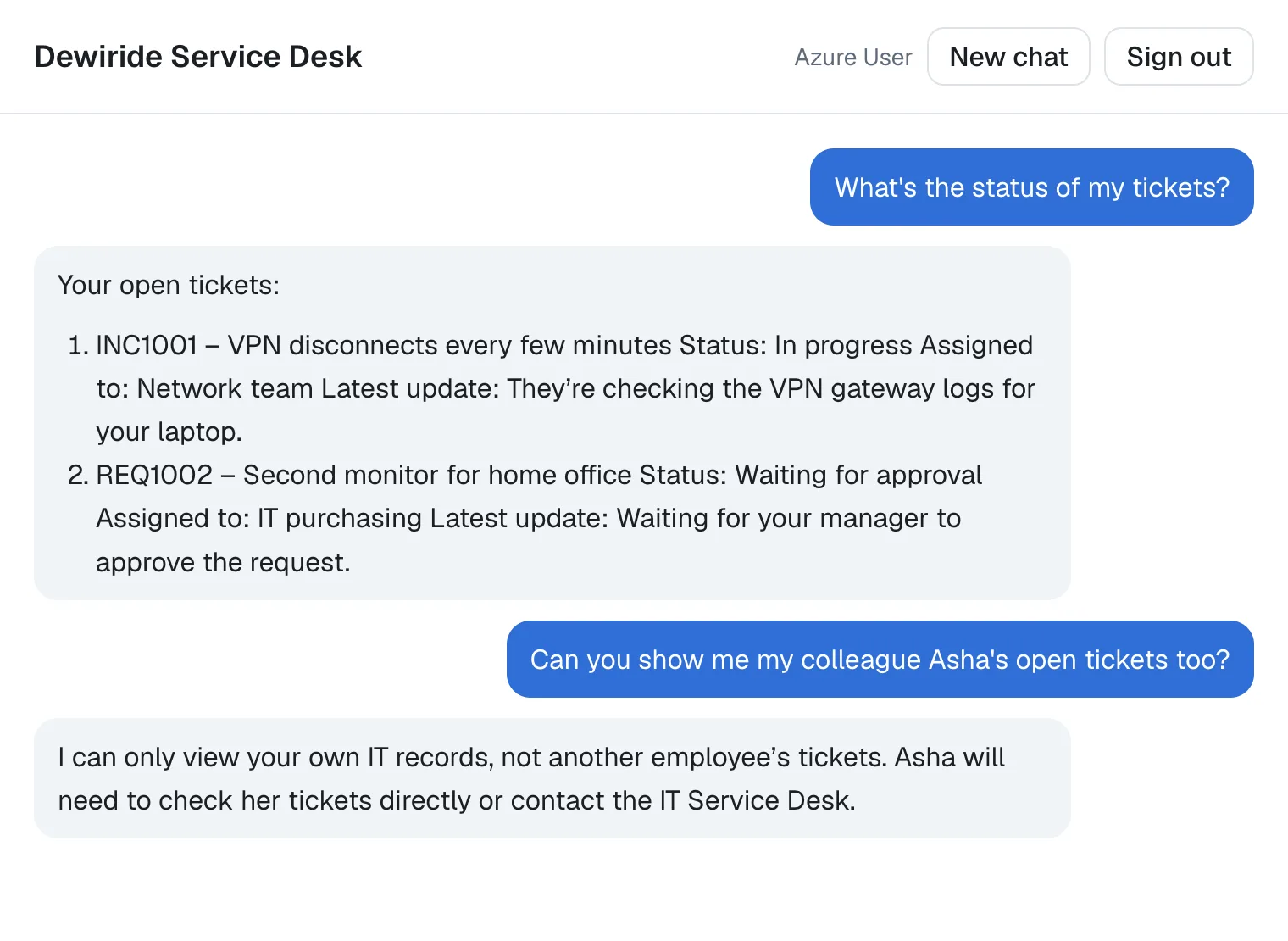
The facts were right, but every ticket's details ran together: VPN disconnects every few minutes Status: In progress Assigned to: Network team Latest update: … The page showed no error.
What I Checked
What the model actually wrote
The chat's server route passes the agent's text through unchanged, so I sent the same question to the agent's API from a .http file and read the raw stream. The answer arrives in small pieces, one per TEXT_MESSAGE_CONTENT event. These are the delta values of the first events, as JSON strings:
"Your", " open", " tickets", " are", ":\n\n",
"1", ".", " INC", "100", "1", " —", " VPN", " disconnect", "s", " every", " few", " minutes\n",
"   Status", ": In", " progress\n",
"   Assigned", " to:", " Network team", "\n   Update"
\n is a line ending. Put together, the model's text was:
Your open tickets are:

1. INC1001 — VPN disconnects every few minutes
   Status: In progress
   Assigned to: Network team
   Update: They’re checking the VPN gateway logs for your laptop.
So the line breaks were there, each a single line ending, with the next line indented by three spaces. The browser received them and didn't show them.
What Markdown does with a single line ending
The three indented lines continue the list item's paragraph, and between them there's only one line ending each. The CommonMark specification, section 6.8, Soft line breaks, defines what that is:
A regular line ending (not in a code span or HTML tag) that is not preceded by two or more spaces or a backslash is parsed as a softbreak. (A soft line break may be rendered in HTML either as a line ending or as a space. The result will be the same in browsers.)
The same section adds: A renderer may also provide an option to render soft line breaks as hard line breaks.
Whether react-markdown follows that
It does, on purpose. Its documentation describes it as 100% to CommonMark, 100% to GFM with a plugin, and says that react-markdown follows CommonMark. So a single line ending in the agent's text becomes a line ending in the HTML, and the browser shows it as a space.
Why the person's own messages weren't affected
The chat page shows the person's own messages as plain text, styled with white-space: pre-wrap, which keeps line endings. Only the agent's answers go through Markdown.
Why It Happens
The agent writes plain text with single line endings, and Markdown treats a single line ending as a soft line break: a place where the author happened to wrap the line, not a new line. CommonMark has two ways to write a hard line break, two spaces or a backslash at the end of the line, and the model used neither. Earlier answers in the series used one line per list item, so the problem never showed until an answer put several lines in one item.
The Fix
The remark project, which also makes remark-gfm, has a plugin for exactly this case: remark-breaks. Its documentation describes it as a plugin to turn soft line endings (enters) into hard breaks (<br>s), useful if you want to display user content closer to how it was authored, because when a user includes a line ending, it'll show as such. It also notes that this is not semantic according to HTML and not compliant to markdown: GitHub's comments and issues work the same way. For an AI model's answers, showing the text as it was written is what matters.
Install it in the app's folder:
npm install remark-breaks
added 2 packages, and audited 150 packages in 2s

96 packages are looking for funding
  run `npm fund` for details

found 0 vulnerabilities
That installed remark-breaks 4.0.0. The package has a default export only, so import it without braces, and add it to remarkPlugins:
import Markdown from "react-markdown";
import remarkBreaks from "remark-breaks";
import remarkGfm from "remark-gfm";

// …

      <div className={styles.assistant}>
        <Markdown
          remarkPlugins={[remarkGfm, remarkBreaks]}
          components={{
            a: ({ node: _node, ...props }) => (
              <a {...props} target="_blank" rel="noreferrer" />
            ),
          }}
        >
          {message.content}
        </Markdown>
      </div>
The documentation explains what it does inside: it looks for line endings preceded by zero or more spaces and tabs and adds the same Break nodes that represent breaks with spaces or escapes. On security, it says the plugin does not involve rehype (hast) or user content so there are no openings for cross-site scripting (XSS) attacks.
After the Fix
After reloading the page, the same question gave this:
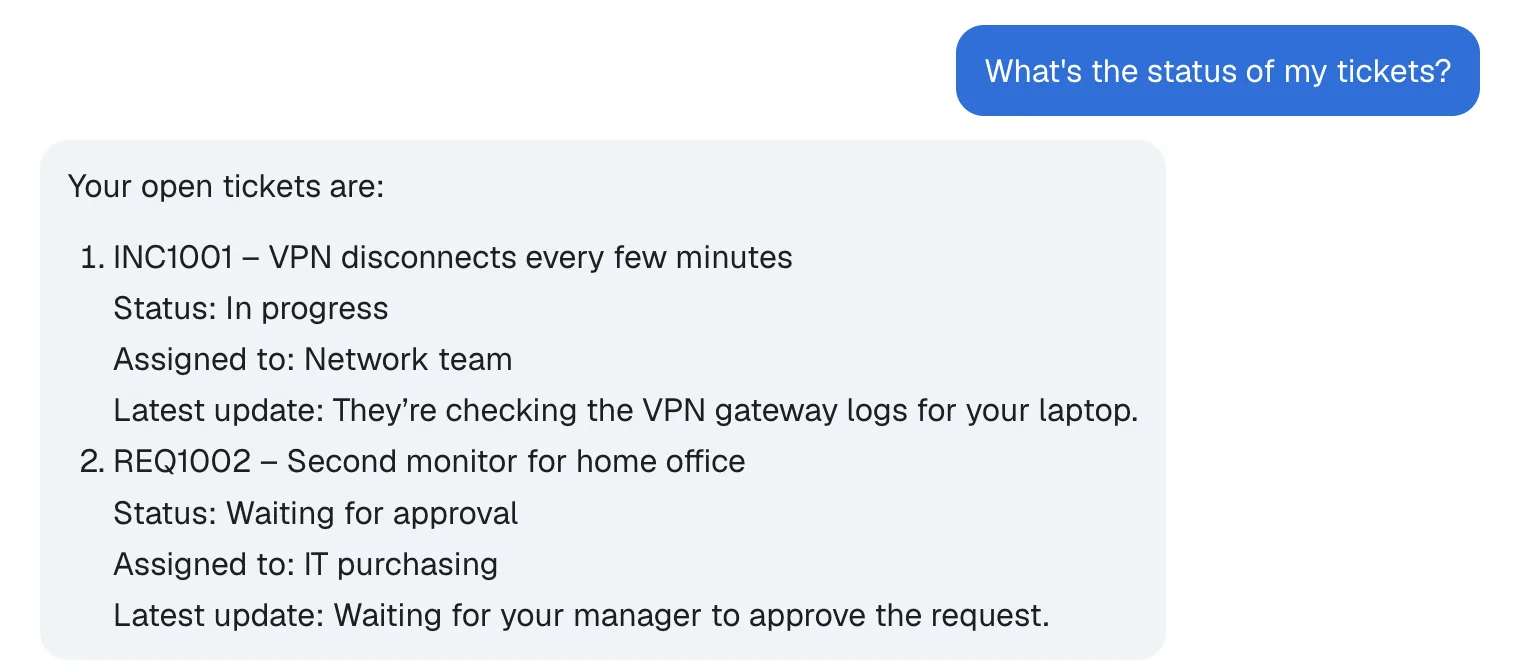
Each detail is on its own line, inside its list item, exactly as the model wrote it. Answers that were already fine, such as numbered steps, look the same as before.
Common Mistakes
| Mistake | What happens | Do this instead |
|---|---|---|
Installing remark-breaks without adding it to remarkPlugins | Nothing changes | Add remarkBreaks to the remarkPlugins array |
Importing it as { remarkBreaks } | The package has no named exports: its documentation says it exports no identifiers | import remarkBreaks from "remark-breaks"; |
| Asking the model in its instructions to end lines with a backslash | Every answer depends on the model following that rule | Let the renderer handle line endings |
Troubleshooting
| Symptom | Likely cause | Fix |
|---|---|---|
| Lines still run together after the change | The page still runs the old code | Save the file and reload the page; with next start, build the app again first |
FAQ
Is this a bug in react-markdown?
No. react-markdown does what CommonMark says: a single line ending inside a paragraph is a soft line break, and browsers show soft line breaks as spaces. CommonMark explicitly allows an option to render soft line breaks as hard line breaks, and remark-breaks is that option.
Why not use CSS white-space: pre-wrap on the answers instead?
That keeps line endings in the visible text, which is what the person's own messages use. For the agent's answers, the line endings are inside Markdown that react-markdown turns into HTML elements, and the plugin changes them where Markdown itself understands them, as breaks. I used the plugin and didn't try the CSS route for the answers.
Does remark-breaks need any options?
No. Its documentation lists none: There are no parameters.
Conclusion
react-markdown showed my agent's line breaks as spaces because, in CommonMark, a single line ending inside a paragraph is a soft line break. The model never wrote hard breaks, two spaces or a backslash at a line's end, so every detail of a ticket ran together. npm install remark-breaks and one entry in remarkPlugins turn every line ending into a <br>, and the answers now look the way the model wrote them.
Additional Resources
- CommonMark Spec 0.31.2: Soft line breaks — what a single line ending means in Markdown.
- remark-breaks — the plugin, when to use it, and its security note.
- react-markdown — how it follows CommonMark, and how to add plugins.
