Fixed: openssl:Error: 'mac' is an invalid command.

openssl mac is OpenSSL 3's command for HMACs and other message authentication codes. On a Mac, it fails with openssl:Error: 'mac' is an invalid command. and a long list of commands. The openssl that comes with macOS isn't OpenSSL 3, but its dgst -hmac command computes the same HMAC.
What I Was Doing
I was writing How to Create an HMAC-SHA256 Signature in the Terminal. OpenSSL's own manual recommends openssl mac over the older dgst -hmac, so I ran it with the openssl that comes with macOS. The message was a webhook-style notice, order 1042 is paid, signed with the key webhook-key:
msg='order 1042 is paid'
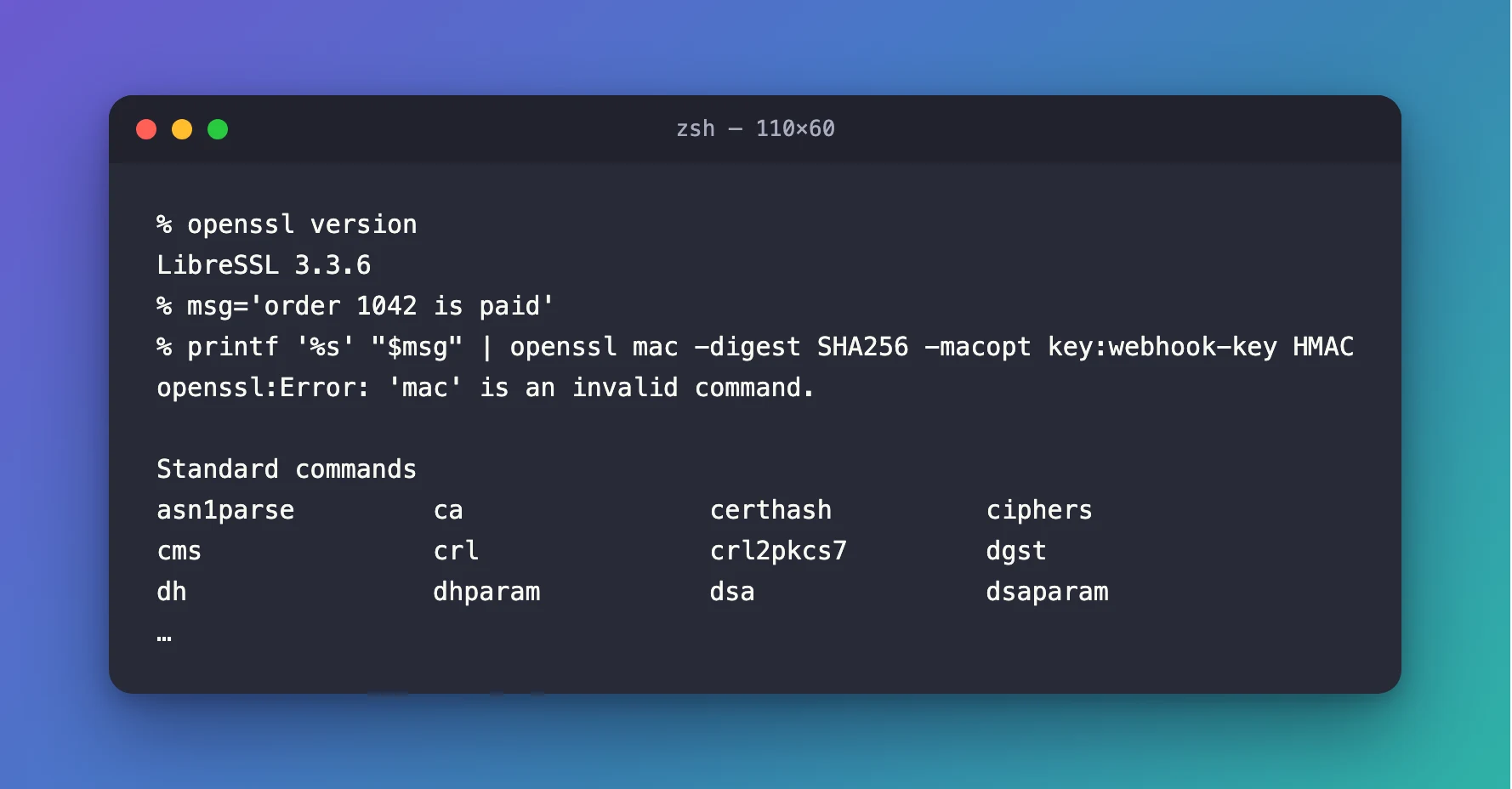
printf '%s' "$msg" | openssl mac -digest SHA256 -macopt key:webhook-key HMAC
What I Expected
The HMAC-SHA256 of the message, as 64 hexadecimal characters.
What I Got
openssl:Error: 'mac' is an invalid command.

Standard commands
asn1parse         ca                certhash          ciphers
cms               crl               crl2pkcs7         dgst
…
The list went on for about 40 lines: every command this openssl has. mac wasn't among them.
What I Checked
Which openssl ran. It wasn't OpenSSL at all:
openssl version
LibreSSL 3.3.6
macOS ships LibreSSL, a separate project that started from OpenSSL's code, as its openssl command.
Where mac comes from. OpenSSL's manual for openssl dgst says of -hmac: "The openssl-mac(1) command should be preferred to using this command line option." openssl mac belongs to OpenSSL 3. LibreSSL's command list, printed with the error, has dgst but no mac.
Why It Happens
The command is called openssl on both systems, but on macOS it's LibreSSL 3.3.6, which doesn't have OpenSSL 3's mac command. LibreSSL says so in its own words, 'mac' is an invalid command., and lists the commands it does have.
The Fix
Use dgst with -hmac, which LibreSSL and OpenSSL 3 both have:
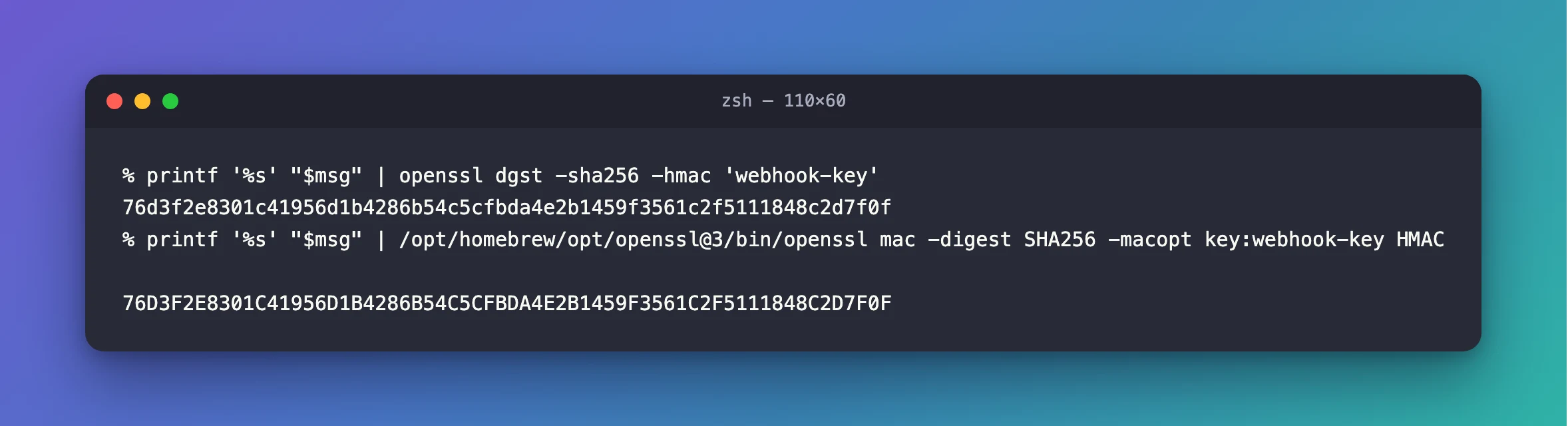
printf '%s' "$msg" | openssl dgst -sha256 -hmac 'webhook-key'
If OpenSSL 3 is installed, from Homebrew for example, you can run its mac command by its full path. On an Apple silicon Mac, Homebrew puts it here:
printf '%s' "$msg" | /opt/homebrew/opt/openssl@3/bin/openssl mac -digest SHA256 -macopt key:webhook-key HMAC
After the Fix
Both gave the same HMAC. LibreSSL prints it in lowercase, and OpenSSL 3's mac in capitals:
76d3f2e8301c41956d1b4286b54c5cfbda4e2b1459f3561c2f5111848c2d7f0f
76D3F2E8301C41956D1B4286B54C5CFBDA4E2B1459F3561C2F5111848C2D7F0F
Common Mistakes
| Mistake | What happens | Do this instead |
|---|---|---|
Assuming openssl on a Mac is OpenSSL | OpenSSL 3 commands fail | Check with openssl version |
| Comparing the two outputs as text | Lowercase and capitals look different | Compare them ignoring case, or convert one |
Writing scripts that need openssl mac | They fail on every Mac without OpenSSL 3 | Use dgst -sha256 -hmac, which both have |
Troubleshooting
| Symptom | Likely cause | Fix |
|---|---|---|
openssl:Error: 'mac' is an invalid command. | macOS's built-in LibreSSL | Use openssl dgst -sha256 -hmac '<key>' |
OpenSSL 3 prints SHA2-256(stdin)= before the value | That's how OpenSSL 3's dgst labels its output | Use the part after = , or openssl mac |
| Your HMAC doesn't match someone else's | A line break in the message, or a different key | Use printf '%s' and check the key |
FAQ
Is LibreSSL's HMAC as good as OpenSSL's?
For HMAC-SHA256, the result is the same value: both printed 76d3f2e8…7f0f above. The difference is which commands each has, not the maths.
Which OpenSSL should a script use?
If it has to run on Macs that may not have OpenSSL 3, stick to commands both have, such as dgst -hmac, base64 and rand.
Conclusion
openssl:Error: 'mac' is an invalid command. means the openssl you ran is LibreSSL, which macOS includes in place of OpenSSL, and which has no mac command. openssl dgst -sha256 -hmac '<key>' computes the same HMAC there, and OpenSSL 3's mac works once you run OpenSSL 3 itself.
Additional Resources
- openssl-dgst — the
-hmacoption and its note aboutopenssl mac. - openssl-mac — OpenSSL 3's message authentication code command.
- LibreSSL — the project behind the
opensslcommand on macOS.
