Fixed: openssl base64 -d Cuts Off a JWT Payload or Prints Nothing

I decoded the payload of a JSON Web Token (JWT) with openssl base64 -d, and OpenSSL 3.5 printed only half of the JSON. The openssl built into macOS did better, but it still dropped the last two characters. Neither printed an error, and both ended with exit status 0. The cause is the = padding that every JWT leaves out, and putting it back fixes both.
What I Was Doing
I was building a token by hand for What Is a JWT?, the first tutorial of the JWT course. To read a token's payload, I took its second part with cut, swapped base64url's - and _ back to base64's + and / with tr, and decoded the result with openssl base64 -d -A. The -d option decodes, and -A reads the input as one line.
This is the token, with the commands I ran on macOS with OpenSSL 3.5.9:
token='eyJhbGciOiJIUzI1NiIsInR5cCI6IkpXVCJ9.eyJzdWIiOiJyYXZpIiwibmFtZSI6IlJhdmkgSyIsInJvbGUiOiJlZGl0b3IiLCJpYXQiOjE3OTU1OTk1MDUsImV4cCI6MTc5NTYwMzEwNX0.YX8WcbR9SkYQUbnxkz-d2GDQbGZN2wNQ989b2oWNVTU'
payload=$(echo "$token" | cut -d. -f2)
printf '%s' "$payload" | tr '_-' '/+' | openssl base64 -d -A; echo
What I Expected
The whole payload, a short piece of JSON:
{"sub":"ravi","name":"Ravi K","role":"editor","iat":1795599505,"exp":1795603105}
What I Got
OpenSSL 3.5.9 stopped in the middle of the JSON:
{"sub":"ravi","name":"Ravi K","role":"editor","i
The openssl that comes with macOS is LibreSSL 3.3.6. It printed nearly everything, but the last two characters, 5}, were missing:
{"sub":"ravi","name":"Ravi K","role":"editor","iat":1795599505,"exp":179560310
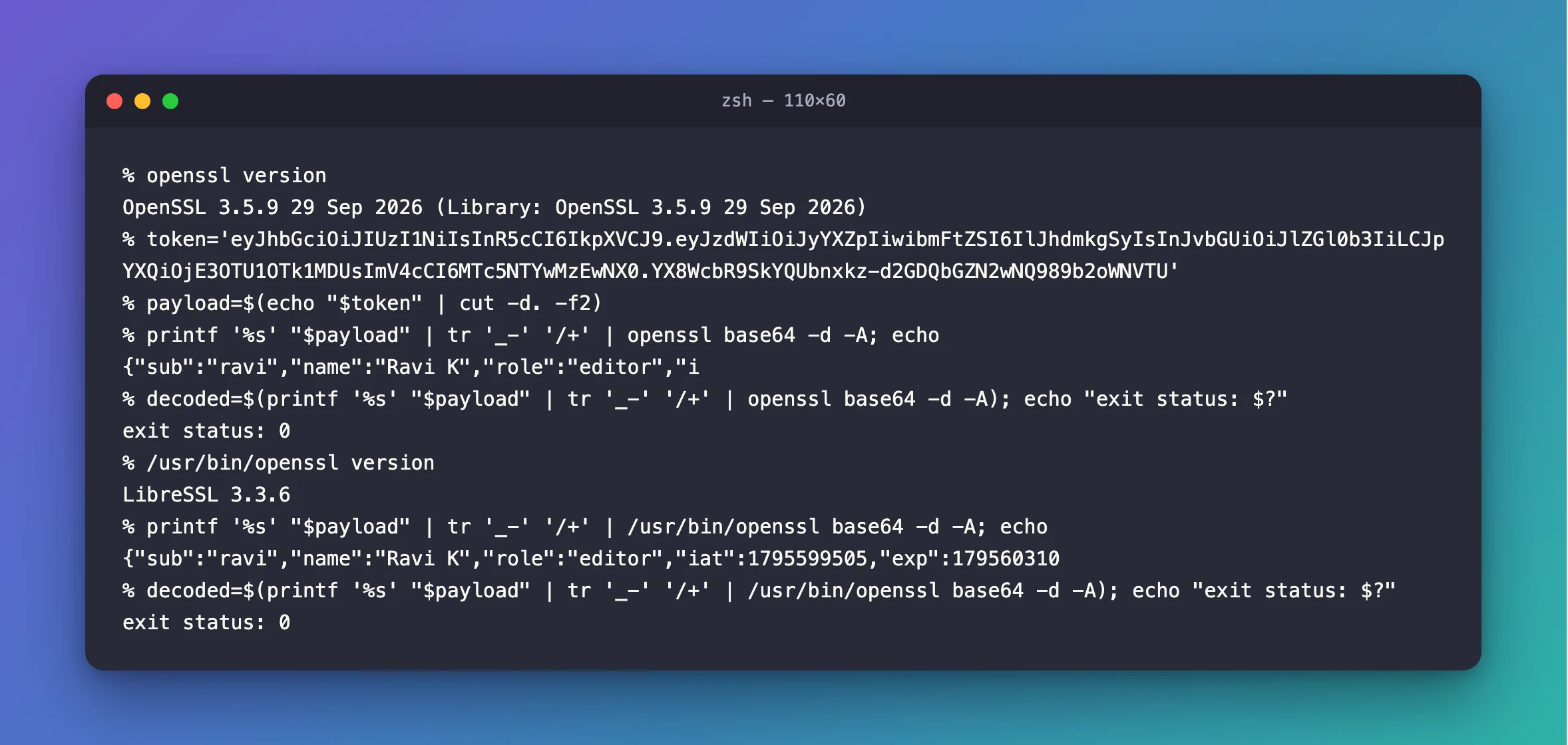
No error message appeared. In an earlier test, a shorter part decoded to nothing at all on OpenSSL 3.5.9.
What I Checked
The exit status. I ran the decode again inside $(…) and printed $?, the exit status of the command that just ran. Both versions reported exit status: 0, which normally means success:
decoded=$(printf '%s' "$payload" | tr '_-' '/+' | openssl base64 -d -A); echo "exit status: $?"
exit status: 0
The -A option. Without -A, OpenSSL expects line breaks in base64 input. Its openssl-enc manual says that "on decoding a newline is expected among the first 1024 bytes of input", and that with -A, "base64 decoding does not require any newlines." I had -A, so line length wasn't the problem.
The length of the part. Base64 turns every 3 bytes into 4 characters, so complete base64 text is always a multiple of 4 characters long. This part wasn't:
echo ${#payload}
echo $(( ${#payload} % 4 ))
107
3
${#payload} is the length of the variable, and % gives the remainder after dividing by 4. A remainder of 3 means one character is missing from the last group of 4.
What a JWT leaves out. RFC 7515, the standard for signed JWTs, defines base64url encoding as base64 with URL-safe characters "with all trailing '=' characters omitted". Its Appendix C, Notes on Implementing base64url Encoding without Padding, explains that a decoder built on standard base64 has to add the = characters back first: two when the length leaves a remainder of 2, one when it leaves 3.
What OpenSSL does with a missing =. OpenSSL's manual for its base64 decoder, EVP_DecodeUpdate, says that input that is "not a multiple of 4 (including any padding)" is held back. At the end, "If there is residual data, its length is not a multiple of 4, i.e. it was not properly padded", the decoder returns -1, its error value. The manual for the base64 filter the openssl command uses, BIO_f_base64, lists this under BUGS: "It may be possible for BIO_read(3) to return zero, rather than -1, even if an error has been detected".
Why It Happens
A JWT stores each part as base64url without padding. Standard base64 decoders, including openssl base64 -d, work in groups of 4 characters and expect = to fill the last group. With the = missing, the last group is incomplete, and OpenSSL treats it as an error. The openssl command doesn't report that error: OpenSSL 3.5.9 printed what it had decoded up to that point and stopped, and LibreSSL printed every complete group and dropped the incomplete one. Both then ended with status 0.
Whether a part needs padding depends only on its length. The common header {"alg":"HS256","typ":"JWT"} encodes to 36 characters, a multiple of 4, so it decodes fine, which makes the payload's failure look random.
The Fix
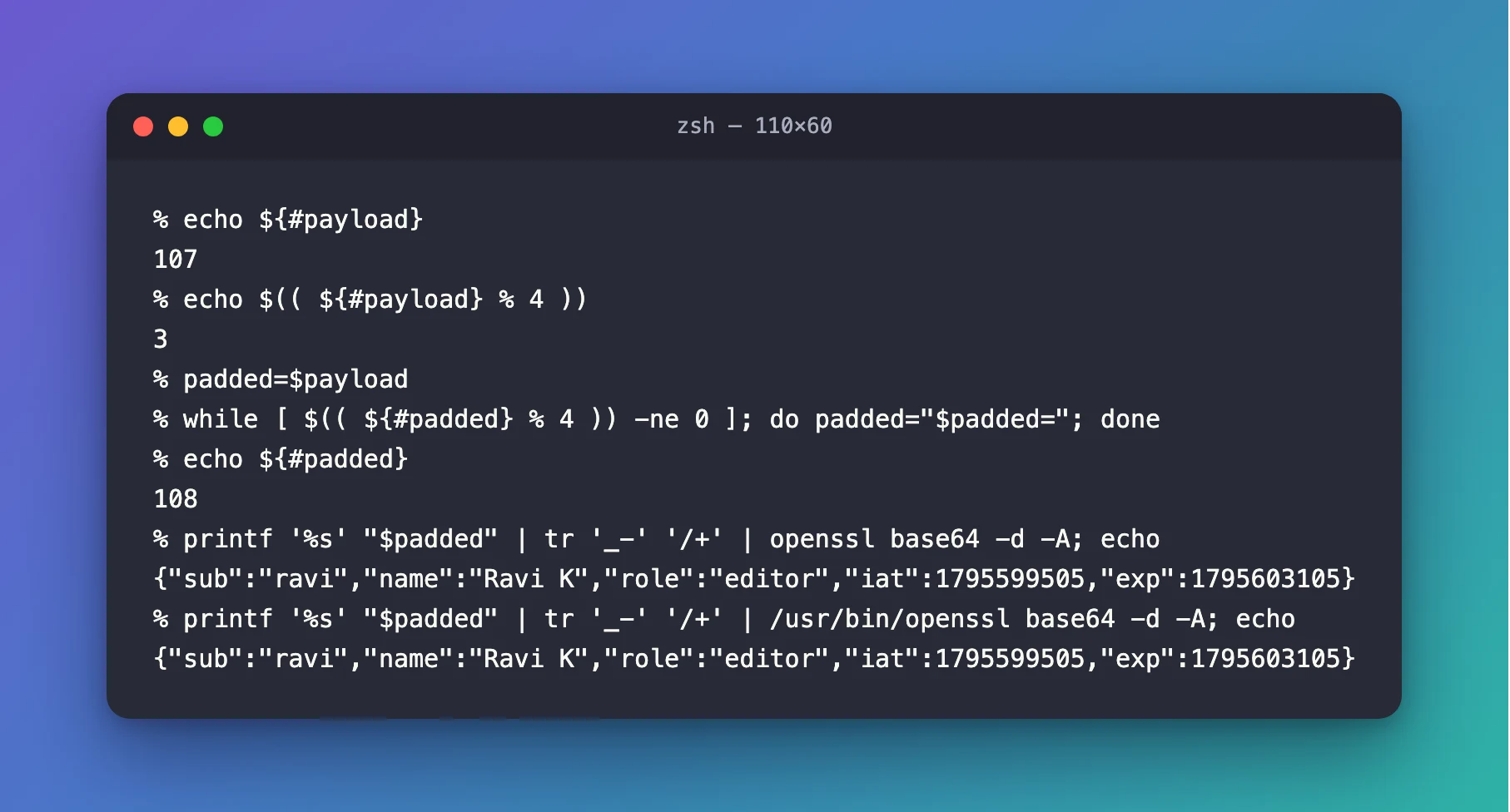
Add = to the end until the length is a multiple of 4, then decode:
padded=$payload
while [ $(( ${#padded} % 4 )) -ne 0 ]; do padded="$padded="; done
echo ${#padded}
108
The while loop adds one = at a time and stops as soon as the length divides by 4. Here that took one =, so 107 became 108.
printf '%s' "$padded" | tr '_-' '/+' | openssl base64 -d -A; echo
To do it in one step every time, wrap the swap, the padding and the decode in a small function. How to Decode Base64url Text in the Terminal builds it for bash, zsh and PowerShell.
After the Fix
Both versions printed the whole payload:
{"sub":"ravi","name":"Ravi K","role":"editor","iat":1795599505,"exp":1795603105}
{"sub":"ravi","name":"Ravi K","role":"editor","iat":1795599505,"exp":1795603105}
Common Mistakes
| Mistake | What happens | Do this instead |
|---|---|---|
| Trusting exit status 0 | The command "succeeds" with part of the data missing | Check that the decoded JSON ends with } |
| Testing only the header | The header is 36 characters, so it works and hides the problem | Test the payload too, or always add the padding |
Adding one = every time | Parts with a remainder of 2 need two | Add = until the length is a multiple of 4 |
Skipping the tr '_-' '/+' step | - and _ aren't base64 characters | Swap them back before decoding |
Troubleshooting
| Symptom | Likely cause | Fix |
|---|---|---|
| Nothing printed, exit status 0 | A short part without its = padding | Add the padding, then decode |
| The JSON stops partway | The same missing padding on a longer part | Add the padding, then decode |
| Output looks like random symbols | You decoded the third part, the signature, which is binary data and not text | Decode only the first two parts |
FAQ
Does this happen in PowerShell?
Not silently. [Convert]::FromBase64String refuses unpadded input with an error: The input is not a valid Base-64 string as it contains a non-base 64 character, more than two padding characters, or an illegal character among the padding characters. The fixes post for that error shows its causes, and the base64url decoding guide adds the padding first, or uses .NET's Base64Url class, which accepts input without it.
Is decoding the payload enough to trust it?
No. Anyone can decode a JWT and read its claims. Only checking the signature tells you that nobody changed them, which What Is a JWT? does in its last steps.
Conclusion
openssl base64 -d needs standard base64, and a JWT stores its parts as base64url without padding. When a part's length isn't a multiple of 4, OpenSSL 3.5 returns only part of the data and LibreSSL drops the last characters, and neither says so. Swap - and _ back, add = until the length divides by 4, and both decode the whole part.
Additional Resources
- RFC 7515: JSON Web Signature (JWS) — Section 2 defines base64url encoding without padding, and Appendix C shows how to decode it.
- RFC 4648: The Base16, Base32, and Base64 Data Encodings — base64, padding, and the URL-safe alphabet in Section 5.
- openssl-enc — the
-aand-Aoptions ofopenssl base64. - EVP_EncodeInit and BIO_f_base64 — how OpenSSL decodes base64, and the known bug in its error reporting.
