Fixed: "npm warn install-scripts 3 packages had install scripts blocked because they are not covered by allowScripts" (Microsoft 365 Agents Toolkit CLI)

I installed the Microsoft 365 Agents Toolkit CLI and npm finished with a warning: three packages had their install scripts blocked. The CLI worked anyway, so the warning looked harmless. It wasn't: one of the blocked scripts belongs to keytar, the library the CLI uses to encrypt the sign-in tokens it saves on your disk.
What I Was Doing
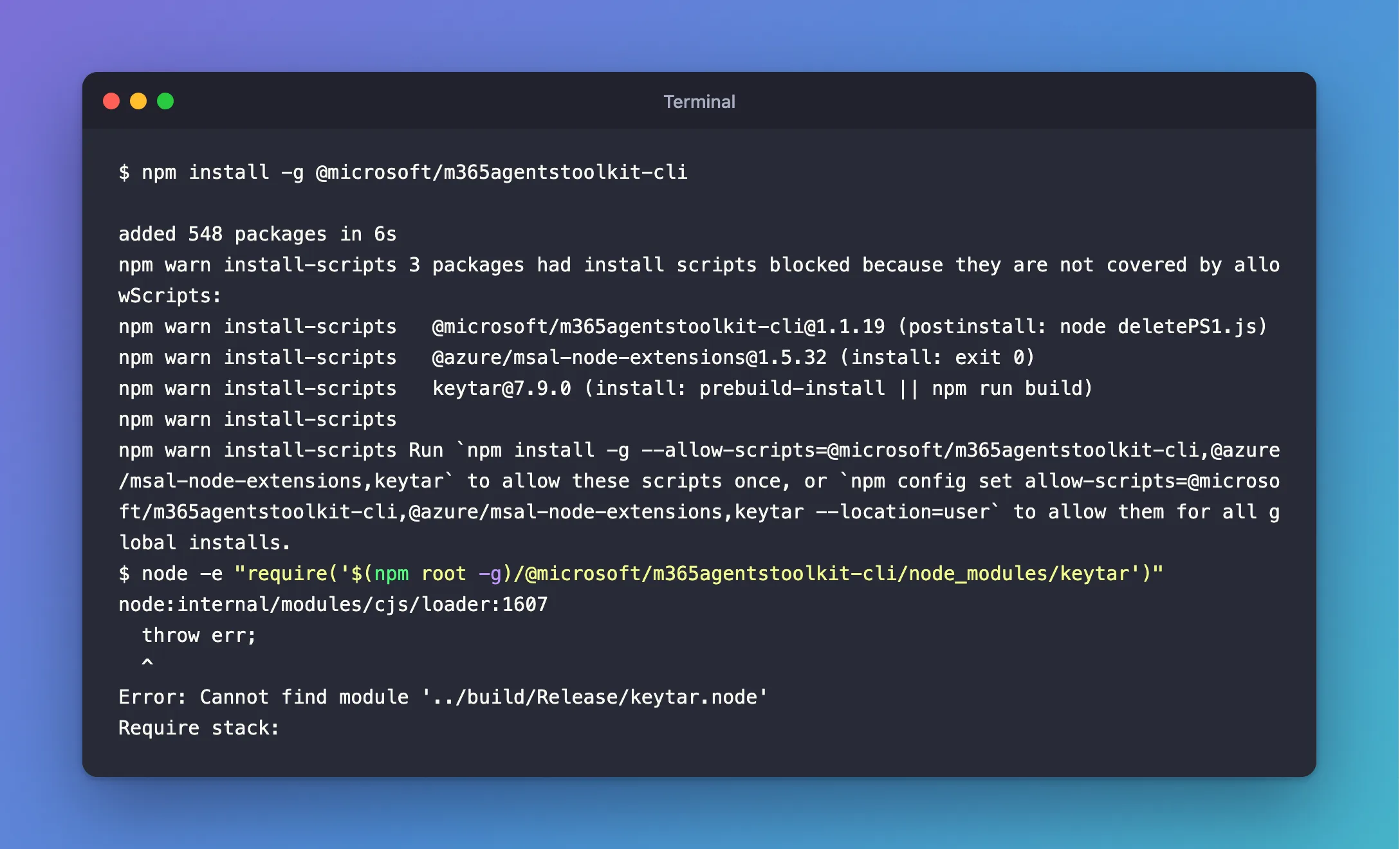
I was setting up a Mac for the Microsoft 365 Agents SDK course, and the Agents Toolkit CLI was next. It's an npm package, so I installed it globally with the command Microsoft documents, on Node.js 26 with npm 12.2.3:
npm install -g @microsoft/m365agentstoolkit-cli
What I Expected
A clean install: added 548 packages, and an atk command ready to use.
What I Got
The packages were added, and then npm printed a warning:
added 548 packages in 6s
npm warn install-scripts 3 packages had install scripts blocked because they are not covered by allowScripts:
npm warn install-scripts   @microsoft/m365agentstoolkit-cli@1.1.19 (postinstall: node deletePS1.js)
npm warn install-scripts   @azure/msal-node-extensions@1.5.32 (install: exit 0)
npm warn install-scripts   keytar@7.9.0 (install: prebuild-install || npm run build)
npm warn install-scripts
npm warn install-scripts Run `npm install -g --allow-scripts=@microsoft/m365agentstoolkit-cli,@azure/msal-node-extensions,keytar` to allow these scripts once, or `npm config set allow-scripts=@microsoft/m365agentstoolkit-cli,@azure/msal-node-extensions,keytar --location=user` to allow them for all global installs.
atk --version printed 1.1.19, and atk auth list answered normally. Nothing looked broken.
What I Checked
npm's own documentation. The documentation that ships with npm 12 explains the new behavior: Dependency install scripts are blocked by default. Install commands silently skip lifecycle scripts for any dependency that does not have a matching entry in allowScripts, and end with a list of the packages whose scripts were skipped so you can review them here. For global installs, which have no package.json to record approvals in, it says to use the --allow-scripts flag at install time, or to save the setting with npm config set allow-scripts=… --location=user.
What each blocked script does. So the question was whether any of the three mattered:
@microsoft/m365agentstoolkit-cli(node deletePS1.js). I read the script in the published package: it deletes a file calledteamsfx.ps1, a PowerShell launcher left by the old TeamsFx CLI, from npm's global folder. On macOS and Linux that file doesn't exist, so skipping it changes nothing.@azure/msal-node-extensions(exit 0). The script exits immediately. Skipping it changes nothing.keytar(prebuild-install || npm run build). keytar stores secrets in the operating system's credential store, such as the macOS Keychain. It's written partly in native code, and this script is what downloads or builds that native part.
Whether keytar works without its script. I loaded it from the CLI's own folder:
node -e "require('$(npm root -g)/@microsoft/m365agentstoolkit-cli/node_modules/keytar'); console.log('keytar loaded')"
Error: Cannot find module '../build/Release/keytar.node'
The native part was missing, exactly because its install script never ran.
What the CLI uses keytar for. In the CLI's published code, a class called AccountCrypto encrypts the sign-in token cache with a key it keeps in the operating system's credential store through keytar. It loads keytar inside a try block and carries on if that fails. When there's no key, its encrypt method returns the content unchanged.
Why It Happens
npm 12 changed a default: install scripts no longer run unless you allow them, which protects you from packages that run code on your machine at install time. Most install scripts are optional, but keytar's isn't: without it, keytar has no native code. The Agents Toolkit CLI treats a missing keytar as "no credential store available" rather than as an error. So the install looks successful and the CLI runs, but according to its code, once you sign in with atk auth login, the token cache it writes is not encrypted.
The Fix
Allow keytar's script, and only keytar's:
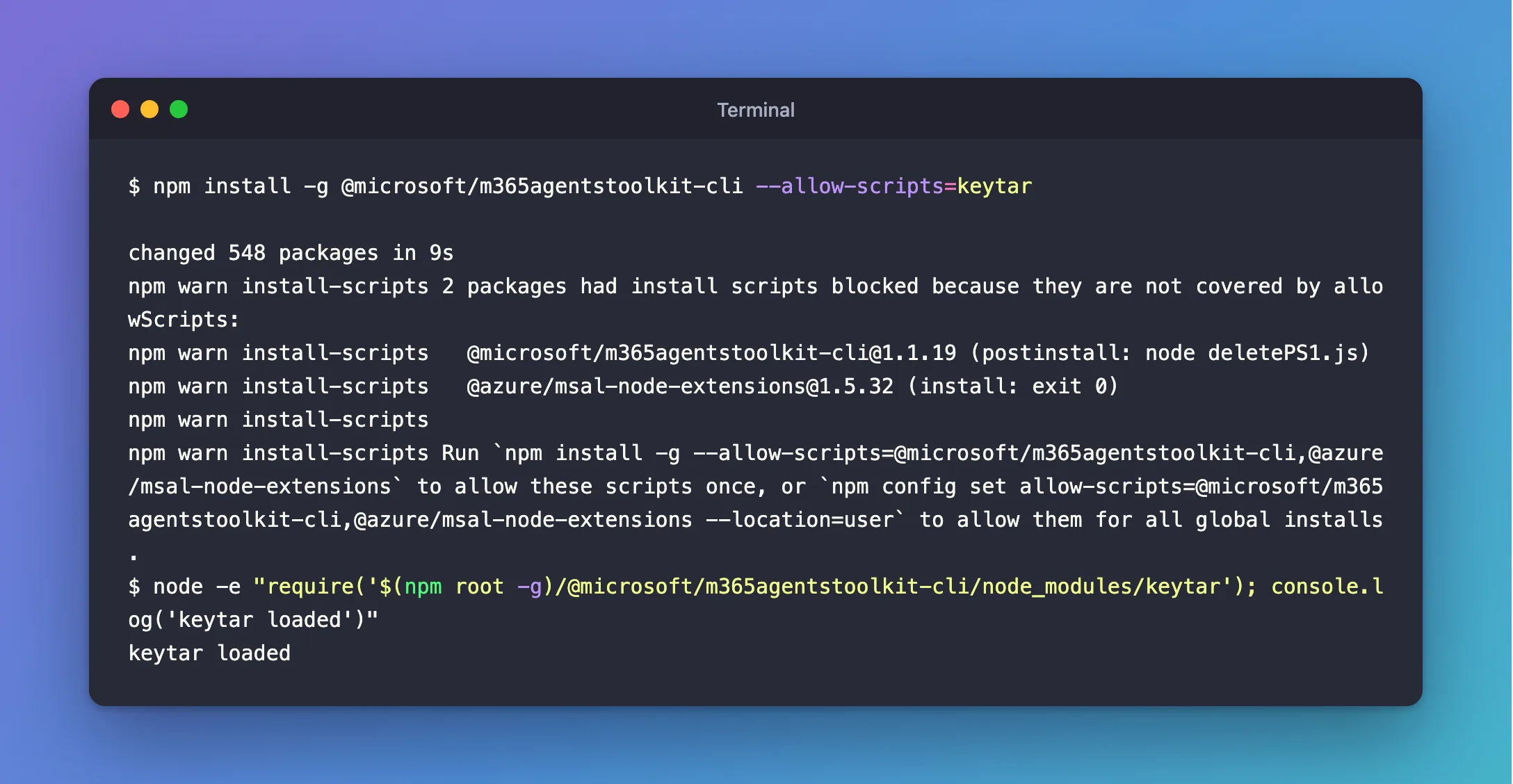
npm install -g @microsoft/m365agentstoolkit-cli --allow-scripts=keytar
You can run this over an existing install: npm reinstalls the packages and runs keytar's script this time. The other two scripts stay blocked, which is fine on macOS and Linux, because they do nothing there.
If you're on npm 11 — the version that comes with Node.js 26 — install scripts run by default, so the plain command already works.
After the Fix
changed 548 packages in 9s
npm warn install-scripts 2 packages had install scripts blocked because they are not covered by allowScripts:
npm warn install-scripts   @microsoft/m365agentstoolkit-cli@1.1.19 (postinstall: node deletePS1.js)
npm warn install-scripts   @azure/msal-node-extensions@1.5.32 (install: exit 0)
npm warn install-scripts
npm warn install-scripts Run `npm install -g --allow-scripts=@microsoft/m365agentstoolkit-cli,@azure/msal-node-extensions` to allow these scripts once, or `npm config set allow-scripts=@microsoft/m365agentstoolkit-cli,@azure/msal-node-extensions --location=user` to allow them for all global installs.
keytar is no longer in the list, and the same check now succeeds:
keytar loaded
Common Mistakes
| Mistake | What happens | Do this instead |
|---|---|---|
| Ignoring the warning because the CLI runs | Sign-in tokens are cached unencrypted | Allow keytar's script |
Allowing every script with --dangerously-allow-all-scripts | Any package can run code at install time again | Allow only the scripts a tool needs |
Running npm install-scripts approve keytar for a global install | It fails: install-scripts works only inside a project with a package.json | Use --allow-scripts on the install command |
Troubleshooting
| Symptom | Likely cause | Fix |
|---|---|---|
Cannot find module '../build/Release/keytar.node' | keytar's install script didn't run | Reinstall with --allow-scripts=keytar |
| keytar's script runs but fails to build | No prebuilt binary for your Node.js version, and no build tools | Install your platform's C++ build tools (on macOS, the Xcode Command Line Tools) and reinstall |
| The warning still lists keytar | The option was misspelled, or put on a different command | Check the spelling: --allow-scripts=keytar |
FAQ
Is it safe to allow keytar's script?
It's the script that gives keytar its native code, published with the package that the Microsoft 365 Agents Toolkit CLI depends on. Allowing one named package keeps every other package's install scripts blocked.
Do I need to allow the other two scripts?
Not on macOS or Linux: deletePS1.js deletes a Windows PowerShell file that doesn't exist there, and the other script is exit 0.
Does this affect other global tools?
Any global npm package whose install script does real work can be affected the same way on npm 12. Read the warning after each global install and check what the listed scripts do.
Conclusion
On npm 12, npm warn install-scripts … blocked isn't noise. For the Microsoft 365 Agents Toolkit CLI, it means keytar has no native code, and the CLI quietly stores its token cache unencrypted. Install it with --allow-scripts=keytar, and check that keytar loads.
Additional Resources
- npm install-scripts — npm's documentation for approving install scripts.
- Microsoft 365 Agents Toolkit CLI — Microsoft's reference for the CLI.
