Fixed: "No text was streamed" in the Microsoft 365 Agents SDK

My Microsoft 365 Agents SDK agent showed a progress update while it worked, then sent its answer as an ordinary message. In the Teams channel, the answer arrived, but above it sat another message from the agent: No text was streamed. The progress update had opened a stream, and the stream ended with nothing in it. End the stream with your answer, and the extra message goes.
What I Was Doing
I was building the weekly report agent for Part 7 of the Microsoft 365 Agents SDK Fundamentals, on Agents SDK 1.9.205 and .NET 10, and checking what happens when an agent mixes the two ways of answering: a progress update through the turn's stream, then the answer as an ordinary message. The handler showed Collecting this week's tickets... while it collected the numbers, built the report, and sent it with SendActivityAsync:
    private async Task SendReportAsync(ITurnContext turnContext, ITurnState turnState, CancellationToken cancellationToken)
    {
        // Channels that stream show the informative updates below; the others get a typing indicator instead.
        if (!turnContext.StreamingResponse.IsStreamingChannel)
        {
            StartTypingTimer(turnContext);
        }

        await turnContext.StreamingResponse.QueueInformativeUpdateAsync("Collecting this week's tickets...", cancellationToken);
        TicketStats stats = await _reportWriter.CollectAsync(cancellationToken);

        string report = "";
        await foreach (string chunk in _reportWriter.WriteAsync(stats, cancellationToken))
        {
            report += chunk;
        }

        await turnContext.SendActivityAsync(report, cancellationToken: cancellationToken);
    }
I ran it in the Microsoft 365 Agents Playground as the Teams channel:
agentsplayground -e http://localhost:3978/api/messages -c msteams
What I Expected
What the code asks for: the progress update while the agent collected the numbers, then the report.
What I Got
The report arrived, and above it, in the place where the progress update had been, the agent said No text was streamed:
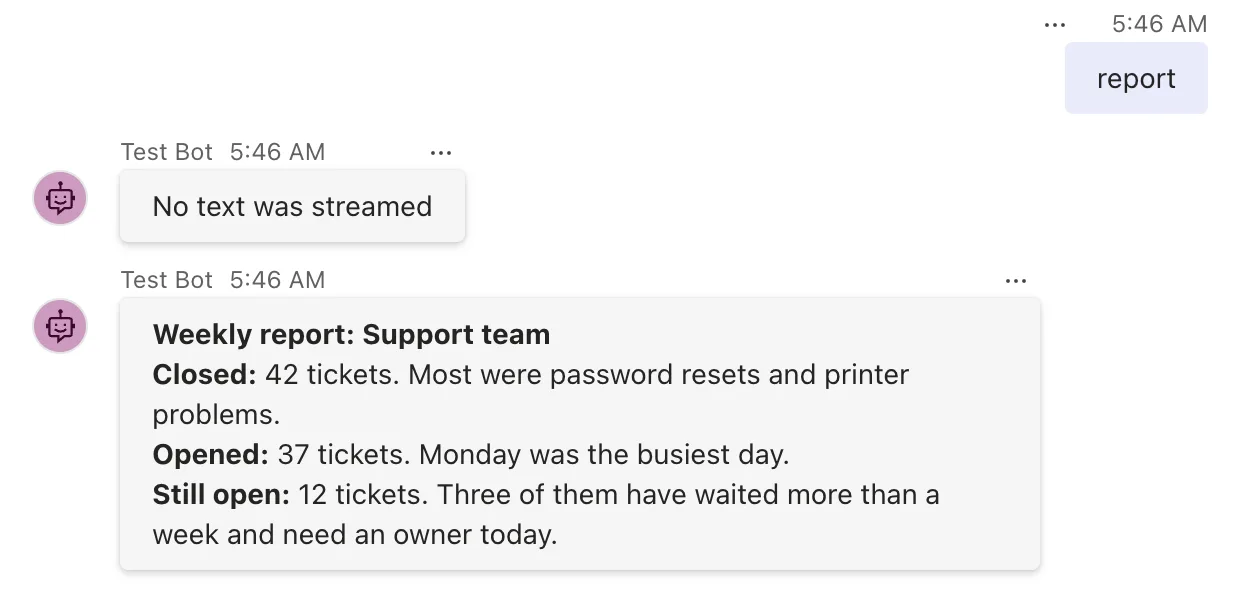
The Playground's Log Panel showed both messages, the extra one last:
[5:46:18 AM] Microsoft 365 Agents Playground -> User Application message 202 report
[5:46:18 AM] User Application -> Microsoft 365 Agents Playground typing 201 Collecting this week's tickets...
[5:46:25 AM] User Application -> Microsoft 365 Agents Playground message 201 **Weekly report: Support team** **Closed:** 42 tickets. Most were password resets and printer probl...
[5:46:25 AM] User Application -> Microsoft 365 Agents Playground message 202 No text was streamed
My code never sends that text.
What I Checked
Where the text comes from. It's in the SDK. In the 1.9.205 source of StreamingResponse, the method that builds a stream's final message uses the text you streamed, and when there's none, puts this in its place, with the SDK's own comment: "No text was streamed"; // Teams won't allow Activity.Text changes or empty text.
Why there was a stream at all. The progress update. On a channel that streams, QueueInformativeUpdateAsync sends a typing activity that opens a stream: the Log Panel shows it coming back 201, Created. Microsoft's Teams documentation describes the same protocol: a stream opens with its first update and is closed by a final message that carries The complete message contents.
Who closed it. Not my code: the handler never called EndStreamAsync. AgentApplication did, at the end of the turn. Its turn handling ends any stream that has started, and the stream had: the progress update started it. With no text queued, the final message got the fallback text.
Why the extra message sat above the report. The stream's message had been in the chat since the progress update appeared, before the report. Ending the stream changed that message to its final text, in place.
Why It Happens
A progress update isn't a separate thing from the answer: it opens the turn's stream, and the stream expects to end with the answer. Sending the answer with SendActivityAsync bypasses the stream, which is left open and empty. At the end of the turn the SDK closes it anyway, and since Teams won't take a final message without text, it closes it with No text was streamed.
The Fix
End the stream with your answer. When the answer is already a finished message, as here, give it to the stream as its FinalMessage and end the stream yourself:
        turnContext.StreamingResponse.FinalMessage = MessageFactory.Text(report);
        await turnContext.StreamingResponse.EndStreamAsync(cancellationToken);
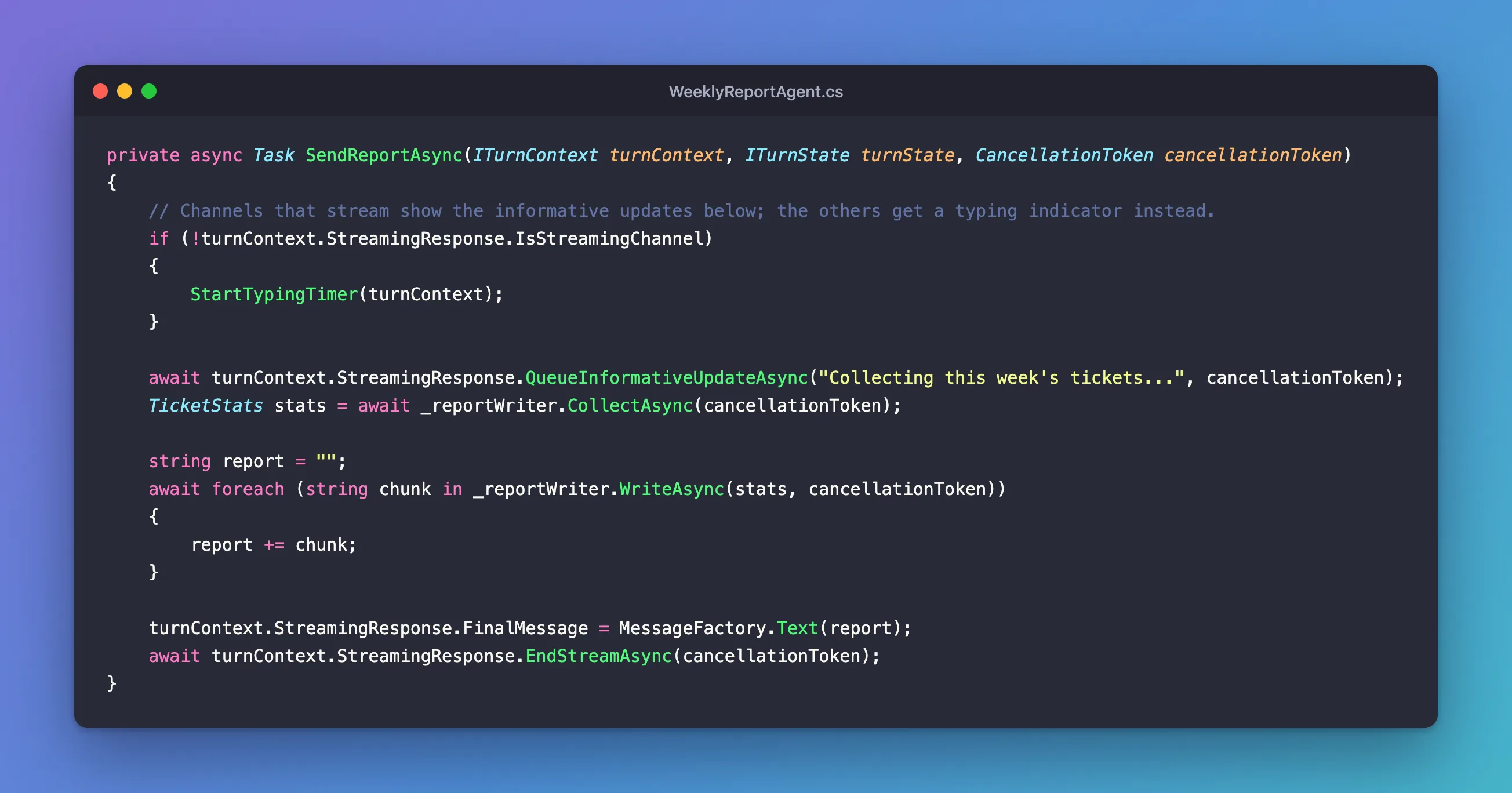
FinalMessageis the activity the stream ends with. It can be any message, attachments included.EndStreamAsyncsends it. In the SDK's source, on a channel that doesn't stream, the same call sends the final message as an ordinary message, so the code works on every channel.
If the answer is text that you produce piece by piece, queue the pieces with QueueTextChunk instead, as Part 7 does, and the stream shows them as they come. Either way, the answer travels through the stream that the progress update opened.
After the Fix
I restarted the agent and sent report again. The progress update showed while the agent worked, and then became the report, in one message:
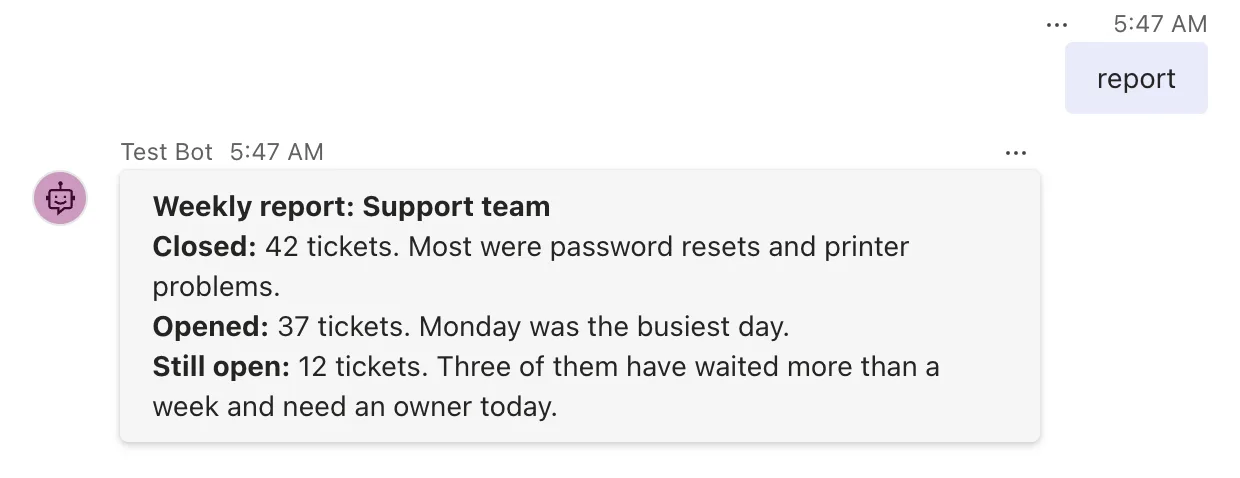
The Log Panel shows the stream opening and closing with the report, and nothing else:
[5:47:18 AM] Microsoft 365 Agents Playground -> User Application message 202 report
[5:47:18 AM] User Application -> Microsoft 365 Agents Playground typing 201 Collecting this week's tickets...
[5:47:25 AM] User Application -> Microsoft 365 Agents Playground message 202 **Weekly report: Support team** **Closed:** 42 tickets. Most were password resets and printer probl...
Common Mistakes
| Mistake | What happens | Do this instead |
|---|---|---|
A progress update, then SendActivityAsync for the answer | No text was streamed above the answer | End the stream with the answer, through FinalMessage or QueueTextChunk |
Calling EndStreamAsync without queuing any text or setting FinalMessage | The stream still ends with No text was streamed | Give the stream its text before you end it |
Testing only on the emulator channel | The problem never shows there: that channel doesn't stream, so progress updates are skipped | Test with -c msteams as well |
Troubleshooting
| Symptom | Likely cause | Fix |
|---|---|---|
| No text was streamed above the answer | A progress update opened a stream, and the answer went out with SendActivityAsync | End the stream with the answer, as in the fix |
| The progress update never appears | The channel doesn't stream, so the SDK skips progress updates | Test with -c msteams |
FAQ
Does this happen on the emulator channel?
Not according to the SDK's source. emulator doesn't stream, so QueueInformativeUpdateAsync returns without sending anything, no stream opens, and there's nothing for the turn to close. The problem appears where streaming does: in Teams, Web Chat and Direct Line.
Can the final message carry an Adaptive Card?
FinalMessage is a whole activity, so it can carry attachments the way any message does. Microsoft's Teams documentation notes that attachments render once the stream is finished, which is when the final message arrives.
Conclusion
No text was streamed is the SDK closing a stream that never got any text. A progress update opens the turn's stream, so the answer has to go through it: set it as the stream's FinalMessage, or queue it with QueueTextChunk, and end the stream yourself with EndStreamAsync.
Additional Resources
- IStreamingResponse interface —
FinalMessage,QueueTextChunkandEndStreamAsync. - Stream agent messages — how Teams opens, updates and closes a stream.
- StreamingResponse.cs at 1.9.205 — where the fallback text comes from.
