Fixed: No "p" element in scope but a "p" end tag seen in Docusaurus

Every build of this Docusaurus site printed No "p" element in scope but a "p" end tag seen seven times, all for one page. The page had no stray </p> in it. MDX had put a second <p> inside each card's <p>, and the browser and React both paid for it.
What I Was Doing
This site runs on Docusaurus 3.10.2, which compiles its pages with MDX 3. Its Downloads page, src/pages/downloads.mdx, is a grid of cards, one for each tool, written as JSX inside MDX: a logo, a heading, a short description and a download button. I was running yarn build before shipping a change to another part of the site.
Here is one of the seven cards, exactly as it was in the page:
  <div className="download-card">
    <img
      src="https://visualstudio.microsoft.com/wp-content/uploads/2021/10/Product-Icon.svg"
      alt="Visual Studio Logo"
      style={{ width: "64px", height: "64px", marginBottom: "1rem" }}
    />
    <h2 style={{ margin: "0.5rem 0" }}>Visual Studio</h2>
    <p style={{ textAlign: "center", marginBottom: "1.2rem" }}>
      A comprehensive IDE for .NET, C++, Python, and more. Ideal for enterprise
      and professional development.
    </p>
    <a
      href="https://visualstudio.microsoft.com/downloads/"
      target="_blank"
      rel="noopener noreferrer"
      style={{
        background: "linear-gradient(90deg, #68217a 0%, #a074c4 100%)",
        color: "#fff",
        padding: "0.6rem 2.2rem",
        borderRadius: "8px",
        fontWeight: "700",
        fontSize: "1.1rem",
        textDecoration: "none",
        boxShadow: "0 2px 8px 0 rgba(104,33,122,0.10)",
      }}
    >
      Download Visual Studio
    </a>
  </div>
What I Expected
A clean build. The page displayed fine, and each card is ordinary JSX: a div holding an image, a heading, a paragraph and a link.
What I Got
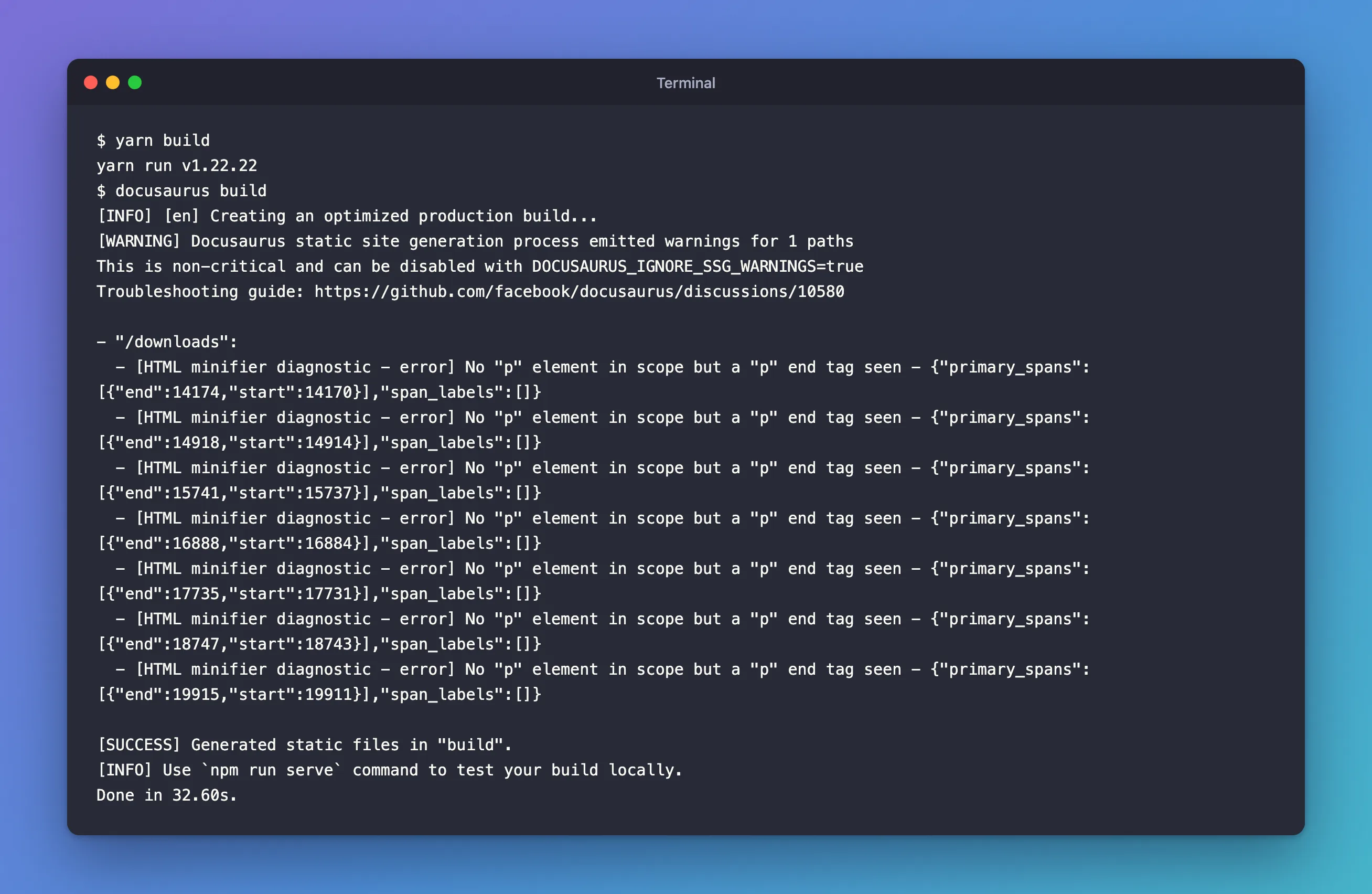
The build finished, but it printed a warning for /downloads with seven diagnostics, one for each card:
[WARNING] Docusaurus static site generation process emitted warnings for 1 paths
This is non-critical and can be disabled with DOCUSAURUS_IGNORE_SSG_WARNINGS=true
Troubleshooting guide: https://github.com/facebook/docusaurus/discussions/10580

- "/downloads":
  - [HTML minifier diagnostic - error] No "p" element in scope but a "p" end tag seen - {"primary_spans":[{"end":14174,"start":14170}],"span_labels":[]}
  - [HTML minifier diagnostic - error] No "p" element in scope but a "p" end tag seen - {"primary_spans":[{"end":14918,"start":14914}],"span_labels":[]}
  - [HTML minifier diagnostic - error] No "p" element in scope but a "p" end tag seen - {"primary_spans":[{"end":15741,"start":15737}],"span_labels":[]}
  - [HTML minifier diagnostic - error] No "p" element in scope but a "p" end tag seen - {"primary_spans":[{"end":16888,"start":16884}],"span_labels":[]}
  - [HTML minifier diagnostic - error] No "p" element in scope but a "p" end tag seen - {"primary_spans":[{"end":17735,"start":17731}],"span_labels":[]}
  - [HTML minifier diagnostic - error] No "p" element in scope but a "p" end tag seen - {"primary_spans":[{"end":18747,"start":18743}],"span_labels":[]}
  - [HTML minifier diagnostic - error] No "p" element in scope but a "p" end tag seen - {"primary_spans":[{"end":19915,"start":19911}],"span_labels":[]}

[SUCCESS] Generated static files in "build".
The page had visible faults too. Each button's label was dark instead of white, and it sat near the top of the button instead of in the middle:

And each time the page loaded, the browser console showed a React error:
Docusaurus React Root onRecoverableError: Error: Minified React error #418; visit https://react.dev/errors/418?args[]=text&args[]= for the full message or use the non-minified dev environment for full errors and additional helpful warnings.
What I Checked
What the numbers mean. Each diagnostic gives a span of characters, such as 14170 to 14174, which is four characters long, the length of </p>. The Docusaurus team's troubleshooting thread for these warnings, the one the warning links to, says the minifier "provides an input HTML char number, not a line number". That input is the page's HTML before it's minified, and the build folder only keeps the minified file, where character 14170 falls in the middle of a card's title. So I looked for the pattern instead, in the built page, build/downloads/index.html. Here is the Visual Studio card:
<div class=download-card><img src=https://visualstudio.microsoft.com/wp-content/uploads/2021/10/Product-Icon.svg alt="Visual Studio Logo" style=width:64px;height:64px;margin-bottom:1rem /><h2 style="margin:0.5rem 0">Visual Studio</h2><p style=text-align:center;margin-bottom:1.2rem><p>A comprehensive IDE for .NET, C++, Python, and more. Ideal for enterprise
and professional development.<p></p><a href=https://visualstudio.microsoft.com/downloads/ target=_blank rel="noopener noreferrer" style="background:linear-gradient(90deg, #68217a 0%, #a074c4 100%);color:#fff;padding:0.6rem 2.2rem;border-radius:8px;font-weight:700;font-size:1.1rem;text-decoration:none;box-shadow:0 2px 8px 0 rgba(104,33,122,0.10)"><p>Download Visual Studio</p></a></div>
The minifier had already read the card the way a browser reads it, and written it back out that way. There's an empty paragraph that carries the centring style, then the description in a second paragraph with no style, then an empty <p></p>. The button's label is inside a <p> as well.
What MDX compiles. To see where the second paragraph came from, I compiled the card's description markup on its own with @mdx-js/mdx 3.1.1, the MDX compiler this site's Docusaurus uses. With the text on lines of its own, MDX wraps it in a Markdown paragraph, _components.p:
return <p style={{
    textAlign: "center",
    marginBottom: "1.2rem"
  }}><_components.p>{"A comprehensive IDE for .NET, C++, Python, and more. Ideal for enterprise\nand professional development."}</_components.p></p>;
The page with JavaScript off. The minified HTML is what a browser builds before React runs, so I loaded the page with JavaScript turned off. The description had lost its centring, and an empty paragraph had pushed it down:

The console error. React's error 418 reads "Hydration failed because the server rendered %s didn't match the client. As a result this tree will be regenerated on the client." Its list of causes includes "Invalid HTML tag nesting." I took it for the same problem at first. But it said text, and its component stack pointed at style, not at a paragraph. The page also had a <style> block with the cards' CSS. The minifier had compacted that CSS, so React found different text from the text it renders. It was the first mismatch on the page, so it was the one React reported.
So I built a copy of the page without its <style> block. The same seven warnings came back, and so did error 418. This time it said HTML, and the component stack was a p inside a p:
Docusaurus React Root onRecoverableError: Error: Minified React error #418; visit https://react.dev/errors/418?args[]=HTML&args[]= for the full message or use the non-minified dev environment for full errors and additional helpful warnings.
    at MessagePort.E (http://localhost:3100/assets/js/main.c55927d5.js:1:287783) {componentStack:
    at p (<anonymous>)
    at p (<anonymous>)
The development server. yarn start printed no warning at all. The browser console said it plainly, though:
In HTML, <p> cannot be a descendant of <p>.
This will cause a hydration error.
The documentation. MDX's own guide, "What is MDX", explains the rule: "Text and tags on one line don't produce blocks so they don't produce <p>s either. On separate lines, they do". It adds: "We differentiate using this rule (same line or not). Not based on semantics of elements in HTML." The Docusaurus thread uses this exact case as its first example: a <p> with its content on a line of its own compiles to a <p> inside a <p>.
Why It Happens
MDX decides what is a paragraph by where the text sits, not by which tag is around it. Text on the same line as its tags stays as it is. Text on a line of its own inside a tag becomes a paragraph. The description sat on its own lines inside a <p>, so MDX made it a paragraph inside that <p>. The button's label sat on its own line inside the <a>, so it became a paragraph too. So did the two card headings whose text was on separate lines, which reached the build as <h2 style="margin:0.5rem 0"><p>Bot Framework v4 SDK Templates for Visual Studio</h2>.
HTML doesn't allow a <p> inside a <p>, and the parsing rules in the HTML standard say what a browser does instead. When a <p> starts while another is open, "If the stack of open elements has a p element in button scope, then close a p element." So the outer paragraph closes, empty, and the description gets a paragraph of its own. Its </p> closes it. Then the outer </p> has no paragraph left to close, and the rule for that is: "If the stack of open elements does not have a p element in button scope, then this is a parse error; insert an HTML element for a "p" start tag token with no attributes." That parse error is the minifier's message. The paragraph it inserts is the empty <p></p> in the built file.
React then hydrates the page. It walks the HTML the browser built and expects to find the tree it renders itself, a paragraph inside a paragraph. It finds three paragraphs side by side, so hydration fails, React logs error 418, and it builds the whole page again in the browser. The page ends up looking almost right, because a script can put a <p> inside a <p> through the DOM, even though the parser never will.
The dark labels came from the page's own CSS. The rule .download-card p set the colour of the card's description. Once the label was inside a <p>, the same rule applied to it, and replaced the white it would otherwise have taken from the link. The theme also gives every <p> a bottom margin, and that margin pushed the label up inside the button.
The Fix
Move the card into a React component, and pass every piece of text to it as a prop. MDX parses the page, not the strings you hand to a component, so there's nothing left for it to wrap. It also means the card's markup is written once instead of seven times.
The Component
The props are everything that changes from one card to the next. The gradient is two colours, left to right:
type DownloadCardProps = {
  /** The tool's name, shown as the card's heading. */
  title: string;
  /** One or two sentences about the tool. */
  description: string;
  /** The logo, shown at 64 × 64. Use a copy in the site's blob storage: vendors move their files. */
  logo: string;
  logoAlt: string;
  /** The official download page. */
  href: string;
  /** The button's label. */
  action: string;
  /** The button's gradient as two `#rrggbb` colours, left to right. */
  colors: [string, string];
};
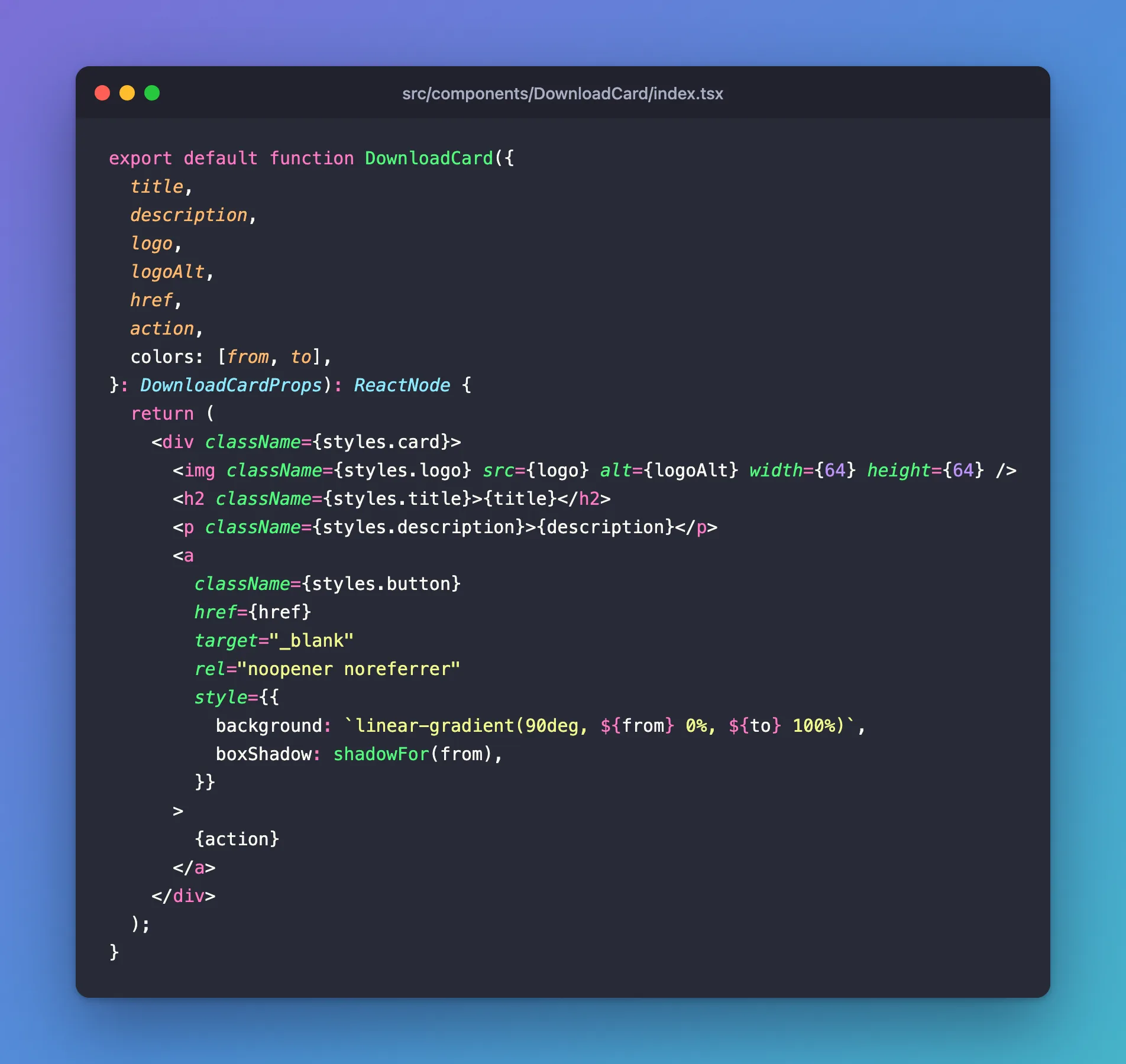
The card puts each prop straight into the element it belongs in: the title into the <h2>, the description into the <p>, the label into the <a>. Nothing sits on a line of its own for MDX to wrap:
export default function DownloadCard({
  title,
  description,
  logo,
  logoAlt,
  href,
  action,
  colors: [from, to],
}: DownloadCardProps): ReactNode {
  return (
    <div className={styles.card}>
      <img className={styles.logo} src={logo} alt={logoAlt} width={64} height={64} />
      <h2 className={styles.title}>{title}</h2>
      <p className={styles.description}>{description}</p>
      <a
        className={styles.button}
        href={href}
        target="_blank"
        rel="noopener noreferrer"
        style={{
          background: `linear-gradient(90deg, ${from} 0%, ${to} 100%)`,
          boxShadow: shadowFor(from),
        }}
      >
        {action}
      </a>
    </div>
  );
}
Each card had its button shadow written out by hand: the gradient's first colour at 10% opacity. A small function works it out from that colour instead:
/** The button's shadow: its left colour at 10% opacity. */
function shadowFor(hex: string): string {
  const rgb = Number.parseInt(hex.slice(1), 16);
  return `0 2px 8px 0 rgba(${(rgb >> 16) & 255}, ${(rgb >> 8) & 255}, ${rgb & 255}, 0.1)`;
}
Each section of the page repeated the same flex div around its cards. DownloadGrid replaces it:
/** A section's row of cards, wrapping onto new lines as the screen narrows. */
export function DownloadGrid({ children }: { children: ReactNode }): ReactNode {
  return <div className={styles.grid}>{children}</div>;
}
The complete file:
import React, { type ReactNode } from "react";
import styles from "./styles.module.css";

// A tool on the /downloads page (src/pages/downloads.mdx). Every text arrives as a prop, so MDX
// never parses it. In MDX, text on its own line inside a tag becomes a paragraph: written inline
// in the page, each card's <p> got a second <p> inside it. That is invalid HTML, the browser
// re-arranged it, and React then failed to hydrate the page (minified React error #418).

type DownloadCardProps = {
  /** The tool's name, shown as the card's heading. */
  title: string;
  /** One or two sentences about the tool. */
  description: string;
  /** The logo, shown at 64 × 64. Use a copy in the site's blob storage: vendors move their files. */
  logo: string;
  logoAlt: string;
  /** The official download page. */
  href: string;
  /** The button's label. */
  action: string;
  /** The button's gradient as two `#rrggbb` colours, left to right. */
  colors: [string, string];
};

/** The button's shadow: its left colour at 10% opacity. */
function shadowFor(hex: string): string {
  const rgb = Number.parseInt(hex.slice(1), 16);
  return `0 2px 8px 0 rgba(${(rgb >> 16) & 255}, ${(rgb >> 8) & 255}, ${rgb & 255}, 0.1)`;
}

export default function DownloadCard({
  title,
  description,
  logo,
  logoAlt,
  href,
  action,
  colors: [from, to],
}: DownloadCardProps): ReactNode {
  return (
    <div className={styles.card}>
      <img className={styles.logo} src={logo} alt={logoAlt} width={64} height={64} />
      <h2 className={styles.title}>{title}</h2>
      <p className={styles.description}>{description}</p>
      <a
        className={styles.button}
        href={href}
        target="_blank"
        rel="noopener noreferrer"
        style={{
          background: `linear-gradient(90deg, ${from} 0%, ${to} 100%)`,
          boxShadow: shadowFor(from),
        }}
      >
        {action}
      </a>
    </div>
  );
}

/** A section's row of cards, wrapping onto new lines as the screen narrows. */
export function DownloadGrid({ children }: { children: ReactNode }): ReactNode {
  return <div className={styles.grid}>{children}</div>;
}
The Styles
The page's <style> block moves into a CSS module next to the component, with the same values. A CSS module's class names belong to that component alone, so .card can't clash with anything else on the site. This also removes the <style> element whose CSS the minifier was rewriting, and with it the other mismatch React reported.
One rule needs care. The theme styles every link's hover state with a:hover, which outranks a single class. Listing .button:hover together with .button keeps the label white when the pointer is over it.
.grid {
  display: flex;
  flex-wrap: wrap;
  gap: 2rem;
  margin: 2.5rem 0;
}

.card {
  background: var(--ifm-card-background, #f5f6fa);
  color: var(--ifm-font-color-base, #222);
  border-radius: 16px;
  box-shadow: 0 4px 24px 0 rgba(0, 0, 0, 0.08);
  border: 1.5px solid #ffe58f;
  padding: 2rem 1.5rem;
  display: flex;
  flex-direction: column;
  align-items: center;
  min-width: 280px;
  flex: 1 1 320px;
  transition:
    background 0.3s,
    color 0.3s;
  height: 420px; /* every card the same height */
  box-sizing: border-box;
}

html[data-theme="dark"] .card {
  background: var(--ifm-background-surface-color, #23272f);
  color: #fff;
}

.logo {
  width: 64px;
  height: 64px;
  margin-bottom: 1rem;
  object-fit: contain;
}

.title {
  margin: 0.5rem 0;
  color: var(--ifm-color-primary, #0078e7);
}

/* Grows to fill the card, so every button sits at the bottom. */
.description {
  flex: 1 1 auto;
  margin-bottom: 1.2rem;
  text-align: center;
  color: var(--ifm-font-color-base, #222);
}

html[data-theme="dark"] .description {
  color: #e0e0e0;
}

/* Listed with :hover so it outranks the theme's a:hover colour and underline. */
.button,
.button:hover {
  margin-top: auto;
  padding: 0.6rem 2.2rem;
  border-radius: 8px;
  color: #fff;
  font-size: 1.1rem;
  font-weight: 700;
  text-decoration: none;
}

@media (max-width: 700px) {
  .card {
    height: auto;
    min-height: 340px;
  }
}
The Page
The page imports the component once, below its front matter, and gives each tool's text as props. Every string is inside quotes, so MDX has nothing to wrap. Here is the import and the first section's cards:
import DownloadCard, { DownloadGrid } from "@site/src/components/DownloadCard";

<DownloadGrid>
  <DownloadCard
    title="Visual Studio Code"
    description="A free, powerful, and lightweight code editor for all platforms. Perfect for web, cloud, and AI development."
    logo="https://strdewiridedevblogsprod.blob.core.windows.net/images/static/downloads/visual-studio-code.webp"
    logoAlt="VS Code Logo"
    href="https://code.visualstudio.com/download"
    action="Download VS Code"
    colors={["#0078e7", "#00c6fb"]}
  />
  <DownloadCard
    title="Visual Studio"
    description="A comprehensive IDE for .NET, C++, Python, and more. Ideal for enterprise and professional development."
    logo="https://strdewiridedevblogsprod.blob.core.windows.net/images/static/downloads/visual-studio.webp"
    logoAlt="Visual Studio Logo"
    href="https://visualstudio.microsoft.com/downloads/"
    action="Download Visual Studio"
    colors={["#68217a", "#a074c4"]}
  />
  <DownloadCard
    title="SQL Server Management Studio (SSMS)"
    description="The official IDE for managing, querying, and developing SQL Server databases. Essential for database professionals and developers working with Microsoft SQL Server."
    logo="https://strdewiridedevblogsprod.blob.core.windows.net/images/static/downloads/sql-server-management-studio.webp"
    logoAlt="SSMS Logo"
    href="https://aka.ms/ssms"
    action="Download SSMS"
    colors={["#0078d4", "#5eaefd"]}
  />
</DownloadGrid>
The other two sections have the same shape, each under its ## heading.
Keep the Text on the Same Line
For a single element, there's a smaller fix. The Docusaurus thread gives three: keep the text on the same line as its tags, wrap it in a fragment (<>content</>), or give it as a string ({'content'}). Here is the first one for this card:
<p style={{ textAlign: "center", marginBottom: "1.2rem" }}>A comprehensive IDE for .NET, C++, Python, and more. Ideal for enterprise and professional development.</p>
Compiled with the same @mdx-js/mdx 3.1.1, the text stays as it is, with no second paragraph:
return <p style={{
    textAlign: "center",
    marginBottom: "1.2rem"
  }}>{"A comprehensive IDE for .NET, C++, Python, and more. Ideal for enterprise and professional development."}</p>;
It works as long as nobody moves the text back onto a line of its own. A prop can't be wrapped, however the file is edited later, which is why I used the component for the cards.
After the Fix
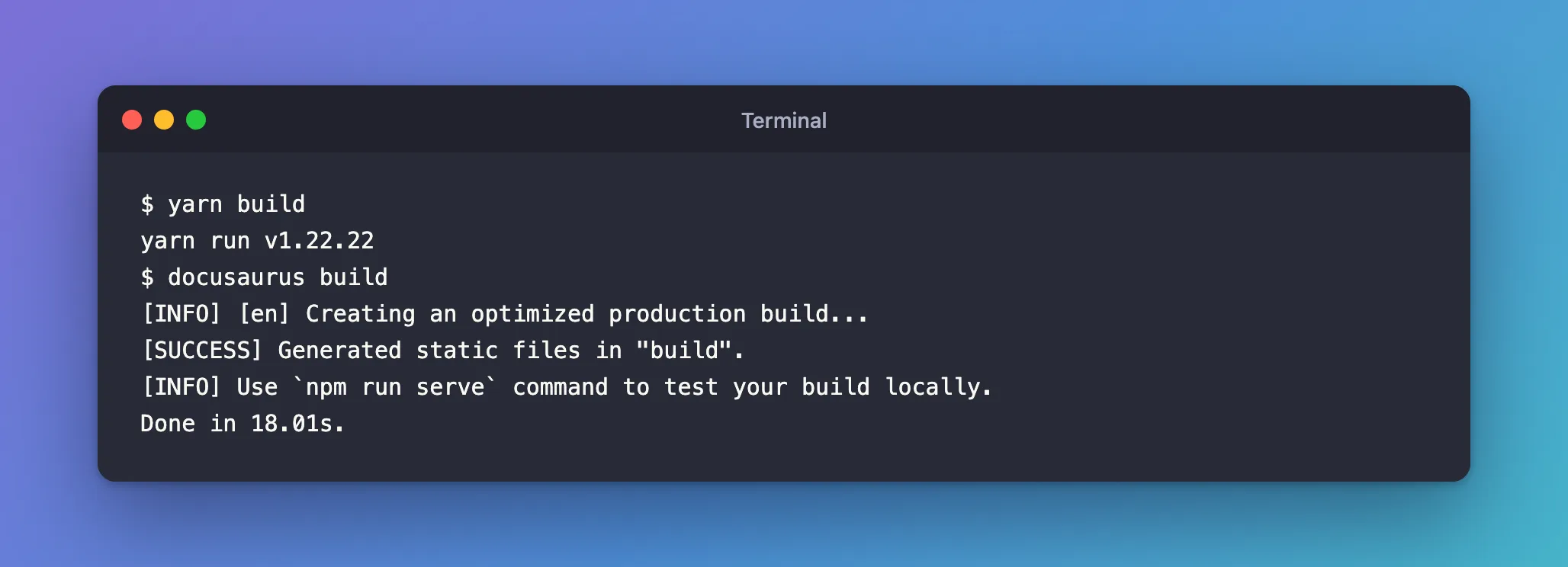
The next build printed no warnings:
yarn run v1.22.22
$ docusaurus build
[INFO] [en] Creating an optimized production build...
[SUCCESS] Generated static files in "build".
[INFO] Use `npm run serve` command to test your build locally.
Done in 18.01s.
Each card is now one heading, one paragraph and one link, the same with JavaScript on or off, and the console shows no errors. The label is white and sits in the middle of the button:

Common Mistakes
| Mistake | What happens | Do this instead |
|---|---|---|
Searching the .mdx file for a stray </p> | There isn't one, because MDX adds the inner paragraph | Look for text on a line of its own inside a tag |
Setting DOCUSAURUS_IGNORE_SSG_WARNINGS=true | The message goes away, but the HTML stays invalid and hydration still fails | Fix the markup |
Checking only with yarn start | No build warning, only a message in the browser console | Run yarn build |
| Joining the lines once, then letting them wrap again | The warning comes back | Pass the text as a prop |
Keeping a <style> block in MDX | The minifier rewrites its CSS, and React reports error 418 for text | Put the CSS in a CSS module |
Troubleshooting
| Symptom | Likely cause | Fix |
|---|---|---|
| The warning repeats once for each card or block on a page | A <p> in a repeated block has its text on its own line | Pass the text as a prop, or keep it on the tag's line |
React error 418 with args[]=HTML and a stack of p inside p | A paragraph inside a paragraph | The same fix |
React error 418 with args[]=text and a stack at style | A <style> element whose CSS the minifier compacted | Move the CSS into a CSS module |
| A link or heading styled like body text | MDX wrapped the text inside the <a> or <h2> in a paragraph | Keep the text on the tag's line, or pass it as a prop |
| The warning names a page whose MDX has no such tag | A React component on that page renders the nested markup | Remove parts of the page until the warning stops, as the Docusaurus thread suggests |
FAQ
Why doesn't yarn start print this warning?
The warning comes from the HTML minifier that runs in yarn build, while it writes the static pages; the Docusaurus thread says "only our HTML minifier emits those warnings". yarn start printed nothing for this page. React's development build reported the nesting in the browser console instead: In HTML, <p> cannot be a descendant of <p>.
Can I just turn the warning off?
Yes. DOCUSAURUS_IGNORE_SSG_WARNINGS=true stops the message, as the warning itself says. The HTML stays invalid, though, and on this page that meant a failed hydration on every visit.
Do I have to rewrite every page that has JSX?
No. Only text on a line of its own inside a tag gets wrapped. A tag with its text on the same line, such as this page's <h2 style={{ margin: "0.5rem 0" }}>Visual Studio</h2>, came through as written. The Docusaurus thread adds that "A regular Markdown file with no JSX tag shouldn't have any problem."
Why did the page look almost right with JavaScript on?
After the hydration error, React built the page again in the browser. React's own message says so: "As a result this tree will be regenerated on the client." It creates elements through the DOM, which accepts a paragraph inside a paragraph, so the description was centred again. The labels stayed dark, because that came from the CSS rule, not from the parsing.
How do I find the element when the warning only gives numbers?
The numbers count characters in the page's HTML before it's minified, and that isn't in the build folder. Search the built page in build/ for a paragraph that opens straight after another one, as the Visual Studio card above shows. The Docusaurus thread also suggests pasting the content into the MDX playground, or removing parts of the page until the warning stops.
Conclusion
No "p" element in scope but a "p" end tag seen in a Docusaurus build means that a page's HTML has a paragraph inside a paragraph. In MDX, that usually comes from text on a line of its own inside a <p>. The browser splits the paragraphs apart, React fails to hydrate the page, and the styling goes wrong in small ways. Keep such text on the same line as its tags, or better, move the markup into a component and pass the text as props, so MDX never gets the chance to wrap it.
Additional Resources
- Docusaurus SSG warnings - troubleshooting — the Docusaurus team's thread for these warnings, with this exact case as its first example.
- What is MDX — how MDX decides when text inside JSX becomes a paragraph.
- HTML Standard: the "in body" insertion mode — what a browser does with a
pend tag that has nothing to close. - hydrateRoot — how React hydrates HTML rendered on the server.
- MDX and React — importing your own components into MDX in Docusaurus.
- Styling and Layout — CSS modules in Docusaurus.
