Fixed: "No Additional Information Is Needed for This Step" and "Not Connected" After Saving a Flow

I saved a cloud flow, and the action I had open in Power Automate's new designer suddenly showed No additional information is needed for this step, Not connected. and an empty Code view. It looked as if Save had wiped the action. It hadn't: selecting the action again brought everything back.
What I Was Doing
I was building the setup flow in Part 11 of the Career Development Plan series. Its actions are Send an HTTP request to SharePoint actions (How to Use Send an HTTP Request to SharePoint explains the action). Find the list looks for a list by its title. I had just filled in its Site Address, Method, Uri and Accept header, and selected Save with its pane still open.
What I Expected
Your flow is ready to go, with the action's settings still in the pane.
What I Got
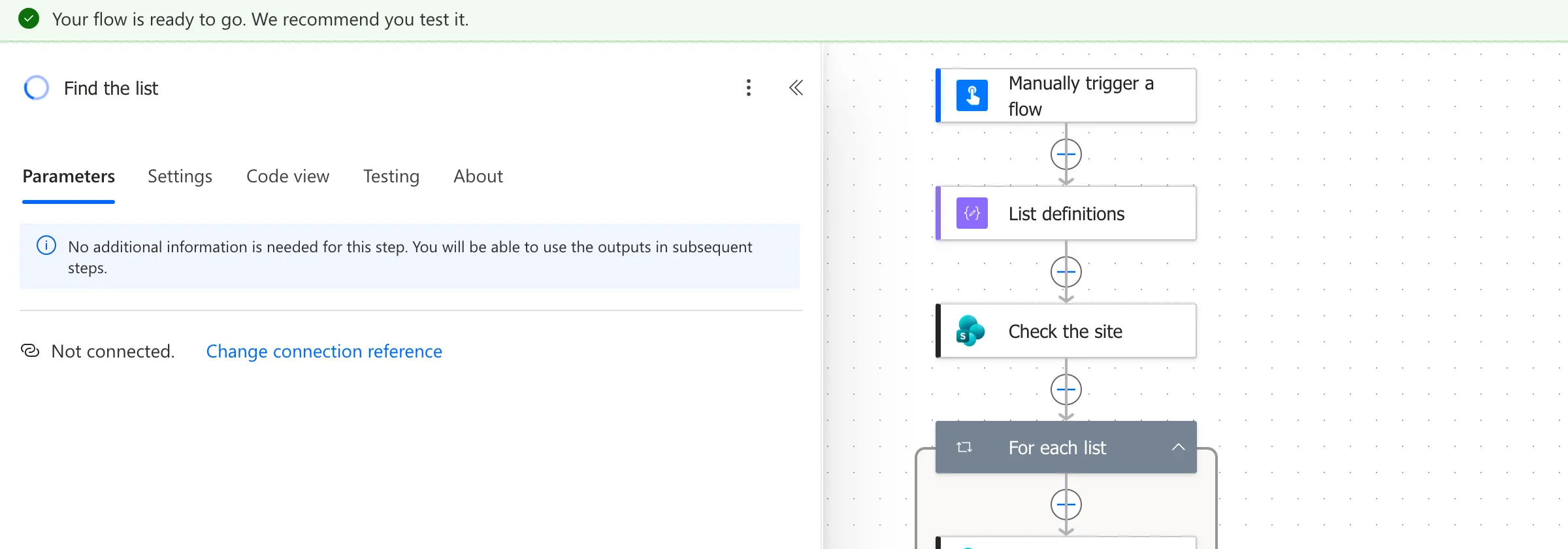
The banner said the flow was saved. But the pane had lost the action's settings. The SharePoint logo next to its name had turned into a loading circle, the Parameters tab said No additional information is needed for this step. You will be able to use the outputs in subsequent steps., and the connection line said Not connected.:
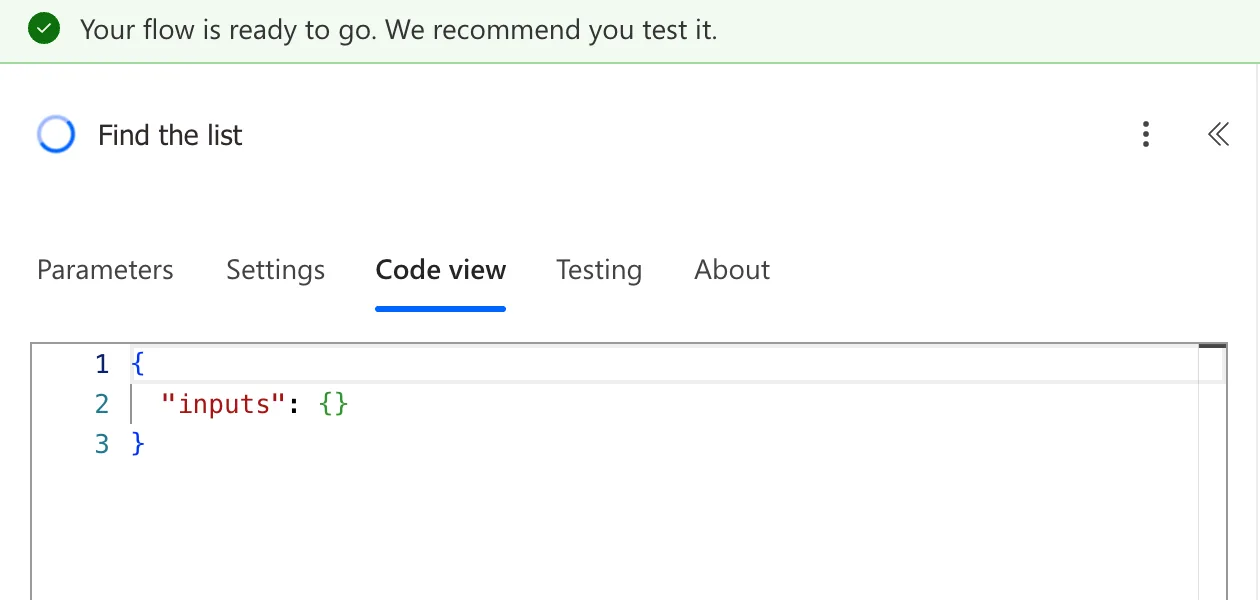
Code view was worse. It showed the action with no inputs at all:
What I Checked
It was the second time. Earlier, the same thing had happened to Check the site, the action I had open when I saved the flow before.
- Whether it would load by itself. The first time, I waited: eight seconds later the pane still said Not connected.
- Whether I should fill the action in again. I didn't, because typing over a value I couldn't see could change it. I looked at the evidence first.
- The other actions. Every card on the canvas was still there, and none showed an error. The only thing that had changed was the pane that was open when I saved.
- A test run. Right after the first time, I tested the flow (How to Test a Cloud Flow Manually). Check the site ran with the address, Uri and header I had entered, so the saved flow still had them, whatever the pane said.
- Microsoft's documentation. Classic designer vs. new designer for cloud flows lists known issues with the new designer, such as saves that don't persist. None of them describes this pane, and I didn't find this message described for a saved action anywhere in Microsoft's docs.
Why It Happens
Microsoft's documentation doesn't explain it. From what I saw, the pane that's open during a save reloads and stays half-loaded, with a loading circle where the connector's logo should be. The flow itself was saved correctly.
The Fix
Select a different card on the canvas, then select the action again. The pane loads properly, with the SharePoint logo, every parameter and the connection:
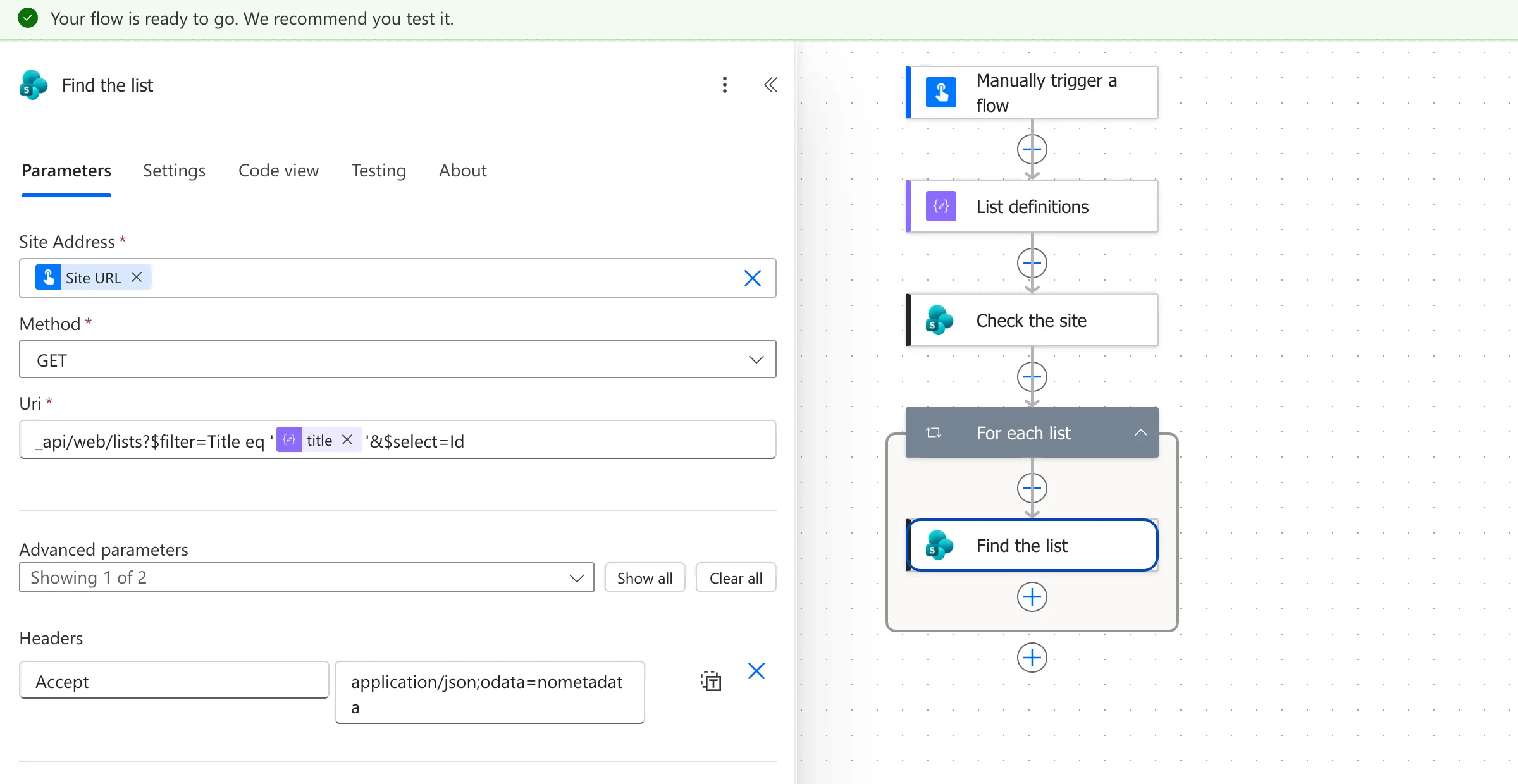
The connection line at the bottom of the pane said Connected to Career Development Plan Setup SharePoint. again. The same fix worked both times, for Check the site and for Find the list.
Common Mistakes
| Mistake | What happens | Do this instead |
|---|---|---|
| Filling the action in again | You may change values you can't see | Select another card, then this one |
| Choosing Change connection reference | You change a setting that wasn't broken | Reload the pane first |
| Assuming the save failed | You redo work that was saved | Check the action after reselecting it, or run a test |
Troubleshooting
| Symptom | Likely cause | Fix |
|---|---|---|
| No additional information is needed for this step on an action that has settings | The pane didn't finish loading after the save | Select another card, then the action again |
| Not connected. right after a save | Same | Same |
| The values are really gone after reselecting | The save didn't keep your change, a known issue Microsoft lists | Enter them again, save, and wait for Your flow is ready to go |
FAQ
Is my flow broken?
No. In my case the saved flow had every value, and the test run straight afterwards used them.
Does this happen in the classic designer?
I only saw it in the new designer, which is the one I built the flow in.
Conclusion
If an action shows No additional information is needed for this step and Not connected. right after you save, don't fill it in again. Select another card and then the action: its settings come back, because they were saved all along.
Additional Resources
- Classic designer vs. new designer for cloud flows: known issues in the new designer.
- Explore the cloud flows designer: the designer's panes and tabs.
