Fixed: Next.js Caches the MSAL Redirect Page with "Cache-Control: s-maxage=31536000"

MSAL Browser v5 says its redirect bridge page must be served with Cache-Control: no-store, because the sign-in response arrives in that page's address. In my Next.js 16 app the development server did exactly that, but the production build served /redirect with Cache-Control: s-maxage=31536000: one year in any shared cache. The page has nothing dynamic, so Next.js builds it as a static page. One headers() rule in next.config.ts fixed it.
What I Was Doing
In Part 9 of the Microsoft Agent Framework series, the chat app signs people in with MSAL Browser 5.30.0 and MSAL React 5.8.3. MSAL version 5 sends the sign-in response to a redirect bridge: a small page that hands the response back to the app. I built it as MSAL's guide shows for the Next.js App Router, a Client Component at app/redirect/page.tsx:
"use client";

import { broadcastResponseToMainFrame } from "@azure/msal-browser/redirect-bridge";
import { useEffect } from "react";

// Microsoft sends the sign-in response here. This page passes it back to the
// chat page, which finishes the sign-in. It must stay outside MsalProvider.
export default function Redirect() {
  useEffect(() => {
    broadcastResponseToMainFrame().catch((error: unknown) => {
      console.error("Couldn't pass the sign-in response to the chat.", error);
    });
  }, []);

  return <p>Signing in…</p>;
}
Sign-in worked in development. MSAL's guide also sets a rule about caching the page, so I built the app for production, started it, and asked for the page's headers. Port 3000 was in use by another app, so I started the build on port 3005:
npm run build
npm start -- -p 3005
curl -sI http://localhost:3005/redirect
curl -sI sends a HEAD request and prints only the response headers.
What I Expected
Cache-Control: no-store. MSAL's redirect bridge guide is explicit: Because the bridge page carries sensitive authentication material in the URL, it must not be cached by any intermediary. Serve the redirect bridge page with Cache-Control: no-store to prevent CDNs, reverse proxies, and browser disk caches from retaining the page — and the authorization codes or tokens in its URL — after the response has been processed.
What I Got
HTTP/1.1 200 OK
Vary: rsc, next-router-state-tree, next-router-prefetch, next-router-segment-prefetch, Accept-Encoding
x-nextjs-cache: HIT
x-nextjs-prerender: 1
x-nextjs-prerender: 1
link: </_next/static/media/07a39a8a4660cc7c-s.p.0r6juujl39pe6.woff2>; rel=preload; as="font"; crossorigin=""; type="font/woff2", </_next/static/media/605ce01b664af129-s.p.0wgildi0cnwt9.woff2>; rel=preload; as="font"; crossorigin=""; type="font/woff2"
x-nextjs-stale-time: 300
X-Powered-By: Next.js
Cache-Control: s-maxage=31536000
ETag: "7r90wnopst5mo"
Content-Type: text/html; charset=utf-8
Content-Length: 7298
Date: Thu, 19 Nov 2026 12:06:20 GMT
Connection: keep-alive
Keep-Alive: timeout=5
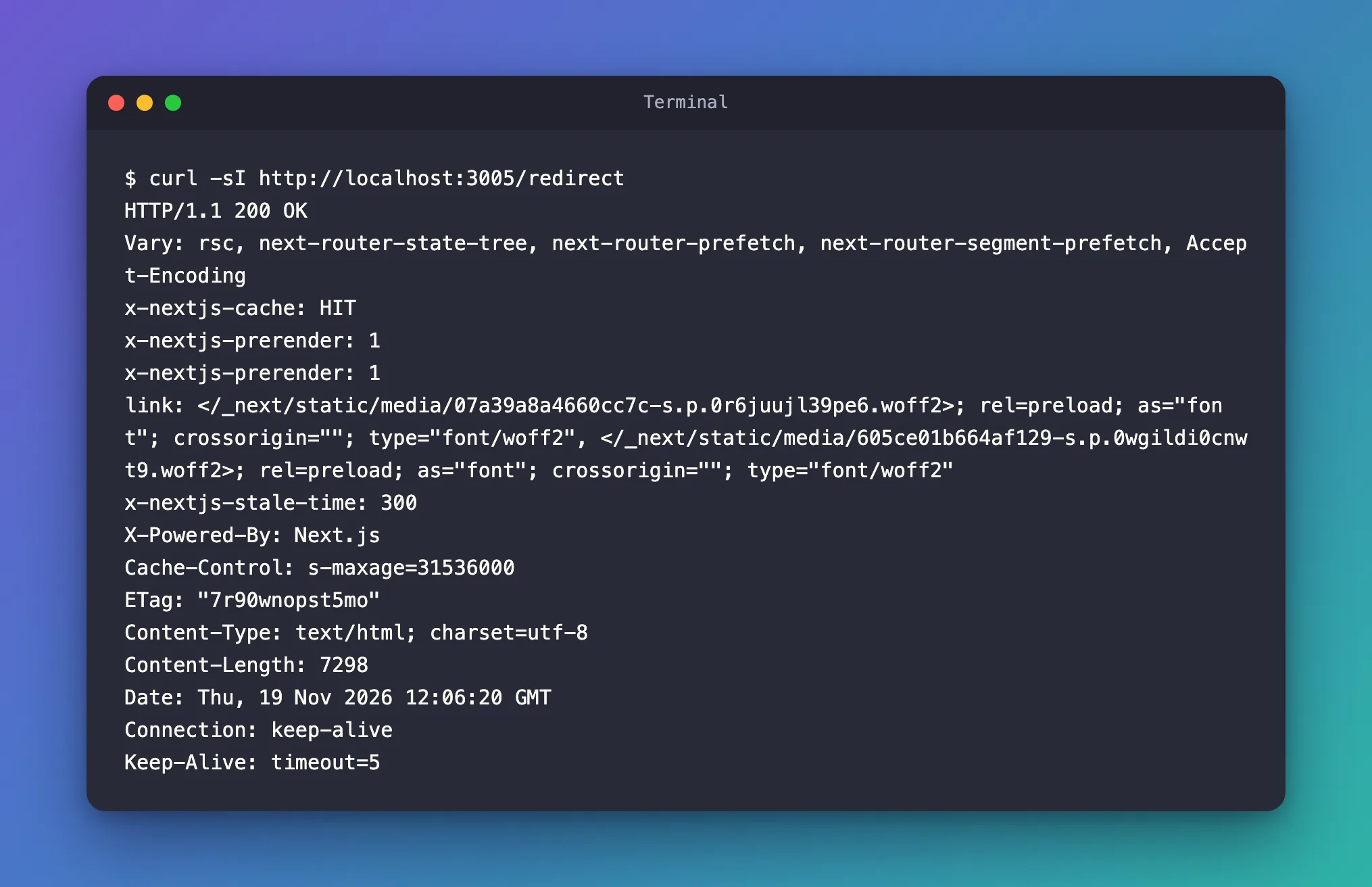
s-maxage=31536000 tells shared caches — a CDN or reverse proxy in front of the app — that they may keep the page for 31,536,000 seconds: a year. No no-store anywhere.
What I Checked
The development server. The same request to npm run dev -- -p 3005 returned Cache-Control: no-store. The development server sent the header MSAL asks for; only the production build didn't. Testing sign-in in development alone would never have shown it.
MSAL's Next.js instructions. The same guide's Next.js section ends with: No next.config.js changes are needed for either router — Next.js serves pages automatically. That holds for making the page work, but not for the caching rule from the guide's own warning.
How Next.js built the page. The build output lists the route as static:
Route (app)
┌ ◐ /
├ ○ /_not-found
├ ƒ /api/chat
└ ○ /redirect


○  (Static)             prerendered as static content
◐  (Partial Prerender)  prerendered as static HTML with dynamic server-streamed content
ƒ  (Dynamic)            server-rendered on demand
/redirect reads no request data and no settings, so Next.js renders it once, at build time. The headers say the same: x-nextjs-prerender: 1, and x-nextjs-cache: HIT — the server answered from its cache of built pages.
What Next.js documents for such pages. The self-hosting guide lists the Cache-Control headers Next.js sets by itself. Static pages are cached with s-maxage and if you set revalidate: false, it will default to a one-year cache duration. A page that never revalidates, like this one, gets exactly the year I saw. Dynamically rendered pages, by contrast, set a Cache-Control header of private, no-cache, no-store, max-age=0, must-revalidate — which the chat page /, rendered on every request, already had.
Whether the header can be changed. The headers reference says that the one-year public, max-age=31536000, immutable header of truly immutable assets, files with a hash in their name, cannot be overridden — However, you can set Cache-Control headers for other responses or data. A page is one of those other responses.
Why It Happens
Next.js decides how to render each route from what it uses. The redirect bridge uses nothing request-specific: its work happens in the browser, in useEffect. So Next.js prerenders it as a static page and serves it with the cache header it gives every static page that never revalidates: s-maxage=31536000. The sign-in response that MSAL puts in the page's address doesn't change how Next.js sees the page. The development server sent this page with no-store, which hides the difference until a production build.
The Fix
Add a headers() rule for /redirect in next.config.ts:
import type { NextConfig } from "next";

const nextConfig: NextConfig = {
  /* config options here */
  cacheComponents: true,
  partialPrefetching: true,
  // The sign-in response arrives at /redirect in the page's address, so no
  // browser, proxy or CDN may keep a copy of that page.
  async headers() {
    return [
      {
        source: "/redirect",
        headers: [{ key: "Cache-Control", value: "no-store" }],
      },
    ];
  },
};

export default nextConfig;
| Part | What it does |
|---|---|
async headers() | Returns rules that add response headers to matching paths |
source: "/redirect" | The rule applies to this one path only; every other page keeps its own headers |
Cache-Control: no-store | Nobody — browser, proxy or CDN — may store a copy of the response |
Then build and start the app again:
npm run build
npm start -- -p 3005
After the Fix
curl -sI http://localhost:3005/redirect
HTTP/1.1 200 OK
Cache-Control: no-store
Vary: rsc, next-router-state-tree, next-router-prefetch, next-router-segment-prefetch, Accept-Encoding
x-nextjs-cache: HIT
x-nextjs-prerender: 1
x-nextjs-prerender: 1
link: </_next/static/media/07a39a8a4660cc7c-s.p.0r6juujl39pe6.woff2>; rel=preload; as="font"; crossorigin=""; type="font/woff2", </_next/static/media/605ce01b664af129-s.p.0wgildi0cnwt9.woff2>; rel=preload; as="font"; crossorigin=""; type="font/woff2"
x-nextjs-stale-time: 300
X-Powered-By: Next.js
ETag: "oun8318hng5mo"
Content-Type: text/html; charset=utf-8
Content-Length: 7298
Date: Thu, 19 Nov 2026 12:06:34 GMT
Connection: keep-alive
Keep-Alive: timeout=5
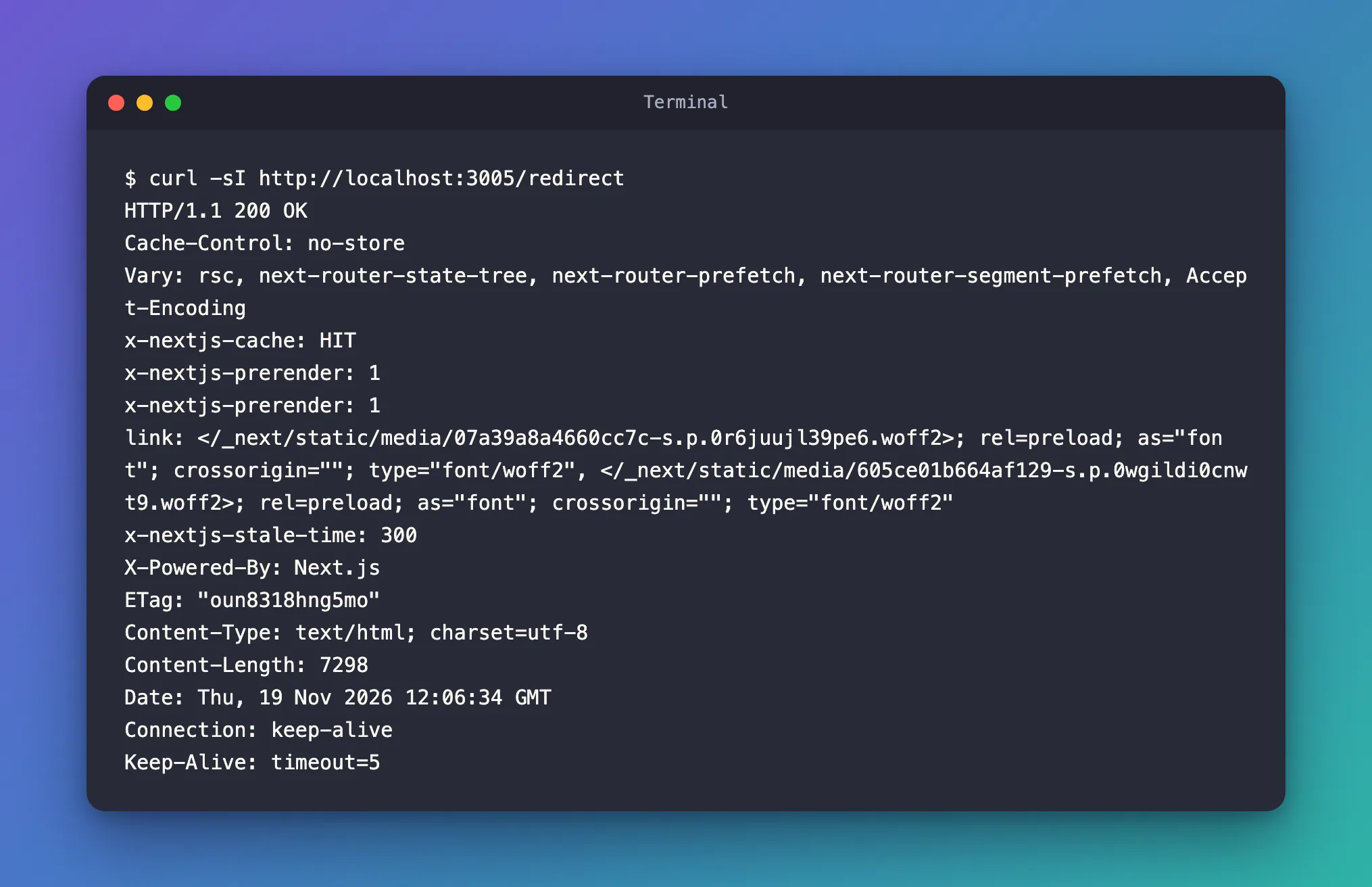
Cache-Control: no-store, and the s-maxage is gone. The page itself is unchanged — still static, still served from the server's cache of built pages (x-nextjs-cache: HIT) — but nobody downstream may keep a copy. The chat page / kept its own private, no-cache, no-store, max-age=0, must-revalidate.
Common Mistakes
| Mistake | What happens | Do this instead |
|---|---|---|
Checking the headers only with npm run dev | The development server sends no-store, so the problem never shows | Check a production build with npm run build and npm start |
A rule for /:path* with no-store | Every page and response loses its caching | Match /redirect only |
| Making the page dynamic just to change its header | The page renders on every request for no reason | Keep it static and set the header in next.config.ts |
Troubleshooting
| Symptom | Likely cause | Fix |
|---|---|---|
/redirect still shows s-maxage=31536000 | source doesn't match the bridge's path | Use the exact path, and build the app again |
| The redirect URI in MSAL is a different path | The rule protects a page the sign-in doesn't use | Use the path of your redirectUri in source |
FAQ
Is a cached redirect page really a risk?
MSAL's guide calls the response in the page's address sensitive authentication material and says the page must not be cached by any intermediary. A copy kept by a shared cache, together with its address, is exactly what that rule is there to prevent.
Why doesn't MSAL's Next.js section mention this?
Its No next.config.js changes are needed is about making the page work: Next.js turns any file under app into a route by itself. The caching rule comes from the general warning earlier in the same guide.
Does no-store slow the sign-in down?
The page is small and loads once per sign-in. In my production build it is still prerendered, so the server sends it straight from its cache; only browsers and proxies stop keeping copies.
Conclusion
A Next.js page that uses nothing request-specific is prerendered and served with Cache-Control: s-maxage=31536000. For MSAL's redirect bridge, whose address carries the sign-in response, add a headers() rule in next.config.ts that sends Cache-Control: no-store for that path, and check it on a production build, not on the development server.
Additional Resources
- MSAL Browser: Redirect Bridge — the bridge page and its caching rule.
- Next.js: headers — adding response headers to a path, and what can't be overridden.
- Next.js: How to self-host your Next.js application — the
Cache-Controlheaders Next.js sets by itself. - MDN: Cache-Control —
no-storeands-maxage.
