Fixed: "Name Isn't Valid. 'Content' Isn't Recognized" on a Power Apps Badge

You want a badge's color to follow its text, so you write Switch(Self.Content, ...) in its Intent. Studio underlines Content and says Name isn't valid. 'Content' isn't recognized. The modern Badge's text can't be read that way. Base the color on the same value the text comes from.
The Error
In the example, a badge in each row of the Career Development Plan app's My Plan gallery showed the competency's level (Content: ThisItem.Level.Value). Its color was meant to follow that text:
Switch(
    Self.Content,
    "Beginner", BadgeIntent.Neutral,
    "Intermediate", BadgeIntent.Informative,
    "Advanced", BadgeIntent.Highlight,
    BadgeIntent.Positive
)
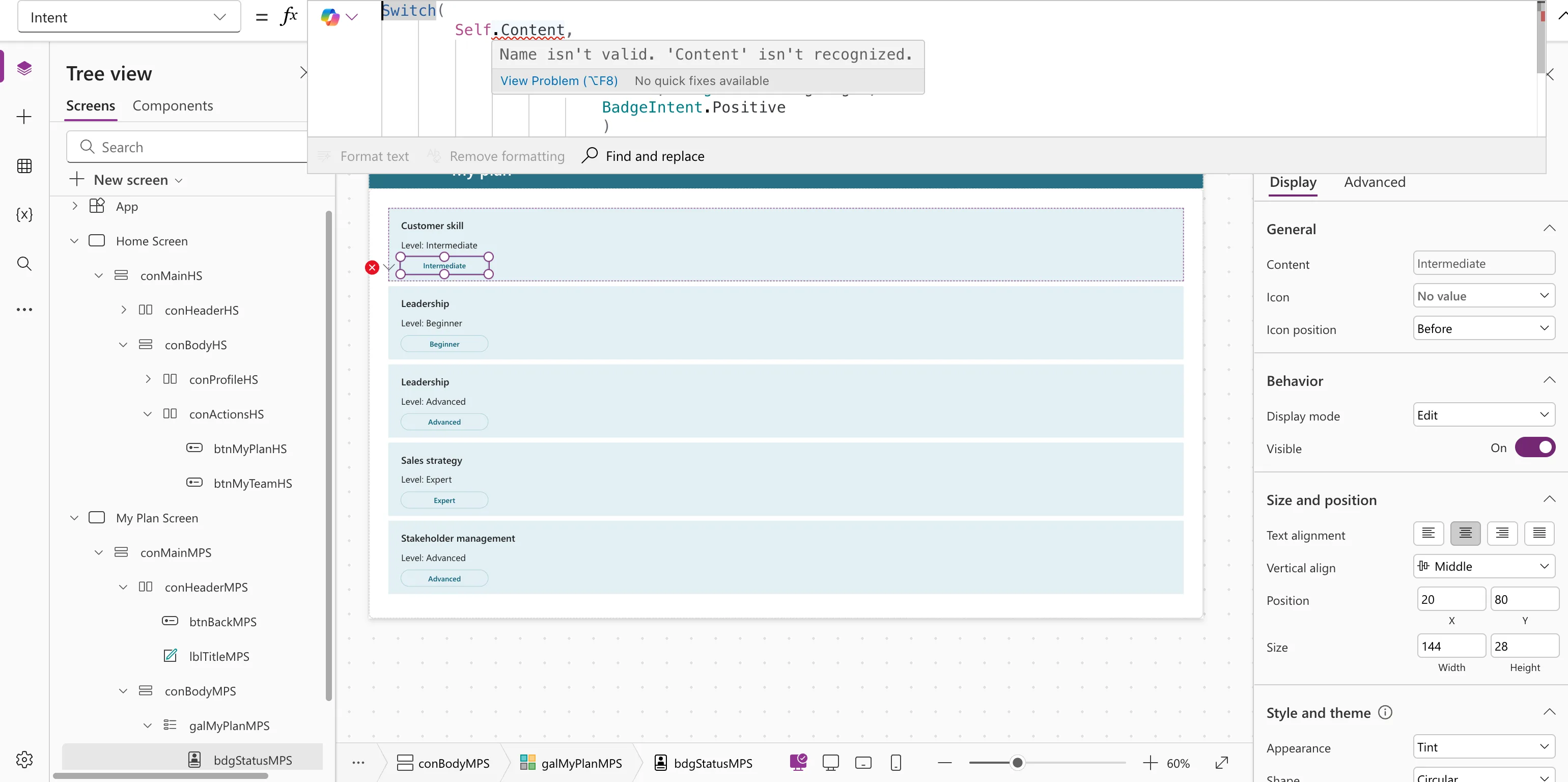
Name isn't valid. 'Content' isn't recognized.
View Problem (⌥F8)    No quick fixes available
Why It Happens
Name isn't valid. 'X' isn't recognized means Power Apps can't find X where you used it. Here, X is the badge's Content: in the example's Studio (version 3.26102.13), a Badge's Content couldn't be read from a formula. The same error came back from another control, with bdgStatusMPS.Content. Microsoft's Badge reference lists Content as the text the badge displays, and doesn't describe reading it back (Badge modern control).
The same message appears for any name Power Apps doesn't know, such as a misspelled control, column or variable.
The Fix: Use the Badge's Source Value
Write the color formula from the value the badge shows, not from the badge:
Switch(
    ThisItem.Level.Value,
    "Beginner", BadgeIntent.Neutral,
    "Intermediate", BadgeIntent.Informative,
    "Advanced", BadgeIntent.Highlight,
    BadgeIntent.Positive
)
No errors, and each level gets its own color (How to Use the Switch Function in Power Apps).
When the Text Is Worked Out
If the badge's text comes from a longer formula, don't repeat it in Content, Intent and AccessibleLabel. Work it out once as a column of the gallery's Items with AddColumns, and read it with ThisItem everywhere. The finished app does this for each competency's status:
Switch(
    ThisItem.StatusText,
    "Waiting for review", BadgeIntent.Caution,
    "Approved", BadgeIntent.Positive,
    "Declined", BadgeIntent.Critical,
    BadgeIntent.Informative
)
Common Mistakes
| Mistake | What happens | Do this instead |
|---|---|---|
| Copying a long formula into Content and Intent | They can drift apart | Compute it once with AddColumns |
| Reading the badge's text from another control | The same error | Use the source value |
Troubleshooting
| Symptom | Likely cause | Fix |
|---|---|---|
| Name isn't valid on a control or column name | A typo, or it doesn't exist | Pick the name from the suggestions as you type |
| Name isn't valid on a variable | The formula that creates it hasn't been written yet | Create it first, for example in OnVisible |
FAQ
Does Self work on a Badge at all?
Self works for properties a control lets formulas read. In the example, Content wasn't one of them on the Badge.
Does using the badge's name instead of Self help?
No. In the example, bdgStatusMPS.Content in another control's formula gave the same error. Use the source value in both places.
Conclusion
Name isn't valid. 'Content' isn't recognized on a Badge means you tried to read its text. Base Intent and AccessibleLabel on the same value the text comes from, ideally a column worked out once in Items.
