Fixed: MLflow Search Box Adds Backticks and Doesn't Search When You Press Enter

I typed metrics.val_rmse < 0.54 into the search box of the MLflow UI's runs table and pressed Enter. The search didn't run: the box changed my text to metrics.`val_rmse` < 0.54, with backticks around the metric's name, and the table still listed every run. That first Enter picks the suggestion MLflow highlights while you type. Press Enter a second time to search, or press Esc before Enter to keep your text exactly as typed.
What I Was Doing
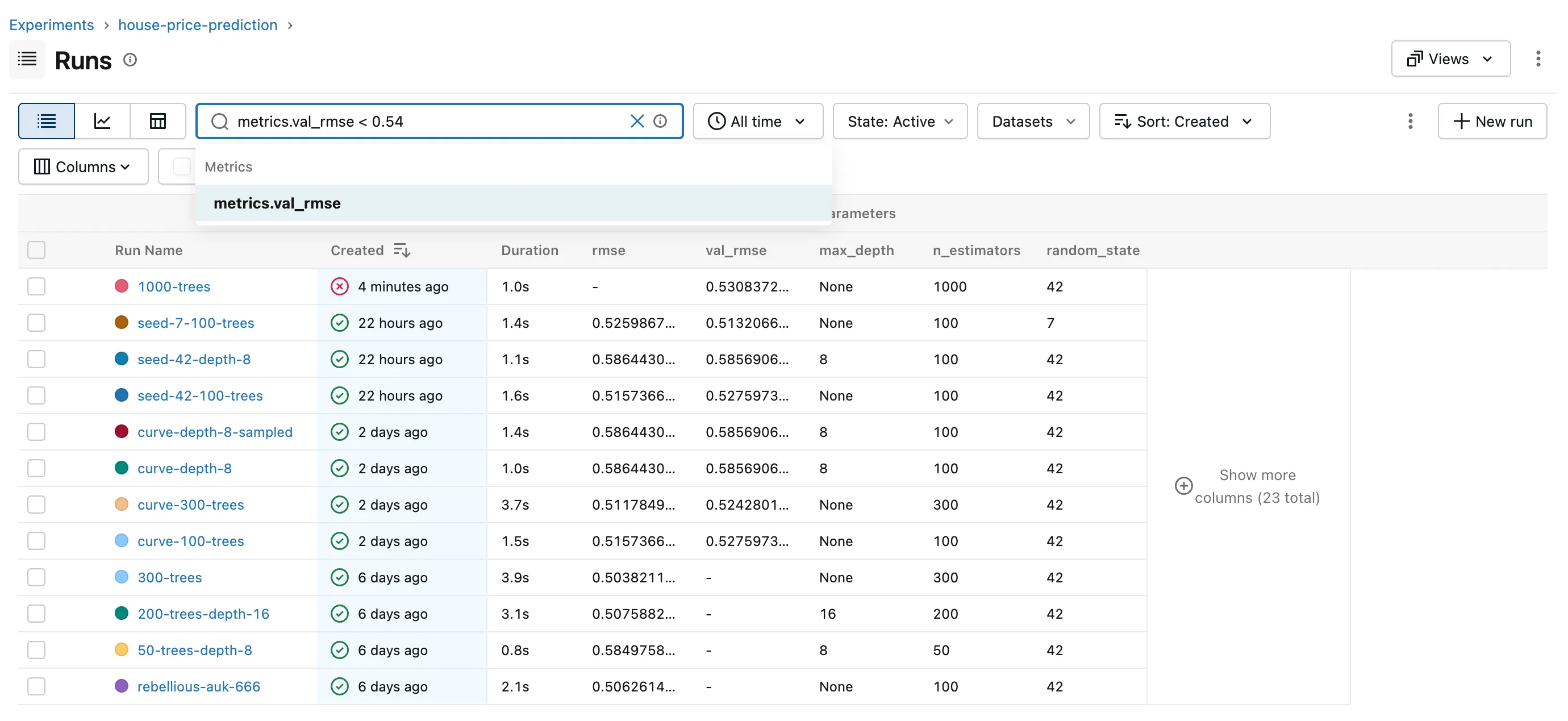
I was filtering the runs of the house price experiment in the MLflow series, with MLflow 3.18.0's UI open on the experiment's Runs page, which listed 12 runs. I clicked the search box above the table and typed a query for the runs whose validation error is below 0.54:
metrics.val_rmse < 0.54
While I typed, a list opened under the box, with one entry, metrics.val_rmse, under the heading Metrics:
Then I pressed Enter.
What I Expected
The table to shrink to the runs with a val_rmse below 0.54, as when you press Enter in any search box.
What I Got
The list closed, the text in the box changed, and the table didn't change:
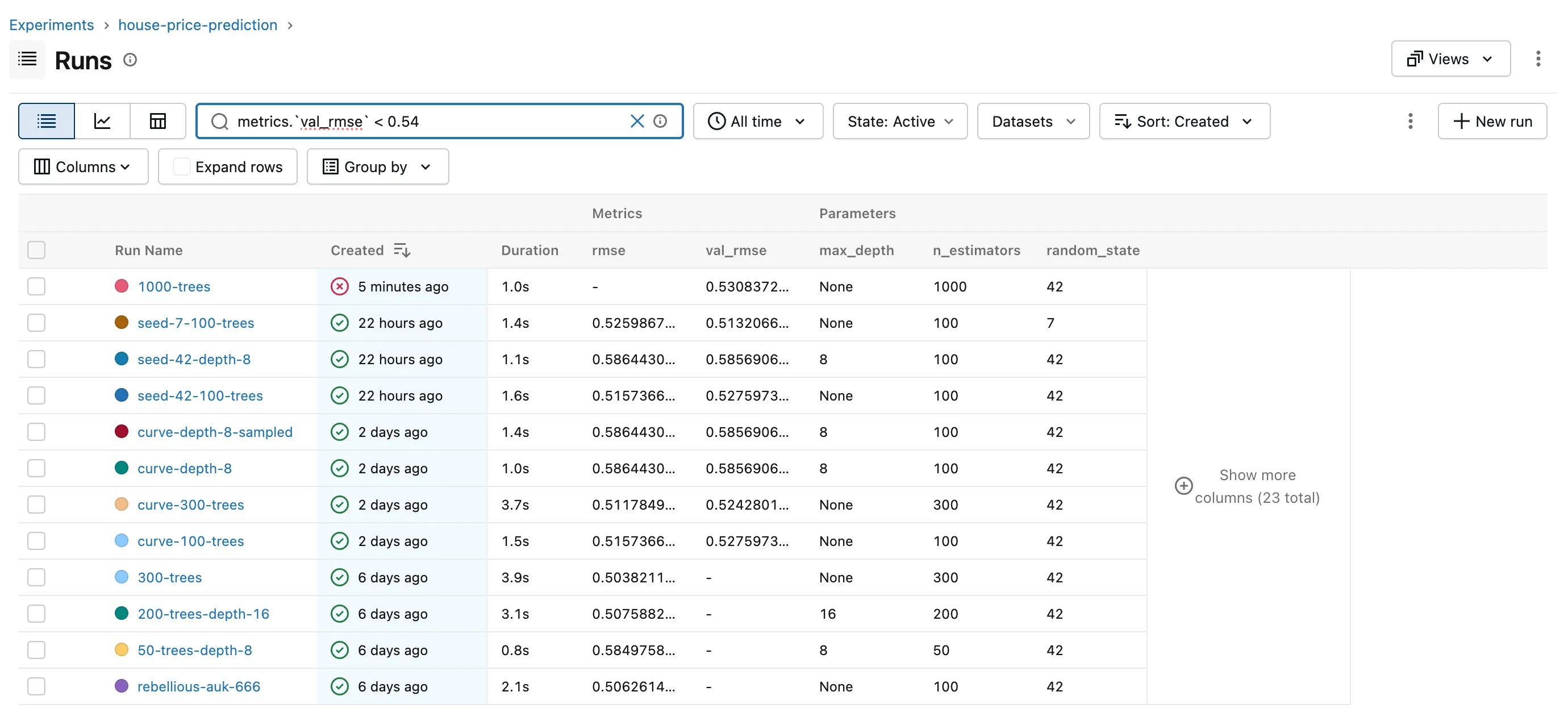
- The box read
metrics.`val_rmse` < 0.54: MLflow had wrapped the metric's name in backticks. - The count under the table still said 12 matching runs.
- The red dotted line under
val_rmsecomes from the browser's spell checker, not from MLflow.
What I Checked
The list under the box. The search box offers what you might be typing: here, the experiment's metric whose name matched. The first entry was highlighted as soon as the list opened.
What the backticks mean. MLflow's Search Runs guide says to "use backticks for fields that contain special characters or are reserved keywords", and its examples include metrics.`log-scale-loss` <= 0. Backticks around a plain name are allowed too, so metrics.`val_rmse` < 0.54 is still a valid query: it's what the highlighted entry inserts.
The documentation. The guide explains the query language in detail, but says nothing about the suggestion list or what Enter does while it's open. The help that the ⓘ in the search box opens, "Search runs using a simplified version of the SQL WHERE clause", doesn't either.
Why It Happens
While the suggestion list is open, Enter belongs to the list: it accepts the highlighted entry, which replaces the name you typed with its backticked form, and closes the list. Only an Enter with no list open runs the search. Because the suggestion matched what I had typed, accepting it changed nothing but the backticks, so it looked as if Enter did nothing.
The Fix
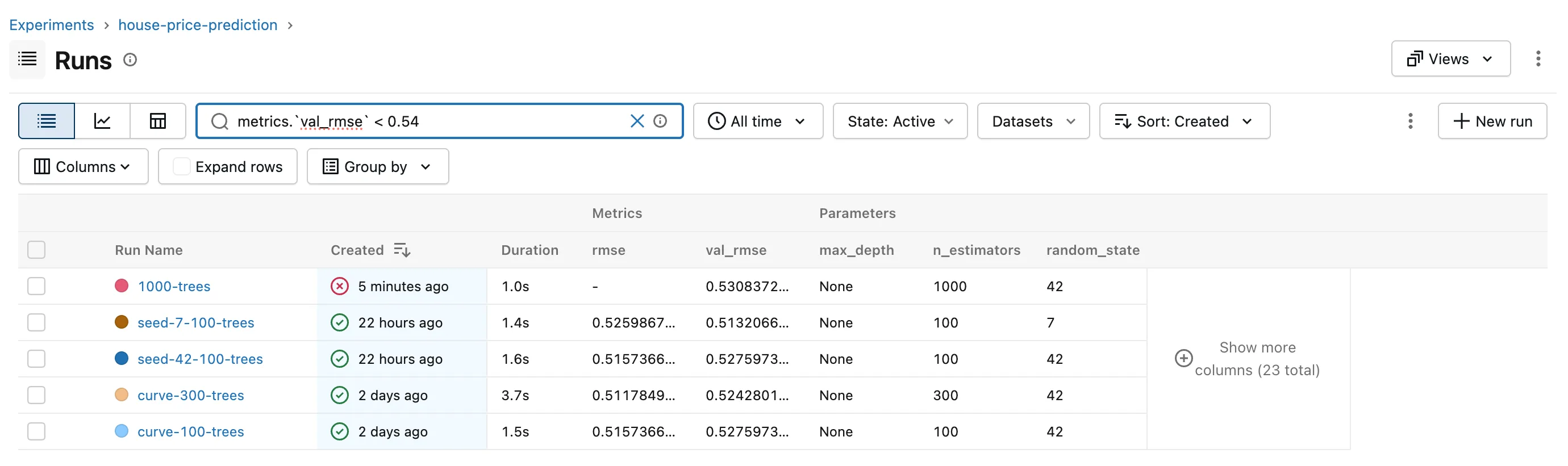
Press Enter again. The list is closed now, so this one runs the search:
Or Close the List First
Press Esc when you've finished typing, then Enter. Esc closes the list without changing anything, and Enter searches with the text exactly as you typed it, without backticks.
After the Fix
The table lists the five runs with a val_rmse below 0.54, and the count reads 5 matching runs. With Esc then Enter, the box keeps metrics.val_rmse < 0.54 as typed, and the result is the same five runs.
Common Mistakes
| Mistake | What happens | Do this instead |
|---|---|---|
| Pressing Enter once while the suggestions are open | The suggestion is inserted and nothing is searched | Press Enter again, or Esc then Enter |
| Deleting the backticks and starting over | The suggestions open again and the same thing happens | Leave them: they're valid, or use Esc before Enter |
| Assuming the query is wrong because nothing happened | You rewrite a query that was fine | Check the count under the table: if it didn't change, the search never ran |
Troubleshooting
| Symptom | Likely cause | Fix |
|---|---|---|
| Backticks appear around a name after Enter | A suggestion was accepted | Press Enter again to search |
| The count under the table doesn't change | The search hasn't run | Close the suggestions with Esc, then press Enter |
| Request error appears instead of the table | The search ran, and MLflow rejected the query | Fix the query: How to Write a Search Filter for MLflow Runs |
FAQ
Are the backticks a problem?
No. Backticks around a metric, parameter or tag name are part of MLflow's query language; you need them for names with spaces or dashes, such as metrics.`f1 score`, and they do no harm around plain names.
Can I turn the suggestions off?
MLflow's Settings page, under General, has no option for it: only the theme, telemetry and demo data. Esc closes the list whenever it gets in the way.
Does this happen in Python?
No. mlflow.search_runs() runs the query string you pass as it is; the suggestion list only exists in the UI.
Conclusion
The search didn't run because the first Enter went to the suggestion list, which replaced metrics.val_rmse with metrics.`val_rmse`. A second Enter runs the search, and Esc before Enter keeps the query as typed. The count under the table tells you whether a search actually ran.
Additional Resources
- Search Runs — MLflow's guide to the query language, including backticks.
