Fixed: mlflow gc Leaves Logged Model Files Behind

I deleted an MLflow experiment and ran mlflow gc to remove it for good. The experiment and its run were gone, but its logged model's files were still on disk, and asking gc for that model by ID answered Logged model with ID '...' not found. Deleting an experiment doesn't delete its logged models, and once gc removed the experiment, nothing pointed at the model's files anymore. Deleting the models first, then the experiment, let gc remove everything.
What I Was Doing
I first ran into this cleaning up the demo experiments of the MLflow series. Here it is again with one small experiment, on MLflow 3.18.0, with the tracking server's files in its own folder (mlflow.db and mlartifacts).
In the project, I logged a model into an experiment named gc-demo, then deleted the experiment:
uv run python log_diabetes_model.py gc-demo
uv run mlflow experiments delete -x 24
🏃 View run secretive-conch-329 at: http://127.0.0.1:8080/#/experiments/24/runs/c8eff8262cb14fc380e42ed0a35a30f4
🧪 View experiment at: http://127.0.0.1:8080/#/experiments/24
Model URI: models:/m-f018b7ef8e544fd3b6e7c0fb42c01dc0
Experiment with ID 24 has been deleted.
Then, in the server's folder, I removed it for good, and looked for what was left of experiment 24:
uv run mlflow gc --experiment-ids 24 --tracking-uri http://127.0.0.1:8080
find mlartifacts/24 -type f
What I Expected
mlflow gc --help says it "deletes all artifacts and metadata associated with the specified runs", and for --experiment-ids that it deletes the experiments "including all of their associated runs". I expected nothing left under mlartifacts/24.
What I Got
Run with ID c8eff8262cb14fc380e42ed0a35a30f4 has been permanently deleted.
Logged model with ID m-373a4420935347279810ec2dc25a1c35 has been permanently deleted.
Logged model with ID m-e8c0a59a92ef46ed8fcebb2733645342 has been permanently deleted.
Logged model with ID m-b6754065fd324aadb7d232310cf93d46 has been permanently deleted.
Experiment with ID 24 has been permanently deleted.
mlartifacts/24/models/m-f018b7ef8e544fd3b6e7c0fb42c01dc0/artifacts/python_env.yaml
mlartifacts/24/models/m-f018b7ef8e544fd3b6e7c0fb42c01dc0/artifacts/requirements.txt
mlartifacts/24/models/m-f018b7ef8e544fd3b6e7c0fb42c01dc0/artifacts/MLmodel
mlartifacts/24/models/m-f018b7ef8e544fd3b6e7c0fb42c01dc0/artifacts/serving_input_example.json
mlartifacts/24/models/m-f018b7ef8e544fd3b6e7c0fb42c01dc0/artifacts/input_example.json
mlartifacts/24/models/m-f018b7ef8e544fd3b6e7c0fb42c01dc0/artifacts/conda.yaml
mlartifacts/24/models/m-f018b7ef8e544fd3b6e7c0fb42c01dc0/artifacts/model.skops
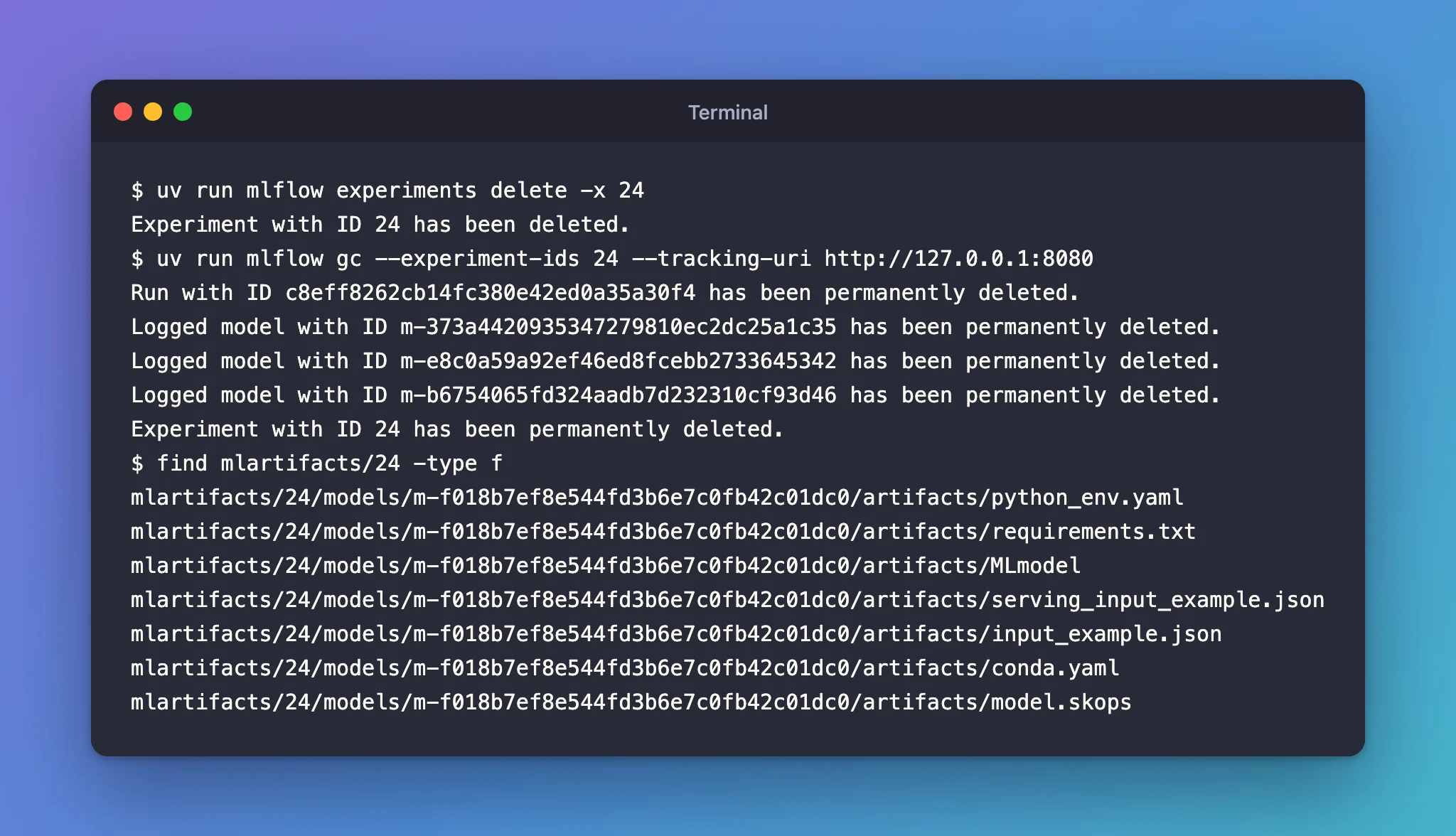
The run and the experiment were removed, but all seven files of the experiment's model, m-f018b7ef…, were still there. And the three logged models gc did remove weren't from this experiment at all: they were models I had deleted earlier, in another experiment.
What I Checked
Whether gc could still remove the model. gc has a --logged-model-ids option, so I asked for this model directly:
uv run mlflow gc --logged-model-ids m-f018b7ef8e544fd3b6e7c0fb42c01dc0 --tracking-uri http://127.0.0.1:8080
mlflow.exceptions.MlflowException: Logged model with ID 'm-f018b7ef8e544fd3b6e7c0fb42c01dc0' not found.
The tracking database no longer knows the model, so nothing points at its files.
What gc removes. Its help, for --logged-model-ids: "If logged model IDs are not specified, data is removed for all logged models in the deleted lifecycle stage." That explains the three other models: they were in the deleted state. This one wasn't: deleting the experiment didn't mark its models as deleted.
Why It Happens
In MLflow 3, a logged model is an entity of its own, stored under the experiment's models/<model ID> folder rather than with the run. Deleting an experiment doesn't mark its logged models as deleted, as the first gc run showed. mlflow gc removes the files of runs and of models in the deleted state; then, removing the experiment for good, it also removes the experiment's records, the model's included. The model's files are left with no record pointing at them.
The Fix
Delete the experiment's logged models before the experiment. delete_experiment.py does both, in that order:
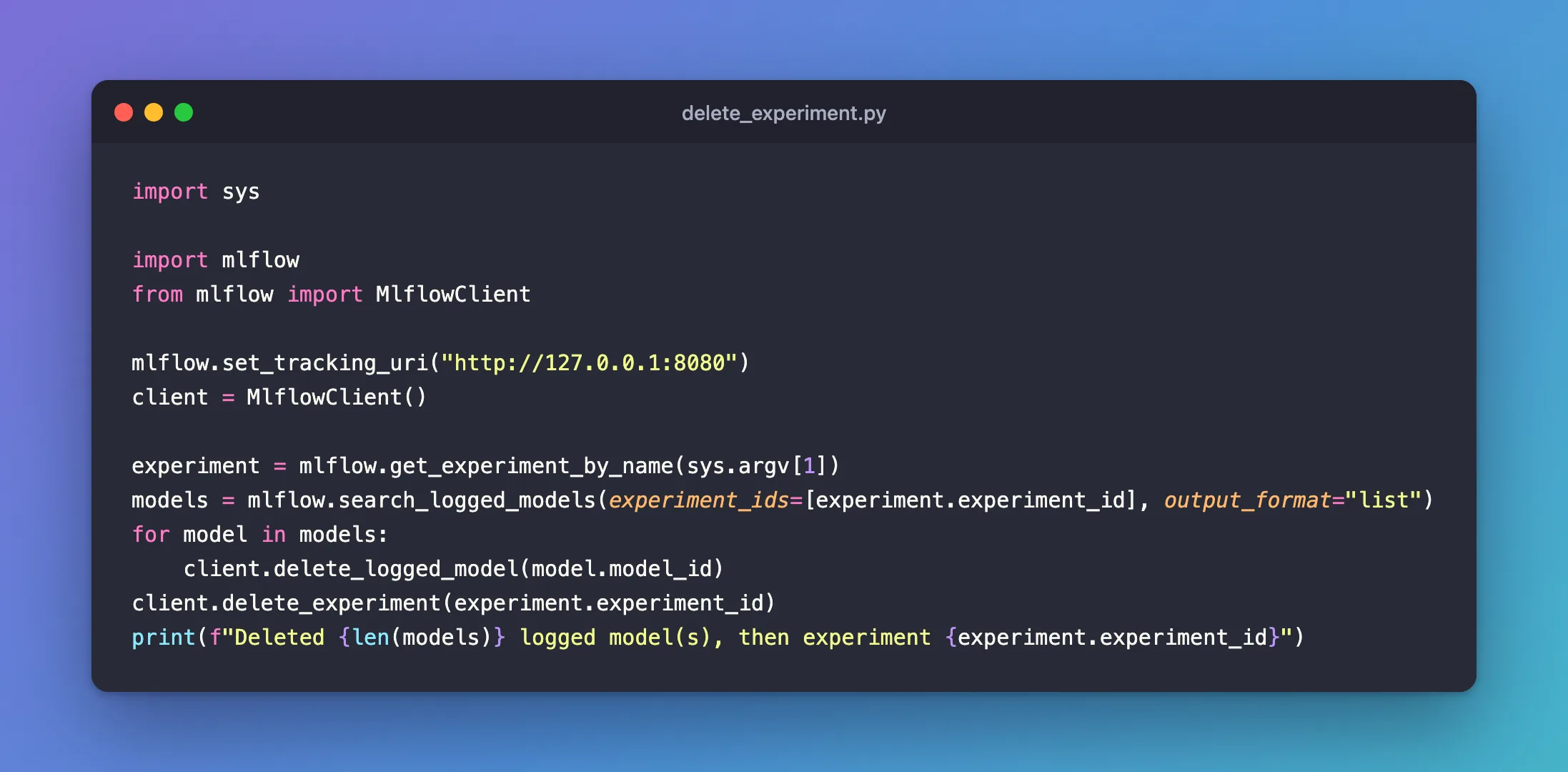
import sys

import mlflow
from mlflow import MlflowClient

mlflow.set_tracking_uri("http://127.0.0.1:8080")
client = MlflowClient()

experiment = mlflow.get_experiment_by_name(sys.argv[1])
models = mlflow.search_logged_models(experiment_ids=[experiment.experiment_id], output_format="list")
for model in models:
    client.delete_logged_model(model.model_id)
client.delete_experiment(experiment.experiment_id)
print(f"Deleted {len(models)} logged model(s), then experiment {experiment.experiment_id}")
For files already orphaned, like m-f018b7ef… above, gc can't help: delete that experiment's folder under mlartifacts yourself, mlartifacts/24 here, once the experiment is gone for good.
After the Fix
A new gc-demo experiment with a new model, cleaned up the fixed way:
uv run python log_diabetes_model.py gc-demo
uv run python delete_experiment.py gc-demo
uv run mlflow gc --experiment-ids 24 --tracking-uri http://127.0.0.1:8080
find mlartifacts/24 -type f
Deleted 1 logged model(s), then experiment 24
Run with ID 7cc076fc994b420085a42355e10c06d2 has been permanently deleted.
Logged model with ID m-30ce55dc2dd34fe1b73f19ae007f3955 has been permanently deleted.
Experiment with ID 24 has been permanently deleted.
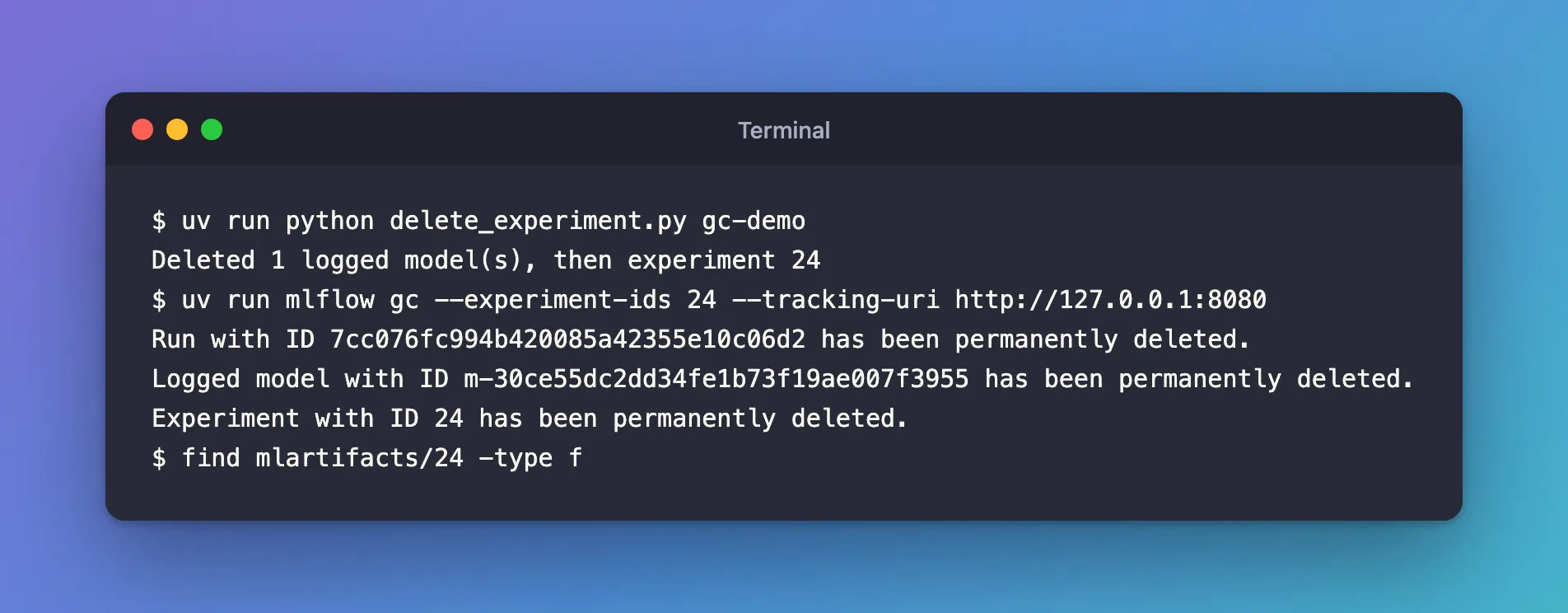
This time gc lists the model, and find prints nothing: no files left. (MLflow reused the ID 24 for the new experiment, since the old one was gone for good.) Only empty folders remain, mlartifacts/24/models/m-30ce55dc…, which take no space.
Common Mistakes
| Mistake | What happens | Do this instead |
|---|---|---|
Deleting an experiment that has logged models, then running gc | The models' files stay on disk with no record | Delete the models first |
Running mlflow gc with MLFLOW_TRACKING_URI set to the server | This cli can only be used with a backend that allows hard-deleting runs | Run it in the server's folder with --tracking-uri |
Troubleshooting
| Symptom | Likely cause | Fix |
|---|---|---|
Logged model with ID '...' not found. from gc --logged-model-ids | The model's records were removed with its experiment | Delete its folder under mlartifacts yourself |
mlartifacts/<id>/models/ still holds files after gc | The models weren't deleted before the experiment | Delete them first next time; remove these by hand |
FAQ
Does the MLflow UI show the orphaned files?
No: the experiment and its records are gone, so there's nothing left to show them.
Why did gc remove models from another experiment?
Without --logged-model-ids, it removes every logged model in the deleted state, whichever experiment it's in.
Conclusion
mlflow gc removed experiment 24 and its run but left its logged model's seven files behind, and couldn't find the model afterwards: deleting an experiment doesn't delete its models. Deleting the logged models before the experiment let gc remove them, files included.
Additional Resources
- MLflow CLI: mlflow gc — what it deletes, and
--logged-model-ids. - MLflow 3 migration guide — where model artifacts are stored.
