Fixed: Microsoft Agent Framework UseLogging Ignores the Microsoft.Agents.AI Log Level

I set "Microsoft.Agents.AI": "Trace" in appsettings.Development.json to see what Microsoft Agent Framework's UseLogging() records about each run, and it recorded nothing. Its logs don't use a category under Microsoft.Agents.AI: they use LoggingAgent, and "LoggingAgent": "Trace" shows them.
What I Was Doing
I was adding a guardrail to an IT service desk agent in Part 17 of the IT Service Desk series: middleware that takes passwords out of a run's messages before the model sees them. The agent's pipeline also has UseLogging(), which adds a logging layer to the agent. Its documentation says that when the employed ILogger enables LogLevel.Trace, the contents of messages, options, and responses are logged, so I wanted to see, at Trace level, whether the logging layer sees the password or the placeholder.
Agent Framework's types live in the Microsoft.Agents.AI namespace, so I set that level in the API's appsettings.Development.json:
{
  "Logging": {
    "LogLevel": {
      "Default": "Information",
      "Microsoft.AspNetCore": "Warning",
      "Microsoft.Agents.AI": "Trace"
    }
  }
}
Then I started the API and sent it one message, Hi! What can you help me with?
What I Expected
trce lines from the logging layer, starting with the run's messages.
What I Got
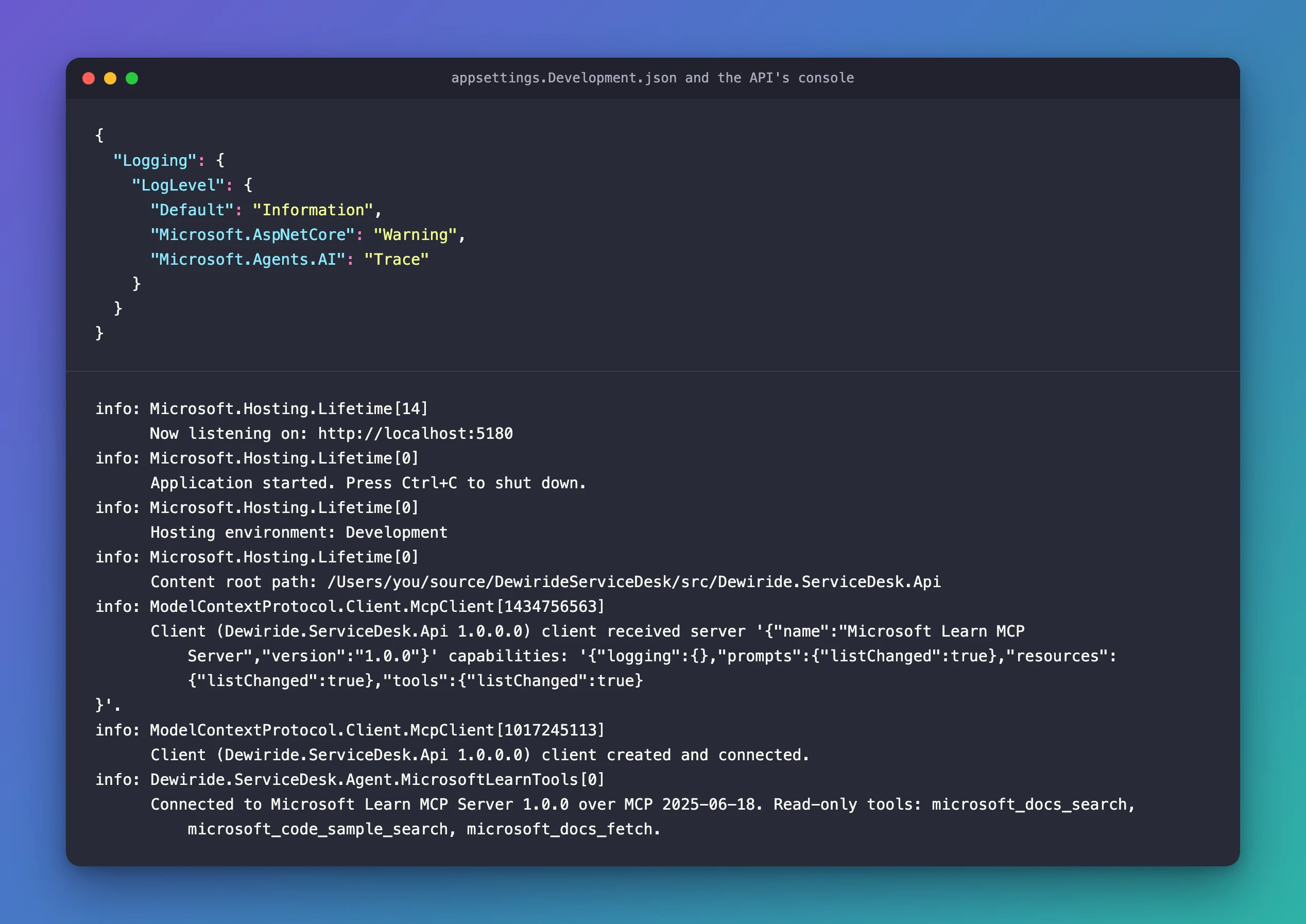
Not one line from it. The console showed the API starting, and the agent connecting to its MCP server during the run, which proves a run took place, and nothing else:
info: Microsoft.Hosting.Lifetime[14]
      Now listening on: http://localhost:5180
info: Microsoft.Hosting.Lifetime[0]
      Application started. Press Ctrl+C to shut down.
info: Microsoft.Hosting.Lifetime[0]
      Hosting environment: Development
info: Microsoft.Hosting.Lifetime[0]
      Content root path: /Users/you/source/DewirideServiceDesk/src/Dewiride.ServiceDesk.Api
info: ModelContextProtocol.Client.McpClient[1017245113]
      Client (Dewiride.ServiceDesk.Api 1.0.0.0) client created and connected.
info: Dewiride.ServiceDesk.Agent.MicrosoftLearnTools[0]
      Connected to Microsoft Learn MCP Server 1.0.0 over MCP 2025-06-18. Read-only tools: microsoft_docs_search, microsoft_code_sample_search, microsoft_docs_fetch.
(One long line from the MCP client is left out above; the screenshot has it.)
What I Checked
Which category the logging layer uses. I ran the API once with Default set to Trace, so that every category without its own rule logs everything. The logging layer's lines appeared, under the category LoggingAgent:
trce: LoggingAgent[805843669]
      RunStreamingAsync invoked: [{"role":"user","contents":[{"$type":"text","text":"I can't sign in to Outlook. My password is [password removed] and it keeps saying it's wrong."}],"messageId":"message-1"}]. Options: {}. Metadata: {"providerName":"microsoft.foundry"}.
The category is the type's short name, without its namespace. Every other category in the console has a full name, such as Dewiride.ServiceDesk.Agent.MicrosoftLearnTools or ModelContextProtocol.Client.McpClient.
What the package itself holds. A .NET assembly keeps every piece of text that its code spells out, such as a fixed category name, in a table of strings. The table in the Microsoft.Agents.AI 1.28.0 assembly holds LoggingAgent once and Microsoft.Agents.AI.LoggingAgent not at all, so the category is that fixed short name, not the type's full name.
What the .NET documentation says about categories. The category string is arbitrary, but the convention is to use the fully qualified class name. Agent Framework's logging layer doesn't follow that convention.
Why It Happens
A log level in appsettings.json applies to every category that starts with its name. The .NET documentation describes how a logger picks its rule: From the result of the preceding step, select rules with longest matching category prefix. If no match is found, select all rules that don't specify a category.
Microsoft.Agents.AI is not the beginning of LoggingAgent, so the rule doesn't match, and the logger falls back to Default, which is Information. The logging layer writes the contents of a run only at Trace level: in its documentation's words, Messages and options are not logged at other logging levels. So it wrote nothing.
The Fix
Set the level for the category the logging layer really uses:
{
  "Logging": {
    "LogLevel": {
      "Default": "Information",
      "Microsoft.AspNetCore": "Warning",
      "LoggingAgent": "Trace"
    }
  }
}
After the Fix
The same message, after a restart, produced 47 trce lines and one dbug line from LoggingAgent. The first is the run's messages:
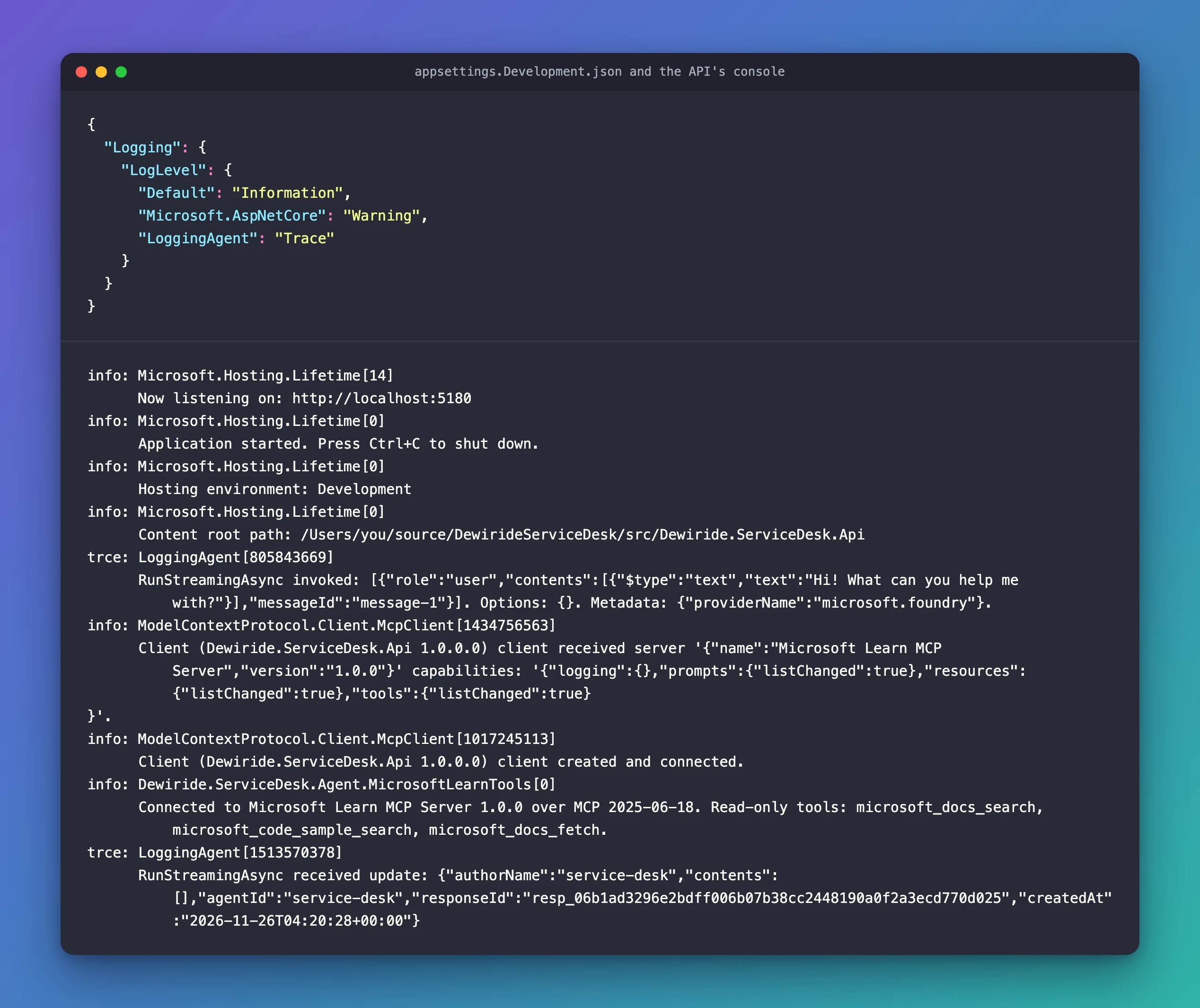
trce: LoggingAgent[805843669]
      RunStreamingAsync invoked: [{"role":"user","contents":[{"$type":"text","text":"Hi! What can you help me with?"}],"messageId":"message-1"}]. Options: {}. Metadata: {"providerName":"microsoft.foundry"}.
The rest are RunStreamingAsync received update lines, one for each piece of the streamed answer, and the run ends with dbug: LoggingAgent[1553703230] RunStreamingAsync completed.
Microsoft's Agent Safety guidance: At log level Trace, the full ChatMessages collection is logged. This can include PII. Trace level should never be enabled in production. Set it in appsettings.Development.json only, while you look, and take it out again.
Common Mistakes
| Mistake | What happens | Do this instead |
|---|---|---|
Setting "Microsoft.Agents.AI": "Trace" | The logging layer writes nothing more | Set "LoggingAgent": "Trace" |
Setting "Default": "Trace" to find the category | Every library without its own rule logs at Trace, and the console fills up | Do it once to read the category name, then set only that one |
| Leaving Trace logging on | The logs hold every conversation, secrets included | Turn it on only on your machine, and take it out when you're done |
Troubleshooting
| Symptom | Likely cause | Fix |
|---|---|---|
No LoggingAgent lines at Trace or Debug | The level is set for Microsoft.Agents.AI | Set it for LoggingAgent |
Only fail: LoggingAgent lines appear | Default is Information, so only failed runs are logged | Set "LoggingAgent": "Trace" while you investigate |
FAQ
Can I set it with an environment variable instead?
Yes. .NET reads two underscores in an environment variable name as the : between settings sections, so Logging__LogLevel__LoggingAgent with the value Trace does the same. I used exactly that variable while checking the guard's order.
Why do failed runs show up without any setting?
The logging layer writes a failed run as an error, and errors pass the Information level of Default. Only the contents of runs need Trace.
Conclusion
UseLogging() logs under the category LoggingAgent, not under Microsoft.Agents.AI, and .NET applies a log level to the categories that begin with its name. "Microsoft.Agents.AI": "Trace" therefore matches nothing, and "LoggingAgent": "Trace" shows every message the agent runs with, which is also why it belongs on your machine only.
Additional Resources
- Logging in C# and .NET — log categories, and how a logger picks its filter rule.
- Agent Safety — what Agent Framework logs at Trace level.
