Fixed: KeyNotFoundException: The given key was not present in the dictionary when reading Microsoft Learn MCP search results

A C# program that read the excerpt of every result of the Microsoft Learn MCP server's search stopped at the fifth one with KeyNotFoundException: The given key was not present in the dictionary. The search used maxTokenBudget, and with a budget, the server leaves out the excerpts that don't fit and marks those results with content_omitted. Reading the excerpt with TryGetProperty fixed it.
What I Was Doing
I was checking what maxTokenBudget does to the search results of the Microsoft Learn MCP server: a C# program searched with a budget of 2,000 tokens and printed the length of each result's excerpt. It uses the official MCP C# SDK, ModelContextProtocol.Core 2.4.0, in a .NET 10 console app:
dotnet new console -n LearnExcerptsDemo
cd LearnExcerptsDemo
dotnet add package ModelContextProtocol.Core --version 2.4.0
using System.Text.Json;
using ModelContextProtocol.Client;
using ModelContextProtocol.Protocol;

// Search Microsoft Learn with a budget of 2,000 tokens for the results.
await using McpClient client = await McpClient.CreateAsync(
    new HttpClientTransport(new HttpClientTransportOptions
    {
        Endpoint = new Uri("https://learn.microsoft.com/api/mcp?maxTokenBudget=2000"),
        TransportMode = HttpTransportMode.StreamableHttp,
    }),
    new McpClientOptions { ProtocolVersion = "2025-06-18" });

McpClientTool search = (await client.ListToolsAsync()).Single(tool => tool.Name == "microsoft_docs_search");
CallToolResult result = await search.CallAsync(
    new Dictionary<string, object?> { ["query"] = "move Microsoft Authenticator to a new phone" });

// Print the length of each result's excerpt.
using JsonDocument document = JsonDocument.Parse(result.Content.OfType<TextContentBlock>().Single().Text);
foreach (JsonElement item in document.RootElement.GetProperty("results").EnumerateArray())
{
    string excerpt = item.GetProperty("content").GetString()!;
    Console.WriteLine($"{excerpt.Length,5} characters: {item.GetProperty("title").GetString()}");
}
Without the budget, every result of this search has a title, a content excerpt and a contentUrl.
What I Expected
Ten lines, one for each result, each with the length of its excerpt.
What I Got
dotnet run
 2144 characters: Transfer Microsoft Authenticator account entries to a new phone
 2025 characters: Transfer Microsoft Authenticator account entries to a new phone
  741 characters: Transfer Microsoft Authenticator account entries to a new phone
 1993 characters: How to change Microsoft Authenticator from old phone to new phone? - Microsoft Q&A
Unhandled exception. System.Collections.Generic.KeyNotFoundException: The given key was not present in the dictionary.
   at System.Text.Json.JsonElement.GetProperty(String propertyName)
   at Program.<Main>$(String[] args) in /Users/you/source/LearnExcerptsDemo/Program.cs:line 22
   at Program.<Main>$(String[] args) in /Users/you/source/LearnExcerptsDemo/Program.cs:line 20
   at Program.<Main>(String[] args)
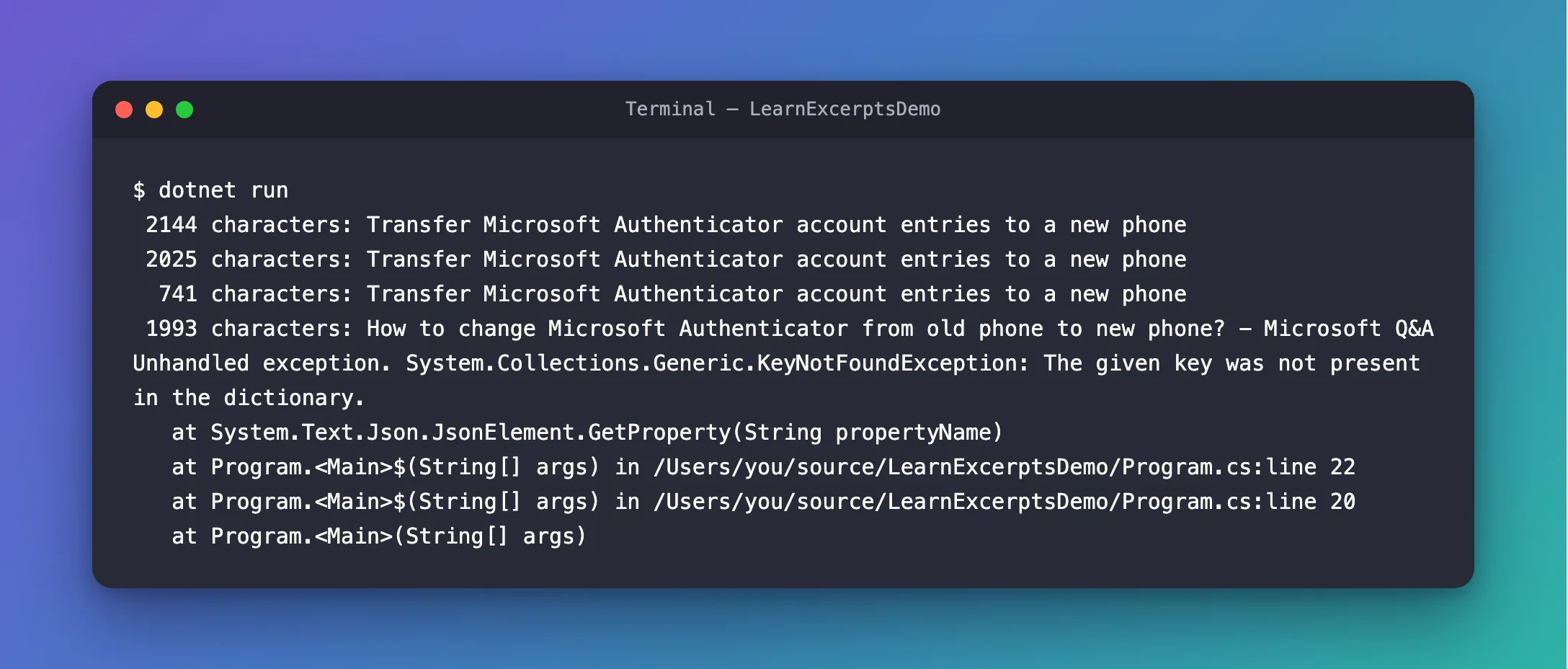
Four results printed, and the fifth stopped the program. Line 22 is item.GetProperty("content").
What I Checked
1. What GetProperty does when the property is missing. It throws: the stack trace starts at JsonElement.GetProperty(String propertyName). So the fifth result has no content.
2. What the fifth result holds. I printed it as raw JSON:
{"title":"New phone authenticator app - Microsoft Q&A","contentUrl":"https://learn.microsoft.com/answers/a/12311586","content_omitted":true}
A title and a link, no excerpt, and a property that isn't in the results without a budget: "content_omitted": true.
3. What Microsoft says about the budget. Its best practices for the Learn server: Append maxTokenBudget to the endpoint URL to cap the token count in search responses. This truncates content in results to stay within your budget. The page doesn't say how. The result above shows it: the server keeps every result and leaves out whole excerpts that don't fit.
Why It Happens
With maxTokenBudget, the server keeps all the search results, with their titles and links, and drops the excerpts that would take it over the budget. A result without its excerpt has no content property, only content_omitted. JsonElement.GetProperty throws KeyNotFoundException for a property that isn't there, so code that expects content in every result fails on the first result that lost it.
The Fix
Read content with TryGetProperty, which returns false instead of throwing when the property is missing, and handle the result without an excerpt:
foreach (JsonElement item in document.RootElement.GetProperty("results").EnumerateArray())
{
    string title = item.GetProperty("title").GetString()!;

    // An excerpt that didn't fit the budget is left out: the result has content_omitted instead.
    if (item.TryGetProperty("content", out JsonElement excerpt))
    {
        Console.WriteLine($"{excerpt.GetString()!.Length,5} characters: {title}");
    }
    else
    {
        Console.WriteLine($"   no excerpt: {title}");
    }
}
After the Fix
 2144 characters: Transfer Microsoft Authenticator account entries to a new phone
 2025 characters: Transfer Microsoft Authenticator account entries to a new phone
  741 characters: Transfer Microsoft Authenticator account entries to a new phone
 1993 characters: How to change Microsoft Authenticator from old phone to new phone? - Microsoft Q&A
   no excerpt: New phone authenticator app - Microsoft Q&A
   no excerpt: How do I make my authenticator app work on my new device? - Microsoft Q&A
 2042 characters: How do I transfer my Microsoft Authenticator data from my iPhone to a Samsung phone? - Microsoft Q&A
   no excerpt: Having trouble logging into my 365 mail as authenticator app not updated when i transfer to new phone - Microsoft Q&A
   no excerpt: I change my phone and have issues with auhtenticator - Microsoft Q&A
   no excerpt: Move my authenticator to a new phone - Microsoft Q&A
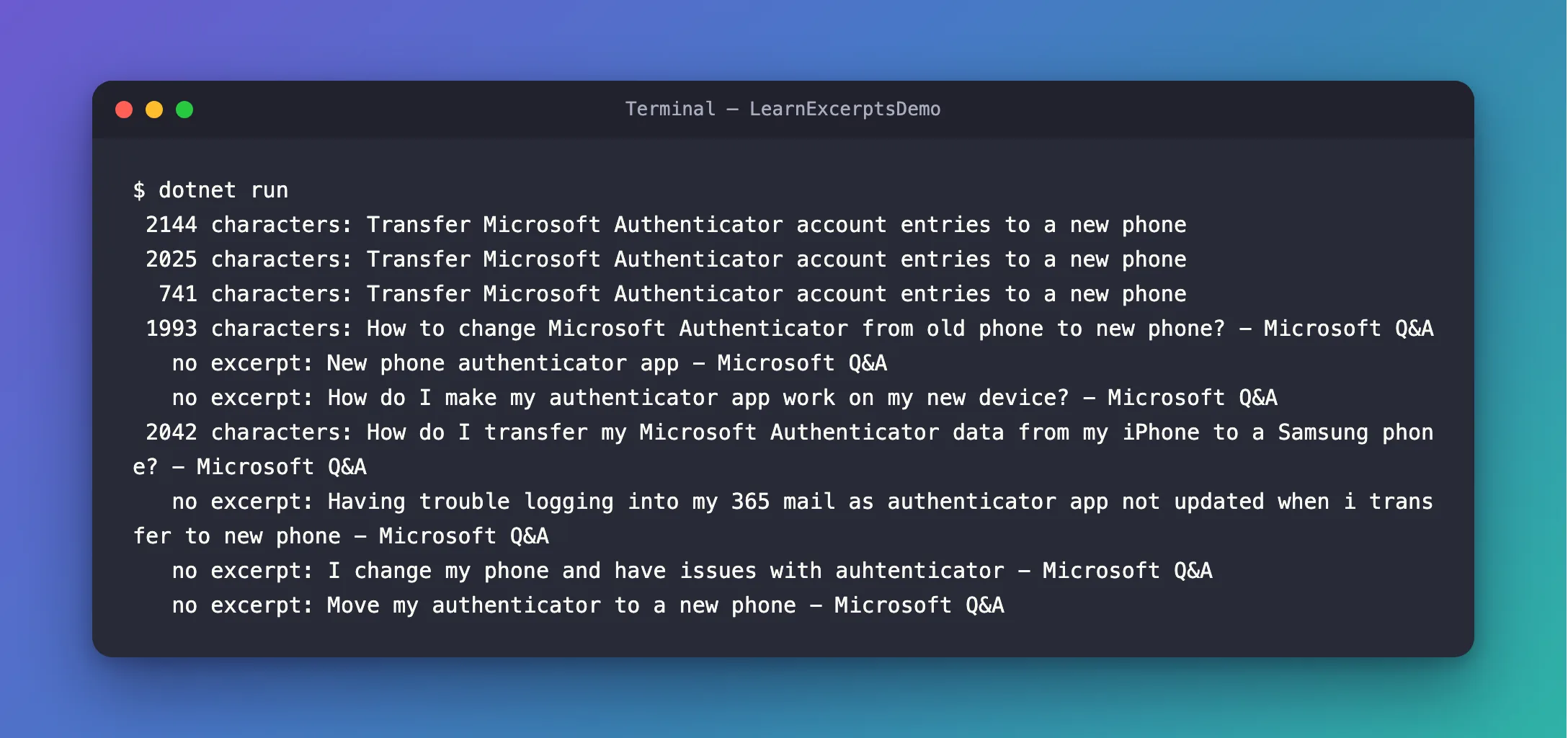
All ten results, five of them without their excerpt. Within the budget, the server kept the first four excerpts and the seventh, and left out the rest.
Common Mistakes
| Mistake | What happens | Do this instead |
|---|---|---|
Calling GetProperty for a property that's sometimes missing | KeyNotFoundException on the first result without it | Use TryGetProperty |
| Removing the budget to make the error go away | Every search costs your AI model twice as many tokens again | Keep the budget and handle the results without an excerpt |
| Treating a result without an excerpt as a bad result | It may be the page you need | Keep its title and link: microsoft_docs_fetch can read the whole page |
FAQ
Does an AI agent that uses the server's tools have this problem?
No. An agent gives the search result to the model as it is, and the model reads it as text, with or without the excerpts. The exception only happens in your own code, when it reads the JSON itself.
Does microsoft_docs_fetch have a budget too?
No. Microsoft's best practices say The parameter only affects search results - fetch always returns the full page.
Conclusion
KeyNotFoundException: The given key was not present in the dictionary while reading Microsoft Learn MCP search results means a result has no content: with maxTokenBudget, the server keeps every result but leaves out the excerpts that don't fit, and marks those results with content_omitted. Read content with TryGetProperty, and treat a result without an excerpt as a title and a link.
Additional Resources
- Best practices for using the Microsoft Learn MCP Server — token budget control.
- JsonElement.TryGetProperty — reading a property that may be missing.
- JsonElement.GetProperty — and the
KeyNotFoundExceptionit throws.
