Fixed: "JsonTypeInfo metadata for type 'System.String' was not provided by TypeInfoResolver of type 'System.Text.Json.Serialization.Metadata.EmptyJsonTypeInfoResolver'" with JsonArray

JsonArray builds JSON in C# without a class to describe it, so a crash on new JsonArray { "red", "green" } was a surprise: JsonTypeInfo metadata for type 'System.String' was not provided by TypeInfoResolver of type 'System.Text.Json.Serialization.Metadata.EmptyJsonTypeInfoResolver'. It happened in a one-file program run with dotnet run, and one line at the top of the file fixed it.
What I Was Doing
I was building a small JSON array with JsonArray, from System.Text.Json.Nodes, in a one-file C# program with the .NET 10 SDK, version 10.0.404:
using System.Text.Json.Nodes;

JsonArray colors = new() { "red", "green" };
colors.Add("blue");

Console.WriteLine(colors.ToJsonString());
Then I ran the file with dotnet run, which builds and runs a single .cs file without a project file:
dotnet run main.cs
What I Expected
The three colors as a JSON array: ["red","green","blue"].
What I Got
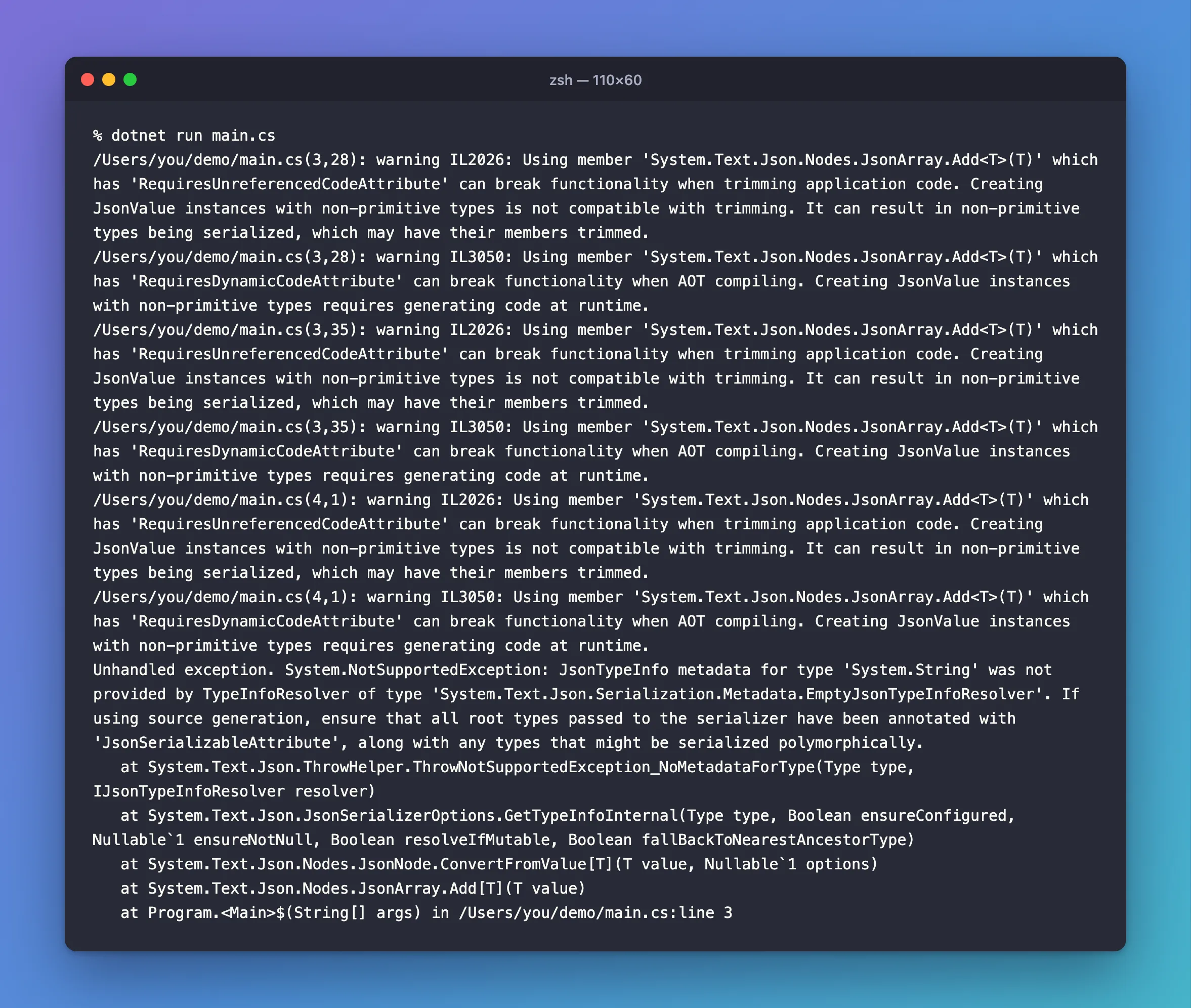
Six warnings while it built, and then a crash:
/Users/you/demo/main.cs(3,28): warning IL2026: Using member 'System.Text.Json.Nodes.JsonArray.Add<T>(T)' which has 'RequiresUnreferencedCodeAttribute' can break functionality when trimming application code. Creating JsonValue instances with non-primitive types is not compatible with trimming. It can result in non-primitive types being serialized, which may have their members trimmed.
/Users/you/demo/main.cs(3,28): warning IL3050: Using member 'System.Text.Json.Nodes.JsonArray.Add<T>(T)' which has 'RequiresDynamicCodeAttribute' can break functionality when AOT compiling. Creating JsonValue instances with non-primitive types requires generating code at runtime.
/Users/you/demo/main.cs(3,35): warning IL2026: Using member 'System.Text.Json.Nodes.JsonArray.Add<T>(T)' which has 'RequiresUnreferencedCodeAttribute' can break functionality when trimming application code. Creating JsonValue instances with non-primitive types is not compatible with trimming. It can result in non-primitive types being serialized, which may have their members trimmed.
/Users/you/demo/main.cs(3,35): warning IL3050: Using member 'System.Text.Json.Nodes.JsonArray.Add<T>(T)' which has 'RequiresDynamicCodeAttribute' can break functionality when AOT compiling. Creating JsonValue instances with non-primitive types requires generating code at runtime.
/Users/you/demo/main.cs(4,1): warning IL2026: Using member 'System.Text.Json.Nodes.JsonArray.Add<T>(T)' which has 'RequiresUnreferencedCodeAttribute' can break functionality when trimming application code. Creating JsonValue instances with non-primitive types is not compatible with trimming. It can result in non-primitive types being serialized, which may have their members trimmed.
/Users/you/demo/main.cs(4,1): warning IL3050: Using member 'System.Text.Json.Nodes.JsonArray.Add<T>(T)' which has 'RequiresDynamicCodeAttribute' can break functionality when AOT compiling. Creating JsonValue instances with non-primitive types requires generating code at runtime.
Unhandled exception. System.NotSupportedException: JsonTypeInfo metadata for type 'System.String' was not provided by TypeInfoResolver of type 'System.Text.Json.Serialization.Metadata.EmptyJsonTypeInfoResolver'. If using source generation, ensure that all root types passed to the serializer have been annotated with 'JsonSerializableAttribute', along with any types that might be serialized polymorphically.
   at System.Text.Json.ThrowHelper.ThrowNotSupportedException_NoMetadataForType(Type type, IJsonTypeInfoResolver resolver)
   at System.Text.Json.JsonSerializerOptions.GetTypeInfoInternal(Type type, Boolean ensureConfigured, Nullable`1 ensureNotNull, Boolean resolveIfMutable, Boolean fallBackToNearestAncestorType)
   at System.Text.Json.Nodes.JsonNode.ConvertFromValue[T](T value, Nullable`1 options)
   at System.Text.Json.Nodes.JsonArray.Add[T](T value)
   at Program.<Main>$(String[] args) in /Users/you/demo/main.cs:line 3
What I Checked
Whether the same code works in a project. I created a console project with dotnet new console, put the same code in its Program.cs and ran it with dotnet run. It printed ["red","green","blue"], with no warnings. So the code was fine, and something about the one-file program was different.
What a one-file program turns on. Microsoft's file-based apps page says: "File-based apps enable native ahead-of-time (AOT) compilation by default."
Whether that turns reflection-based JSON off. I ran two tiny one-file programs that print JsonSerializer.IsReflectionEnabledByDefault. They are the same, except that the second has #:property PublishAot=false as its first line:
using System.Text.Json;

Console.WriteLine(JsonSerializer.IsReflectionEnabledByDefault);
False
The second printed True. Microsoft's source generation page explains why the setting exists: "Because System.Text.Json uses reflection by default, calling a basic serialization method can break Native AOT apps, which doesn't support all required reflection APIs."
What the warnings point at. All six name JsonArray.Add<T>(T), at line 3, columns 28 and 35, which are "red" and "green" in the initializer, and at line 4, the Add("blue") call. The JsonArray.Add reference lists two overloads: Add(JsonNode? item), and Add<T>(T? value), which carries the RequiresDynamicCode attribute with the message "Creating JsonValue instances with non-primitive types requires generating code at runtime." For each string, C# used Add<T>: a string fits Add<string> as it is, while Add(JsonNode) would need a conversion first.
Why It Happens
A one-file program targets native AOT by default, even when you only run it with dotnet run, and that turns System.Text.Json's reflection-based defaults off. The stack trace shows what Add<T> does with a value: JsonNode.ConvertFromValue asks JsonSerializerOptions for the type information of System.String. With reflection off, the resolver it asks is the EmptyJsonTypeInfoResolver in the message, which has none, not even for string.
A normal project keeps reflection on, which is why the console project worked.
The Fix
Turn Native AOT Off for the File
If you don't need native AOT, make #:property PublishAot=false the first line of the file. The file-based apps page: "If you need to disable native AOT, use the following setting:"
#:property PublishAot=false

using System.Text.Json.Nodes;

JsonArray colors = new() { "red", "green" };
colors.Add("blue");

Console.WriteLine(colors.ToJsonString());
Keep Native AOT: Give JsonArray JsonNode Values
Add(JsonNode? item) and the constructor JsonArray(params JsonNode?[] items) carry no such attributes. Pass the strings to the constructor, and cast a value you add later to JsonNode?:
using System.Text.Json.Nodes;

JsonArray colors = new("red", "green");
colors.Add((JsonNode?)"blue");

Console.WriteLine(colors.ToJsonString());
Each string becomes a JsonNode through the conversion that JsonNode defines, which its reference describes as "an implicit conversion of a specified nullable String to a JsonNode", so the serializer isn't involved.
After the Fix
Both versions printed the array, and the warnings were gone:
dotnet run main.cs
["red","green","blue"]

Common Mistakes
| Mistake | What happens | Do this instead |
|---|---|---|
Putting #:property PublishAot=false below the using line | CS9297 | Make it the first line |
Adding JsonValue.Create("blue") to keep native AOT | It ran, but the build still warned IL2026 and IL3050: a JsonValue fits Add<JsonValue>, so C# still picked Add<T> | Cast to JsonNode?, or pass the values to the constructor |
Ignoring warnings IL2026 and IL3050 | They pointed at the exact lines before the crash | Read them, and fix each line they name |
Troubleshooting
| Symptom | Likely cause | Fix |
|---|---|---|
| The same error in a normal project | Reflection-based JSON is off in the project file | Check the .csproj for JsonSerializerIsReflectionEnabledByDefault, PublishTrimmed or PublishAot |
Reflection-based serialization has been disabled for this application | The same setting, hit by JsonSerializer.Serialize | The fix for that message |
JsonObject with ["name"] = "Ana" works in the same file | Its indexer takes a JsonNode, so the string converts to one | Nothing to fix |
FAQ
Why does it fail for string, of all types?
Add<T> sends every value through the serializer's type information, whatever its type. With reflection off, the resolver has information about no type at all, string included.
Does this affect JsonObject?
Setting a property with the indexer, person["name"] = "Ana", ran without warnings in the same kind of one-file program. The indexer's type is JsonNode?, so the string converts to a JsonNode instead of going through Add<T>.
Will a normal project hit this?
Only if reflection-based JSON is off in it. The source generation page lists the cases: setting JsonSerializerIsReflectionEnabledByDefault to false, and "If you don't specify this property and PublishTrimmed is enabled, reflection-based serialization is automatically disabled."
Conclusion
One-file C# programs target native AOT by default, which turns off reflection-based JSON, and JsonArray.Add<T> needs it for every value, string included. Add #:property PublishAot=false as the first line, or give JsonArray JsonNode values through its constructor or a JsonNode? cast to keep native AOT.
Additional Resources
- File-based apps, on Microsoft Learn: native AOT by default, and how to turn it off.
- JsonArray.Add method, on Microsoft Learn: both overloads and their attributes.
- How to use source generation in System.Text.Json, on Microsoft Learn: the reflection default.
Related
- Fixed: "Reflection-based serialization has been disabled for this application" with dotnet run
- Fixed: "error CS9297: '#:' directives cannot be after first token in file"
- Fixed: JsonTypeInfo metadata for type was not provided by TypeInfoResolver of type 'Microsoft.Extensions.AI.AIJsonUtilities+JsonContext'
