Fixed: IsEmpty Returns False When Nothing Is Selected in a Power Apps Combo Box

A formula checked IsEmpty(cmbEndLO.SelectedItems) to see whether a modern combo box had a choice yet. With nothing chosen, it still returned false, so the formula carried on with a blank value and showed 2 hours for a shift with no finish time. IsBlank(cmbEndLO.Selected) is the check Microsoft documents for "nothing selected", and it works.
What I Was Doing
Part 6 of the Overtime Timesheet series builds a screen where people log overtime. The start and finish times are two modern Combobox controls, cmbStartLO and cmbEndLO, that list every time of day (How to Let Users Pick a Time in Power Apps). Under them, a text control shows the hours worked as soon as both times are chosen.
Its Text formula first checked that both combo boxes had a choice, using IsEmpty on their SelectedItems tables:
If(
    IsEmpty(cmbStartLO.SelectedItems) || IsEmpty(cmbEndLO.SelectedItems),
    "Choose the start and finish times to see the hours worked.",
    With(
        {Minutes: Max(0, ShiftMinutes(dpWorkDateLO.SelectedDate, cmbStartLO.Selected.Value, cmbEndLO.Selected.Value) - numBreakLO.Value)},
        $"Hours worked: {Text(Minutes / 60, "0.00")} ({RoundDown(Minutes / 60, 0)} h {Mod(Minutes, 60)} min)"
    )
)
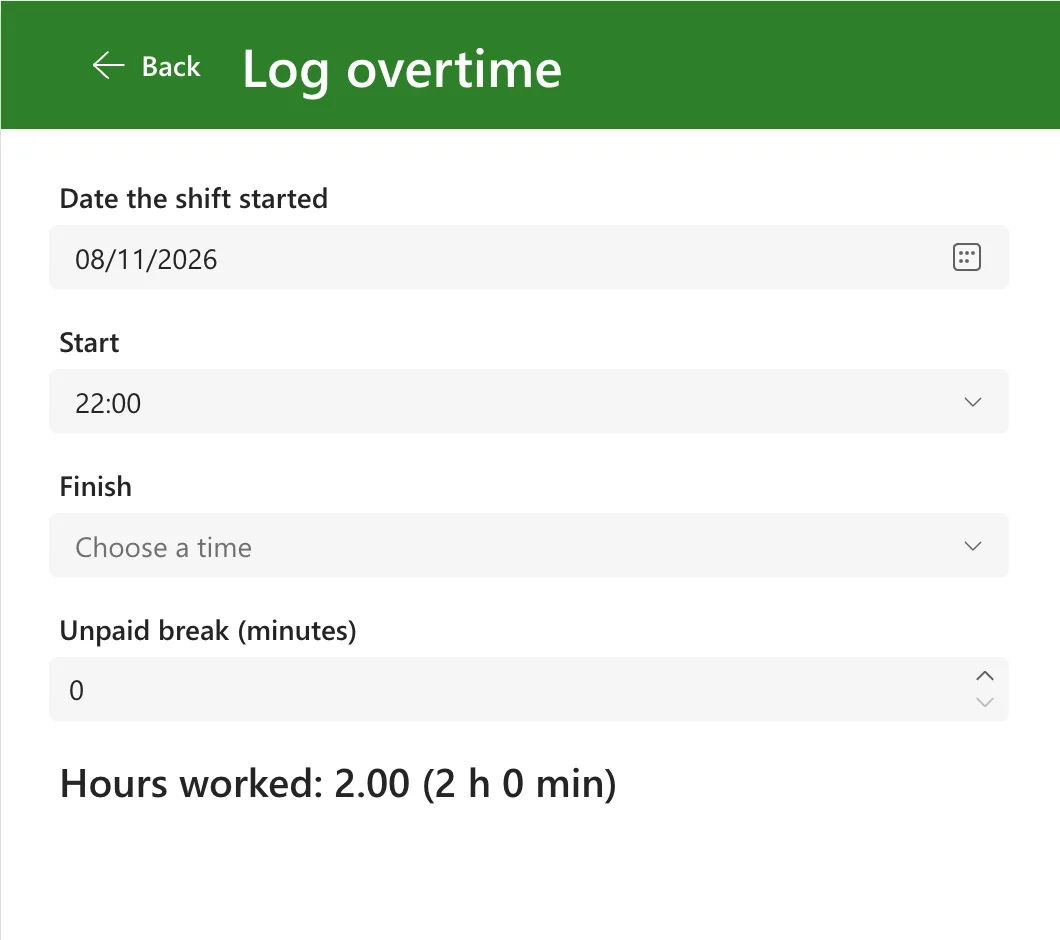
In Preview, I chose 22:00 as the start and hadn't chosen a finish yet.
What I Expected
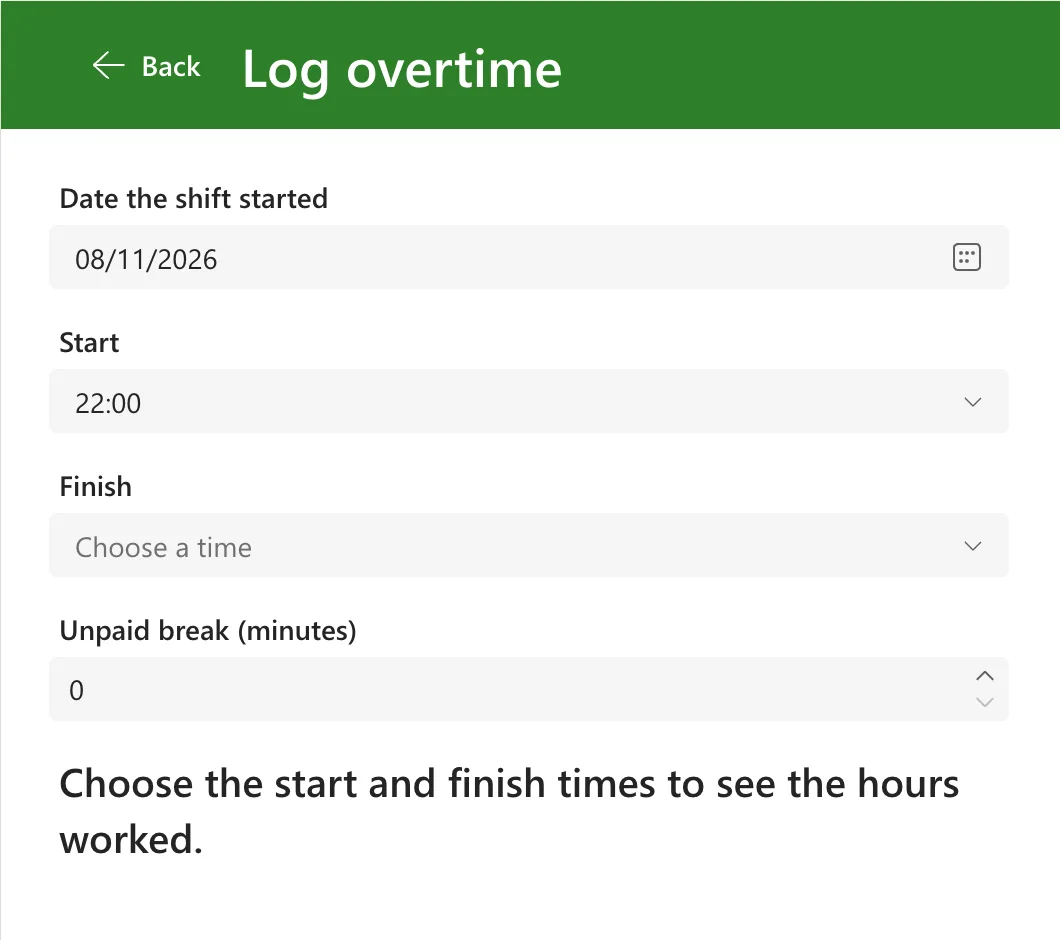
With Finish still empty, the first branch should run and the text should read Choose the start and finish times to see the hours worked.
What I Got
The text read Hours worked: 2.00 (2 h 0 min):
Studio showed the same value in the control's Properties pane, next to the formula:

Two hours is exactly 22:00 to midnight. The formula had gone on with an empty finish time, which counts as 00:00, and the next day's midnight.
What I Checked
I put each part of the check into a text control's Text for a moment, so Studio's preview strip under the formula bar showed its value.
IsEmpty on the empty combo box's SelectedItems was false:

CountRows of the same table wasn't 0. It was Blank:

And IsBlank on the combo box's Selected was true:

Then the documentation:
- Microsoft's Blank, Coalesce, IsBlank, and IsEmpty functions page says, in its first example of a blank value, that a Combo box control's Selected property is blank if the user hasn't made a selection.
- The same page says IsEmpty tests whether a table contains any records and is equivalent to using the CountRows function and checking for zero.
- The Combo box modern control reference describes Selected as the single selected item when SelectMultiple is off.
Why It Happens
Before anything was chosen, SelectedItems gave back a blank value, not an empty table: CountRows of it was blank, not 0. IsEmpty is the same as "CountRows is zero", and blank isn't zero, so it said false. The formula then took the second branch with cmbEndLO.Selected.Value blank, and a blank time counts as midnight.
The documented test for "nothing selected" is IsBlank on Selected, which returned true.
The Fix
Test Selected with IsBlank instead of SelectedItems with IsEmpty:
If(
    IsBlank(cmbStartLO.Selected) || IsBlank(cmbEndLO.Selected),
    "Choose the start and finish times to see the hours worked.",
    With(
        {Minutes: Max(0, ShiftMinutes(dpWorkDateLO.SelectedDate, cmbStartLO.Selected.Value, cmbEndLO.Selected.Value) - numBreakLO.Value)},
        $"Hours worked: {Text(Minutes / 60, "0.00")} ({RoundDown(Minutes / 60, 0)} h {Mod(Minutes, 60)} min)"
    )
)
The same check went into every other formula on the screen that needs both times, such as the Save button's DisplayMode.
After the Fix
In Preview, with Start at 22:00 and Finish still empty, the text asks for both times:
Once a finish time is chosen, the hours appear, such as 8.00 hours for 22:00 to 06:00 with an hour's break on the night the clocks went back.
Common Mistakes
| Mistake | What happens | Do this instead |
|---|---|---|
IsEmpty(ComboBox.SelectedItems) to find an empty combo box | It returns false before anything is chosen | IsBlank(ComboBox.Selected) |
CountRows(ComboBox.SelectedItems) = 0 | Blank isn't 0, so it's false too | IsBlank(ComboBox.Selected) |
Using .Selected.Value without checking it first | A blank time counts as midnight, a blank number as 0 | Check IsBlank first, as in the fix |
| Testing only with both boxes filled in | The empty case never shows up | Check the screen with each box empty too |
Troubleshooting
| Symptom | Likely cause | Fix |
|---|---|---|
| A result appears although a combo box is empty | The formula checks SelectedItems with IsEmpty | Check Selected with IsBlank |
| A time calculation is out by whole hours to midnight | A blank time from an empty combo box | Same fix |
| IsBlank(…Selected) is false although the box looks empty | Text is typed in the search box but nothing is chosen | Choose an item from the list, or clear the box |
FAQ
Does this happen with the classic combo box?
The example uses the modern Combobox control; I didn't try the classic one. The IsBlank check comes from Microsoft's description of the combo box's Selected property, so it's the safe test either way.
What about a combo box that allows several choices?
The modern control's reference says that when SelectMultiple is on, Selected returns the first selected item, so IsBlank(ComboBox.Selected) still tells you whether anything is chosen.
Is IsEmpty wrong, then?
No. IsEmpty is the right test for a table, such as a collection or a filtered list, and Microsoft's page says IsBlank doesn't treat an empty table as blank. Here SelectedItems wasn't an empty table to begin with.
Conclusion
A modern combo box with nothing chosen gave a blank SelectedItems, so IsEmpty(…SelectedItems) returned false and CountRows returned blank. IsBlank(ComboBox.Selected) is the check Microsoft documents, and with it the formula waits for both times.
Additional Resources
- Blank, Coalesce, IsBlank, and IsEmpty functions: Selected is blank until a choice is made.
- Combo box modern control: Selected, SelectedItems and SelectMultiple.
- CountRows, CountA, CountIf functions: what IsEmpty is equivalent to.
